---
title: "Reference: Artificial Lighting values"
description: Reference on Artificial Lighting values
---
Solutions
[Architectural design All you need to bring your residential, commercial or institutional designs to life](https://lumion.com/product/architectural-design) [Landscape architecture Beautiful terrains and fine-detailed nature for any climate or season](https://lumion.com/product/landscape-architecture)
[Interior design Realistic light, high-quality textures, and an extensive asset library](https://lumion.com/product/interior-design) [Students and Faculties Lumion is free for students, educators, and faculties around the world](https://lumion.com/product/educational-licenses)
[SketchUp](https://lumion.com/compatibility/sketchup-rendering) [Revit](https://lumion.com/compatibility/revit-rendering) [ArchiCAD](https://lumion.com/compatibility/archicad-rendering) [Rhino](https://lumion.com/compatibility/rhino-rendering) [Autocad](https://lumion.com/compatibility/autocad-rendering) [See more](https://lumion.com/compatibility/)
Product
[Discover Axogram New Live architectural diagramming](https://lumion.com/product/axogram) [Lumion Cloud Where design meets collaboration](https://lumion.com/product/lumion-cloud)
[Lumion Pro Advanced visualization solution](https://lumion.com/product/lumion-pro) [Discover AI tools New AI built for architectural work](https://lumion.com/product/ai)
[Lumion Pro 2026.1 is out now! 🚀](https://lumion.com/product/latest-version-pro) [Compatibility](https://lumion.com/compatibility/) [System Requirements](https://lumion.com/product/system-requirements) [Roadmap](https://lumion.com/product/roadmap)
[Pricing](https://lumion.com/product/buy) Resources
[Made with Lumion Get inspired by the stories behind the designs](https://lumion.com/made-with-lumion)
[Tips & Guides Make the most out of Lumion with helpful guides and tutorials](https://lumion.com/tips-guides)
[Knowledge base](https://support.lumion.com/knowledge-base?hsLang=en-us) [Community](https://community.lumion.com/index.php) [Downloads](https://support.lumion.com/downloads?hsLang=en-us)
About
[Who we are Learn about our story and mission](https://lumion.com/about) [Careers - We're hiring Let's build the future of architectural visualization](https://lumion.com/about/careers)
[News Discover the latest product news and more](https://lumion.com/news)
[Find your local reseller](https://lumion.com/about/find-reseller) [Contact us](https://lumion.com/about/contact)
[](http://lumion.com)
[My Account](https://account.lumion.com)
Solutions
[Architectural design](https://lumion.com/product/architectural-design) [Interior design](https://lumion.com/product/interior-design) [Landscape architecture](https://lumion.com/product/landscape-architecture) [Students and Faculties](https://lumion.com/product/educational-licenses)
---
[SketchUp](https://lumion.com/compatibility/sketchup-rendering) [Revit](https://lumion.com/compatibility/revit-rendering) [ArchiCAD](https://lumion.com/compatibility/archicad-rendering) [Rhino](https://lumion.com/compatibility/rhino-rendering) [Autocad](https://lumion.com/compatibility/autocad-rendering) [See more](https://lumion.com/compatibility/)
Product
[Axogram New](https://lumion.com/product/axogram) [Lumion Cloud](https://lumion.com/product/lumion-cloud) [Lumion Pro](https://lumion.com/product/lumion-pro) [Discover AI tools New](https://lumion.com/product/ai)
---
[Lumion Pro 2026.1 is out now! 🚀](https://lumion.com/product/latest-version-pro) [Compatibility](https://lumion.com/compatibility/) [System Requirements](https://lumion.com/product/system-requirements) [Roadmap](https://lumion.com/product/roadmap)
[Pricing](https://lumion.com/product/buy) Resources
[Made with Lumion](https://lumion.com/made-with-lumion) [Tips & Guides](https://lumion.com/tips-guides)
---
[Knowledge base](https://support.lumion.com/knowledge-base?hsLang=en-us) [Community](https://community.lumion.com/index.php) [Downloads](https://support.lumion.com/downloads?hsLang=en-us)
About
[Who we are](https://lumion.com/about) [Careers - We're hiring](https://lumion.com/about/careers) [News](https://lumion.com/news)
---
[Find your local reseller](https://lumion.com/about/find-reseller) [Contact us](https://lumion.com/about/contact)
[My Account](https://account.lumion.com)
[Submit a request](https://support.lumion.com/hc/en-us/requests/new?hsLang=en-us)
Lumion Knowledge Base
How can we help?
- There are no suggestions because the search field is empty.
[Skip to content](https://support.lumion.com/knowledge-base/api/v2/help_center/en-us/articles/10216209128860.json#main-content)
English - United States
Show submenu for translations

Open main navigation
Close main navigation
- English - United States
Show submenu for translations
- Contact us
Contact us
How can we help you?
- There are no suggestions because the search field is empty.
1. [Knowledge Base](https://support.lumion.com/knowledge-base?hsLang=en-us)
2. [Build Mode Questions](https://support.lumion.com/knowledge-base/build-mode-questions?hsLang=en-us)
3. [Lighting: Sun and Artificial Lights](https://support.lumion.com/knowledge-base/build-mode-questions?hsLang=en-us#lighting-sun-and-artificial-lights)
# Reference: Artificial Lighting values
Here are some values that you can work with in Lumion (2023.0 and newer). This applies to both the *Ray Tracing* and also the *Rasterization* rendering pipeline which work with a (new) unified lighting system.
Lumion now uses real-world measurements for lighting.
See also:
- **Knowledge Base:** [Transitions: Why does my Project look different in Lumion 2023 compared to previous versions?](https://support.lumion.com/knowledge-base/api/v2/help_center/en-us/articles/8088431180060.json?hsLang=en-us)
This section from the above article is very useful:
You will also notice that lights are much **less visible during the day**. This is because artificial lighting, just as in real life, cannot compete with the *Sun's Brightness*.
- The noonday *Sun *in Lumion measures around **1,600,000,000** *Nits *and the night sky around **0.001** *Nits*.
- *Emissiveness* has a maximum of **10,000** *Nits *and *Area Lights* a maximum of **100,000** *Nits* (the average for a TV is **500-1500** *Nits*).
- *Spotlights *and *Omnilights *have a max of **100,000** *Lumens*. (**1.0** *Lumen *= **0.29** *Nits*)
So even at maximum settings, artificial lights are far from the *Sun's *maximum *Brightness*. This means that you might find you need to lower the *Sun/Sky/Real Sky Brightness* setting to make artificial lighting more visible during the day (this is for both interiors and exteriors). In other words, the darker the *Scene*, the more visible artificial light will be.
If you want to have the light cast from an artificial light seen more strongly then the *Brightness* should be increased. In some cases that could be up to the maximum Lumens, depending on the balance of direct lighting in the *Scene*.
See also section: Tips for working with Lights:
- **Learning Pathways: **[Lighting](https://support.lumion.com/learning-pathways/api/v2/help_center/en-us/articles/12358806503964.json?hsLang=en-us)
### 1. Nits:
Used in Lumion for:
- *Area/Line Lights*.
- The *Emissive* value for a *Standard Material* (and *Billboard Material* - based on a *Standard Material*).
1. Nits or NITS are a measure of luminance, meaning it is a measure how much light an object emits. Its brightness. *(1)*
2. One Nit is equal to one candela (one candlepower) per square meter (1cd/m2). The sun at noon is rated at 1.6 billion nits. *(1)*
3. 1 Nit = 3.426 Lumens / **1.0** *Lumen* = **0.29188** *Nits..* To convert Nits to Lumens multiply the number of Nits by 3.426.
### 2. Lumens:
### Used in Lumion for:
- *Spotlights*.
- Light from the Sun and ambient light from the sky.
Lumens or ANSI Lumens are used as a measurement of how much light is being projected.
- 1 Lumen = 0.29 Nits. 1 Nit = 3.426 Lumens.
### 3. Lumens or Nits:
Both are to quantify optical output.
Lumens are a unit of light created/projected.
Nits are a unit of measurement for how much visible light is being seen. Its brightness.
*Area and Line Lights* use Nits. If you need to convert or relate Lumens needed for them then see below, section [5.1: Setting Line Lights to an Equivalent Lumens](https://support.lumion.com/knowledge-base/api/v2/help_center/en-us/articles/10216209128860.json#h_01J2WEQHR9K9KTQ8DFFHW4RW5Q).
### 4. Objects:
#### 4.1: LED Lights
**See this very useful ArchDaily guide:**
- **External Link: **[How To Determine How Many LED Lumens You’ll Need To Properly Light Your Space](https://www.archdaily.com/897277/how-to-determine-how-many-led-lumens-youll-need-to-properly-light-your-space)
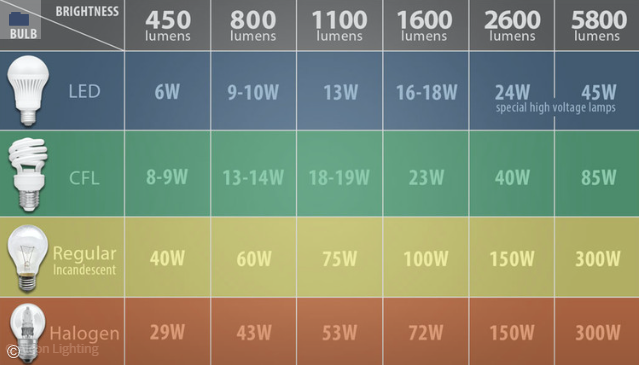
*(credit: David Hakimi, July 02, 2018, source: [ArchDaily](https://www.archdaily.com/897277/how-to-determine-how-many-led-lumens-youll-need-to-properly-light-your-space))*
In general terms:
*"For the average space of 250 square feet (edit: 23.23 square meters), you’ll need roughly 5,000 lumens as your primary light source (20 lumens x 250 square feet). In your dining room, you’ll want about 30 lumens per square foot on your dining table (you want to see your food, but not examine it), so if your table is 6 x 3 feet, that’s 540 lumens."*
Square feet to square meters: multiple by 0.092903. Or: Square Feet / 10.764.
20 Lumens per square foot = 215 Lumens per square meter.
Allow also for light absorption in the room, for example, if the walls are dark colored, and also personal preferences for brightness. For your visualization you may sometimes also choose to over-emphasize the artificial lighting.
### 4.2: LED signage
Outdoor LED signs can range from 5,000 to 8,000 nits or higher.
Indoor LED signs from 1,000 to 2,000 Nits.
### 4.3: HDR TVs
*"Better-performing HDR TVs typically generate at least 600 Nits of peak brightness, with top performers hitting 1,000 Nits or more.*
*But many HDR TVs produce only 100 to 300 Nits....*
*In comparison, typical televisions range from 500 to 1,000 Nits."*
- **External Link: **[Everything You Need to Know About 4K HDR TVs](https://www.consumerreports.org/electronics-computers/tvs/everything-you-need-to-know-about-4k-hdr-tvs-a3185152015/#:~:text=Better%2Dperforming%20HDR%20TVs%20typically,to%20deliver%20an%20HDR%20experience.))
### 4.4: Lumens for a space
See this site for a guide and for a general calculator of Lumens a room may need:
*"1000-3000 lumens per 100 Square Feet*
*If you're lighting up a new space or don't have a reference point to compare with incandescent or fluorescent lamps, you can also estimate your lighting needs by square footage. For every 100 square feet, 1000 lumens is sufficient for low-light level areas such as living rooms and lounge areas, while task-oriented spaces may require up to 3000 lumens or more."*
- **External Link:** [How many lumens do I need for my space?](https://www.waveformlighting.com/support/home-residential-lighting/how-many-lumens-do-i-need-for-my-space)
- **External Link: ** [Lumen Estimation Calculator](https://www.waveformlighting.com/lumen-calculator)
- **External Link: **[Lumens Calculator: How to Determine Total Required Lumens for Your Space](https://www.alconlighting.com/blog/residential-led-lighting/how-do-i-determine-how-many-led-lumens-i-need-for-a-space/)
### 4.5: Watts
Need to work with Watts and get some general guides on LEDs such as LED Light Bulb A19 and LED Recessed Ceiling Light, etc:
- **External Link: ** [1100 Lumens to Watts Conversion](https://quickandeasylighting.com/1100-lumens-to-watts/)
- **External Link: **[1600 Lumens to Watts Conversion](https://quickandeasylighting.com/1600-lumens-to-watts/)
### 5. FAQ:
#### 5.1: Setting Line Lights to an Equivalent Lumens
#### Question:
You are using a *Line Light* in a *Scene* and trying to determine the required light output, in Nits so that each has the same Lumens per foot output.
Is the Nits value applied as a per foot value or is it the cumulative output from the entire light?
For example: you have *Line Light* that is an inch in one dimension and 2 feet in the other. Do you assign it 31.5 Nits in order to achieve a 31.5 Lumens/foot output? Or assign it 63 nits?
#### Answer:
**Nits and Lumens:**
Nits (candela/m², cd/m²) measures the brightness of a surface. If you increase the surface area, the light output automatically increases.
Lumens measures the total amount of light emitted. If you spread the same amount of light over a larger area, the perceived brightness decreases.
**Conversion:**
To achieve 31.5 Lumens per foot, we need to convert Nits to Lumens using the area of the light.
The formula to convert Nits to Lumens is: Lumens=Nits×area×π
**Calculating for Your Line Light value:**
Your Line Light dimensions: 1 inch width (0.0254 meters) and 2 feet long (0.6096 meters).
Area in square meters: 0.0254×0.6096=0.01551 m²
Desired Lumens: 31.5 Lumens per foot. For a 2-foot light: 31.5×2=63 Lumens.
Using the formula:
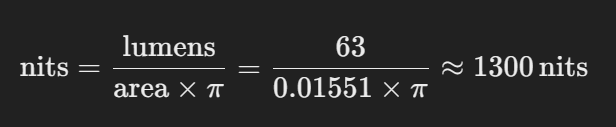
You can conclude that to achieve a light output of 31.5 Lumens per foot for your Line Light, you need to set it to approximately 1,300 Nits.
Keep in mind that Nits describe the brightness of the surface. So increasing the size of the light will proportionally increase the total light output.
### See Also:
- **External Link:** [Lumens vs Nits : What’s the Difference?](https://quickandeasylighting.com/lumens-vs-nits/)
- (1) **External Link:** [Nits vs Lumens vs Luminance](https://newhavendisplay.com/blog/nits-vs-lumens-vs-luminance/)
- **External Link:** [LED Lighting: How Many Lumens is Enough?](https://www.birddogdistributing.com/blog/led-lighting-how-many-lumens-is-enough)
- **Knowledge Base:** [Why do you get artifacts, blotches or patchy looking renders with Ray Tracing?](https://support.lumion.com/knowledge-base/api/v2/help_center/en-us/articles/8433564469916.json?hsLang=en-us)
- [Visit our other Sections](https://support.lumion.com/knowledge-base/visit-our-other-sections?hsLang=en-us)
- [Contact Us](https://support.lumion.com/knowledge-base/contact-us?hsLang=en-us)
- [Lumion Account](https://support.lumion.com/knowledge-base/lumion-account?hsLang=en-us)
- [Latest News](https://support.lumion.com/knowledge-base/latest-news?hsLang=en-us#main-content)
- [Major Known Issues](https://support.lumion.com/knowledge-base/latest-news?hsLang=en-us#major-known-issues)
- [Lumion 2025: Major Version Release Details](https://support.lumion.com/knowledge-base/latest-news?hsLang=en-us#lumion-2025-major-version-release-details)
- [Lumion 2024: Major Version Release Details](https://support.lumion.com/knowledge-base/latest-news?hsLang=en-us#lumion-2024-major-version-release-details)
- [Lumion 2023: Major Version Release Details](https://support.lumion.com/knowledge-base/latest-news?hsLang=en-us#lumion-2023-major-version-release-details)
- [Lumion 2023: Update Release Notes](https://support.lumion.com/knowledge-base/latest-news?hsLang=en-us#lumion-2023-update-release-notes)
- [Lumion 12](https://support.lumion.com/knowledge-base/latest-news?hsLang=en-us#lumion-12)
- [Lumion 11](https://support.lumion.com/knowledge-base/latest-news?hsLang=en-us#lumion-11)
- [Lumion 10](https://support.lumion.com/knowledge-base/latest-news?hsLang=en-us#lumion-10)
- [Sales Questions](https://support.lumion.com/knowledge-base/sales-questions?hsLang=en-us)
- [Subscriptions](https://support.lumion.com/knowledge-base/subscriptions?hsLang=en-us)
- [New User Questions](https://support.lumion.com/knowledge-base/new-user-questions?hsLang=en-us)
- [Learning Resources](https://support.lumion.com/knowledge-base/learning-resources?hsLang=en-us)
- [System Requirements Questions](https://support.lumion.com/knowledge-base/system-requirements-questions?hsLang=en-us#main-content)
- [Determining the 'Complexity' of your Projects](https://support.lumion.com/knowledge-base/system-requirements-questions?hsLang=en-us#determining-the-complexity-of-your-projects)
- [System Messages from Lumion](https://support.lumion.com/knowledge-base/system-requirements-questions?hsLang=en-us#system-messages-from-lumion)
- [Requirements for Prior Versions](https://support.lumion.com/knowledge-base/system-requirements-questions?hsLang=en-us#requirements-for-prior-versions)
- [Download & Installation Questions](https://support.lumion.com/knowledge-base/download-installation-questions?hsLang=en-us#main-content)
- [Download/Installation: General Questions](https://support.lumion.com/knowledge-base/download-installation-questions?hsLang=en-us#download-installation-general-questions)
- [Download Questions](https://support.lumion.com/knowledge-base/download-installation-questions?hsLang=en-us#download-questions)
- [Installation Questions](https://support.lumion.com/knowledge-base/download-installation-questions?hsLang=en-us#installation-questions)
- [Lumion Pro Updater](https://support.lumion.com/knowledge-base/download-installation-questions?hsLang=en-us#lumion-pro-updater)
- [Plugins to CAD software](https://support.lumion.com/knowledge-base/download-installation-questions?hsLang=en-us#plugins-to-cad-software)
- [License and General Product Questions](https://support.lumion.com/knowledge-base/license-and-general-product-questions?hsLang=en-us#main-content)
- [License System Messages from Lumion](https://support.lumion.com/knowledge-base/license-and-general-product-questions?hsLang=en-us#license-system-messages-from-lumion)
- [Import & Export Questions](https://support.lumion.com/knowledge-base/import-export-questions?hsLang=en-us#main-content)
- [Model Import Guidelines](https://support.lumion.com/knowledge-base/import-export-questions?hsLang=en-us#model-import-guidelines)
- [Lumion LiveSync and import plugins](https://support.lumion.com/knowledge-base/import-export-questions?hsLang=en-us#lumion-livesync-and-import-plugins)
- [System Messages from Lumion when importing](https://support.lumion.com/knowledge-base/import-export-questions?hsLang=en-us#system-messages-from-lumion-when-importing)
- [General Questions](https://support.lumion.com/knowledge-base/general-questions?hsLang=en-us#main-content)
- [Keyboard Shortcuts in Lumion](https://support.lumion.com/knowledge-base/general-questions?hsLang=en-us#keyboard-shortcuts-in-lumion)
- [Upgrading and Updating your Lumion Version](https://support.lumion.com/knowledge-base/general-questions?hsLang=en-us#upgrading-and-updating-your-lumion-version)
- [Using Lumion 2023](https://support.lumion.com/knowledge-base/general-questions?hsLang=en-us#using-lumion-2023)
- [System Messages from Lumion](https://support.lumion.com/knowledge-base/general-questions?hsLang=en-us#system-messages-from-lumion)
- [Build Mode Questions](https://support.lumion.com/knowledge-base/build-mode-questions?hsLang=en-us#main-content)
- [Landscape and Terrains](https://support.lumion.com/knowledge-base/build-mode-questions?hsLang=en-us#landscape-and-terrains)
- [OpenStreetMap](https://support.lumion.com/knowledge-base/build-mode-questions?hsLang=en-us#openstreetmap)
- [Lighting: Sun and Artificial Lights](https://support.lumion.com/knowledge-base/build-mode-questions?hsLang=en-us#lighting-sun-and-artificial-lights)
- [Questions mainly for older versions than Lumion 12](https://support.lumion.com/knowledge-base/build-mode-questions?hsLang=en-us#questions-mainly-for-older-versions-than-lumion-12)
- [Library Content](https://support.lumion.com/knowledge-base/library-content?hsLang=en-us#main-content)
- [Library Content in Lumion 2026](https://support.lumion.com/knowledge-base/library-content?hsLang=en-us#library-content-in-lumion-2026)
- [Library Content in Lumion 2025](https://support.lumion.com/knowledge-base/library-content?hsLang=en-us#library-content-in-lumion-2025)
- [Library Content in Lumion 2024](https://support.lumion.com/knowledge-base/library-content?hsLang=en-us#library-content-in-lumion-2024)
- [Library Content in Lumion 2023](https://support.lumion.com/knowledge-base/library-content?hsLang=en-us#library-content-in-lumion-2023)
- [Library Content in Lumion 12](https://support.lumion.com/knowledge-base/library-content?hsLang=en-us#library-content-in-lumion-12)
- [Movie & Photo Mode Questions](https://support.lumion.com/knowledge-base/movie-photo-mode-questions?hsLang=en-us#main-content)
- [Photo Mode](https://support.lumion.com/knowledge-base/movie-photo-mode-questions?hsLang=en-us#photo-mode)
- [Movie Mode](https://support.lumion.com/knowledge-base/movie-photo-mode-questions?hsLang=en-us#movie-mode)
- [Animation in Movie Mode](https://support.lumion.com/knowledge-base/movie-photo-mode-questions?hsLang=en-us#animation-in-movie-mode)
- [Effects in Photo or Movie Mode](https://support.lumion.com/knowledge-base/movie-photo-mode-questions?hsLang=en-us#effects-in-photo-or-movie-mode)
- [Reflections](https://support.lumion.com/knowledge-base/movie-photo-mode-questions?hsLang=en-us#reflections)
- [Material Questions](https://support.lumion.com/knowledge-base/material-questions?hsLang=en-us#main-content)
- [Materials in versions 12 and earlier](https://support.lumion.com/knowledge-base/material-questions?hsLang=en-us#materials-in-versions-12-and-earlier)
- [Using LiveSync for Revit and a Section Box](https://support.lumion.com/knowledge-base/material-questions?hsLang=en-us#using-livesync-for-revit-and-a-section-box)
- [Rendering Questions](https://support.lumion.com/knowledge-base/rendering-questions?hsLang=en-us#main-content)
- [General Rendering Questions](https://support.lumion.com/knowledge-base/rendering-questions?hsLang=en-us#general-rendering-questions)
- [Rendering of Photos](https://support.lumion.com/knowledge-base/rendering-questions?hsLang=en-us#rendering-of-photos)
- [Rendering of Clips and Movies](https://support.lumion.com/knowledge-base/rendering-questions?hsLang=en-us#rendering-of-clips-and-movies)
- [Tips to getting the best renders](https://support.lumion.com/knowledge-base/rendering-questions?hsLang=en-us#tips-to-getting-the-best-renders)
- [Rendering Performance](https://support.lumion.com/knowledge-base/rendering-questions?hsLang=en-us#rendering-performance)
- [Technical Issues when Rendering](https://support.lumion.com/knowledge-base/rendering-questions?hsLang=en-us#technical-issues-when-rendering)
- [Panorama Mode Questions](https://support.lumion.com/knowledge-base/panorama-mode-questions?hsLang=en-us#main-content)
- [Technical questions when rendering with Panorama Mode](https://support.lumion.com/knowledge-base/panorama-mode-questions?hsLang=en-us#technical-questions-when-rendering-with-panorama-mode)
- [File & BackUp Questions](https://support.lumion.com/knowledge-base/file-backup-questions?hsLang=en-us#main-content)
- [Saving and Backup](https://support.lumion.com/knowledge-base/file-backup-questions?hsLang=en-us#saving-and-backup)
- [File Saving Issues](https://support.lumion.com/knowledge-base/file-backup-questions?hsLang=en-us#file-saving-issues)
- [Lumion-Documents](https://support.lumion.com/knowledge-base/file-backup-questions?hsLang=en-us#lumion-documents)
- [Transfer, Move or Migrate Files](https://support.lumion.com/knowledge-base/file-backup-questions?hsLang=en-us#transfer-move-or-migrate-files)
- [Troubleshooting](https://support.lumion.com/knowledge-base/troubleshooting?hsLang=en-us#main-content)
- [Reports about your PC](https://support.lumion.com/knowledge-base/troubleshooting?hsLang=en-us#reports-about-your-pc)
- [Photo and Movie Mode Issues](https://support.lumion.com/knowledge-base/troubleshooting?hsLang=en-us#photo-and-movie-mode-issues)
- [Rendering Issues](https://support.lumion.com/knowledge-base/troubleshooting?hsLang=en-us#rendering-issues)
- [Error Messages from Lumion](https://support.lumion.com/knowledge-base/troubleshooting?hsLang=en-us#error-messages-from-lumion)
- [Hardware related Issues](https://support.lumion.com/knowledge-base/troubleshooting?hsLang=en-us#hardware-related-issues)
- [Other Troubleshooting Issues](https://support.lumion.com/knowledge-base/troubleshooting?hsLang=en-us#other-troubleshooting-issues)
- [Article Developments](https://support.lumion.com/knowledge-base/article-developments?hsLang=en-us#main-content)
- [Devs - Multi‑Image Button Viewer](https://support.lumion.com/knowledge-base/article-developments?hsLang=en-us#devs-multi-image-button-viewer)
[](https://lumion.com/)
[mailto:email@email.com](mailto:email@email.com)
Copyright © 2026, Lumion - Act3D B.V.
#### Product
[Plans and pricing](https://lumion.com/product/buy)
[Discover Lumion](https://lumion.com/product/discover-lumion)
[Compatibility](https://lumion.com/compatibility/)
[System Requirements](https://lumion.com/product/system-requirements)
[Find a reseller](https://lumion.com/about/find-reseller)
[Free trial](https://lumion.com/product/free-trial)
#### Solutions
[Architectural design](https://lumion.com/product/architectural-design)
[Interior design](https://lumion.com/product/interior-design)
[Landscape architecture](https://lumion.com/product/landscape-architecture)
[Urban planning](https://lumion.com/product/urban-planning)
[3D rendering](https://lumion.com/product/3d-rendering-software)
[Education](https://lumion.com/product/educational-licenses)
#### Compatibility
[Trimble SketchUp](https://lumion.com/compatibility/sketchup-rendering)
[Autodesk Revit](https://lumion.com/compatibility/revit-rendering)
[Graphisoft ArchiCAD](https://lumion.com/compatibility/archicad-rendering)
[Rhinoceros](https://lumion.com/compatibility/rhino-rendering)
[Autodesk Autocad](https://lumion.com/compatibility/autocad-rendering)
[Autodesk FormIt Pro](https://lumion.com/compatibility/lumion-for-autodesk-formit-pro)
[Nemetschek Allplan](https://lumion.com/compatibility/allplan-rendering)
[Nemetschek Vectorworks](https://lumion.com/compatibility/vectorworks-rendering)
[BricsCAD](https://lumion.com/compatibility/bricscad-rendering)
[3D Studio Max](https://lumion.com/compatibility/3ds-max-rendering)
#### Resources
[Made with Lumion](https://lumion.com/made-with-lumion)
[Tutorials](https://support.lumion.com/video-tutorials?hsLang=en-us)
[Support and learning](https://support.lumion.com/knowledge-base/api/v2/help_center/en-us/articles/360044608053.json?hsLang=en-us)
[Downloads](https://support.lumion.com/downloads?hsLang=en-us)
[Community](https://community.lumion.com/index.php)
#### About
[Our Story](https://lumion.com/about)
[We're hiring!](https://lumion.com/about/careers)
[News](https://lumion.com/news)
[Contact us](https://lumion.com/about/contact)
[Terms & conditions](https://lumion.com/legal/terms-of-service) [EULA](https://lumion.com/legal/eula) [Privacy statement](https://lumion.com/legal/privacy-statement) [CEIP](https://lumion.com/legal/ceip) [Disclaimer](https://lumion.com/legal/disclaimer) © 2026 Lumion