---
title: "Lumion 2023: Update to 23.3.0 - Release Notes"
description: Knowledge Base
---
Solutions
[Architectural design All you need to bring your residential, commercial or institutional designs to life](https://lumion.com/product/architectural-design) [Landscape architecture Beautiful terrains and fine-detailed nature for any climate or season](https://lumion.com/product/landscape-architecture)
[Interior design Realistic light, high-quality textures, and an extensive asset library](https://lumion.com/product/interior-design) [Students and Faculties Lumion is free for students, educators, and faculties around the world](https://lumion.com/product/educational-licenses)
[SketchUp](https://lumion.com/compatibility/sketchup-rendering) [Revit](https://lumion.com/compatibility/revit-rendering) [ArchiCAD](https://lumion.com/compatibility/archicad-rendering) [Rhino](https://lumion.com/compatibility/rhino-rendering) [Autocad](https://lumion.com/compatibility/autocad-rendering) [See more](https://lumion.com/compatibility/)
Product
[Discover Axogram New Live architectural diagramming](https://lumion.com/product/axogram) [Lumion Cloud Where design meets collaboration](https://lumion.com/product/lumion-cloud)
[Lumion Pro Advanced visualization solution](https://lumion.com/product/lumion-pro) [Discover AI tools New AI built for architectural work](https://lumion.com/product/ai)
[Lumion Pro 2026.1 is out now! 🚀](https://lumion.com/product/latest-version-pro) [Compatibility](https://lumion.com/compatibility/) [System Requirements](https://lumion.com/product/system-requirements) [Roadmap](https://lumion.com/product/roadmap)
[Pricing](https://lumion.com/product/buy) Resources
[Made with Lumion Get inspired by the stories behind the designs](https://lumion.com/made-with-lumion)
[Tips & Guides Make the most out of Lumion with helpful guides and tutorials](https://lumion.com/tips-guides)
[Knowledge base](https://support.lumion.com/knowledge-base?hsLang=en-us) [Community](https://community.lumion.com/index.php) [Downloads](https://support.lumion.com/downloads?hsLang=en-us)
About
[Who we are Learn about our story and mission](https://lumion.com/about) [Careers - We're hiring Let's build the future of architectural visualization](https://lumion.com/about/careers)
[News Discover the latest product news and more](https://lumion.com/news)
[Find your local reseller](https://lumion.com/about/find-reseller) [Contact us](https://lumion.com/about/contact)
[](http://lumion.com)
[My Account](https://account.lumion.com)
Solutions
[Architectural design](https://lumion.com/product/architectural-design) [Interior design](https://lumion.com/product/interior-design) [Landscape architecture](https://lumion.com/product/landscape-architecture) [Students and Faculties](https://lumion.com/product/educational-licenses)
---
[SketchUp](https://lumion.com/compatibility/sketchup-rendering) [Revit](https://lumion.com/compatibility/revit-rendering) [ArchiCAD](https://lumion.com/compatibility/archicad-rendering) [Rhino](https://lumion.com/compatibility/rhino-rendering) [Autocad](https://lumion.com/compatibility/autocad-rendering) [See more](https://lumion.com/compatibility/)
Product
[Axogram New](https://lumion.com/product/axogram) [Lumion Cloud](https://lumion.com/product/lumion-cloud) [Lumion Pro](https://lumion.com/product/lumion-pro) [Discover AI tools New](https://lumion.com/product/ai)
---
[Lumion Pro 2026.1 is out now! 🚀](https://lumion.com/product/latest-version-pro) [Compatibility](https://lumion.com/compatibility/) [System Requirements](https://lumion.com/product/system-requirements) [Roadmap](https://lumion.com/product/roadmap)
[Pricing](https://lumion.com/product/buy) Resources
[Made with Lumion](https://lumion.com/made-with-lumion) [Tips & Guides](https://lumion.com/tips-guides)
---
[Knowledge base](https://support.lumion.com/knowledge-base?hsLang=en-us) [Community](https://community.lumion.com/index.php) [Downloads](https://support.lumion.com/downloads?hsLang=en-us)
About
[Who we are](https://lumion.com/about) [Careers - We're hiring](https://lumion.com/about/careers) [News](https://lumion.com/news)
---
[Find your local reseller](https://lumion.com/about/find-reseller) [Contact us](https://lumion.com/about/contact)
[My Account](https://account.lumion.com)
[Submit a request](https://support.lumion.com/hc/en-us/requests/new?hsLang=en-us)
Lumion Knowledge Base
How can we help?
- There are no suggestions because the search field is empty.
[Skip to content](https://support.lumion.com/knowledge-base/api/v2/help_center/en-us/articles/10711010271644.json#main-content)
English - United States
Show submenu for translations

Open main navigation
Close main navigation
- English - United States
Show submenu for translations
- Contact us
Contact us
How can we help you?
- There are no suggestions because the search field is empty.
1. [Knowledge Base](https://support.lumion.com/knowledge-base?hsLang=en-us)
2. [Latest News](https://support.lumion.com/knowledge-base/latest-news?hsLang=en-us)
3. [Lumion 2023: Update Release Notes](https://support.lumion.com/knowledge-base/latest-news?hsLang=en-us#lumion-2023-update-release-notes)
# Lumion 2023: Update to 23.3.0 - Release Notes
#### ****
October 17, 2023
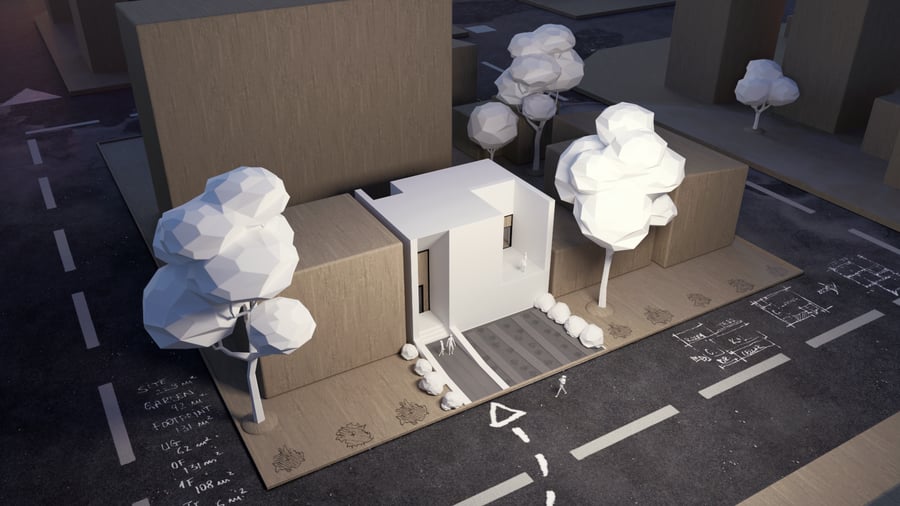
*Lumion 2023.3* includes added features and functionality, new library items, and addresses some usability issues.
**Important:** To install the changes, *Lumion* 2023 needs to be updated. Please follow the instructions in the Lumion pop-up window and see the article below for additional information:
- **Knowledge Base:** [How does the Updater for Lumion work?](https://support.lumion.com/knowledge-base/api/v2/help_center/en-us/articles/7846598739612.json?hsLang=en-us)
For background information, also consult:
- **Knowledge Base:** [Lumion 2023.0: Release Notes](https://support.lumion.com/knowledge-base/api/v2/help_center/en-us/articles/7441741355804.json?hsLang=en-us)
- **Knowledge Base:** [Lumion 2023: Update to 23.1.0 - Release Notes](https://support.lumion.com/knowledge-base/api/v2/help_center/en-us/articles/9140568268956.json?hsLang=en-us)
- **Knowledge Base:** [Lumion 2023: Update to 23.2.0 - Release Notes](https://support.lumion.com/knowledge-base/api/v2/help_center/en-us/articles/10118642455452.json?hsLang=en-us)
- **Knowledge Base:** [Transitions: From prior versions to working with the new Lumion 2023](https://support.lumion.com/knowledge-base/api/v2/help_center/en-us/articles/7807462680732.json?hsLang=en-us)
For a video walkthrough, please check the link below:
- **Video Tutorial:** [New Features of Lumion 23.3.0](https://support.lumion.com/video-tutorials/api/v2/help_center/en-us/articles/10847555455260.json?hsLang=en-us)
## **1. New functionality:**
### **Build Mode -\> Place Mode**
#### **1.1: Line Placement**
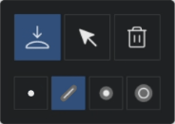
The new Line Placement now replaces Mass Placement from previous versions and brings several key improvements for easier and faster placement:
**1.1.1:** *Objects* are now placed along a spline that is considerably easier to manipulate using its *Control Points* and the *Gizmo*.
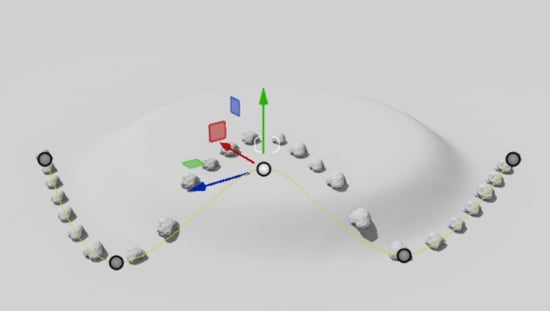
**1.1.2:** The *Control Points* can now be moved above or below the surface they are placed/projected on.
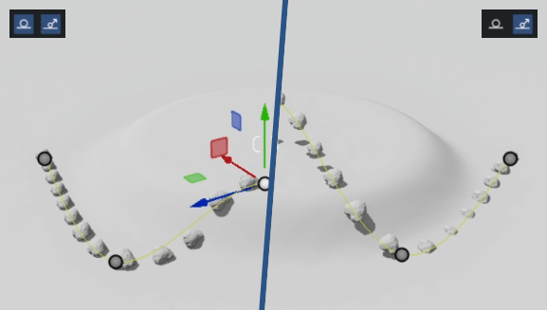
**1.1.3:** A new *Toggle* button has been added, Conform to ground, that enables objects to inherit the angle and orientation of the surface they are placed on.
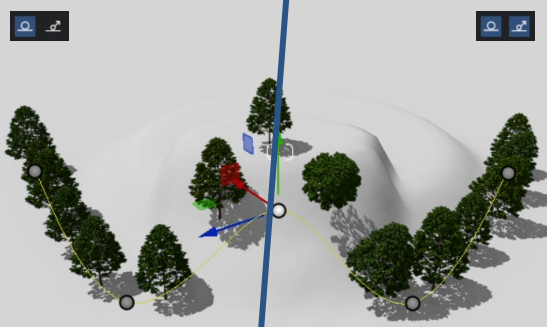
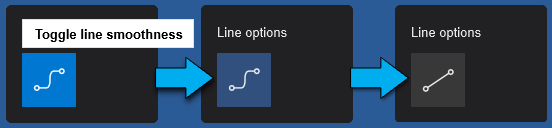
**1.1.4:** Switching between a *Smooth* and a *Linear* path is also possible by changing the *Line Options.*
**
#### **1.2: Cluster Placement**
**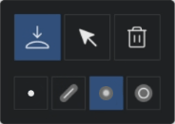**
The improved Cluster Placement comes with additional functionality that allows for easier and faster *Scene* building:
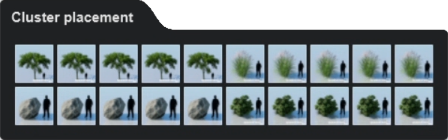
**1.2.1:** Up to 20 *Objects* can be selected from the Library**:**
**1.2.2:** The *Radius* of placement can now be controlled (maximum of 100m) alongside the number of items (maximum of 50):
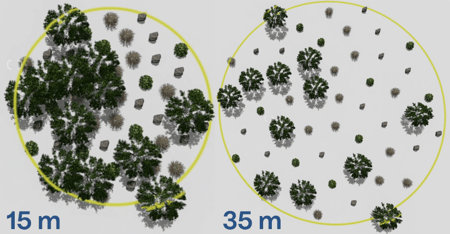
**1.2.3:** Sliders similar to the ones in the Line Placement tool have also been integrated (*Randomize positions*, *Direction*, and *Randomize direction*).
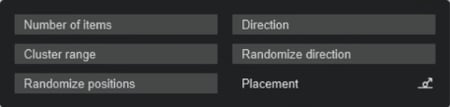
The L key can be used to control the *Cluster Range* and the R key for the *Direction*.
**1.2.4:** Conform to ground (see section **1.1.3** for more details) is also available.

See also:
- **Knowledge Base:** [What are the keyboard shortcuts in Lumion 2023?](https://support.lumion.com/knowledge-base/api/v2/help_center/en-us/articles/7693744640540.json?hsLang=en-us)
### **Build Mode -\> Object Library**
#### **1.3: New Library *Objects***
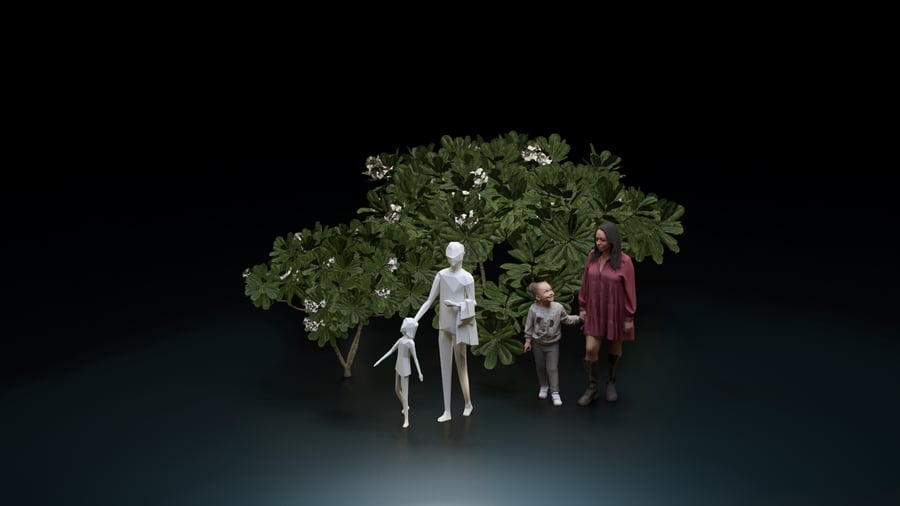
**1.3.1:** The Lumion Library has been updated with 188 new *Objects*
- 100 Fine-detail Nature.
- 50 high-quality static *3D People*.
- 28 Stylized low-poly *Objects* for conceptual representation: 10 Trees, 12 People, 6 Cars.
- 10 OmniLight *Presets.*
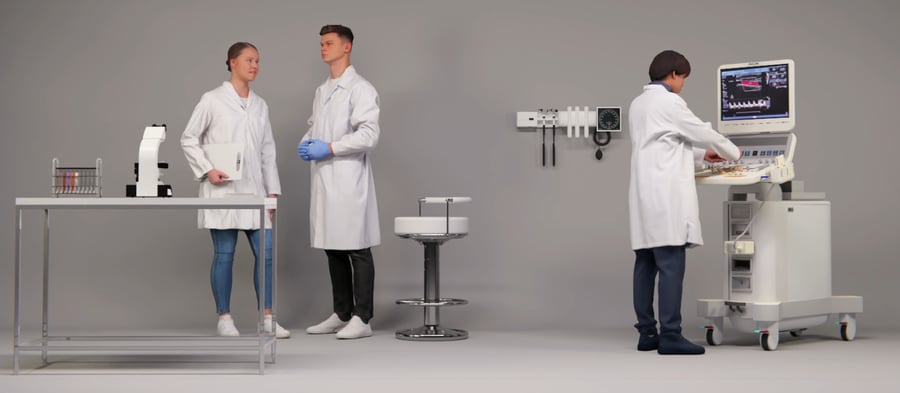
**1.3.2:** Searching the Lumion Library using the term *L23.3* will display all newly added items.
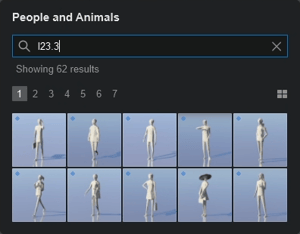
Lumion Pro 2023.3 now includes **188** new Library Objects out of which **34** new have been made available for Lumion Standard.
**1.3.3:** See also:
- **Knowledge Base:** [What is the new content added in Lumion 2023?](https://support.lumion.com/knowledge-base/api/v2/help_center/en-us/articles/7706684669212.json?hsLang=en-us)
- **Knowledge Base:** [Which content is available in the Model & Material Libraries?](https://support.lumion.com/knowledge-base/api/v2/help_center/en-us/articles/360003475113.json?hsLang=en-us)
#### **1.4: IES profiles for *OmniLights***
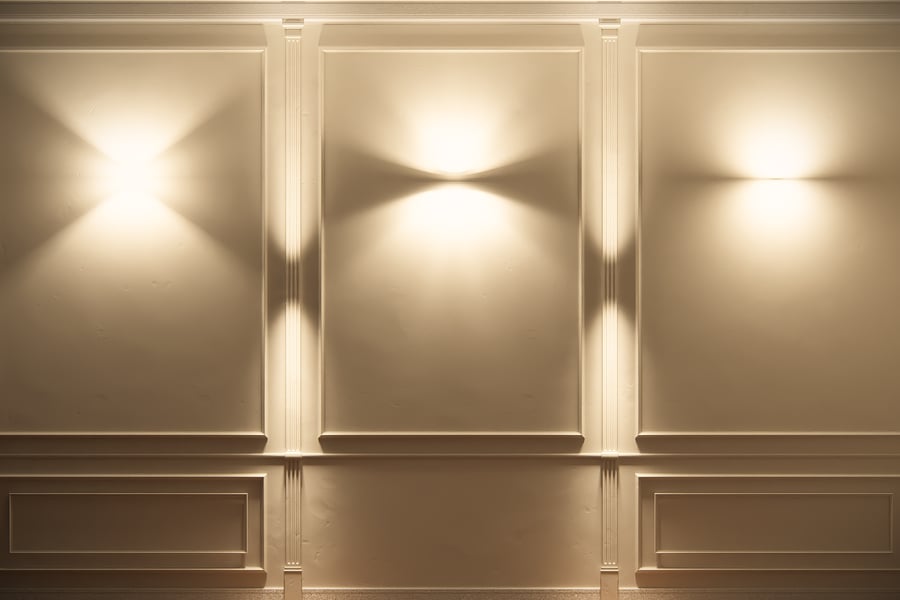
A set of 10 new *OmniLights* has been added to the *Lights Library*.
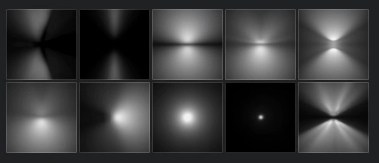
It is now also possible to load a custom *IES Profile* for OmniLights.
### **Build Mode -\> Landscape Mode**
#### **1.5: *OpenStreetMaps* improvements**
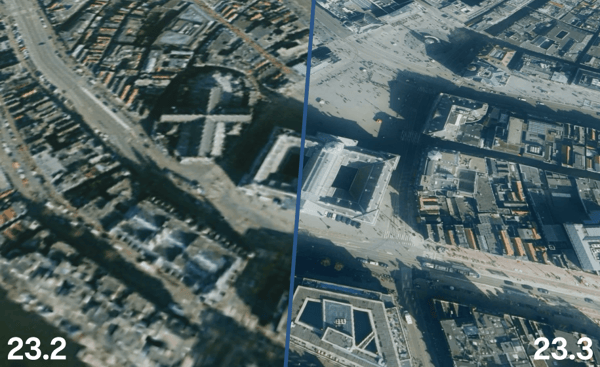
**1.5.1:** *OpenStreetMaps* texture resolution has been highly improved for supported areas.
**1.5.2:** In addition, the download speed for *OSM* tiles has been improved significantly.
### **Output Modes**
#### **1.6: Movie Mode -\> Render multiple clips**
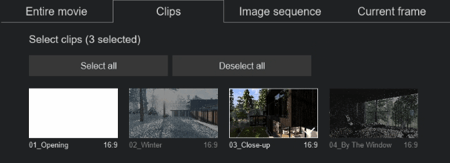
*Clips* within the same *Clip Set* can now be rendered to individual '.MP4' files when selected via the *Clips tab*. This tab is visible when clicking the *Render Movie button* while *Entire Movie* is selected or one of the *Clips* is selected.
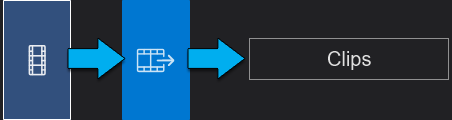
The interface is similar to that in *Photo Mode*.
### **Effects**
#### **1.7: Custom HDR/HDRi Skies for *Real Skies***
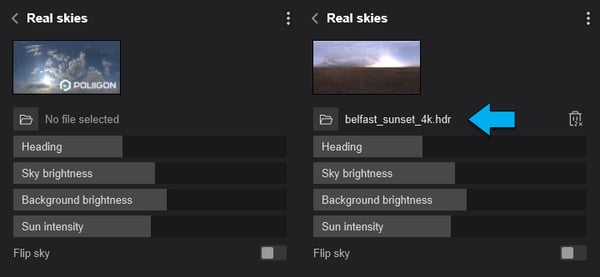
Loading a custom '.HDR' file to replace the presets is now possible through the *Load* button available in the *Real Skies Effect*. Using a custom image file will replace the sky map and emit light from the brightest registered area of the loaded texture. The sliders will affect the sky map in the same way as they affect the existing presets.
 
The lighting system is optimized for exteriors and using '.HDR' files for interiors may result in unexpected behavior.
See also:
- **Knowledge Base:** [How do you replace the sky with a photo?](https://support.lumion.com/knowledge-base/api/v2/help_center/en-us/articles/360003474993.json?hsLang=en-us)
#### **1.8: LUT support for *Color Correction***
**1.8.1:** LUT functionality has been added to help keep a consistent look between images.
**1.8.2:** There are 10 presets in Lumion:
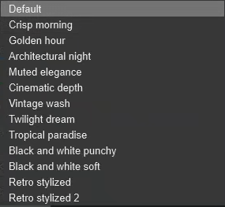
**1.8.3:** Custom '.CUBE' files can also be loaded.
**1.8.4:** An additional slider has been added to control the intensity of a LUT (*LUT intensity*).

 
See also:
- **Knowledge Base:** [How do you use the Color Correction Effect?](https://support.lumion.com/knowledge-base/api/v2/help_center/en-us/articles/7985570700060.json?hsLang=en-us)
## **2. Improvements:**
### **Build Mode -\> Landscape Mode**
#### **2.1: New *Landscape* textures**
There are 18 new high-quality textures added to *Landscape Mode* covering a range of environments. Older textures have been moved to the *Legacy* folder for a cleaner presentation of the *Texture* panel.
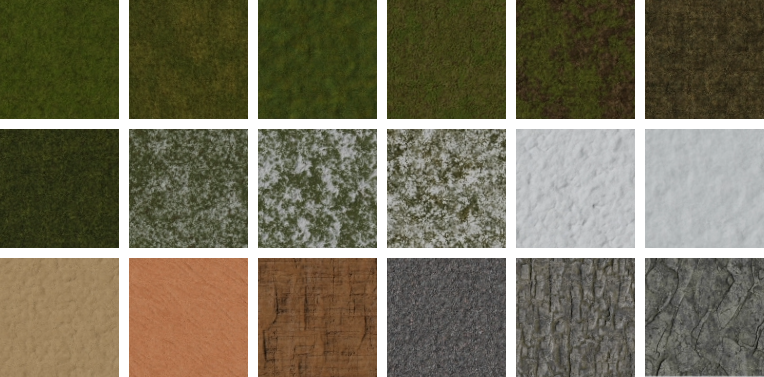
See also Section 4. Custom Landscape textures.:
- **Knowledge Base:** [How do you work with terrains in Lumion 12 and newer versions?](https://support.lumion.com/knowledge-base/api/v2/help_center/en-us/articles/4409053962130.json?hsLang=en-us)
### **Build Mode -\> Objects**
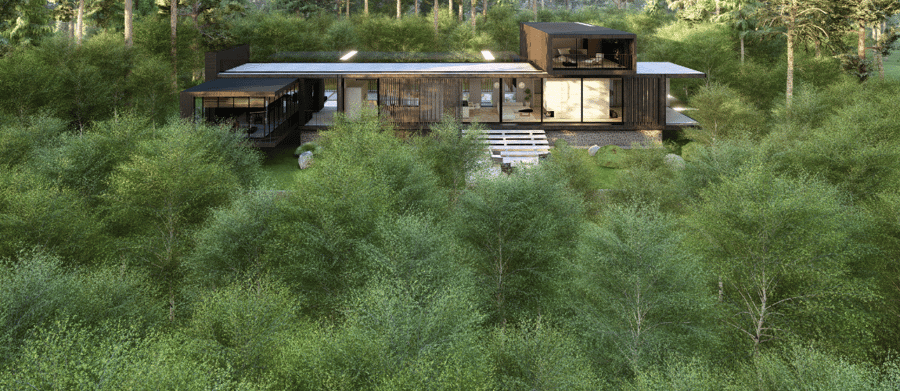
#### **2.2: Randomize *Nature Object* colors**
Lumion 2023.3 and newer versions will apply a small *Hue* adjustment when placing multiple Nature *Objects* of the same type.
### **Build Mode -\> Material Mode**
#### **2.3: Colorization for *Leaves***
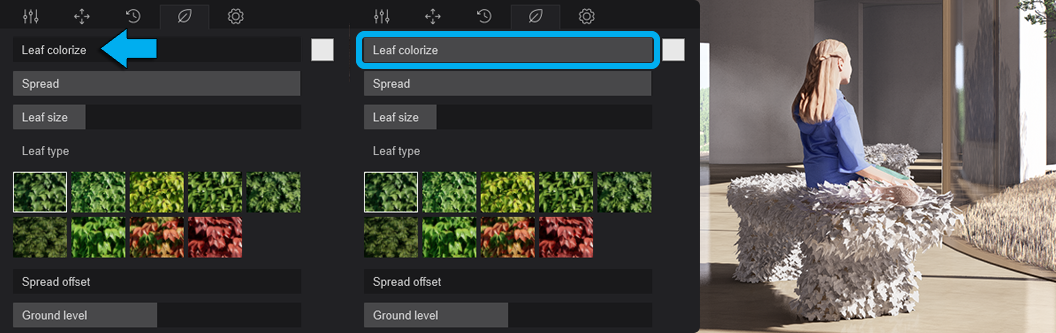
The *Leaf Material* and *Foliage Property* of the *Standard Material* are now colorizable using the *Leaf Colorize* slider.
### **Build Mode -\> Importing**
#### **2.4: Variations panel**
Creating a Variation will toggle a panel that allows for either the duplication of the current *Imported Model* (example left) or importing a new model (example right):
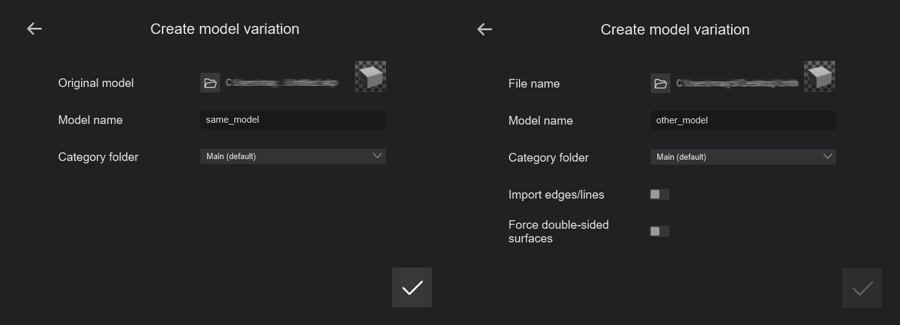
The left example for the panel will create a (unique) duplicate of the current *Imported Model.*
Clicking on the '*Browse*' (folder) button and selecting a new model will create a new *Variation*.
### **Output Modes**
#### **2.5: Movie Mode - Camera Paths**
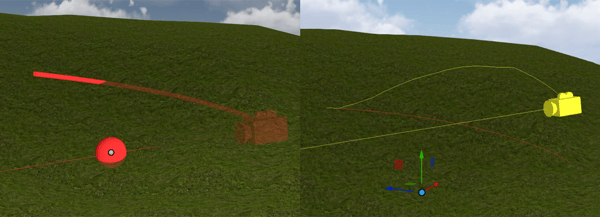
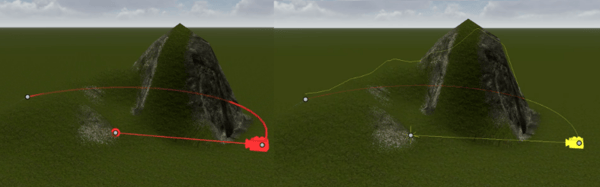
*Camera path* movement and projection have been redesigned to avoid intersections with the *Lumion Landscape*. When camera movement set via a path intersects the landscape mesh, it will now project the position of the camera to the closest point above the landscape.
#### 
#### **2.6: Photo/Movie/Panorama Mode - Copy and Paste notification**
A notification will appear when a Photo/Movie/Panorama Position or Effect Stack is copied to the clipboard.

### **Effects**
#### **2.7: Improved light control for *Real Skies***
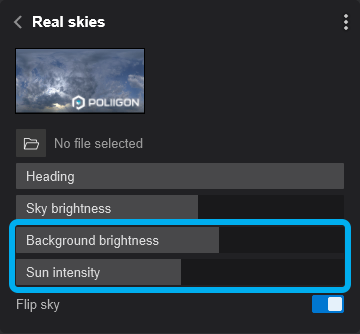
**2.7.1:** A new slider, *Sun Intensity* now controls the brightness of the *Sun* independently from the rest of the *Sky*.
The slider allows for tweaking the sun intensity without the need to add the *Sun Effect* on top of the *Real Skies Effect*.
This slider value will be the same value in the *Sun Effect* if it is included in the *Effect Stack*.
**2.7.2:** The *Overall Brightness* has been renamed to *Background Brightness*. to better reflect what it does.
Setting the brightness of the HDR image itself without affecting the actual lighting cast by the sky map.
#### **2.8: Keyframing for *Real Skies***
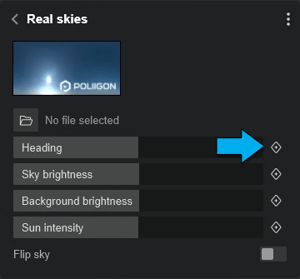
The *Heading*, *Sky Brightness*, *Background Brightness*, and *Sun Intensity* sliders can be keyframed in Movie Mode**:**
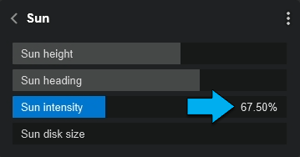
#### **2.9: Improved UI display of sliders**
Slider values are now displayed on the right side, within the area of the slider, thus avoiding overlap of UI elements and improving readability.
#### 
### **New example *Projects* and *Templates***
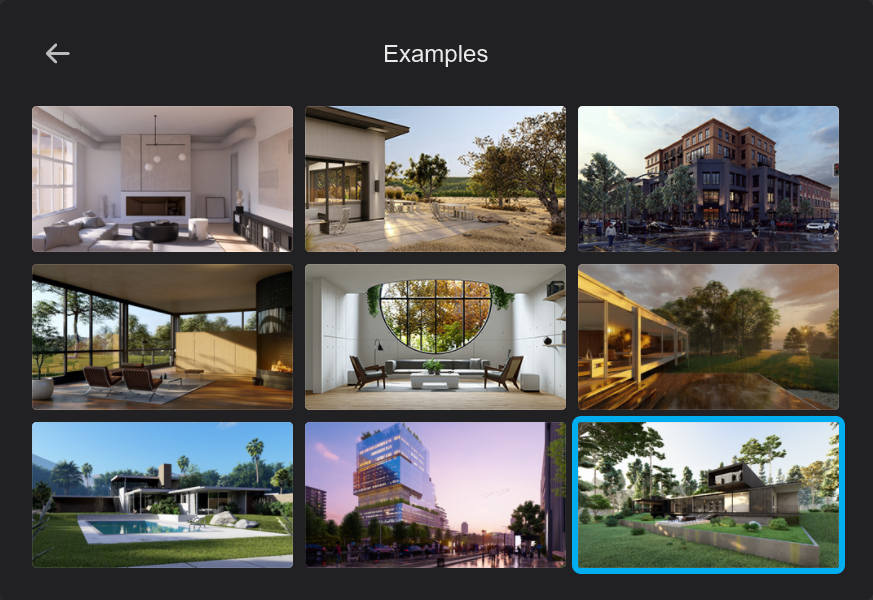
#### **2.10: *Example Projects***
*Lumion* 2023.3 includes:
- 1 (one) new *Example Project*: *House of Time*.
- 8 (eight) of the existing *Example Projects* have received improvements.
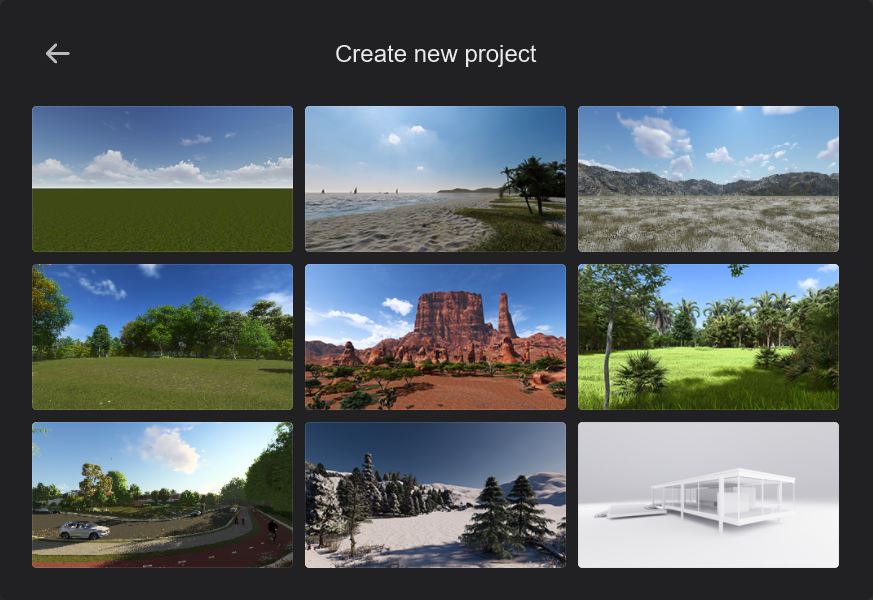
#### **2.11: *Templates***
- 1 (one) improved *Template*: *Design Showcase*.
- 3 (three) tweaked *Templates* (*Mountain Range, Forest,* *Tropical*).
## **3. Resolved issues and other improvements:**
### **3.1:** *Build Mode*
#### **3.1.1:** *Object Library*
- ***Lights*:** *Omnilight* presets now replace the Red/Green/Blue *Omnilights*.
- ***Lights*:** Names of custom *IES Profiles* are now displayed in the *Light's* name.
- ***Nature*:** The *Cactus Subcategory* has been relocated under *Plants*.
- ***Nature*:** The *Cactus Subcategory* has been relocated under *Plants*.
- ***Effects -\> Decals*:** no longer lose their assigned *Custom Texture* when moved.
- **Library Οbjects:** Custom-assigned *Colors* no longer reset to default after reloading a *Project*.
- **Library Οbjects:** Tags for the new *Objects* have been added. The search function will also filter *Objects* when using the following keywords:
- **Continent**
**People**
**Attributes**
**Season**
Asia
Casual
Books
Shovel
Spring
Europe
Business
Bag
Crate
Summer
Africa
Uniform
Coffee Mug & Bag
Coffee Mug
Fall
America
Adult
Coffee Mug & Phone
Travel Bags
Winter
Oceania
Child
Laptop Headphones
Phone & Travel bag
Notepad
Laptop & Phone
#### **3.1.2:** *Place Mode*
- Mass Placement has been renamed to Line Placement.
#### **3.1.3:** *Select Mode*
- **Selection:** The performance during *Object* selection has now been improved.
- **Snapping:** Moving an *Object* away from an *Imported Model* will no longer push it away when *Snapping* is enabled.
- ***Context Menu* -\> '*Find material in Library'* button:** will now select the correct Material.
- ***Context Menu* -\> *Characters*:** The *Color Wheel* no longer appears next to the Characters' *Thumbnails*.
#### **3.1.4:** *Landscape Mode*
- OpenStreetMaps**:** *OSM* buildings now appear less reflective.
- OpenStreetMaps**:** Adjusting the Landscape *Height* under an *OSM* building no longer results in intense shadows applied to its geometry.
- Landscape**:** *Objects* outside the editable *Lumion Landscape* are now clipped as expected.
- Landscape**:** The border marking the editable *Landscape area* is now always visible in *Build Mode*.
- Landscape**:** The *White* Landscape Material has been updated with a *Normal Map* that is completely flat.
- Sky**:** Visual glitches no longer occur when the mouse is hovering over the interface while an *Object* is selected in *Place Mode*.
#### **3.1.5: Other**
- **Object Thumbnails**: *Object Thumbnails* created in older versions of Lumion, now display as expected when opened in Lumion 2023.
### **3.2:** *Material Mode*
- **Materials -\> *Roughness Map*:** *Surfaces* where a value or map is assigned to their *Roughness* are now correctly displayed in *Planar Reflections*.
- **Custom materials:** The naming of Custom Materials no longer has capitalization issues.
- **Library Materials:** *Wood 053 a* and *Wood 053 b* are now tileable.
### **3.3:** *Photo/Movie/Panorama Mode*
- Camera presets**:** The imperial and metric units are now displayed as expected.
- Camera presets**:** A distorted outline is no longer visible when selecting an *Object* for *Follow object Camera*.
- Camera presets**:** The camera target is now displayed as expected when the camera position is pushed above the landscape.
- Camera presets**:** The path is now always positioned at the camera view when entering a preset *Clip*.
- Camera presets - Pan/Tilt**:** The *Tilt Control points* are now behaving as expected.
- Import Camera Path**:** This feature now behaves as expected.
- Photo/Movie/Panorama Positions**:** after being copied to the clipboard via the *Context Menu*, are now pasted in the correct *Slot*.
- Photo Mode**:** Switching to Photo Mode will now retain the *Camera position* from Build Mode.
- **Shortcuts:** Photo/Movie/Panorama Positions can now be copied and pasted using the Ctrl+C and Ctrl+V commands.
#### **3.3.1 Rendering**
- Render image sequence**:** Edit boxes for “From” and “To” are now pre-filled with frame values.
- **Rendering** Clips**:** The *Sky* is now rendered correctly in the first *Frame* of the Clip.
- **Various tweaks:** to the *Lights* in Lumion for better and more realistic calibration, including natural lighting (*Sky*, *Sun*, and *Real Skies*), artificial lights, and *Effects* that influence lighting (**example:** *Lens Flare Effect*).
### **3.4:** *Effects*
- Color Correction Effect**:** *Sliders* are now locked between keyframes to prevent accidental changes
- Ray Tracing Effect and Lights**:** Lights no longer become invisible occasionally in combination with Raytracing.
- Ray Tracing Effect for Clips**:** Lights on hidden Layers are now ignored by the Ray Tracing Effect resulting in improvements in the shadows.
- Ray Tracing Effect -\> **Denoiser**: The *Denoiser* no longer switches between GPU and CPU during the rendering process.
- Real Skies Effect**:** The selected *Sky* is now retained when switching Photo Sets.
- Animated Phasing Effect**:** The *Global center point* has been reduced in size and no longer overlaps the UI.
- Animated Phasing Effect**:** The stagger order now matches the selection order.
- Handheld Camera Effect**:** Tree Cluster *Objects* now have the Y-axis facing up at all times.
- Image Overlay Effect**:** The image file name used in the *Effect* is now saved and displayed at all times.
- Titles Effect**:** The font assigned via a *Preset* is now displayed as expected.
- Advanced Move Effect**:** The *Path* is now correctly updated after *Keyframes* are removed.
- Advanced Move Effect**:** The tooltip for the *Linear*/*Smooth* toggle now displays as expected
### **3.5:** *LiveSync* and *Importing*
- *Livesync for SketchUp*: Crashes will no longer occur when hiding and unhiding tags in SketchUp while LiveSync is on.
- *Livesync for Revit*: Crashes will no longer occur when hiding and unhiding an isolated item in Revit while LiveSync is on.
- *Livesync for Vectoworks*: Surface orientation now works as expected when importing a model from Vectoworks.
- **Importing and re-importing .FBX files**: now retains the correct surface naming.
## **4. General:**
#### **4.1: User Interface**
- **Movie Mode -\> Keyframes:** Updated the slider *Keyframe* buttons.
- **Updated UI for the following Effects:** *Sound, Image overlay, Shadow, Fade In/Out, Title, Variation control, Advanced move, Photo Matching, Layer visibility,* and *Depth of field*.
#### **4.2: Miscellaneous**
- **Lumion updater:** Lumion now checks if the *Updater* is running when starting.
- **Translations:** Language translations have been updated.
- **Texts:** Various text updates.
- **UI:** Various UI improvements.
- **Improvements:** Restricted-Mode:
- **Knowledge Base:** [What happens when your Lumion License Key expires?](https://support.lumion.com/knowledge-base/api/v2/help_center/en-us/articles/10270316337948.json?hsLang=en-us)
## **See Also:**
- **Knowledge Base:** [Lumion 2023.0: Release Notes](https://support.lumion.com/knowledge-base/api/v2/help_center/en-us/articles/7441741355804.json?hsLang=en-us)
- [Visit our other Sections](https://support.lumion.com/knowledge-base/visit-our-other-sections?hsLang=en-us)
- [Contact Us](https://support.lumion.com/knowledge-base/contact-us?hsLang=en-us)
- [Lumion Account](https://support.lumion.com/knowledge-base/lumion-account?hsLang=en-us)
- [Latest News](https://support.lumion.com/knowledge-base/latest-news?hsLang=en-us#main-content)
- [Major Known Issues](https://support.lumion.com/knowledge-base/latest-news?hsLang=en-us#major-known-issues)
- [Lumion 2025: Major Version Release Details](https://support.lumion.com/knowledge-base/latest-news?hsLang=en-us#lumion-2025-major-version-release-details)
- [Lumion 2024: Major Version Release Details](https://support.lumion.com/knowledge-base/latest-news?hsLang=en-us#lumion-2024-major-version-release-details)
- [Lumion 2023: Major Version Release Details](https://support.lumion.com/knowledge-base/latest-news?hsLang=en-us#lumion-2023-major-version-release-details)
- [Lumion 2023: Update Release Notes](https://support.lumion.com/knowledge-base/latest-news?hsLang=en-us#lumion-2023-update-release-notes)
- [Lumion 12](https://support.lumion.com/knowledge-base/latest-news?hsLang=en-us#lumion-12)
- [Lumion 11](https://support.lumion.com/knowledge-base/latest-news?hsLang=en-us#lumion-11)
- [Lumion 10](https://support.lumion.com/knowledge-base/latest-news?hsLang=en-us#lumion-10)
- [Sales Questions](https://support.lumion.com/knowledge-base/sales-questions?hsLang=en-us)
- [Subscriptions](https://support.lumion.com/knowledge-base/subscriptions?hsLang=en-us)
- [New User Questions](https://support.lumion.com/knowledge-base/new-user-questions?hsLang=en-us)
- [Learning Resources](https://support.lumion.com/knowledge-base/learning-resources?hsLang=en-us)
- [System Requirements Questions](https://support.lumion.com/knowledge-base/system-requirements-questions?hsLang=en-us#main-content)
- [Determining the 'Complexity' of your Projects](https://support.lumion.com/knowledge-base/system-requirements-questions?hsLang=en-us#determining-the-complexity-of-your-projects)
- [System Messages from Lumion](https://support.lumion.com/knowledge-base/system-requirements-questions?hsLang=en-us#system-messages-from-lumion)
- [Requirements for Prior Versions](https://support.lumion.com/knowledge-base/system-requirements-questions?hsLang=en-us#requirements-for-prior-versions)
- [Download & Installation Questions](https://support.lumion.com/knowledge-base/download-installation-questions?hsLang=en-us#main-content)
- [Download/Installation: General Questions](https://support.lumion.com/knowledge-base/download-installation-questions?hsLang=en-us#download-installation-general-questions)
- [Download Questions](https://support.lumion.com/knowledge-base/download-installation-questions?hsLang=en-us#download-questions)
- [Installation Questions](https://support.lumion.com/knowledge-base/download-installation-questions?hsLang=en-us#installation-questions)
- [Lumion Pro Updater](https://support.lumion.com/knowledge-base/download-installation-questions?hsLang=en-us#lumion-pro-updater)
- [Plugins to CAD software](https://support.lumion.com/knowledge-base/download-installation-questions?hsLang=en-us#plugins-to-cad-software)
- [License and General Product Questions](https://support.lumion.com/knowledge-base/license-and-general-product-questions?hsLang=en-us#main-content)
- [License System Messages from Lumion](https://support.lumion.com/knowledge-base/license-and-general-product-questions?hsLang=en-us#license-system-messages-from-lumion)
- [Import & Export Questions](https://support.lumion.com/knowledge-base/import-export-questions?hsLang=en-us#main-content)
- [Model Import Guidelines](https://support.lumion.com/knowledge-base/import-export-questions?hsLang=en-us#model-import-guidelines)
- [Lumion LiveSync and import plugins](https://support.lumion.com/knowledge-base/import-export-questions?hsLang=en-us#lumion-livesync-and-import-plugins)
- [System Messages from Lumion when importing](https://support.lumion.com/knowledge-base/import-export-questions?hsLang=en-us#system-messages-from-lumion-when-importing)
- [General Questions](https://support.lumion.com/knowledge-base/general-questions?hsLang=en-us#main-content)
- [Keyboard Shortcuts in Lumion](https://support.lumion.com/knowledge-base/general-questions?hsLang=en-us#keyboard-shortcuts-in-lumion)
- [Upgrading and Updating your Lumion Version](https://support.lumion.com/knowledge-base/general-questions?hsLang=en-us#upgrading-and-updating-your-lumion-version)
- [Using Lumion 2023](https://support.lumion.com/knowledge-base/general-questions?hsLang=en-us#using-lumion-2023)
- [System Messages from Lumion](https://support.lumion.com/knowledge-base/general-questions?hsLang=en-us#system-messages-from-lumion)
- [Build Mode Questions](https://support.lumion.com/knowledge-base/build-mode-questions?hsLang=en-us#main-content)
- [Landscape and Terrains](https://support.lumion.com/knowledge-base/build-mode-questions?hsLang=en-us#landscape-and-terrains)
- [OpenStreetMap](https://support.lumion.com/knowledge-base/build-mode-questions?hsLang=en-us#openstreetmap)
- [Lighting: Sun and Artificial Lights](https://support.lumion.com/knowledge-base/build-mode-questions?hsLang=en-us#lighting-sun-and-artificial-lights)
- [Questions mainly for older versions than Lumion 12](https://support.lumion.com/knowledge-base/build-mode-questions?hsLang=en-us#questions-mainly-for-older-versions-than-lumion-12)
- [Library Content](https://support.lumion.com/knowledge-base/library-content?hsLang=en-us#main-content)
- [Library Content in Lumion 2026](https://support.lumion.com/knowledge-base/library-content?hsLang=en-us#library-content-in-lumion-2026)
- [Library Content in Lumion 2025](https://support.lumion.com/knowledge-base/library-content?hsLang=en-us#library-content-in-lumion-2025)
- [Library Content in Lumion 2024](https://support.lumion.com/knowledge-base/library-content?hsLang=en-us#library-content-in-lumion-2024)
- [Library Content in Lumion 2023](https://support.lumion.com/knowledge-base/library-content?hsLang=en-us#library-content-in-lumion-2023)
- [Library Content in Lumion 12](https://support.lumion.com/knowledge-base/library-content?hsLang=en-us#library-content-in-lumion-12)
- [Movie & Photo Mode Questions](https://support.lumion.com/knowledge-base/movie-photo-mode-questions?hsLang=en-us#main-content)
- [Photo Mode](https://support.lumion.com/knowledge-base/movie-photo-mode-questions?hsLang=en-us#photo-mode)
- [Movie Mode](https://support.lumion.com/knowledge-base/movie-photo-mode-questions?hsLang=en-us#movie-mode)
- [Animation in Movie Mode](https://support.lumion.com/knowledge-base/movie-photo-mode-questions?hsLang=en-us#animation-in-movie-mode)
- [Effects in Photo or Movie Mode](https://support.lumion.com/knowledge-base/movie-photo-mode-questions?hsLang=en-us#effects-in-photo-or-movie-mode)
- [Reflections](https://support.lumion.com/knowledge-base/movie-photo-mode-questions?hsLang=en-us#reflections)
- [Material Questions](https://support.lumion.com/knowledge-base/material-questions?hsLang=en-us#main-content)
- [Materials in versions 12 and earlier](https://support.lumion.com/knowledge-base/material-questions?hsLang=en-us#materials-in-versions-12-and-earlier)
- [Using LiveSync for Revit and a Section Box](https://support.lumion.com/knowledge-base/material-questions?hsLang=en-us#using-livesync-for-revit-and-a-section-box)
- [Rendering Questions](https://support.lumion.com/knowledge-base/rendering-questions?hsLang=en-us#main-content)
- [General Rendering Questions](https://support.lumion.com/knowledge-base/rendering-questions?hsLang=en-us#general-rendering-questions)
- [Rendering of Photos](https://support.lumion.com/knowledge-base/rendering-questions?hsLang=en-us#rendering-of-photos)
- [Rendering of Clips and Movies](https://support.lumion.com/knowledge-base/rendering-questions?hsLang=en-us#rendering-of-clips-and-movies)
- [Tips to getting the best renders](https://support.lumion.com/knowledge-base/rendering-questions?hsLang=en-us#tips-to-getting-the-best-renders)
- [Rendering Performance](https://support.lumion.com/knowledge-base/rendering-questions?hsLang=en-us#rendering-performance)
- [Technical Issues when Rendering](https://support.lumion.com/knowledge-base/rendering-questions?hsLang=en-us#technical-issues-when-rendering)
- [Panorama Mode Questions](https://support.lumion.com/knowledge-base/panorama-mode-questions?hsLang=en-us#main-content)
- [Technical questions when rendering with Panorama Mode](https://support.lumion.com/knowledge-base/panorama-mode-questions?hsLang=en-us#technical-questions-when-rendering-with-panorama-mode)
- [File & BackUp Questions](https://support.lumion.com/knowledge-base/file-backup-questions?hsLang=en-us#main-content)
- [Saving and Backup](https://support.lumion.com/knowledge-base/file-backup-questions?hsLang=en-us#saving-and-backup)
- [File Saving Issues](https://support.lumion.com/knowledge-base/file-backup-questions?hsLang=en-us#file-saving-issues)
- [Lumion-Documents](https://support.lumion.com/knowledge-base/file-backup-questions?hsLang=en-us#lumion-documents)
- [Transfer, Move or Migrate Files](https://support.lumion.com/knowledge-base/file-backup-questions?hsLang=en-us#transfer-move-or-migrate-files)
- [Troubleshooting](https://support.lumion.com/knowledge-base/troubleshooting?hsLang=en-us#main-content)
- [Reports about your PC](https://support.lumion.com/knowledge-base/troubleshooting?hsLang=en-us#reports-about-your-pc)
- [Photo and Movie Mode Issues](https://support.lumion.com/knowledge-base/troubleshooting?hsLang=en-us#photo-and-movie-mode-issues)
- [Rendering Issues](https://support.lumion.com/knowledge-base/troubleshooting?hsLang=en-us#rendering-issues)
- [Error Messages from Lumion](https://support.lumion.com/knowledge-base/troubleshooting?hsLang=en-us#error-messages-from-lumion)
- [Hardware related Issues](https://support.lumion.com/knowledge-base/troubleshooting?hsLang=en-us#hardware-related-issues)
- [Other Troubleshooting Issues](https://support.lumion.com/knowledge-base/troubleshooting?hsLang=en-us#other-troubleshooting-issues)
- [Article Developments](https://support.lumion.com/knowledge-base/article-developments?hsLang=en-us#main-content)
- [Devs - Multi‑Image Button Viewer](https://support.lumion.com/knowledge-base/article-developments?hsLang=en-us#devs-multi-image-button-viewer)
[](https://lumion.com/)
[mailto:email@email.com](mailto:email@email.com)
Copyright © 2026, Lumion - Act3D B.V.
#### Product
[Plans and pricing](https://lumion.com/product/buy)
[Discover Lumion](https://lumion.com/product/discover-lumion)
[Compatibility](https://lumion.com/compatibility/)
[System Requirements](https://lumion.com/product/system-requirements)
[Find a reseller](https://lumion.com/about/find-reseller)
[Free trial](https://lumion.com/product/free-trial)
#### Solutions
[Architectural design](https://lumion.com/product/architectural-design)
[Interior design](https://lumion.com/product/interior-design)
[Landscape architecture](https://lumion.com/product/landscape-architecture)
[Urban planning](https://lumion.com/product/urban-planning)
[3D rendering](https://lumion.com/product/3d-rendering-software)
[Education](https://lumion.com/product/educational-licenses)
#### Compatibility
[Trimble SketchUp](https://lumion.com/compatibility/sketchup-rendering)
[Autodesk Revit](https://lumion.com/compatibility/revit-rendering)
[Graphisoft ArchiCAD](https://lumion.com/compatibility/archicad-rendering)
[Rhinoceros](https://lumion.com/compatibility/rhino-rendering)
[Autodesk Autocad](https://lumion.com/compatibility/autocad-rendering)
[Autodesk FormIt Pro](https://lumion.com/compatibility/lumion-for-autodesk-formit-pro)
[Nemetschek Allplan](https://lumion.com/compatibility/allplan-rendering)
[Nemetschek Vectorworks](https://lumion.com/compatibility/vectorworks-rendering)
[BricsCAD](https://lumion.com/compatibility/bricscad-rendering)
[3D Studio Max](https://lumion.com/compatibility/3ds-max-rendering)
#### Resources
[Made with Lumion](https://lumion.com/made-with-lumion)
[Tutorials](https://support.lumion.com/video-tutorials?hsLang=en-us)
[Support and learning](https://support.lumion.com/knowledge-base/api/v2/help_center/en-us/articles/360044608053.json?hsLang=en-us)
[Downloads](https://support.lumion.com/downloads?hsLang=en-us)
[Community](https://community.lumion.com/index.php)
#### About
[Our Story](https://lumion.com/about)
[We're hiring!](https://lumion.com/about/careers)
[News](https://lumion.com/news)
[Contact us](https://lumion.com/about/contact)
[Terms & conditions](https://lumion.com/legal/terms-of-service) [EULA](https://lumion.com/legal/eula) [Privacy statement](https://lumion.com/legal/privacy-statement) [CEIP](https://lumion.com/legal/ceip) [Disclaimer](https://lumion.com/legal/disclaimer) © 2026 Lumion