

Resources: Tips and Guides:- Rendering Tip
Craft cinematic narratives with these easy-to-use video animation tools
Increase your understanding and skills of Lumion.
In the Guide:
Lumion Web site: Tips and Guides: Build immersive animations with preset camera paths
Date: Feb 05, 2024
- From static to cinematic.
- Lights, camera, render!
- Direct the action.
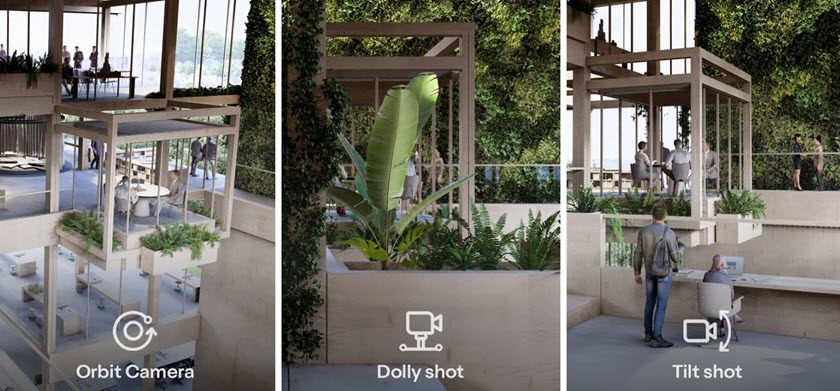
- 1. Orbit path.
- 2. Dolly shot.
- 3. Pan/tilt shot.
- 4. Follow object.
- Take your own path.
"Anyone can create cinematic animations in Lumion through clever utilization of its camera path tools. This quick guide will show you one of the simplest and most effective methods for enhancing storytelling in your animations.
Learning how to employ our predefined camera paths will enable you to showcase key aspects of your project in a highly engaging manner. Get ready to provide your clients with a virtual tour like no other!"
Other posts in the Series: Tips and Guides:-
Lumion Community (forum):
Lumion Web site:
- Guide | Rendering Tip: Lumion Pro 2025: tips to get you started [May 12, 2025]
- Guide: Computer hardware advice for faster 3D rendering in Lumion Pro 2025 [Apr 30, 2025]
- Guide: How to work with Lumion View in SketchUp [Apr 03, 2025]
- Guide: 8 keyboard shortcuts for fast asset control [Mar 10, 2025]
- Guide: How to animate lights in 4 steps [Feb 28, 2025]
- Guide: Top tips for creating compelling layer animations [Feb 27, 2025]
- Rendering Tip: How to use the photo match effect in 3 steps [Feb 12, 2025]
- Guide: The art of motion: creating impactful animations with Lumion [Feb 10, 2025]
- Guide: How to visualize urban environments in Lumion [Feb 03, 2025]
- Guide: 6 easy effects for realistic close-ups [Jan 24, 2025]
- Guide: How to create architectural presentation boards [Dec 30, 2024]
- Guide: How to recreate this dynamic holiday scene [Dec 18, 2024]
- Guide: A guide to importing lights into Lumion [Nov 11, 2024]
- Guide: Scene-building shortcuts: OpenStreetMap [Nov 08, 2024]
- Guide: 5 essential tools for faster asset placement [Oct 15, 2024]
- Guide: How to tell stories with animated characters [Sep 23, 2024]
- Guide: 7 tips to creating photorealistic renders [Sep 11, 2024]
- Guide: How to render custom architectural drawings [Sep 02, 2024]
- Guide: How to achieve authentic natural lighting in Lumion [Aug 28, 2024]
- Guide: Ray-traced subsurface scattering: perfecting the art of translucency [Aug 13, 2024]
- Guide | Rendering Tip: Ray-traced glass: how to replicate reality [Aug 06, 2024]
- Guide: Find your style: creating a signature look in Lumion [Jul 02, 2024]
- Rendering Tip: How to craft true-to-life, custom materials [June 27, 2024]
- Rendering Tip: How to get the most out of nature in Lumion 2024 [Apr 24, 2024]
- Rendering Tip: Beyond the horizon: utilizing skies in your renders [Apr 22, 2024]
- Guide | Rendering Tip: How to use parallax interiors [Mar 17, 2024]
- Rendering Tip: How to build scenes more efficiently [Mar 01, 2024]
- Rendering Tip: Three simple steps to creating dynamic phasing animations [Feb 16, 2024]
- Rendering Tip: Conjuring atmosphere with seasonal weather effects [Feb 15, 2024]
- Rendering Tip: Build immersive animations with preset camera paths [Feb 05, 2024]
- Guide | Rendering Tip: A quick guide to building a green wall in Lumion [Dec 07, 2023]
- Guide | Rendering Tip: How to import a custom camera path into Lumion [Dec 05, 2023]
- Guide | Rendering Tip: How to harness the power of Lumion from concept to final creation [Nov 16, 2023]
- Guide | Rendering Tip: How to render realistic interior scenes [Oct 11, 2023]
- Guide: Guide to visualizing interior designs [Oct 09, 2023]
- Guide: Guide to visualizing exterior designs [Oct 09, 2023]
- Guide: Guide to visualizing landscapes [Oct 06, 2023]
- Rendering Tip: How to create a stunning forest house in 10 minutes [Sep 29, 2023]
- Guide | Rendering Tip: How to start rendering with Lumion [Jul 14, 2023]
- Guide: How to make your materials more realistic with surface decals [May 17, 2022]
- Guide: How to create the perfect atmosphere with the volumetric spotlights effect [Jan 20, 2022]
- Guide: Express your artistic vision with Lumion [May 17, 2021]
- Guide: Guide to rendering and the architectural design process [May 05, 2021]
- Guide: Rendering made simple [Apr 15, 2021]
- Guide: How rendering can be a rewarding experience [Mar 24, 2021]
- Guide: How to place designs in their real-life context [Feb 14, 2021]