---
title: Lumion View 25.0 Release Notes
description: Lumion View 25.0 Release Notes
---
Solutions
[Architectural design All you need to bring your residential, commercial or institutional designs to life](https://lumion.com/product/architectural-design) [Landscape architecture Beautiful terrains and fine-detailed nature for any climate or season](https://lumion.com/product/landscape-architecture)
[Interior design Realistic light, high-quality textures, and an extensive asset library](https://lumion.com/product/interior-design) [Students and Faculties Lumion is free for students, educators, and faculties around the world](https://lumion.com/product/educational-licenses)
[SketchUp](https://lumion.com/compatibility/sketchup-rendering) [Revit](https://lumion.com/compatibility/revit-rendering) [ArchiCAD](https://lumion.com/compatibility/archicad-rendering) [Rhino](https://lumion.com/compatibility/rhino-rendering) [Autocad](https://lumion.com/compatibility/autocad-rendering) [See more](https://lumion.com/compatibility/)
Product
[Discover Axogram New Live architectural diagramming](https://lumion.com/product/axogram) [Lumion Cloud Where design meets collaboration](https://lumion.com/product/lumion-cloud)
[Lumion Pro Advanced visualization solution](https://lumion.com/product/lumion-pro) [Discover AI tools New AI built for architectural work](https://lumion.com/product/ai)
[Lumion Pro 2026.1 is out now! 🚀](https://lumion.com/product/latest-version-pro) [Compatibility](https://lumion.com/compatibility/) [System Requirements](https://lumion.com/product/system-requirements) [Roadmap](https://lumion.com/product/roadmap)
[Pricing](https://lumion.com/product/buy) Resources
[Made with Lumion Get inspired by the stories behind the designs](https://lumion.com/made-with-lumion)
[Tips & Guides Make the most out of Lumion with helpful guides and tutorials](https://lumion.com/tips-guides)
[Knowledge base](https://support.lumion.com/knowledge-base?hsLang=en-us) [Community](https://community.lumion.com/index.php) [Downloads](https://support.lumion.com/downloads?hsLang=en-us)
About
[Who we are Learn about our story and mission](https://lumion.com/about) [Careers - We're hiring Let's build the future of architectural visualization](https://lumion.com/about/careers)
[News Discover the latest product news and more](https://lumion.com/news)
[Find your local reseller](https://lumion.com/about/find-reseller) [Contact us](https://lumion.com/about/contact)
[](http://lumion.com)
[My Account](https://account.lumion.com)
Solutions
[Architectural design](https://lumion.com/product/architectural-design) [Interior design](https://lumion.com/product/interior-design) [Landscape architecture](https://lumion.com/product/landscape-architecture) [Students and Faculties](https://lumion.com/product/educational-licenses)
---
[SketchUp](https://lumion.com/compatibility/sketchup-rendering) [Revit](https://lumion.com/compatibility/revit-rendering) [ArchiCAD](https://lumion.com/compatibility/archicad-rendering) [Rhino](https://lumion.com/compatibility/rhino-rendering) [Autocad](https://lumion.com/compatibility/autocad-rendering) [See more](https://lumion.com/compatibility/)
Product
[Axogram New](https://lumion.com/product/axogram) [Lumion Cloud](https://lumion.com/product/lumion-cloud) [Lumion Pro](https://lumion.com/product/lumion-pro) [Discover AI tools New](https://lumion.com/product/ai)
---
[Lumion Pro 2026.1 is out now! 🚀](https://lumion.com/product/latest-version-pro) [Compatibility](https://lumion.com/compatibility/) [System Requirements](https://lumion.com/product/system-requirements) [Roadmap](https://lumion.com/product/roadmap)
[Pricing](https://lumion.com/product/buy) Resources
[Made with Lumion](https://lumion.com/made-with-lumion) [Tips & Guides](https://lumion.com/tips-guides)
---
[Knowledge base](https://support.lumion.com/knowledge-base?hsLang=en-us) [Community](https://community.lumion.com/index.php) [Downloads](https://support.lumion.com/downloads?hsLang=en-us)
About
[Who we are](https://lumion.com/about) [Careers - We're hiring](https://lumion.com/about/careers) [News](https://lumion.com/news)
---
[Find your local reseller](https://lumion.com/about/find-reseller) [Contact us](https://lumion.com/about/contact)
[My Account](https://account.lumion.com)
[Submit a request](https://support.lumion.com/hc/en-us/requests/new?hsLang=en-us)
[](https://lumion.com/) [Login](https://account.lumion.com/)
[](https://lumion.com/)
## Main menu
Solutions
Product
[Pricing](https://lumion.com/product/buy)
Resources
About
[Submit a request](https://support.lumion.com/hc/en-us/requests/new?hsLang=en-us)
[Login](https://account.lumion.com/)
Start for free
Back
### Solutions
[Architectural design](https://lumion.com/product/architectural-design) [Interior design](https://lumion.com/product/interior-design) [Landscape architecture](https://lumion.com/product/landscape-architecture) [Students and Faculties](https://lumion.com/product/educational-licenses)
---
[SketchUp](https://lumion.com/compatibility/sketchup-rendering) [Revit](https://lumion.com/compatibility/revit-rendering) [ArchiCAD](https://lumion.com/compatibility/archicad-rendering) [Rhino](https://lumion.com/compatibility/rhino-rendering) [Autocad](https://lumion.com/compatibility/autocad-rendering) [See more](https://lumion.com/compatibility/)
Back
### Product
[Axogram — New](https://lumion.com/product/axogram) [Lumion Cloud](https://lumion.com/product/lumion-cloud) [Lumion Pro](https://lumion.com/product/lumion-pro) [Discover AI tools — New](https://lumion.com/product/ai)
---
[Lumion Pro 2026.1 is out now! 🚀](https://lumion.com/product/latest-version-pro) [Compatibility](https://lumion.com/compatibility/) [System Requirements](https://lumion.com/product/system-requirements) [Roadmap](https://lumion.com/product/roadmap)
Back
### Resources
[Made with Lumion](https://lumion.com/made-with-lumion) [Tips & Guides](https://lumion.com/tips-guides)
---
[Knowledge base](https://support.lumion.com/knowledge-base?hsLang=en-us) [Community](https://community.lumion.com/index.php) [Downloads](https://support.lumion.com/downloads?hsLang=en-us)
Back
### About
[Who we are](https://lumion.com/about) [Careers - We're hiring](https://lumion.com/about/careers) [News](https://lumion.com/news)
---
[Find your local reseller](https://lumion.com/about/find-reseller) [Contact us](https://lumion.com/about/contact)
Back
### Start for free
[Lumion Pro](https://lumion.com/product/free-trial#request-trial) [Lumion Cloud](https://lumion.com/product/lumion-cloud#start) [Axogram](https://lumion.com/product/axogram#plans-pricing)
Lumion Knowledge Base: Lumion View
How can we help?
- There are no suggestions because the search field is empty.
[Skip to content](https://support.lumion.com/lumion-view/api/v2/help_center/en-us/articles/19134281958556.json#main-content)
English - United States
Show submenu for translations

Open main navigation
Close main navigation
- English - United States
Show submenu for translations
- Contact us
Contact us
How can we help you?
- There are no suggestions because the search field is empty.
1. [Lumion View](https://support.lumion.com/lumion-view?hsLang=en-us)
2. [Lumion View News](https://support.lumion.com/lumion-view/lumion-view-news?hsLang=en-us)
# Lumion View 25.0 Release Notes
### ⚠️Lumion View has evolved into Axogram
Lumion View has been discontinued and replaced by **[Axogram](https://lumion.com/product/axogram)**, a free tool with new and improved features for creating live architectural diagrams directly from your CAD model.
[Learn more about the transition from Lumion View to Axogram →](https://support.lumion.com/axogram/from-lumion-view-to-axogram?hsLang=en-us)
 **Introducing Lumion View**
**March 25, 2025**
Lumion View is a lightweight yet powerful visualization tool that runs directly in your 3D modeling software as a plugin.
Offering a fast *Ray Traced* real-time view, customizable *Lights*, *Styles*, and enhanced *Materials* controls, it makes design exploration effortless and enjoyable—helping shape, test, and present concepts with speed and creative freedom.
For a full overview of Lumion View, see this article:
- **Knowledge Base:**[Getting Started with Lumion View: An Introduction](https://support.lumion.com/lumion-view/api/v2/help_center/en-us/articles/19151040201116.json?hsLang=en-us)
Make sure to also check out the dedicated Lumion View webpage and announcement video below:
- **Lumion Website:** [Discover Lumion View](https://lumion.com/product/lumion-view)
### **Compatibility**
**Software**
**Version**
SketchUp
2025 and newer
### **System Requirements**
- **Knowledge Base:** [Lumion View: System Requirements](https://support.lumion.com/lumion-view/api/v2/help_center/en-us/articles/14894811786908.json?hsLang=en-us)
### **Download and Installation**
- **Knowledge Base:** [Lumion Live: Installation guide: SketchUp](https://support.lumion.com/lumion-view/api/v2/help_center/en-us/articles/14877410277148.json?hsLang=en-us)
### **License-related information**
- **Knowledge Base:** [Lumion View Account and License Management](https://support.lumion.com/lumion-view/api/v2/help_center/en-us/articles/19059149315612.json?hsLang=en-us)
**Lumion View 25: Major updates**
Name change to 25.x from 2025.x.
- **Knowledge Base:** [Lumion View 25.2 Release Notes](https://support.lumion.com/lumion-view/api/v2/help_center/en-us/articles/20394214734492.json?hsLang=en-us)
- **Knowledge Base:** [Lumion View 25.1 Release Notes](https://support.lumion.com/lumion-view/api/v2/help_center/en-us/articles/19682298157084.json?hsLang=en-us)
**Lumion View 2025.0: Minor updates**
Lumion View 2025.0.4 - Release Notes
### Resolved issues in Lumion View 2025.0.4
March 25, 2025
#### **License and Account Management:**
- **Early Access:** Now also available for Lumion Pro *Subscription License Key* holders on the *Grace Period* or who have disabled *Auto-renewal*.
Lumion View 2025.0.5 - Release Notes
### Resolved issues in Lumion View 2025.0.5
April 2, 2025
#### **License and Account Management:**
- **Early Access:** Now also available for Lumion Pro *Perpetual License Key* holders.
**Lumion View 2025.0: Release Notes** **Features**
### **1. Rendering and Synchronization**
**1.1. Ray-Tracing Viewport**
When started, Lumion View renders a high-performance *Ray-Traced* view of your model.

**1.2.** **Real-time Model Sync**
Any geometry or *Material* changes you make to the model are automatically reflected in the Lumion View window in real-time.
### **2. Camera & Navigation**
#### 2.1. Camera Controls
**2.1.1. Gizmo**

The *Camera* can easily be switched to standard views (**Top**, **Front**, **Back**, **Left**, **Right**, and **Isometric**) using the *View Cube* or using the number keys.

**2.1.2. Toggle Camera Sync**

By default, *Camera Sync* is enabled. This can be toggled on/off to allow having different separate *Camera* views in Lumion View and your 3D modeling software.
**2.1.3. Orthographic View**
****
The *Camera* view can be switched between *Perspective* and *Orthographics*.
#### 2.2 Navigation Shortcuts
**2.2.1. Camera Movement**
The **W/A/S/D** keys are used for *Camera* movement (**Forward**/**Left**/**Back**/**Right**) and **Q**/**E** keys to move vertically (**Up**/**Down**).
**2.2.2. Camera Speed**
While moving the *Camera*:
- **Hold Spacebar**: Slows down movement.
- **Hold Shift**: Increases camera speed.
- **Hold Shift + Spacebar**: Maximum speed.
**2.2.3. Camera Orientation**
****
The *Camera* can be moved by holding the left mouse button and dragging in any direction.
**2.2.4. Camera Pan**

This can be done by clicking and holding the middle mouse button.
**2.2.5. Camera Orbit**
****
The *Camera* can *Orbit* around the center of the window by holding the **O** key while clicking and dragging the right mouse button.
**2.2.6. Field of View Controls**
****
****
*Field of View* can be adjusted directly in Lumion View by holding **Ctrl** and scrolling the middle mouse button.
### **3. Lighting Controls**
#### 3.1. Sun and Environment
**
3.1.1. Sun Controls**
****
*Sun Direction*, *Height*, and *Brightness* can be adjusted using this menu or using these keyboard shortcuts:

**3.1.2. Solid Background**
****
The *Sky* can be replaced with a color by enabling the *Solid Background* option. There are 4 predefined colors to choose from, or a custom color can be selected using the *Color Picker*. Note that the background color may affect shading and reflections.
#### 3.2. Artificial Lighting
**3.2.1. Lights Support**
*****Lights* and settings from your 3D modeling software are visible in Lumion View.
**3.2.2. SketchUp Lights**
For SketchUp, you can add *Spotlights* , *Point Lights*, *Area Lights*, and *Line Lights* directly from the Lumion View toolbar:
 

*Lights* can be placed directly in the model as proxy objects and can be moved, rotated, copied, grouped, and colorized by assigning a color to the light's surface.

**3.3.3. Light Editor**

The following options are available when creating and when double-clicking a *Light*:
- **Point Light:** *Intensity* (Lumens)
- **Spot:** *Intensity* (Lumens) and *Cone Angle*.
- **Area:** *Intensity* (Nits), *Width*, and *Length*.
- **Line:** *Intensity* (Nits), *Width* only.
**3.3.4. Light Instancing**
Copied *Lights* will share the same *Intensity*, *Cone Angle*, color, and size settings.
### 4. Materials and Surface Editing
#### 4.1. Synced PBR Support
****
PBR *Material* settings are synced from your 3D modeling application. At the moment, the following properties are supported:
**4.1.1. SketchUp 2025:**
- **Texture Color Map and Color Map Texture Size and Mapping.**
- **Colorization.**
- **Opacity.**
- **Metalness** (Supports additional texture map).
- **Roughness** (Supports additional texture map).
- **Normal** (Supports additional texture map).
#### 4.2 Lumion View Material Panel
**4.2.1. Additional Material Properties**
Lumion View has its own *Material* panel that includes additional settings. These can be accessed by clicking the brush icon in the plugin toolbar for the SketchUp material that has been selected:

The following additional *Material* Types and settings are available in this *Material* Panel:
**4.2.2. Standard**
****
The *Standard Material* offers additional properties to the ones included in your 3D modeling software. Such as:
**Emissiveness**
****
The *Emissive Strength* setting can be accessed directly from the Lumion View *Material* button under the *Standard Material* tab. This will make a surface cast light - ideal for lamps and screens. The brightness can be adjusted in Nits. Note that the amount of sunlight (Brightness) has an impact on the visibility of *Emissiveness*.
**4.2.3. Glass**
****
The *Glass Material* can be assigned to any surface from the additional *Material* properties panel. You can adjust *Reflectivity* and add thickness to the *Glass* by enabling the *Volumetric* toggle.
*Glass* can also be colorized and will cast colored shadows. The transparency of the *Glass* will depend on how dark the color is and on the *Opacity* setting of the surface.
**4.2.4. Water**

The *Water Material* can also be applied from the additional *Material* properties panel. It behaves and looks similar to *Glass* but includes a *Waves* setting that allows setting the scale and strength of wavy patterns.
**4.2.5. Material Auto-Assignment**
Surfaces that have the word 'Glass' or 'Water' in it's *Material* name will automatically be assigned the *Glass* or *Water Material* in Lumion View.
### **5. Visual Styles and Customization**
****
#### 5.1. Conceptual Styles
**5.1.1. Surface Finishes**
Lumion View includes different customizable *Conceptual Styles* and settings that can be accessed via the *Visual Styles* tab. These *Styles* will replace the *Materials* in your model (except for *Glass* and *Water*) with a different color, texture, or surface finish. *Styles* also affect the shading of the model.

The following *Conceptual Styles* are currently available:
- ***Clay*:** Applies a smooth surface finish.
- ***Wood*:** Applies a wood texture.
- ***Styrofoam*:** Applies a styrofoam pattern.
- ***Glossy*:** Applies a reflective surface finish.
**5.1.2. Styles Colorization**
All *Conceptual Styles* can also be colorized using the *Color Picker*.
#### 5.2. Edges
**5.2.1. Edges Toggle**
****
*Edges* can be displayed on all *Styles* by enabling this setting.
**5.2.2. Edges Colorization**
*Edges* can have their color changed using the *Color Picker*.
### **6. Output**
****
#### 6.1. Render Options
**6.1.1. Resolution**
- ***Current*:** Render using the current window size resolution and aspect ratio.
- ***Full HD*:** Render in 1920x1080.
- ***4K*:** Renders the view in 3840 x 2060.
**6.1.2. Aspect Ratios:**
- ***16:9*** (landscape)
- ***9:16*** (portrait)
- ***1:1*** (square)
**6.1.3. Last finished render Options**
****
This window allows you to copy your last render to the clipboard or quickly go to the folder where it was saved.
### **7. Miscellaneous**
**7.1. Window Controls**

These buttons allows you to *Minimize*, *Maximize*, or *Close* the Lumion View window. Lumion View can also be resized by clicking + dragging the corners or edges of the window.
**7.2. Multiple Windows**
****
Lumion View can be run multiple times at once (one per model file open). Closing the model file or switching to a different model file will automatically close Lumion View.
**Note:** Multiple open SketchUp and Lumion View Editor windows are hardware dependent. For performance reasons we suggest in most cases using just the one Lumion View Editor window.
**7.3. Pin to Top**

Clicking this button will make Lumion View always be on top. When this is enabled, the interface will be hidden if the cursor is not inside the Lumion View window.
**7.4. Account and Feedback**

The *Account Options* menu shows your **Username**, **Email**, and **License** information. It also allows you to quickly go to your *Account* , send feedback, or log out.
**7.5. Help Screen**
**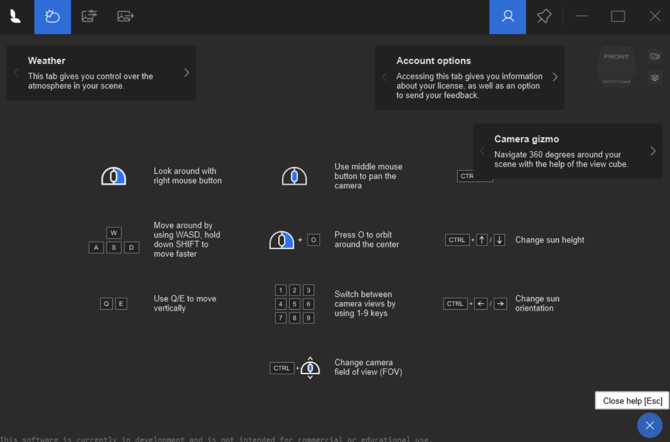**
The *Help* screen explains the Lumion View interface and keyboard shortcuts. It can be accessed by clicking the ** button on the bottom right corner at any time and can be closed by hitting the **Esc** Key.
**7.6. SketchUp Shortcuts**

Keyboard Shortcuts can be added for Lumion View actions by going to *Window \> Preferences \> Shortcuts*, under Extensions/Lumion View.
### **8. Limitations**
**8.1. SketchUp:** Section Planes are not visible in Lumion View.
**8.2. SketchUp:** FaceMe (Billboard) components don't continuously face the camera.
**8.3.** **SketchUp:** Importing *Lights* from SketchUp Lumion Pro is not possible in Lumion 2024. This is planned for Lumion 2025.0 via classic import and for Lumion 2025.1 via *LiveSync*.
### **9. Known Issues**
**9.1.** The *Current* resolution render size output sometimes does not match the actual size of the window.
**9.2.** Copied *Lights* are not sharing color changes.
### **10. Upcoming Features and Improvements**
**10.1.** Importing a SketchUp model edited using Lumion View into Lumion Pro will import all PBR *Material* settings and *Lights*.
**10.2.** SketchUp time of day settings synchronization with Lumion View.
**10.3.** Render quality improvements (radiance cache implementation).
**10.4.** Shorter startup times.
**10.5.** Remembering Lumion View settings between sessions.
**10.6.** Clouds System.
#### **See Also:**
- **Knowledge Base:** [Lumion View: FAQ](https://support.lumion.com/lumion-view/api/v2/help_center/en-us/articles/14877760561948.json?hsLang=en-us)
- **Lumion Tutorials:** [Lumion View Tutorials](https://support.lumion.com/hc/en-us/sections/14893008255516-All-About-Lumion-Live-Tutorials?hsLang=en-us)
- **Lumion Website:** [Lumion View System Requirements](https://lumion.com/product/system-requirements#view)
#### 
### Your direct links to Articles and Guides on Lumion View for SketchUp
#### Introduction/Overview:
- **Knowledge Base:** [Getting Started with Lumion View: an Introduction](https://support.lumion.com/lumion-view/api/v2/help_center/en-us/articles/19151040201116.json?hsLang=en-us)
- **Knowledge Base:** [Lumion View: Your View Journey begins here](https://support.lumion.com/lumion-view/api/v2/help_center/en-us/articles/14892665257116.json?hsLang=en-us)
- **Knowledge Base:** [When should you use Lumion View?](https://support.lumion.com/lumion-view/api/v2/help_center/en-us/articles/16393206687260.json?hsLang=en-us)
#### Getting Started:
- **Knowledge Base:** [How do you get access to Lumion View?](https://support.lumion.com/lumion-view/api/v2/help_center/en-us/articles/14894919969052.json?hsLang=en-us)
- **Knowledge Base:** [Lumion View: System Requirements](https://support.lumion.com/lumion-view/api/v2/help_center/en-us/articles/14894811786908.json?hsLang=en-us)
- **Knowledge Base:** [Lumion View: Installation guide: SketchUp](https://support.lumion.com/lumion-view/api/v2/help_center/en-us/articles/14877410277148.json?hsLang=en-us)
- **Knowledge Base:** [Lumion View Account and License Management](https://support.lumion.com/lumion-view/api/v2/help_center/en-us/articles/19059149315612.json?hsLang=en-us)
#### The Lumion View Editor:
- **Knowledge Base:** [Working in the Lumion View Editor](https://support.lumion.com/lumion-view/api/v2/help_center/en-us/articles/14878165331228.json?hsLang=en-us)
- **Knowledge Base:** [Working in the Lumion View editor - Environment: Sun, Sky and Background](https://support.lumion.com/lumion-view/api/v2/help_center/en-us/articles/14878261609884.json?hsLang=en-us)
- **Knowledge Base:** [Working in the Lumion View Editor - Styles](https://support.lumion.com/lumion-view/api/v2/help_center/en-us/articles/19085177425564.json?hsLang=en-us)
- **Knowledge Base:** [Working in the Lumion View Editor - Output](https://support.lumion.com/lumion-view/api/v2/help_center/en-us/articles/14878258505884.json?hsLang=en-us)
- **Knowledge Base:** [Camera, Keyboard and Mouse actions in Lumion View](https://support.lumion.com/lumion-view/api/v2/help_center/en-us/articles/16393255879452.json?hsLang=en-us)
#### Lumion View Toolbar Editors:
- **Knowledge Base:** [Using the Lumion View toolbar](https://support.lumion.com/lumion-view/api/v2/help_center/en-us/articles/14877770360476.json?hsLang=en-us)
- **Knowledge Base:** [Lumion View Toolbar: Using the Lights Editor](https://support.lumion.com/lumion-view/api/v2/help_center/en-us/articles/14878339284508.json?hsLang=en-us)
#### FAQ and Other Support:
- **Knowledge Base:** [Lumion View: FAQ](https://support.lumion.com/lumion-view/api/v2/help_center/en-us/articles/14877760561948.json?hsLang=en-us)
#### Video Tutorials:
- **Video Tutorial:** [Lumion View Tutorial 1: Getting Started with Lumion View](https://support.lumion.com/lumion-view/api/v2/help_center/en-us/articles/14892795062172.json?hsLang=en-us)
- **Video Tutorial:** [Lumion View Tutorial 2: How to Install Lumion View for SketchUp](https://support.lumion.com/lumion-view/api/v2/help_center/en-us/articles/14892892275868.json?hsLang=en-us)
- [Visit our other Sections](https://support.lumion.com/lumion-view/visit-our-other-sections?hsLang=en-us)
- [All About Lumion View](https://support.lumion.com/lumion-view/all-about-lumion-view?hsLang=en-us)
- [Lumion View News](https://support.lumion.com/lumion-view/lumion-view-news?hsLang=en-us)
- [Lumion View for SketchUp: Windows edition](https://support.lumion.com/lumion-view/lumion-view-for-sketchup-windows-edition?hsLang=en-us)
- [Lumion View for SketchUp: Mac edition](https://support.lumion.com/lumion-view/lumion-view-for-sketchup-mac-edition?hsLang=en-us)
- [Lumion View for Revit](https://support.lumion.com/lumion-view/lumion-view-for-revit?hsLang=en-us)
- [Lumion View for ArchiCAD: Windows Edition](https://support.lumion.com/lumion-view/lumion-view-for-archicad-windows-edition?hsLang=en-us)
- [Video Tutorials for Lumion View](https://support.lumion.com/lumion-view/video-tutorials-for-lumion-view?hsLang=en-us)
[](https://lumion.com/)
[mailto:email@email.com](mailto:email@email.com)
Copyright © 2026, Lumion - Act3D B.V.
#### Product
[Plans and pricing](https://lumion.com/product/buy)
[Discover Lumion](https://lumion.com/product/discover-lumion)
[Compatibility](https://lumion.com/compatibility/)
[System Requirements](https://lumion.com/product/system-requirements)
[Find a reseller](https://lumion.com/about/find-reseller)
[Free trial](https://lumion.com/product/free-trial)
#### Solutions
[Architectural design](https://lumion.com/product/architectural-design)
[Interior design](https://lumion.com/product/interior-design)
[Landscape architecture](https://lumion.com/product/landscape-architecture)
[Urban planning](https://lumion.com/product/urban-planning)
[3D rendering](https://lumion.com/product/3d-rendering-software)
[Education](https://lumion.com/product/educational-licenses)
#### Compatibility
[Trimble SketchUp](https://lumion.com/compatibility/sketchup-rendering)
[Autodesk Revit](https://lumion.com/compatibility/revit-rendering)
[Graphisoft ArchiCAD](https://lumion.com/compatibility/archicad-rendering)
[Rhinoceros](https://lumion.com/compatibility/rhino-rendering)
[Autodesk Autocad](https://lumion.com/compatibility/autocad-rendering)
[Autodesk FormIt Pro](https://lumion.com/compatibility/lumion-for-autodesk-formit-pro)
[Nemetschek Allplan](https://lumion.com/compatibility/allplan-rendering)
[Nemetschek Vectorworks](https://lumion.com/compatibility/vectorworks-rendering)
[BricsCAD](https://lumion.com/compatibility/bricscad-rendering)
[3D Studio Max](https://lumion.com/compatibility/3ds-max-rendering)
#### Resources
[Made with Lumion](https://lumion.com/made-with-lumion)
[Tutorials](https://support.lumion.com/video-tutorials?hsLang=en-us)
[Support and learning](https://support.lumion.com/knowledge-base/api/v2/help_center/en-us/articles/360044608053.json?hsLang=en-us)
[Downloads](https://support.lumion.com/downloads?hsLang=en-us)
[Community](https://community.lumion.com/index.php)
#### About
[Our Story](https://lumion.com/about)
[We're hiring!](https://lumion.com/about/careers)
[News](https://lumion.com/news)
[Contact us](https://lumion.com/about/contact)
[Terms & conditions](https://lumion.com/legal/terms-of-service) [EULA](https://lumion.com/legal/eula) [Privacy statement](https://lumion.com/legal/privacy-statement) [CEIP](https://lumion.com/legal/ceip) [Disclaimer](https://lumion.com/legal/disclaimer) © 2026 Lumion