---
title: Transitions from prior versions to using Lumion 2025/2026
description: Transitions from prior versions to using Lumion 2025/2026
---
Solutions
[Architectural design All you need to bring your residential, commercial or institutional designs to life](https://lumion.com/product/architectural-design) [Landscape architecture Beautiful terrains and fine-detailed nature for any climate or season](https://lumion.com/product/landscape-architecture)
[Interior design Realistic light, high-quality textures, and an extensive asset library](https://lumion.com/product/interior-design) [Students and Faculties Lumion is free for students, educators, and faculties around the world](https://lumion.com/product/educational-licenses)
[SketchUp](https://lumion.com/compatibility/sketchup-rendering) [Revit](https://lumion.com/compatibility/revit-rendering) [ArchiCAD](https://lumion.com/compatibility/archicad-rendering) [Rhino](https://lumion.com/compatibility/rhino-rendering) [Autocad](https://lumion.com/compatibility/autocad-rendering) [See more](https://lumion.com/compatibility/)
Product
[Discover Axogram New Live architectural diagramming](https://lumion.com/product/axogram) [Lumion Cloud Where design meets collaboration](https://lumion.com/product/lumion-cloud)
[Lumion Pro Advanced visualization solution](https://lumion.com/product/lumion-pro) [Discover AI tools New AI built for architectural work](https://lumion.com/product/ai)
[Lumion Pro 2026.1 is out now! 🚀](https://lumion.com/product/latest-version-pro) [Compatibility](https://lumion.com/compatibility/) [System Requirements](https://lumion.com/product/system-requirements) [Roadmap](https://lumion.com/product/roadmap)
[Pricing](https://lumion.com/product/buy) Resources
[Made with Lumion Get inspired by the stories behind the designs](https://lumion.com/made-with-lumion)
[Tips & Guides Make the most out of Lumion with helpful guides and tutorials](https://lumion.com/tips-guides)
[Knowledge base](https://support.lumion.com/knowledge-base?hsLang=en-us) [Community](https://community.lumion.com/index.php) [Downloads](https://support.lumion.com/downloads?hsLang=en-us)
About
[Who we are Learn about our story and mission](https://lumion.com/about) [Careers - We're hiring Let's build the future of architectural visualization](https://lumion.com/about/careers)
[News Discover the latest product news and more](https://lumion.com/news)
[Find your local reseller](https://lumion.com/about/find-reseller) [Contact us](https://lumion.com/about/contact)
[](http://lumion.com)
[My Account](https://account.lumion.com)
Solutions
[Architectural design](https://lumion.com/product/architectural-design) [Interior design](https://lumion.com/product/interior-design) [Landscape architecture](https://lumion.com/product/landscape-architecture) [Students and Faculties](https://lumion.com/product/educational-licenses)
---
[SketchUp](https://lumion.com/compatibility/sketchup-rendering) [Revit](https://lumion.com/compatibility/revit-rendering) [ArchiCAD](https://lumion.com/compatibility/archicad-rendering) [Rhino](https://lumion.com/compatibility/rhino-rendering) [Autocad](https://lumion.com/compatibility/autocad-rendering) [See more](https://lumion.com/compatibility/)
Product
[Axogram New](https://lumion.com/product/axogram) [Lumion Cloud](https://lumion.com/product/lumion-cloud) [Lumion Pro](https://lumion.com/product/lumion-pro) [Discover AI tools New](https://lumion.com/product/ai)
---
[Lumion Pro 2026.1 is out now! 🚀](https://lumion.com/product/latest-version-pro) [Compatibility](https://lumion.com/compatibility/) [System Requirements](https://lumion.com/product/system-requirements) [Roadmap](https://lumion.com/product/roadmap)
[Pricing](https://lumion.com/product/buy) Resources
[Made with Lumion](https://lumion.com/made-with-lumion) [Tips & Guides](https://lumion.com/tips-guides)
---
[Knowledge base](https://support.lumion.com/knowledge-base?hsLang=en-us) [Community](https://community.lumion.com/index.php) [Downloads](https://support.lumion.com/downloads?hsLang=en-us)
About
[Who we are](https://lumion.com/about) [Careers - We're hiring](https://lumion.com/about/careers) [News](https://lumion.com/news)
---
[Find your local reseller](https://lumion.com/about/find-reseller) [Contact us](https://lumion.com/about/contact)
[My Account](https://account.lumion.com)
[Submit a request](https://support.lumion.com/hc/en-us/requests/new?hsLang=en-us)
Lumion Knowledge Base
How can we help?
- There are no suggestions because the search field is empty.
[Skip to content](https://support.lumion.com/knowledge-base/api/v2/help_center/en-us/articles/19338843803292.json#main-content)
English - United States
Show submenu for translations

Open main navigation
Close main navigation
- English - United States
Show submenu for translations
- Contact us
Contact us
How can we help you?
- There are no suggestions because the search field is empty.
1. [Knowledge Base](https://support.lumion.com/knowledge-base?hsLang=en-us)
2. [Latest News](https://support.lumion.com/knowledge-base/latest-news?hsLang=en-us)
# Transitions from prior versions to using Lumion 2025/2026

For the Lumion roadmap, please visit:
- **Lumion website:** [Lumion product roadmap](https://lumion.com/product/roadmap)
Along with the following, please also see the new features and improvements for the Lumion 2026 Release:
- **Knowledge Base:** [Lumion 2026.0: Release Notes](https://support.lumion.com/knowledge-base/api/v2/help-center/en-us/articles/lumion-2026.0-release-notes?hsLang=en-us)
### TOPICS:
[1. From Lumion 2024.0 to Lumion 2025.0 and New Lumion 2026](https://support.lumion.com/knowledge-base/api/v2/help_center/en-us/articles/19338843803292.json#01JST9WPRRK1E79XSX73E1XE1B).
[2. From versions before Lumion 2023 through to Lumion 2025](https://support.lumion.com/knowledge-base/api/v2/help_center/en-us/articles/19338843803292.json#h_01JSXSHF3PXG1QGGPZKXZH0PQT).
[3. Understanding the Changes](https://support.lumion.com/knowledge-base/api/v2/help_center/en-us/articles/19338843803292.json#h_01JSXSP31TJRTYT0K7P5QQYDYE).
[4. Continuous development cycle](https://support.lumion.com/knowledge-base/api/v2/help_center/en-us/articles/19338843803292.json#h_01JSXSRB2VF2AAWZ1ZKTFFZYYA).
[5. Improvements - highlights](https://support.lumion.com/knowledge-base/api/v2/help_center/en-us/articles/19338843803292.json#h_01JSXSTARK7VXKYSM62PHWSJD8).
[6. Feature Changes](https://support.lumion.com/knowledge-base/api/v2/help_center/en-us/articles/19338843803292.json#h_01JSXSXS6H39577TMJEJAQHHJE).
[7. Update on Technical Limitations](https://support.lumion.com/knowledge-base/api/v2/help_center/en-us/articles/19338843803292.json#h_01JSXT035AM2ZACXZ6H03J3E7T).
### Guide to working with the changes from your version of Lumion
Lumion 2025.0 introduced a revised product range. Existing Lumion Pro users gained access to Lumion View through Lumion Studio, while Lumion Standard users moved to Lumion Studio.
Lumion View was commercially released alongside Lumion Pro/Studio.
From 27 July 2026, Lumion Studio was renamed **Lumion Pro (Floating)**, and Lumion View became a separate product. Existing Lumion Studio customers retain one Lumion View Seat for each Lumion Pro (Floating) Seat.
8K rendering for *Photos* returns, and we look forward to further enhancements to ensure the level of quality from AI Upscaling can reach your expectations.
Whilst not all *Effects*, content, and assets have yet been fully converted (where needed) to the *Ray Trace* rendering pipeline, Lumion 2025.0 sees the implementation of two great *Ray Tracing* features.
Performance is always part of the mix of considerations for the developers. Especially as demands grow for more quality and detail in visualizations. The introduction of new file formats will have an immediate benefit from faster and smaller file sizes, with further plans for getting the best performance for your *Projects*.
Performance and quality improvements for the real time rendering environment has driven the first implementation of *Radiance Caching* for real time *Ray Tracing* and with its quality advantages, further moves Lumion to the next level for *Ray Trace rendering*.
Product and License management sees the introduction of *Named-User based Login and Accounts*. Something long asked for by, and well suited to, customers with a need for more flexible access to support a larger pool of staff to use Lumion.
**1. From Lumion 2024.0 to Lumion 2025.0 and New to Lumion 2025:**
### For Ray Trace rendering:
Lumion 2024.0 advanced the capability to use *Ray Tracing* much more in *Movie Mode* for animations by implementing a high performance neural *Denoiser*, multiple sampling techniques and improving light distribution to produce a higher accuracy result.
The changes result in improved ability to use *Ray Tracing* as part of your rendering workflows:
For *Photos and Clips*: editing and preparing them before final render get much better due to real time improvements in the *Preview* window - both for FPS performance and for quality. This aspect is also part of an upgrade path flowing into Lumion 2025 (re: *Radiance Cache* system).
For *Photos*: improved quality compared to Lumion 2023.
For *Movie* animations: significant in terms of render timeframes as well as quality. Noting though that there still may be a need to render using the *Rasterization* rendering option for fastest possible outcomes (Project dependent).
The following *Ray Traced Clip* was rendered with 1 *Sample* in under **2 minutes** (Full HD, 30 FPS) using an RTX 3090 graphics card:
Including:
- Real-time temporal Denoising in the Preview window (*Photo Mode* and *Movie Mode*) using *NRD*. NRD refers to NVIDIA's Real-Time Denoisers - ReLAX and ReBLUR).
- Render time temporal Denoising for Movies using *NRD*.
- Rendering quality/performance subsystem: Multiple Importance Sampling (*MIS*).
- Fully Ray-Traced Glass. New, advanced *Fully Ray Traced Glass*: supports refraction (IOR), emulated glass depth, absorption, colored light and shadow transmittal, etc.
- Fully Ray-Traced Nature. All *Nature Objects* have been converted are now in the bindless pipeline and can be rendered with *Ray Trace* rendering as well as *Rasterization*.

### Additional features and improvements included in Lumion 2024:
- *Parallax Interiors*.
- Improved *Landscape Tiling*.
- *Ray Traced Subsurface Scattering*.
- Batch Import.
- glTF Compatibility.
- New Camera Controls.
- New Content.

### Additional features and improvements were included throughout Lumion 2024:
- Implementation of fully *Ray Traced Landscape Grass*.
- Local space *Gizmo*.
- Further New Content in three Updates.
- Sun disk size for softer shadows for *Ray Tracing*.
- Improvements to the Material Library preview.
- Import of Lights from certain CAD or file formats.
- Improved *Paint Placement*.
- Performance Improvements and improved resource management.
- Improved *Clip Plane Object*.
- Improved *Blueprint Effect*.
- New Effect - *Remove Background*.
- Quad HD Resolution rendering for *Photo Mode*.
Overall the state of improvements ready for the next version - Lumion 2025 saw features and capability improvements to help you both create and build your *Scenes*, but also render them at higher levels of quality, in shorter timeframes.

There are however still some *Effects*, materials and content yet to also be fully included in the Ray trace rendering pipeline.
Some of the materials (for example: *3D Grass* and *Foliage*) we know were planned to be done for Lumion 2024; however, the complexity and impacts on performance possible have resulted in further developments needed before any release.
- **Lumion Community:** [Lumion - R&D Preview: Ray-traced Grass](https://community.lumion.com/index.php?threads/lumion-r-d-preview-ray-traced-grass.5199/)
See Section 7 for the update on [Technical Limitations](https://support.lumion.com/knowledge-base/api/v2/help_center/en-us/articles/13085371332764.json?hsLang=en-us#h_01HS5WJPCEF6GEXQQ59ZS7AM88).
#### And for all that's new for moving from Lumion 2024 to 2025.0:
- **Lumion website:** [See what's new - Lumion 2025](https://lumion.com/product/latest-version-pro)
- **Learning Pathways:** [Latest Features and Improvements of Lumion 2025](https://support.lumion.com/learning-pathways/api/v2/help_center/en-us/articles/19338614680732.json?hsLang=en-us)
- **Knowledge Base:** [Lumion 2025.0: Release Notes](https://support.lumion.com/knowledge-base/api/v2/help_center/en-us/articles/19336065135516.json?hsLang=en-us)
**2. From versions before Lumion 2023 through to Lumion 2025:**
Massive and important changes occurred in Lumion 2023 that saw the introduction of a *Ray Trace* rendering engine (using Path Tracing) along with a rewritten *Material System* fully supporting *PBR (Physically Based Rendering)* materials, and an integrated *Lighting System*.
This introduction to Ray Tracing also continued your use and experience of the Rasterization rendering pipeline. So you can pick up from wherever you were. Noting though, three key changes needed to support the implementation of Ray Tracing:- a new Lighting System, new Materials System fully supporting PBR, including editors and new Material Types for the Standard Material, Glass in Lumion 2024 and water in Lumion 2025.
- **Knowledge Base:** [Transitions: Why does my Project look different in Lumion 2023 compared to previous versions?](https://support.lumion.com/knowledge-base/api/v2/help_center/en-us/articles/8088431180060.json?hsLang=en-us)
We've summarized the key changes up to Lumion 2023 here:
- **Knowledge Base:** [What are the changes in Lumion since my version? - Summary](https://support.lumion.com/knowledge-base/api/v2/help_center/en-us/articles/6800242516892.json?hsLang=en-us)
Then see the guide to helping you understand the changes for Lumion 2024 here:
- **Knowledge Base:** [Transitions from prior versions to using Lumion 2024](https://support.lumion.com/knowledge-base/api/v2/help_center/en-us/articles/13085371332764.json?hsLang=en-us)
Then:
**From Lumion 2023 to Lumion 2024:**
See the guide to helping you understand the changes for Lumion 2024 here:
- **Knowledge Base:** [Transitions from prior versions to using Lumion 2024](https://support.lumion.com/knowledge-base/api/v2/help_center/en-us/articles/13085371332764.json?hsLang=en-us)
Then the section above: From Lumion 2024 to Lumion 2025.
**3. Understanding the Changes:**
Lumion continues the full featured Rasterization rendering approach or using the full Ray Trace rendering using Path Tracing approach. You choose which best suits any ***Photo***, ***Movie*** or ***360 Panorama*** you want to render.
In moving from your version to Lumion 2025 we suggest understanding the changes using the above articles in Section: **1. Guide to working with the changes from your version of Lumion**.
**3.1:** You will also find it useful to work through these quick and easy to Learning Guides:
- **Learning Pathways:** [Latest Features and Improvements of Lumion 2025](https://support.lumion.com/learning-pathways/api/v2/help_center/en-us/articles/19338614680732.json?hsLang=en-us)
- **Learning Pathways:** [Latest Features and Improvements of Lumion 2024](https://support.lumion.com/learning-pathways/api/v2/help_center/en-us/articles/13140251485852.json?hsLang=en-us)
**3.2:** Jump right in:
- In-Built interactive Tutorials in Lumion 2025:


- **Video Tutorial:** [Lumion 2025 - Tutorials](https://support.lumion.com/hc/en-us/sections/19336286471324-Lumion-2025-Tutorials?hsLang=en-us)
- **Video Tutorial:** [Lumion 2024 - Tutorials](https://support.lumion.com/hc/en-us/sections/13059638799772?hsLang=en-us)
- **Video Tutorial:** [Lumion 2023 - Tutorials](https://support.lumion.com/hc/en-us/sections/7441599277724?hsLang=en-us)
- **Knowledge Base:** [Your Guide to Learning Lumion](https://support.lumion.com/knowledge-base/api/v2/help_center/en-us/articles/4404675352978.json?hsLang=en-us)
- Open Lumion 2025 and explore the updated *Example Projects* and *New Project Templates.*
- Create a *New Project*, import your model and create a *Photo* with *Effects*. Add in the [Ray Tracing Effect](https://support.lumion.com/knowledge-base/api/v2/help_center/en-us/articles/7442305609628.json?hsLang=en-us) to also see how that works.
- Later, load a *Project* you worked on in a prior version.
**3.3:** Add the *Ray Tracing Effect* and see how simple it can be to render with *Ray Tracing*:
- **Knowledge Base:** [How do you use the new Ray Tracing Effect?](https://support.lumion.com/knowledge-base/api/v2/help_center/en-us/articles/7442305609628.json?hsLang=en-us)
**3.4:** Understand the core features for ***Ray Tracing***:
- **Knowledge Base:** [How do you use the new Ray Tracing Effect?](https://support.lumion.com/knowledge-base/api/v2/help_center/en-us/articles/7442305609628.json?hsLang=en-us)
- **Knowledge Base:** [The New Glass Material for Lumion 2024 and the Glass setting for Ray Tracing](https://support.lumion.com/knowledge-base/api/v2/help_center/en-us/articles/12802058309532.json?hsLang=en-us)
- **Knowledge Base:** [Raytraced Water: Water Materials in Lumion 2025 and newer](https://support.lumion.com/knowledge-base/api/v2/help_center/en-us/articles/19358104296988.json?hsLang=en-us)
- **Knowledge Base:** [How do you use the Material Editor in Lumion 2023?](https://support.lumion.com/knowledge-base/api/v2/help_center/en-us/articles/7789056049180.json?hsLang=en-us)
- **Knowledge Base:** [What do the properties of the Standard Material mean in Lumion 2023 and newer?](https://support.lumion.com/knowledge-base/api/v2/help_center/en-us/articles/7764034284188.json?hsLang=en-us)
- **Knowledge Base:** [Raytraced Water: Water Materials in Lumion 2025 and newer](https://support.lumion.com/knowledge-base/api/v2/help_center/en-us/articles/19358104296988.json?hsLang=en-us)
- **Knowledge Base:** [Raytraced Volumetrics: Fog Effect](https://support.lumion.com/knowledge-base/api/v2/help_center/en-us/articles/19358268042908.json?hsLang=en-us)
**3.5:** And if you have already used the Lumion 2024 or 2025 Pro Trial, then you are already on your way. If not, and you do not have Lumion 2025, then try it:
- **Knowledge Base:** [Is there a Trial of Lumion?](https://support.lumion.com/knowledge-base/api/v2/help_center/en-us/articles/360003469714.json?hsLang=en-us)

**4. Continuous development cycle:**
Lumion 2025.0 is a major release but also now follows the *Update* cycle of improvements established with Lumion 2023.
Future updates will further enhance the software and features and include more of the content that is, as at 25.0, not yet possible to have included in the *Ray Trace rendering pipeline*.
Please also refer to the *Roadmap* for Lumion:
- **Lumion website:** [Lumion Product Roadmap](https://lumion.com/product/roadmap)
#### 
**5. Improvements - highlights:**
### 5.1: Improvements - highlights: Lumion Pro/Lumion Studio
### Rendering:
### 5.1.1: AI Upscaling.
Lumion 2025 brings to the table a new, powerful ***AI Upscaler*** for ***Photo Mode*** that doubles the resolution of images in seconds.


### 5.1.2: Real Time Preview Performance and Quality: Radiance Cache Technology:
Smoother and more refined lighting is added to the *Real-time preview* using this technique that stores and reuses computed radiance values rather than recalculating them for every ray.
A radiance cache in ray tracing is a technique used to store and reuse computed radiance values to improve rendering efficiency. Instead of recalculating light interactions for every ray, the cache allows the system to interpolate previously computed values, reducing computational cost.
#### 5.1.2.1: Benefits
- **Performance Boost:** It speeds up rendering by avoiding redundant calculations, making path tracing more feasible in real-time applications.
- **Noise Reduction:** Cached radiance values help smooth out noise in global illumination, leading to cleaner images.
- **Optimized Light Transport:** It allows for early termination of ray paths, reducing the number of shading operations and texture loads.
- **Better Global Illumination:** It enhances indirect lighting accuracy without requiring excessive ray bounces.
#### 5.1.2.2: Practical application
This is especially noticeable with the way that lights accumulate over time, resulting in a consistent render over time
Radiance Cache is exclusively active in the real-time preview. to improve the editor experience.
At first glance, without a direct comparison, its graphical improvements may seem subtle. However, this feature provides a significant visual boost in darker areas that receive little to no direct lighting.
Even with just one bounce, the effect gradually accumulates, resulting in a stable and consistent render over time.
In previous versions, similar conditions would often produce noticeable moving blotches, even when multiple bounces were used. With Radiance Cache, these artifacts are significantly reduced, leading to smoother and more refined lighting results.
### Ray Trace rendering pipeline:
### 5.1.3: Raytraced Water Materials.


The *Water Material* has now been converted fully for the ray tracing pipeline to provide a boost of realism.
### 5.1.4: Raytraced Volumetrics: Volumetric Fog.


High-quality atmospheric renders can now be created using the new *Ray-traced volumetric Effect* which allows full control over all surfaces and objects that emit light.
### Build and Performance:
### 5.1.4: Scene Inspector 
Lumion 2025.0 comes with this new workflow enhancing feature, designed to increase productivity by easily locating and managing ***Objects*** in complex ***Projects***.

While in *Select Mode* (available both in *Build Mode* and *Build with FX*), click the magnifying glass button at the top-left corner of the interface.
### 5.1.5: Improved Performance Monitor.
The Lumion Title bar has been fitted with an improved speedometer that monitors the performance of the *Project* and displays the frames per second.

The color changes based on the FPS.
On hover, a detailed *Project* overview is displayed:
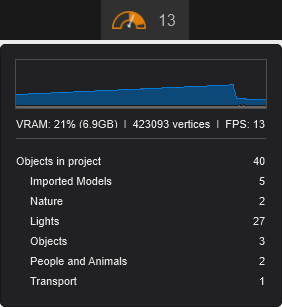
On clicking the speedometer, the window is expanded and displays the *Editor Settings*:
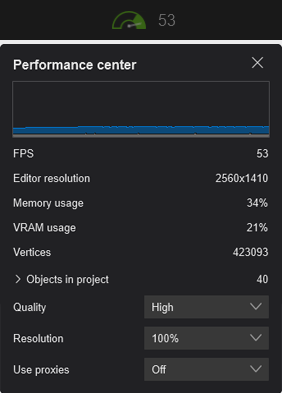
To understand the feature in-detail, visit:
- **Knowledge Base:** [How does the Perfomance Center work?](https://support.lumion.com/knowledge-base/api/v2/help_center/en-us/articles/19340139870620.json?hsLang=en-us)
### Importing:
### 5.1.6: Materials and Lights Importing: as part of Lumion View
SketchUp PBR maps and Lumion View Material settings are now imported when loading an .SKP file into Lumion. *Lights* placed using Lumion View are also imported:

### Under the hood:
#### 5.1.7: New file formats
For establishing improved File Save and Load times and File Sizes.
#### 5.1.8: Account and License Key Management: Named-User based Login and Account.
Lumion 2025 rolls out an easier-to-manage, more secure, and more affordable License type: named-user license. Lumion customers can now log into the product by using the *Lumion Account* credentials, thus reducing any security risks of communicating the *License Key* in emails.
A full guide on how it works can be found below:
- **Knowledge Base:** [Named-user access for Lumion](https://support.lumion.com/knowledge-base/api/v2/help_center/en-us/articles/19339789610268.json?hsLang=en-us)

Rendered in Lumion Pro 2025.0

### 5.2: Lumion View
The release of Lumion 2025.0 also marks the point for the full commercial release of Lumion View:
- **Website:** [Discover Lumion View](https://lumion.com/product/lumion-view)
**[All About Lumion View](https://support.lumion.com/hc/en-us/sections/14877465143836-All-About-Lumion-View?hsLang=en-us):**
- **Knowledge Base:** G[etting Started with Lumion View: an Introduction](https://support.lumion.com/lumion-view/api/v2/help_center/en-us/articles/19151040201116.json?hsLang=en-us)
[](https://support.lumion.com/lumion-view/api/v2/help_center/en-us/articles/19151040201116.json?hsLang=en-us)
**6. Feature Changes:**
Please see the following articles.
### 6.1: Lumion Pro:

- **Web Site:** [Discover Lumion View](https://lumion.com/product/lumion-view)
- **Learning Pathways:** [Latest Features and Improvements in Lumion](https://support.lumion.com/learning-pathways/api/v2/help_center/en-us/articles/13140251485852.json?hsLang=en-us)
- **Knowledge Base:** [How does the AI Upscaler work in Lumion?](https://support.lumion.com/knowledge-base/api/v2/help_center/en-us/articles/19738054247580.json?hsLang=en-us)
- **Knowledge Base:** [The Scene Inspector in Lumion 2025](https://support.lumion.com/knowledge-base/api/v2/help_center/en-us/articles/19339942985884.json?hsLang=en-us)
- **Knowledge Base:** [Raytraced Water: Water Materials in Lumion 2025 and newer](https://support.lumion.com/knowledge-base/api/v2/help_center/en-us/articles/19358104296988.json?hsLang=en-us)
- **Knowledge Base:** [Raytraced Volumetrics: Fog Effect](https://support.lumion.com/knowledge-base/api/v2/help_center/en-us/articles/19358268042908.json?hsLang=en-us)
- **Knowledge Base:** [The new Improved Performance Monitor in Lumion 2025](https://support.lumion.com/knowledge-base/api/v2/help_center/en-us/articles/19340139870620.json?hsLang=en-us)
- **Knowledge Base:** [How does the Custom Program Title Bar work in Lumion 2025 and newer?](https://support.lumion.com/knowledge-base/api/v2/help_center/en-us/articles/19340397270684.json?hsLang=en-us)
- **Knowledge Base:** [How can you Flip or Mirror a model?](https://support.lumion.com/knowledge-base/api/v2/help_center/en-us/articles/19341787565468.json?hsLang=en-us)
- **Knowledge Base:** [Which content is available in the Model & Material Libraries in Lumion 2025?](https://support.lumion.com/knowledge-base/api/v2/help_center/en-us/articles/19357467470108.json?hsLang=en-us)
- **Knowledge Base:** [Lumion 2025.0: Release Notes](https://support.lumion.com/knowledge-base/api/v2/help_center/en-us/articles/19336065135516.json?hsLang=en-us)
- **Knowledge Base:** [User-Based Login for Lumion](https://support.lumion.com/knowledge-base/api/v2/help_center/en-us/articles/19339789610268.json?hsLang=en-us)
### 6.2: Lumion View

- **Web Site:** [Discover Lumion View](https://lumion.com/product/lumion-view)
**[All About Lumion View](https://support.lumion.com/hc/en-us/sections/14877465143836-All-About-Lumion-View?hsLang=en-us):**
- **Knowledge Base:** G[etting Started with Lumion View: an Introduction](https://support.lumion.com/lumion-view/api/v2/help_center/en-us/articles/19151040201116.json?hsLang=en-us)
- **Knowledge Base:** [Lumion View: Your View Journey begins here](https://support.lumion.com/lumion-view/api/v2/help_center/en-us/articles/14892665257116.json?hsLang=en-us)
- **Knowledge Base:** [Lumion View 2025.0 Release Notes](https://support.lumion.com/lumion-view/api/v2/help_center/en-us/articles/19134281958556.json?hsLang=en-us)
- **Knowledge Base:** [Lumion View 25.1 Release Notes](https://support.lumion.com/lumion-view/api/v2/help_center/en-us/articles/19682298157084.json?hsLang=en-us)
**7. Update on Technical Limitations:**
Please refer to article:
- **Knowledge Base:** [Transitions from prior versions to using Lumion 2025: Technical Limitations](https://support.lumion.com/knowledge-base/api/v2/help_center/en-us/articles/19756688804636.json?hsLang=en-us)

### 8. Summary:
With the enhancements in Lumion Pro, greater accessibility to the Pro features, and the introduction of Lumion View, everyone here all hope you get to make the best of Lumion and create amazing visualizations for your clients with Lumion 2025.

- [Visit our other Sections](https://support.lumion.com/knowledge-base/visit-our-other-sections?hsLang=en-us)
- [Contact Us](https://support.lumion.com/knowledge-base/contact-us?hsLang=en-us)
- [Lumion Account](https://support.lumion.com/knowledge-base/lumion-account?hsLang=en-us)
- [Latest News](https://support.lumion.com/knowledge-base/latest-news?hsLang=en-us#main-content)
- [Major Known Issues](https://support.lumion.com/knowledge-base/latest-news?hsLang=en-us#major-known-issues)
- [Lumion 2025: Major Version Release Details](https://support.lumion.com/knowledge-base/latest-news?hsLang=en-us#lumion-2025-major-version-release-details)
- [Lumion 2024: Major Version Release Details](https://support.lumion.com/knowledge-base/latest-news?hsLang=en-us#lumion-2024-major-version-release-details)
- [Lumion 2023: Major Version Release Details](https://support.lumion.com/knowledge-base/latest-news?hsLang=en-us#lumion-2023-major-version-release-details)
- [Lumion 2023: Update Release Notes](https://support.lumion.com/knowledge-base/latest-news?hsLang=en-us#lumion-2023-update-release-notes)
- [Lumion 12](https://support.lumion.com/knowledge-base/latest-news?hsLang=en-us#lumion-12)
- [Lumion 11](https://support.lumion.com/knowledge-base/latest-news?hsLang=en-us#lumion-11)
- [Lumion 10](https://support.lumion.com/knowledge-base/latest-news?hsLang=en-us#lumion-10)
- [Sales Questions](https://support.lumion.com/knowledge-base/sales-questions?hsLang=en-us)
- [Subscriptions](https://support.lumion.com/knowledge-base/subscriptions?hsLang=en-us)
- [New User Questions](https://support.lumion.com/knowledge-base/new-user-questions?hsLang=en-us)
- [Learning Resources](https://support.lumion.com/knowledge-base/learning-resources?hsLang=en-us)
- [System Requirements Questions](https://support.lumion.com/knowledge-base/system-requirements-questions?hsLang=en-us#main-content)
- [Determining the 'Complexity' of your Projects](https://support.lumion.com/knowledge-base/system-requirements-questions?hsLang=en-us#determining-the-complexity-of-your-projects)
- [System Messages from Lumion](https://support.lumion.com/knowledge-base/system-requirements-questions?hsLang=en-us#system-messages-from-lumion)
- [Requirements for Prior Versions](https://support.lumion.com/knowledge-base/system-requirements-questions?hsLang=en-us#requirements-for-prior-versions)
- [Download & Installation Questions](https://support.lumion.com/knowledge-base/download-installation-questions?hsLang=en-us#main-content)
- [Download/Installation: General Questions](https://support.lumion.com/knowledge-base/download-installation-questions?hsLang=en-us#download-installation-general-questions)
- [Download Questions](https://support.lumion.com/knowledge-base/download-installation-questions?hsLang=en-us#download-questions)
- [Installation Questions](https://support.lumion.com/knowledge-base/download-installation-questions?hsLang=en-us#installation-questions)
- [Lumion Pro Updater](https://support.lumion.com/knowledge-base/download-installation-questions?hsLang=en-us#lumion-pro-updater)
- [Plugins to CAD software](https://support.lumion.com/knowledge-base/download-installation-questions?hsLang=en-us#plugins-to-cad-software)
- [License and General Product Questions](https://support.lumion.com/knowledge-base/license-and-general-product-questions?hsLang=en-us#main-content)
- [License System Messages from Lumion](https://support.lumion.com/knowledge-base/license-and-general-product-questions?hsLang=en-us#license-system-messages-from-lumion)
- [Import & Export Questions](https://support.lumion.com/knowledge-base/import-export-questions?hsLang=en-us#main-content)
- [Model Import Guidelines](https://support.lumion.com/knowledge-base/import-export-questions?hsLang=en-us#model-import-guidelines)
- [Lumion LiveSync and import plugins](https://support.lumion.com/knowledge-base/import-export-questions?hsLang=en-us#lumion-livesync-and-import-plugins)
- [System Messages from Lumion when importing](https://support.lumion.com/knowledge-base/import-export-questions?hsLang=en-us#system-messages-from-lumion-when-importing)
- [General Questions](https://support.lumion.com/knowledge-base/general-questions?hsLang=en-us#main-content)
- [Keyboard Shortcuts in Lumion](https://support.lumion.com/knowledge-base/general-questions?hsLang=en-us#keyboard-shortcuts-in-lumion)
- [Upgrading and Updating your Lumion Version](https://support.lumion.com/knowledge-base/general-questions?hsLang=en-us#upgrading-and-updating-your-lumion-version)
- [Using Lumion 2023](https://support.lumion.com/knowledge-base/general-questions?hsLang=en-us#using-lumion-2023)
- [System Messages from Lumion](https://support.lumion.com/knowledge-base/general-questions?hsLang=en-us#system-messages-from-lumion)
- [Build Mode Questions](https://support.lumion.com/knowledge-base/build-mode-questions?hsLang=en-us#main-content)
- [Landscape and Terrains](https://support.lumion.com/knowledge-base/build-mode-questions?hsLang=en-us#landscape-and-terrains)
- [OpenStreetMap](https://support.lumion.com/knowledge-base/build-mode-questions?hsLang=en-us#openstreetmap)
- [Lighting: Sun and Artificial Lights](https://support.lumion.com/knowledge-base/build-mode-questions?hsLang=en-us#lighting-sun-and-artificial-lights)
- [Questions mainly for older versions than Lumion 12](https://support.lumion.com/knowledge-base/build-mode-questions?hsLang=en-us#questions-mainly-for-older-versions-than-lumion-12)
- [Library Content](https://support.lumion.com/knowledge-base/library-content?hsLang=en-us#main-content)
- [Library Content in Lumion 2026](https://support.lumion.com/knowledge-base/library-content?hsLang=en-us#library-content-in-lumion-2026)
- [Library Content in Lumion 2025](https://support.lumion.com/knowledge-base/library-content?hsLang=en-us#library-content-in-lumion-2025)
- [Library Content in Lumion 2024](https://support.lumion.com/knowledge-base/library-content?hsLang=en-us#library-content-in-lumion-2024)
- [Library Content in Lumion 2023](https://support.lumion.com/knowledge-base/library-content?hsLang=en-us#library-content-in-lumion-2023)
- [Library Content in Lumion 12](https://support.lumion.com/knowledge-base/library-content?hsLang=en-us#library-content-in-lumion-12)
- [Movie & Photo Mode Questions](https://support.lumion.com/knowledge-base/movie-photo-mode-questions?hsLang=en-us#main-content)
- [Photo Mode](https://support.lumion.com/knowledge-base/movie-photo-mode-questions?hsLang=en-us#photo-mode)
- [Movie Mode](https://support.lumion.com/knowledge-base/movie-photo-mode-questions?hsLang=en-us#movie-mode)
- [Animation in Movie Mode](https://support.lumion.com/knowledge-base/movie-photo-mode-questions?hsLang=en-us#animation-in-movie-mode)
- [Effects in Photo or Movie Mode](https://support.lumion.com/knowledge-base/movie-photo-mode-questions?hsLang=en-us#effects-in-photo-or-movie-mode)
- [Reflections](https://support.lumion.com/knowledge-base/movie-photo-mode-questions?hsLang=en-us#reflections)
- [Material Questions](https://support.lumion.com/knowledge-base/material-questions?hsLang=en-us#main-content)
- [Materials in versions 12 and earlier](https://support.lumion.com/knowledge-base/material-questions?hsLang=en-us#materials-in-versions-12-and-earlier)
- [Using LiveSync for Revit and a Section Box](https://support.lumion.com/knowledge-base/material-questions?hsLang=en-us#using-livesync-for-revit-and-a-section-box)
- [Rendering Questions](https://support.lumion.com/knowledge-base/rendering-questions?hsLang=en-us#main-content)
- [General Rendering Questions](https://support.lumion.com/knowledge-base/rendering-questions?hsLang=en-us#general-rendering-questions)
- [Rendering of Photos](https://support.lumion.com/knowledge-base/rendering-questions?hsLang=en-us#rendering-of-photos)
- [Rendering of Clips and Movies](https://support.lumion.com/knowledge-base/rendering-questions?hsLang=en-us#rendering-of-clips-and-movies)
- [Tips to getting the best renders](https://support.lumion.com/knowledge-base/rendering-questions?hsLang=en-us#tips-to-getting-the-best-renders)
- [Rendering Performance](https://support.lumion.com/knowledge-base/rendering-questions?hsLang=en-us#rendering-performance)
- [Technical Issues when Rendering](https://support.lumion.com/knowledge-base/rendering-questions?hsLang=en-us#technical-issues-when-rendering)
- [Panorama Mode Questions](https://support.lumion.com/knowledge-base/panorama-mode-questions?hsLang=en-us#main-content)
- [Technical questions when rendering with Panorama Mode](https://support.lumion.com/knowledge-base/panorama-mode-questions?hsLang=en-us#technical-questions-when-rendering-with-panorama-mode)
- [File & BackUp Questions](https://support.lumion.com/knowledge-base/file-backup-questions?hsLang=en-us#main-content)
- [Saving and Backup](https://support.lumion.com/knowledge-base/file-backup-questions?hsLang=en-us#saving-and-backup)
- [File Saving Issues](https://support.lumion.com/knowledge-base/file-backup-questions?hsLang=en-us#file-saving-issues)
- [Lumion-Documents](https://support.lumion.com/knowledge-base/file-backup-questions?hsLang=en-us#lumion-documents)
- [Transfer, Move or Migrate Files](https://support.lumion.com/knowledge-base/file-backup-questions?hsLang=en-us#transfer-move-or-migrate-files)
- [Troubleshooting](https://support.lumion.com/knowledge-base/troubleshooting?hsLang=en-us#main-content)
- [Reports about your PC](https://support.lumion.com/knowledge-base/troubleshooting?hsLang=en-us#reports-about-your-pc)
- [Photo and Movie Mode Issues](https://support.lumion.com/knowledge-base/troubleshooting?hsLang=en-us#photo-and-movie-mode-issues)
- [Rendering Issues](https://support.lumion.com/knowledge-base/troubleshooting?hsLang=en-us#rendering-issues)
- [Error Messages from Lumion](https://support.lumion.com/knowledge-base/troubleshooting?hsLang=en-us#error-messages-from-lumion)
- [Hardware related Issues](https://support.lumion.com/knowledge-base/troubleshooting?hsLang=en-us#hardware-related-issues)
- [Other Troubleshooting Issues](https://support.lumion.com/knowledge-base/troubleshooting?hsLang=en-us#other-troubleshooting-issues)
- [Article Developments](https://support.lumion.com/knowledge-base/article-developments?hsLang=en-us#main-content)
- [Devs - Multi‑Image Button Viewer](https://support.lumion.com/knowledge-base/article-developments?hsLang=en-us#devs-multi-image-button-viewer)
[](https://lumion.com/)
[mailto:email@email.com](mailto:email@email.com)
Copyright © 2026, Lumion - Act3D B.V.
#### Product
[Plans and pricing](https://lumion.com/product/buy)
[Discover Lumion](https://lumion.com/product/discover-lumion)
[Compatibility](https://lumion.com/compatibility/)
[System Requirements](https://lumion.com/product/system-requirements)
[Find a reseller](https://lumion.com/about/find-reseller)
[Free trial](https://lumion.com/product/free-trial)
#### Solutions
[Architectural design](https://lumion.com/product/architectural-design)
[Interior design](https://lumion.com/product/interior-design)
[Landscape architecture](https://lumion.com/product/landscape-architecture)
[Urban planning](https://lumion.com/product/urban-planning)
[3D rendering](https://lumion.com/product/3d-rendering-software)
[Education](https://lumion.com/product/educational-licenses)
#### Compatibility
[Trimble SketchUp](https://lumion.com/compatibility/sketchup-rendering)
[Autodesk Revit](https://lumion.com/compatibility/revit-rendering)
[Graphisoft ArchiCAD](https://lumion.com/compatibility/archicad-rendering)
[Rhinoceros](https://lumion.com/compatibility/rhino-rendering)
[Autodesk Autocad](https://lumion.com/compatibility/autocad-rendering)
[Autodesk FormIt Pro](https://lumion.com/compatibility/lumion-for-autodesk-formit-pro)
[Nemetschek Allplan](https://lumion.com/compatibility/allplan-rendering)
[Nemetschek Vectorworks](https://lumion.com/compatibility/vectorworks-rendering)
[BricsCAD](https://lumion.com/compatibility/bricscad-rendering)
[3D Studio Max](https://lumion.com/compatibility/3ds-max-rendering)
#### Resources
[Made with Lumion](https://lumion.com/made-with-lumion)
[Tutorials](https://support.lumion.com/video-tutorials?hsLang=en-us)
[Support and learning](https://support.lumion.com/knowledge-base/api/v2/help_center/en-us/articles/360044608053.json?hsLang=en-us)
[Downloads](https://support.lumion.com/downloads?hsLang=en-us)
[Community](https://community.lumion.com/index.php)
#### About
[Our Story](https://lumion.com/about)
[We're hiring!](https://lumion.com/about/careers)
[News](https://lumion.com/news)
[Contact us](https://lumion.com/about/contact)
[Terms & conditions](https://lumion.com/legal/terms-of-service) [EULA](https://lumion.com/legal/eula) [Privacy statement](https://lumion.com/legal/privacy-statement) [CEIP](https://lumion.com/legal/ceip) [Disclaimer](https://lumion.com/legal/disclaimer) © 2026 Lumion