---
title: Lumion 2025.1 Release Notes
description: Lumion 2025.1 Release Notes
---
Solutions
[Architectural design All you need to bring your residential, commercial or institutional designs to life](https://lumion.com/product/architectural-design) [Landscape architecture Beautiful terrains and fine-detailed nature for any climate or season](https://lumion.com/product/landscape-architecture)
[Interior design Realistic light, high-quality textures, and an extensive asset library](https://lumion.com/product/interior-design) [Students and Faculties Lumion is free for students, educators, and faculties around the world](https://lumion.com/product/educational-licenses)
[SketchUp](https://lumion.com/compatibility/sketchup-rendering) [Revit](https://lumion.com/compatibility/revit-rendering) [ArchiCAD](https://lumion.com/compatibility/archicad-rendering) [Rhino](https://lumion.com/compatibility/rhino-rendering) [Autocad](https://lumion.com/compatibility/autocad-rendering) [See more](https://lumion.com/compatibility/)
Product
[Discover Axogram New Live architectural diagramming](https://lumion.com/product/axogram) [Lumion Cloud Where design meets collaboration](https://lumion.com/product/lumion-cloud)
[Lumion Pro Advanced visualization solution](https://lumion.com/product/lumion-pro) [Discover AI tools New AI built for architectural work](https://lumion.com/product/ai)
[Lumion Pro 2026.1 is out now! 🚀](https://lumion.com/product/latest-version-pro) [Compatibility](https://lumion.com/compatibility/) [System Requirements](https://lumion.com/product/system-requirements) [Roadmap](https://lumion.com/product/roadmap)
[Pricing](https://lumion.com/product/buy) Resources
[Made with Lumion Get inspired by the stories behind the designs](https://lumion.com/made-with-lumion)
[Tips & Guides Make the most out of Lumion with helpful guides and tutorials](https://lumion.com/tips-guides)
[Knowledge base](https://support.lumion.com/knowledge-base?hsLang=en-us) [Community](https://community.lumion.com/index.php) [Downloads](https://support.lumion.com/downloads?hsLang=en-us)
About
[Who we are Learn about our story and mission](https://lumion.com/about) [Careers - We're hiring Let's build the future of architectural visualization](https://lumion.com/about/careers)
[News Discover the latest product news and more](https://lumion.com/news)
[Find your local reseller](https://lumion.com/about/find-reseller) [Contact us](https://lumion.com/about/contact)
[](http://lumion.com)
[My Account](https://account.lumion.com)
Solutions
[Architectural design](https://lumion.com/product/architectural-design) [Interior design](https://lumion.com/product/interior-design) [Landscape architecture](https://lumion.com/product/landscape-architecture) [Students and Faculties](https://lumion.com/product/educational-licenses)
---
[SketchUp](https://lumion.com/compatibility/sketchup-rendering) [Revit](https://lumion.com/compatibility/revit-rendering) [ArchiCAD](https://lumion.com/compatibility/archicad-rendering) [Rhino](https://lumion.com/compatibility/rhino-rendering) [Autocad](https://lumion.com/compatibility/autocad-rendering) [See more](https://lumion.com/compatibility/)
Product
[Axogram New](https://lumion.com/product/axogram) [Lumion Cloud](https://lumion.com/product/lumion-cloud) [Lumion Pro](https://lumion.com/product/lumion-pro) [Discover AI tools New](https://lumion.com/product/ai)
---
[Lumion Pro 2026.1 is out now! 🚀](https://lumion.com/product/latest-version-pro) [Compatibility](https://lumion.com/compatibility/) [System Requirements](https://lumion.com/product/system-requirements) [Roadmap](https://lumion.com/product/roadmap)
[Pricing](https://lumion.com/product/buy) Resources
[Made with Lumion](https://lumion.com/made-with-lumion) [Tips & Guides](https://lumion.com/tips-guides)
---
[Knowledge base](https://support.lumion.com/knowledge-base?hsLang=en-us) [Community](https://community.lumion.com/index.php) [Downloads](https://support.lumion.com/downloads?hsLang=en-us)
About
[Who we are](https://lumion.com/about) [Careers - We're hiring](https://lumion.com/about/careers) [News](https://lumion.com/news)
---
[Find your local reseller](https://lumion.com/about/find-reseller) [Contact us](https://lumion.com/about/contact)
[My Account](https://account.lumion.com)
[Submit a request](https://support.lumion.com/hc/en-us/requests/new?hsLang=en-us)
Lumion Knowledge Base
How can we help?
- There are no suggestions because the search field is empty.
[Skip to content](https://support.lumion.com/knowledge-base/api/v2/help_center/en-us/articles/21853789940892.json#main-content)
English - United States
Show submenu for translations

Open main navigation
Close main navigation
- English - United States
Show submenu for translations
- Contact us
Contact us
How can we help you?
- There are no suggestions because the search field is empty.
1. [Knowledge Base](https://support.lumion.com/knowledge-base?hsLang=en-us)
2. [Latest News](https://support.lumion.com/knowledge-base/latest-news?hsLang=en-us)
3. [Lumion 2025: Major Version Release Details](https://support.lumion.com/knowledge-base/latest-news?hsLang=en-us#lumion-2025-major-version-release-details)
# Lumion 2025.1 Release Notes
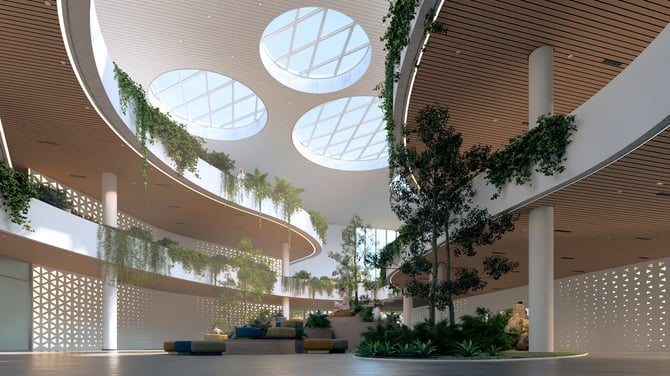
August 26, 2025
Introducing Lumion 2025.1 and Lumion Cloud
**Lumion 2025.1** marks a major step forward in project communication with the launch of [**Lumion Cloud**](https://lumion.com/product/lumion-cloud), a powerful new web platform designed to simplify design sharing, review, feedback, and collaboration.
Now, you can seamlessly upload media directly from Lumion to the cloud, making it easier than ever to share your renders with anyone, anywhere. This release also includes quality-of-life enhancements, interface refinements, and bug fixes.
### Important:
- Lumion 2025.1.0 will initially be available only as a full installation. The *Updater* will only be possible when using Lumion 2025.0.2 and newer.
All versions prior to 2025.0.2 need to do the full install.
It is also highly recommended that those on 2025.0.2 also get the new version now via the full install.
See also: **Knowledge Base:** [Lumion 2025: Everything you need to know](https://support.lumion.com/knowledge-base/api/v2/help_center/en-us/articles/19336288624668.json?hsLang=en-us)
- Note that *Projects* and models saved in version 2025.1.0 **cannot** be opened in older versions of *Lumion*.
- Starting with this version of Lumion, all users are required to log in to their *Lumion Account* when starting Lumion for the first time. See the article below for more details on this change:
- **Knowledge Base:** [Why does Lumion require a sign-in to start?](https://support.lumion.com/knowledge-base/api/v2/help_center/en-us/articles/21543347074332.json?hsLang=en-us)
- Some users experienced crashes for Ray Tracing due to NVidia graphics driver changes. We have fixed that internally. See [section 3.4: Effects & Styles: Ray Tracing](https://support.lumion.com/knowledge-base/api/v2/help_center/en-us/articles/21853789940892.json#Ray_Tracing_fixForCrashes).
This release is for commercial customers. The version release for students and Faculty is planned for September.
1\. New features
### 1.1: Lumion Cloud integration

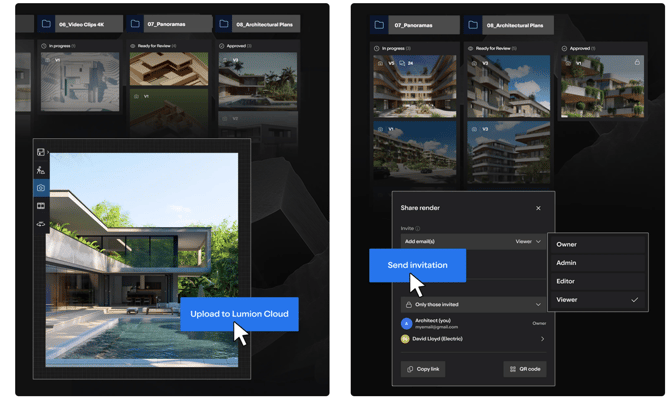
Lumion Cloud is a secure, browser-based platform for sharing and managing your renders online.
You can upload content manually via the Lumion Cloud website or render *Photos*and *Panoramas* directly from Lumion to your cloud page by enabling this setting in the render settings:

When the setting is enabled, Lumion will render the file to the chosen location, but also, a copy will be uploaded to the **Renders** page in your Lumion Cloud:
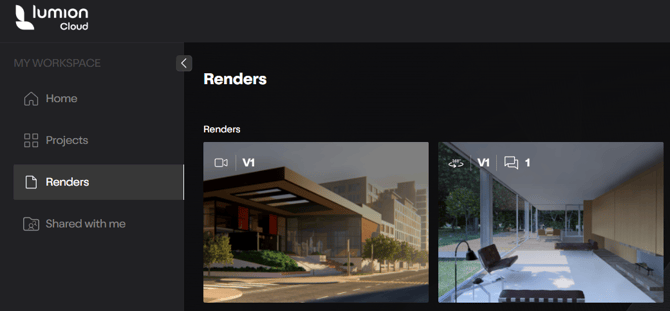
**Note:** Uploading currently requires upload to the Renders workspace. We envisage future developments to integrate with Projects as well.
*Movie/Clip* MP4 uploads are currently via direct upload in Lumion Cloud.
**Note** that it is not possible to enable *Upload to Lumion Cloud* when the storage space available is less than 100MB.
Once Lumion finishes rendering, you can access Lumion Cloud from the '*Rendering is Complete*' screen:

To learn more about Lumion Cloud, follow these articles:
- **Knowledge Base:** [What is Lumion Cloud?](https://support.lumion.com/knowledge-base/api/v2/help_center/en-us/articles/21308656717468.json?hsLang=en-us)
- **Knowledge Base:** [Lumion Cloud: FAQ](https://support.lumion.com/knowledge-base/api/v2/help_center/en-us/articles/21308884528540.json?hsLang=en-us)
- **Lumion News:** [Lumion Cloud Beta is here](https://lumion.com/news/lumion-cloud-beta-is-here)
- **Tips and Guides:** [5 reasons to start collaborating in Lumion Cloud](https://lumion.com/tips-guides/why-use-lumion-cloud)
2\. Changes
### 2.1: Login Requirement
Apart from *Named-User* license holders, *Students*, and *Lumion View Subscribers*, Lumion *Studio* (Floating) and *Faculty* installations now **also** require a *Lumion Account*login to start up.
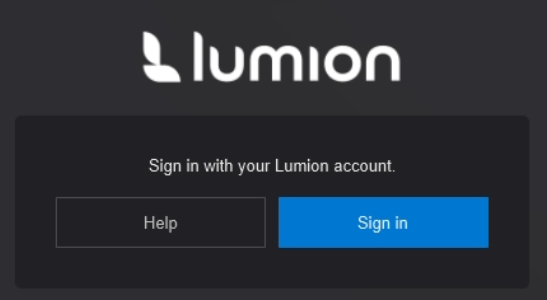
This is to enable access to the Lumion Cloud services. More information on this change and steps for troubleshooting sign-in issues can be found in the article below:
- **Knowledge Base:** [Why does Lumion require a sign-in to start?](https://support.lumion.com/knowledge-base/api/v2/help_center/en-us/articles/21543347074332.json?hsLang=en-us)
### 2.2: The Account panel has been updated
This panel is now visible in Lumion *Studio* and *Faculty* versions too and shows your available Lumion Cloud Storage. Clicking here will take you to your Lumion Cloud page.
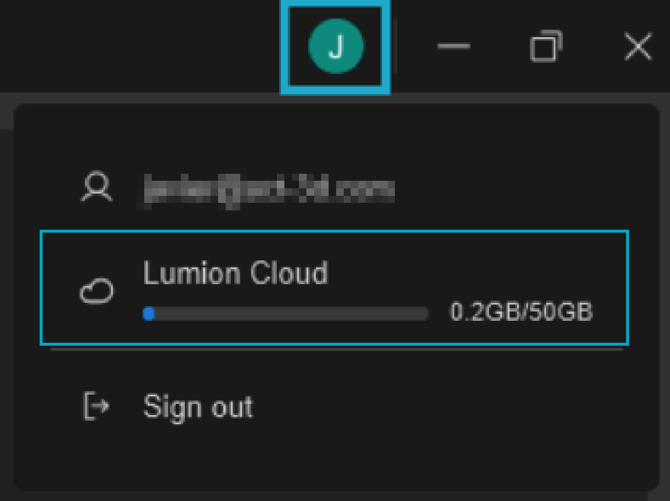
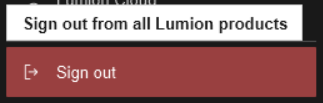
The panel also has an option for signing out at any time during the session.
### Important:
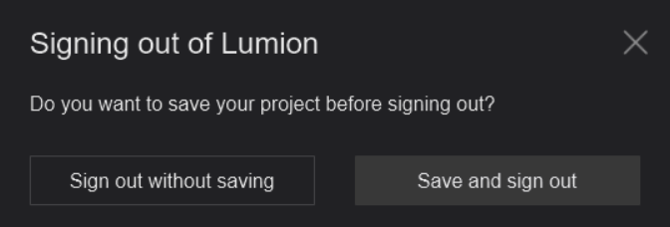
Signing out will close your current *Project,* so you will get an option to save the file before logging out:
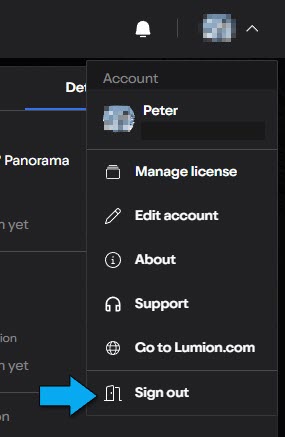
Otherwise, you can stay signed in within Lumion. And if needed, use the Sign Out in Lumion Cloud.
### 2.3. Build with Effects:
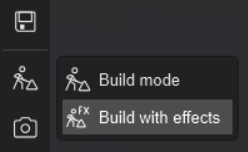
The *Build with Effects* button has been moved to the *Sidebar Menu*. It will show up when hovering the cursor over the *Build Mode* button.
### 2.4. Effect List changes:
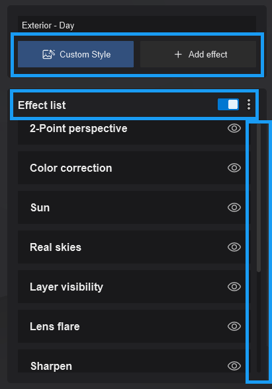
- Replaced the pagination with a scroll bar.
- It is now possible to scroll up/down by using the mouse scroll wheel or Page Up/Down keys.
- The *Effect List*can now be toggled off.
- The *Effect* buttons now turn blue when dragging them in the list.
- The *Delete button* has been updated with a new look and behavior. The icon changes from *2x*to *1x* after clicking it once, and a tooltip appears *Click again to confirm*.
### 2.5. Styles changes:
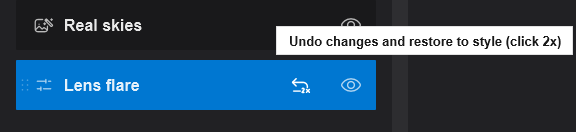
- The *Undo Changes and Restore to Style* button is now hidden as long as the *Style* is unmodified.
- That button has also been updated with the new *Delete Effect* behavior.
### 2.6. Material Mode changes:
Added a scroll bar to the *Advanced Options* when the interface does not fit on the screen.
### 2.7. Phasing Effect:
Tweaked the *Add* and *Delete Animation* buttons.
### 2.8. Photo Matching Effect:
The *Photo Matching Effect* is now visible in the *Movie Effects* library, but it remains disabled.
### 2.9. RT Volumetrics Effect:
Added a drop-down menu with various ready-to-use *Presets*.
### 2.10. Panorama Mode:
Removed the *MyLumion* upload functionality. In its place, you'll see a *Welcome to Lumion Cloud* screen that links to support articles.
More information on how MyLumion will be sunset can be found here:
- **Knowledge Base:** [MyLumion Phasing Out](https://support.lumion.com/knowledge-base/api/v2/help_center/en-us/articles/21631546415644.json?hsLang=en-us)
### 2.11. Miscellaneous:
- ***Post-update screen:*** The post-update screen has been updated.
- ***Start-up message:*** The start-up message has been updated.
- ***User Interface:*** Various UI improvements to the *Import Mode*l, *Merge*, EULA, and user authorization in process screens.
3\. Fixes
### 3.1: *Build Mode*
- ***Layers*****:** Editing a *Layer* no longer triggers the creation of a *Recovery* file.
- ***Text Object*****:** Fixed an issue that would prevent the user from editing the text in the *Text Object*.
- ***Text Object*****:** The text is now copied as expected when Alt+copying a *Text Object*.
- ***Text Object*****:** Fixed an old selection issue that involved selecting *Text Object* first, and then other *Objects* would be automatically selected without clicking when pressing CTRL.
#### *Content Library* & *Place/Select Modes*:
- ***Advanced Options → Flip Object:*** *Object*center will now remain at the exact same position when they are flipped.
- ***Advanced Options → Randomize Position:*** Fixed an issue that would move *Objects* on top of *Imported Models* when using the *Randomize Position* feature.
- ***Auto-Snap:*** Optimized the *Auto-Snap* function. Also clarified the tooltip for when (and why) the feature is not available.
- ***Line Placement:*** New path points will now ignore *Objects* in the scene.
### 3.2: *Materials*
- ***Material Highlight:*** Fixed an issue that would result in the highlight being misaligned with the model's surface.
### 3.3: *Photo Mode*, *Movie Mode* & *Panorama Mode*
- ***Thumbnails*****:** Fixed an issue that would result in thumbnails stored with *Portrait* (9:16)
to not show the correct *Aspect Ratio* after reloading the *Project* file.
#### *Movie Mode*
- ***Clip Thumbnails:*** Fixed an issue that would cause all *Clips* to all have the thumbnail of *Clip* 1 after loading a *Project* .
### 3.4: *Effects* & *Styles*
- ***Real Skies Effect:*** Fixed a problem with the *Sky Background Brightness* in refractions.
#### *Ray Tracing*
- ***Ray Tracing Effect:*** Fixed a crash that could occur when rendering with *NRD* while using the latest NVIDIA drivers from version 580.88. See also:
- **Lumion Community:** [Known Issue: NVIDIA Driver version 580.88 Released 31 July 2025 and newer cause issues with Lumion (until further notice)](https://support.lumion.com/knowledge-base/api/v2/help_center/en-us/articles/21473118075292.json?hsLang=en-us)
- ***Ray Tracing Effect:*** Lumion will no longer crash when opening large files and then switching to a *Photo* or *Movie* that has the *Ray Tracing Effect*applied.
- ***Ray Tracing Effect:*** Fixed the blurring of the *Ocean* near coastlines.
- ***RT Volumetrics Effect:*** Fixed an issue that would result in *Keyframes* for *Noise Reductiton*
and *Noise Scale*to be lost after loading a .LME *Effect* stack file.
### 3.5: Importing and Exporting
- ***Animated Imported Models:*** These no longer lose their animations when opening a *Project* file from older Lumion versions.
- ***Revit Model Import:*** Fixed an issue that would result in the *Normal Map* being used as a *Color Map* if the model only had a *Normal Map* when imported.
### 3.6: Miscellaneous
- ***Example Projects and Templates:*** Updated all the example scenes and fixed their thumbnails.
- ***Merge*****:** Fixed an issue that would result in *Imported Models* being *Merged* even when the *Skip* button was enabled.
- ***Merge*****:** Fixed an issue that would result in an empty *Group* being *Merged* when all the categories were skipped.
- ***Tutorials:*** It is no longer possible to open the save menu when a tutorial is active.
- ***Tutorials:*** Fixed an issue that would prevent the frameless viewer buttons to be usable when a tutorial is active.
- ***Tutorials:*** Adjusted the tutorial UI to fit the new media modes.
- ***Saving Projects:*** Fixed an issue that would prevent the *Save* button from being usable after placing a *Group* from an older Lumion version.
### See Also:
- **Knowledge Base:** [Lumion 2025: Everything you need to know](https://support.lumion.com/knowledge-base/api/v2/help_center/en-us/articles/19336288624668.json-Lumion-2025-Everything-you-need-to-know?hsLang=en-us)
- **Knowledge Base:** [Lumion 2025.0: Release Notes](https://support.lumion.com/hc/en-us/articles/19336065135516-Lumion-2025-0-Release-Notes?hsLang=en-us)
- [Visit our other Sections](https://support.lumion.com/knowledge-base/visit-our-other-sections?hsLang=en-us)
- [Contact Us](https://support.lumion.com/knowledge-base/contact-us?hsLang=en-us)
- [Lumion Account](https://support.lumion.com/knowledge-base/lumion-account?hsLang=en-us)
- [Latest News](https://support.lumion.com/knowledge-base/latest-news?hsLang=en-us#main-content)
- [Major Known Issues](https://support.lumion.com/knowledge-base/latest-news?hsLang=en-us#major-known-issues)
- [Lumion 2025: Major Version Release Details](https://support.lumion.com/knowledge-base/latest-news?hsLang=en-us#lumion-2025-major-version-release-details)
- [Lumion 2024: Major Version Release Details](https://support.lumion.com/knowledge-base/latest-news?hsLang=en-us#lumion-2024-major-version-release-details)
- [Lumion 2023: Major Version Release Details](https://support.lumion.com/knowledge-base/latest-news?hsLang=en-us#lumion-2023-major-version-release-details)
- [Lumion 2023: Update Release Notes](https://support.lumion.com/knowledge-base/latest-news?hsLang=en-us#lumion-2023-update-release-notes)
- [Lumion 12](https://support.lumion.com/knowledge-base/latest-news?hsLang=en-us#lumion-12)
- [Lumion 11](https://support.lumion.com/knowledge-base/latest-news?hsLang=en-us#lumion-11)
- [Lumion 10](https://support.lumion.com/knowledge-base/latest-news?hsLang=en-us#lumion-10)
- [Sales Questions](https://support.lumion.com/knowledge-base/sales-questions?hsLang=en-us)
- [Subscriptions](https://support.lumion.com/knowledge-base/subscriptions?hsLang=en-us)
- [New User Questions](https://support.lumion.com/knowledge-base/new-user-questions?hsLang=en-us)
- [Learning Resources](https://support.lumion.com/knowledge-base/learning-resources?hsLang=en-us)
- [System Requirements Questions](https://support.lumion.com/knowledge-base/system-requirements-questions?hsLang=en-us#main-content)
- [Determining the 'Complexity' of your Projects](https://support.lumion.com/knowledge-base/system-requirements-questions?hsLang=en-us#determining-the-complexity-of-your-projects)
- [System Messages from Lumion](https://support.lumion.com/knowledge-base/system-requirements-questions?hsLang=en-us#system-messages-from-lumion)
- [Requirements for Prior Versions](https://support.lumion.com/knowledge-base/system-requirements-questions?hsLang=en-us#requirements-for-prior-versions)
- [Download & Installation Questions](https://support.lumion.com/knowledge-base/download-installation-questions?hsLang=en-us#main-content)
- [Download/Installation: General Questions](https://support.lumion.com/knowledge-base/download-installation-questions?hsLang=en-us#download-installation-general-questions)
- [Download Questions](https://support.lumion.com/knowledge-base/download-installation-questions?hsLang=en-us#download-questions)
- [Installation Questions](https://support.lumion.com/knowledge-base/download-installation-questions?hsLang=en-us#installation-questions)
- [Lumion Pro Updater](https://support.lumion.com/knowledge-base/download-installation-questions?hsLang=en-us#lumion-pro-updater)
- [Plugins to CAD software](https://support.lumion.com/knowledge-base/download-installation-questions?hsLang=en-us#plugins-to-cad-software)
- [License and General Product Questions](https://support.lumion.com/knowledge-base/license-and-general-product-questions?hsLang=en-us#main-content)
- [License System Messages from Lumion](https://support.lumion.com/knowledge-base/license-and-general-product-questions?hsLang=en-us#license-system-messages-from-lumion)
- [Import & Export Questions](https://support.lumion.com/knowledge-base/import-export-questions?hsLang=en-us#main-content)
- [Model Import Guidelines](https://support.lumion.com/knowledge-base/import-export-questions?hsLang=en-us#model-import-guidelines)
- [Lumion LiveSync and import plugins](https://support.lumion.com/knowledge-base/import-export-questions?hsLang=en-us#lumion-livesync-and-import-plugins)
- [System Messages from Lumion when importing](https://support.lumion.com/knowledge-base/import-export-questions?hsLang=en-us#system-messages-from-lumion-when-importing)
- [General Questions](https://support.lumion.com/knowledge-base/general-questions?hsLang=en-us#main-content)
- [Keyboard Shortcuts in Lumion](https://support.lumion.com/knowledge-base/general-questions?hsLang=en-us#keyboard-shortcuts-in-lumion)
- [Upgrading and Updating your Lumion Version](https://support.lumion.com/knowledge-base/general-questions?hsLang=en-us#upgrading-and-updating-your-lumion-version)
- [Using Lumion 2023](https://support.lumion.com/knowledge-base/general-questions?hsLang=en-us#using-lumion-2023)
- [System Messages from Lumion](https://support.lumion.com/knowledge-base/general-questions?hsLang=en-us#system-messages-from-lumion)
- [Build Mode Questions](https://support.lumion.com/knowledge-base/build-mode-questions?hsLang=en-us#main-content)
- [Landscape and Terrains](https://support.lumion.com/knowledge-base/build-mode-questions?hsLang=en-us#landscape-and-terrains)
- [OpenStreetMap](https://support.lumion.com/knowledge-base/build-mode-questions?hsLang=en-us#openstreetmap)
- [Lighting: Sun and Artificial Lights](https://support.lumion.com/knowledge-base/build-mode-questions?hsLang=en-us#lighting-sun-and-artificial-lights)
- [Questions mainly for older versions than Lumion 12](https://support.lumion.com/knowledge-base/build-mode-questions?hsLang=en-us#questions-mainly-for-older-versions-than-lumion-12)
- [Library Content](https://support.lumion.com/knowledge-base/library-content?hsLang=en-us#main-content)
- [Library Content in Lumion 2026](https://support.lumion.com/knowledge-base/library-content?hsLang=en-us#library-content-in-lumion-2026)
- [Library Content in Lumion 2025](https://support.lumion.com/knowledge-base/library-content?hsLang=en-us#library-content-in-lumion-2025)
- [Library Content in Lumion 2024](https://support.lumion.com/knowledge-base/library-content?hsLang=en-us#library-content-in-lumion-2024)
- [Library Content in Lumion 2023](https://support.lumion.com/knowledge-base/library-content?hsLang=en-us#library-content-in-lumion-2023)
- [Library Content in Lumion 12](https://support.lumion.com/knowledge-base/library-content?hsLang=en-us#library-content-in-lumion-12)
- [Movie & Photo Mode Questions](https://support.lumion.com/knowledge-base/movie-photo-mode-questions?hsLang=en-us#main-content)
- [Photo Mode](https://support.lumion.com/knowledge-base/movie-photo-mode-questions?hsLang=en-us#photo-mode)
- [Movie Mode](https://support.lumion.com/knowledge-base/movie-photo-mode-questions?hsLang=en-us#movie-mode)
- [Animation in Movie Mode](https://support.lumion.com/knowledge-base/movie-photo-mode-questions?hsLang=en-us#animation-in-movie-mode)
- [Effects in Photo or Movie Mode](https://support.lumion.com/knowledge-base/movie-photo-mode-questions?hsLang=en-us#effects-in-photo-or-movie-mode)
- [Reflections](https://support.lumion.com/knowledge-base/movie-photo-mode-questions?hsLang=en-us#reflections)
- [Material Questions](https://support.lumion.com/knowledge-base/material-questions?hsLang=en-us#main-content)
- [Materials in versions 12 and earlier](https://support.lumion.com/knowledge-base/material-questions?hsLang=en-us#materials-in-versions-12-and-earlier)
- [Using LiveSync for Revit and a Section Box](https://support.lumion.com/knowledge-base/material-questions?hsLang=en-us#using-livesync-for-revit-and-a-section-box)
- [Rendering Questions](https://support.lumion.com/knowledge-base/rendering-questions?hsLang=en-us#main-content)
- [General Rendering Questions](https://support.lumion.com/knowledge-base/rendering-questions?hsLang=en-us#general-rendering-questions)
- [Rendering of Photos](https://support.lumion.com/knowledge-base/rendering-questions?hsLang=en-us#rendering-of-photos)
- [Rendering of Clips and Movies](https://support.lumion.com/knowledge-base/rendering-questions?hsLang=en-us#rendering-of-clips-and-movies)
- [Tips to getting the best renders](https://support.lumion.com/knowledge-base/rendering-questions?hsLang=en-us#tips-to-getting-the-best-renders)
- [Rendering Performance](https://support.lumion.com/knowledge-base/rendering-questions?hsLang=en-us#rendering-performance)
- [Technical Issues when Rendering](https://support.lumion.com/knowledge-base/rendering-questions?hsLang=en-us#technical-issues-when-rendering)
- [Panorama Mode Questions](https://support.lumion.com/knowledge-base/panorama-mode-questions?hsLang=en-us#main-content)
- [Technical questions when rendering with Panorama Mode](https://support.lumion.com/knowledge-base/panorama-mode-questions?hsLang=en-us#technical-questions-when-rendering-with-panorama-mode)
- [File & BackUp Questions](https://support.lumion.com/knowledge-base/file-backup-questions?hsLang=en-us#main-content)
- [Saving and Backup](https://support.lumion.com/knowledge-base/file-backup-questions?hsLang=en-us#saving-and-backup)
- [File Saving Issues](https://support.lumion.com/knowledge-base/file-backup-questions?hsLang=en-us#file-saving-issues)
- [Lumion-Documents](https://support.lumion.com/knowledge-base/file-backup-questions?hsLang=en-us#lumion-documents)
- [Transfer, Move or Migrate Files](https://support.lumion.com/knowledge-base/file-backup-questions?hsLang=en-us#transfer-move-or-migrate-files)
- [Troubleshooting](https://support.lumion.com/knowledge-base/troubleshooting?hsLang=en-us#main-content)
- [Reports about your PC](https://support.lumion.com/knowledge-base/troubleshooting?hsLang=en-us#reports-about-your-pc)
- [Photo and Movie Mode Issues](https://support.lumion.com/knowledge-base/troubleshooting?hsLang=en-us#photo-and-movie-mode-issues)
- [Rendering Issues](https://support.lumion.com/knowledge-base/troubleshooting?hsLang=en-us#rendering-issues)
- [Error Messages from Lumion](https://support.lumion.com/knowledge-base/troubleshooting?hsLang=en-us#error-messages-from-lumion)
- [Hardware related Issues](https://support.lumion.com/knowledge-base/troubleshooting?hsLang=en-us#hardware-related-issues)
- [Other Troubleshooting Issues](https://support.lumion.com/knowledge-base/troubleshooting?hsLang=en-us#other-troubleshooting-issues)
- [Article Developments](https://support.lumion.com/knowledge-base/article-developments?hsLang=en-us#main-content)
- [Devs - Multi‑Image Button Viewer](https://support.lumion.com/knowledge-base/article-developments?hsLang=en-us#devs-multi-image-button-viewer)
[](https://lumion.com/)
[mailto:email@email.com](mailto:email@email.com)
Copyright © 2026, Lumion - Act3D B.V.
#### Product
[Plans and pricing](https://lumion.com/product/buy)
[Discover Lumion](https://lumion.com/product/discover-lumion)
[Compatibility](https://lumion.com/compatibility/)
[System Requirements](https://lumion.com/product/system-requirements)
[Find a reseller](https://lumion.com/about/find-reseller)
[Free trial](https://lumion.com/product/free-trial)
#### Solutions
[Architectural design](https://lumion.com/product/architectural-design)
[Interior design](https://lumion.com/product/interior-design)
[Landscape architecture](https://lumion.com/product/landscape-architecture)
[Urban planning](https://lumion.com/product/urban-planning)
[3D rendering](https://lumion.com/product/3d-rendering-software)
[Education](https://lumion.com/product/educational-licenses)
#### Compatibility
[Trimble SketchUp](https://lumion.com/compatibility/sketchup-rendering)
[Autodesk Revit](https://lumion.com/compatibility/revit-rendering)
[Graphisoft ArchiCAD](https://lumion.com/compatibility/archicad-rendering)
[Rhinoceros](https://lumion.com/compatibility/rhino-rendering)
[Autodesk Autocad](https://lumion.com/compatibility/autocad-rendering)
[Autodesk FormIt Pro](https://lumion.com/compatibility/lumion-for-autodesk-formit-pro)
[Nemetschek Allplan](https://lumion.com/compatibility/allplan-rendering)
[Nemetschek Vectorworks](https://lumion.com/compatibility/vectorworks-rendering)
[BricsCAD](https://lumion.com/compatibility/bricscad-rendering)
[3D Studio Max](https://lumion.com/compatibility/3ds-max-rendering)
#### Resources
[Made with Lumion](https://lumion.com/made-with-lumion)
[Tutorials](https://support.lumion.com/video-tutorials?hsLang=en-us)
[Support and learning](https://support.lumion.com/knowledge-base/api/v2/help_center/en-us/articles/360044608053.json?hsLang=en-us)
[Downloads](https://support.lumion.com/downloads?hsLang=en-us)
[Community](https://community.lumion.com/index.php)
#### About
[Our Story](https://lumion.com/about)
[We're hiring!](https://lumion.com/about/careers)
[News](https://lumion.com/news)
[Contact us](https://lumion.com/about/contact)
[Terms & conditions](https://lumion.com/legal/terms-of-service) [EULA](https://lumion.com/legal/eula) [Privacy statement](https://lumion.com/legal/privacy-statement) [CEIP](https://lumion.com/legal/ceip) [Disclaimer](https://lumion.com/legal/disclaimer) © 2026 Lumion