---
title: How do you replace imported 'proxy' objects with Library objects?
description: Knowledge Base
---
Solutions
[Architectural design All you need to bring your residential, commercial or institutional designs to life](https://lumion.com/product/architectural-design) [Landscape architecture Beautiful terrains and fine-detailed nature for any climate or season](https://lumion.com/product/landscape-architecture)
[Interior design Realistic light, high-quality textures, and an extensive asset library](https://lumion.com/product/interior-design) [Students and Faculties Lumion is free for students, educators, and faculties around the world](https://lumion.com/product/educational-licenses)
[SketchUp](https://lumion.com/compatibility/sketchup-rendering) [Revit](https://lumion.com/compatibility/revit-rendering) [ArchiCAD](https://lumion.com/compatibility/archicad-rendering) [Rhino](https://lumion.com/compatibility/rhino-rendering) [Autocad](https://lumion.com/compatibility/autocad-rendering) [See more](https://lumion.com/compatibility/)
Product
[Discover Axogram New Live architectural diagramming](https://lumion.com/product/axogram) [Lumion Cloud Where design meets collaboration](https://lumion.com/product/lumion-cloud)
[Lumion Pro Advanced visualization solution](https://lumion.com/product/lumion-pro) [Discover AI tools New AI built for architectural work](https://lumion.com/product/ai)
[Lumion Pro 2026.1 is out now! 🚀](https://lumion.com/product/latest-version-pro) [Compatibility](https://lumion.com/compatibility/) [System Requirements](https://lumion.com/product/system-requirements) [Roadmap](https://lumion.com/product/roadmap)
[Pricing](https://lumion.com/product/buy) Resources
[Made with Lumion Get inspired by the stories behind the designs](https://lumion.com/made-with-lumion)
[Tips & Guides Make the most out of Lumion with helpful guides and tutorials](https://lumion.com/tips-guides)
[Knowledge base](https://support.lumion.com/knowledge-base?hsLang=en-us) [Community](https://community.lumion.com/index.php) [Downloads](https://support.lumion.com/downloads?hsLang=en-us)
About
[Who we are Learn about our story and mission](https://lumion.com/about) [Careers - We're hiring Let's build the future of architectural visualization](https://lumion.com/about/careers)
[News Discover the latest product news and more](https://lumion.com/news)
[Find your local reseller](https://lumion.com/about/find-reseller) [Contact us](https://lumion.com/about/contact)
[](http://lumion.com)
[My Account](https://account.lumion.com)
Solutions
[Architectural design](https://lumion.com/product/architectural-design) [Interior design](https://lumion.com/product/interior-design) [Landscape architecture](https://lumion.com/product/landscape-architecture) [Students and Faculties](https://lumion.com/product/educational-licenses)
---
[SketchUp](https://lumion.com/compatibility/sketchup-rendering) [Revit](https://lumion.com/compatibility/revit-rendering) [ArchiCAD](https://lumion.com/compatibility/archicad-rendering) [Rhino](https://lumion.com/compatibility/rhino-rendering) [Autocad](https://lumion.com/compatibility/autocad-rendering) [See more](https://lumion.com/compatibility/)
Product
[Axogram New](https://lumion.com/product/axogram) [Lumion Cloud](https://lumion.com/product/lumion-cloud) [Lumion Pro](https://lumion.com/product/lumion-pro) [Discover AI tools New](https://lumion.com/product/ai)
---
[Lumion Pro 2026.1 is out now! 🚀](https://lumion.com/product/latest-version-pro) [Compatibility](https://lumion.com/compatibility/) [System Requirements](https://lumion.com/product/system-requirements) [Roadmap](https://lumion.com/product/roadmap)
[Pricing](https://lumion.com/product/buy) Resources
[Made with Lumion](https://lumion.com/made-with-lumion) [Tips & Guides](https://lumion.com/tips-guides)
---
[Knowledge base](https://support.lumion.com/knowledge-base?hsLang=en-us) [Community](https://community.lumion.com/index.php) [Downloads](https://support.lumion.com/downloads?hsLang=en-us)
About
[Who we are](https://lumion.com/about) [Careers - We're hiring](https://lumion.com/about/careers) [News](https://lumion.com/news)
---
[Find your local reseller](https://lumion.com/about/find-reseller) [Contact us](https://lumion.com/about/contact)
[My Account](https://account.lumion.com)
[Submit a request](https://support.lumion.com/hc/en-us/requests/new?hsLang=en-us)
[](https://lumion.com/) [Login](https://account.lumion.com/)
[](https://lumion.com/)
## Main menu
Solutions
Product
[Pricing](https://lumion.com/product/buy)
Resources
About
[Submit a request](https://support.lumion.com/hc/en-us/requests/new?hsLang=en-us)
[Login](https://account.lumion.com/)
Start for free
Back
### Solutions
[Architectural design](https://lumion.com/product/architectural-design) [Interior design](https://lumion.com/product/interior-design) [Landscape architecture](https://lumion.com/product/landscape-architecture) [Students and Faculties](https://lumion.com/product/educational-licenses)
---
[SketchUp](https://lumion.com/compatibility/sketchup-rendering) [Revit](https://lumion.com/compatibility/revit-rendering) [ArchiCAD](https://lumion.com/compatibility/archicad-rendering) [Rhino](https://lumion.com/compatibility/rhino-rendering) [Autocad](https://lumion.com/compatibility/autocad-rendering) [See more](https://lumion.com/compatibility/)
Back
### Product
[Axogram — New](https://lumion.com/product/axogram) [Lumion Cloud](https://lumion.com/product/lumion-cloud) [Lumion Pro](https://lumion.com/product/lumion-pro) [Discover AI tools — New](https://lumion.com/product/ai)
---
[Lumion Pro 2026.1 is out now! 🚀](https://lumion.com/product/latest-version-pro) [Compatibility](https://lumion.com/compatibility/) [System Requirements](https://lumion.com/product/system-requirements) [Roadmap](https://lumion.com/product/roadmap)
Back
### Resources
[Made with Lumion](https://lumion.com/made-with-lumion) [Tips & Guides](https://lumion.com/tips-guides)
---
[Knowledge base](https://support.lumion.com/knowledge-base?hsLang=en-us) [Community](https://community.lumion.com/index.php) [Downloads](https://support.lumion.com/downloads?hsLang=en-us)
Back
### About
[Who we are](https://lumion.com/about) [Careers - We're hiring](https://lumion.com/about/careers) [News](https://lumion.com/news)
---
[Find your local reseller](https://lumion.com/about/find-reseller) [Contact us](https://lumion.com/about/contact)
Back
### Start for free
[Lumion Pro](https://lumion.com/product/free-trial#request-trial) [Lumion Cloud](https://lumion.com/product/lumion-cloud#start) [Axogram](https://lumion.com/product/axogram#plans-pricing)
Lumion Knowledge Base
How can we help?
- There are no suggestions because the search field is empty.
[Skip to content](https://support.lumion.com/knowledge-base/api/v2/help_center/en-us/articles/360003455214.json#main-content)
English - United States
Show submenu for translations

Open main navigation
Close main navigation
- English - United States
Show submenu for translations
- Contact us
Contact us
How can we help you?
- There are no suggestions because the search field is empty.
1. [Knowledge Base](https://support.lumion.com/knowledge-base?hsLang=en-us)
2. [Build Mode Questions](https://support.lumion.com/knowledge-base/build-mode-questions?hsLang=en-us)
# How do you replace imported 'proxy' objects with Library objects?
## **1. Making a Proxy object**
The *Place item on nodes* function lets you place objects of your choice at the same positions as imported *proxy objects* from your 3D/CAD software.
- Each *proxy object* should be a separate object, for example, simple duplicated boxes.
- Make sure that a single material is assigned to all faces of the *proxy* *objects*.
- The function works with *Revit*, *SketchUp*, *ArchiCAD*, *AutoCAD*, *AllPlan*, *3ds Max*, *Vectorworks,* and *Rhino*.
- *Spotlights* and *Area Lights* are rotated by 90 degrees by default in Lumion (so they are pointing downwards). When wanting to replace with lights, you need to compensate for that by rotating your *proxy object* 90 degrees in the opposite direction in your 3D/CAD software before exporting the *proxy objects*. This might also be the case with other *Library Objects*.
See the steps and export requirements for each of these applications in section 4 below.
## **2. Newly placed Objects on Nodes**
### **2.1: Lumion 9.0 and newer**
After importing a model with *proxy* objects and placing it in your *Scene*, use the *Place item on nodes* function to place an object of your choice on each of the imported *proxy* objects.
- The function is available in the *Object Options* panel for *Imported Models*.

- If a Windows *Open File* window pops up when you click on the *Place item on nodes* button, select the *Imported Model* file with the *proxy* objects, and click on the *Open* button.
- Please note that when you use the *Place item on node* function in *Lumion* after importing a model file, it will place additional objects at the *Object Icon* of the model. Simply delete those objects.
### **2.2: Lumion 8.5 and older**
After importing a model with *proxy* objects and placing it in your *Scene*, use the *Place item on nodes* function to place a tree/plant or light of your choice on each of the imported *proxy* objects.
- The *Place item on nodes* function is available in the *Extra* menu in the *Context Menu* for *Imported Models*.

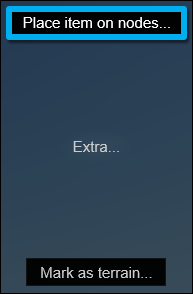
- If a Windows *Open File* window pops up when you click on the *Place item on nodes* option, select the *Imported Model* file with the *proxy* objects, and click on the *Open* button.
- Please note that when you use the *Place item on node* function in *Lumion* after importing a model file, it will place additional objects at the *Object Icon* of the model. Simply delete those objects.
## **3. How to make changes to previously placed Objects on Nodes**
After using the *Placing Objects on Nodes* feature the *proxy object* will be removed from the *Build Mode* viewport. They will remain in the Lumion *Imported Models Library.*
If you need to make use of the nodes again in order to modify or change the placed objects you need to go through these steps:
### **3.1: Place the models:**
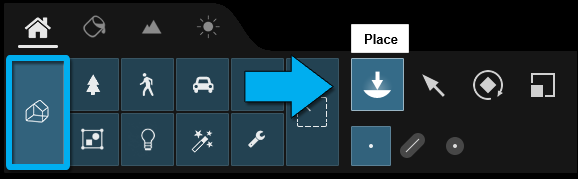
Go to your Lumion *Imported Models Library,* in *Build Mode,* and to place them again, select *Imported Models* and then *Place.*
### **3.2: Align your models:**
In order to align them with your main model you can place the *Nodes* manually by using the *Move* commands.
Alternatively, with the main model selected in the top right corner use the *Lock Object and Make it unselectable* feature.
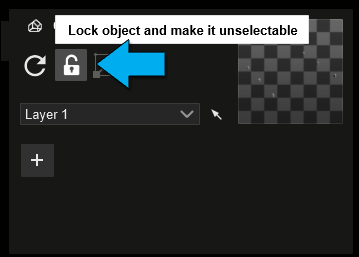
This will prevent the main model from moving.
With the main model and *Nodes* selected, click on *Align Positions.*
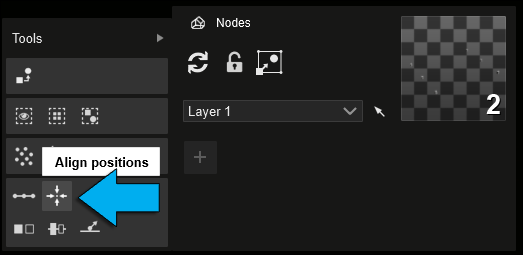
This will bring the nodes in line with the main model.
### **3.3: Replace:**
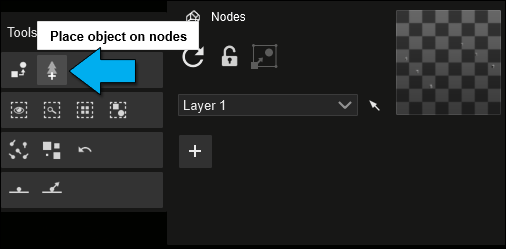
To replace the *Nodes* with new *Objects*, deselect the main model and select the *Place Object on Nodes.*
### **3.4: Group:**
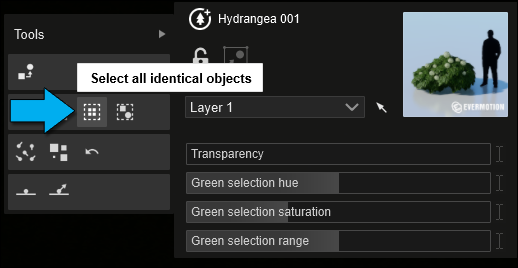
**3.4.1:** For ease of use it is recommended to group the new objects*.* This can be done by selecting an object and again under *Advanced Options,* clicking on *Select All Identical Objects.*
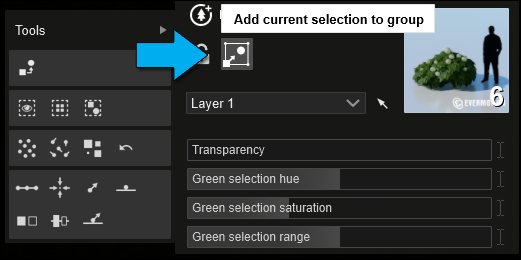
**3.4.2:** With the objects selected, use the *Add Current Selection to a Group* feature.
Please also refer to our *Tutorial Video* below for a more in-depth view of the *Node* placement and replacement:
- **Lumion Tutorial:** [Lumion 9: Nodes & Node Replacement](https://support.lumion.com/video-tutorials/api/v2/help_center/en-us/articles/360018681653.json?hsLang=en-us)
## **4. 3D Modelling Guidelines**
## **4.1: Guidelines for** ***Revit***
**4.1.1:** Install the *Lumion LiveSync for Revit* plug-in if you are using *Revit* 2015 or newer:
- **Knowledge Base:** [Download Lumion LiveSync for Revit](https://support.lumion.com/knowledge-base/api/v2/help_center/en-us/articles/360007538494.json?hsLang=en-us)
**4.1.2:** In a *3D View*, place some simple objects, e.g. columns or boxes (non-extruded shapes), to represent the *proxy* objects. Make sure that a single material is assigned to the objects.
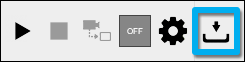
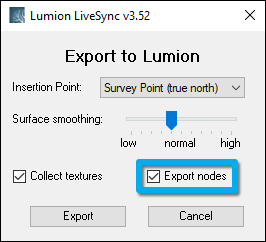
**4.1.3:** Tick the *Export nodes* button in the *Export as Collada* file settings before exporting a .DAE file to Lumion:
**4.1.4:** Follow step 2.1 or 2.2 above.
## **4.2: Guidelines for *SketchUp***
**4.2.1:** Create a box for use as a *proxy object*. Make sure that you have only assigned a single material to all faces of the object.
**4.2.2:** Right-click on the box and select *Make component*.
**4.2.3:** Duplicate the box as many times as you want. Do not group the duplicates.
**4.2.4: *Lumion* 9.0 and newer versions:**
Save the components to a separate .SKP file.
**4.2.5: *Lumion* 8.5 and older versions:**
Select *File* -\> *Export* -\> *3D Model*, choose *Collada file (\*.DAE)*, click on *Options* and make sure that *Preserve Component Hierarchies* is ticked before exporting the .DAE file.
**4.2.6:** Follow step 2.1 or 2.2 above.
## **4.3: Guidelines for** ***ArchiCAD***
**4.3.1: *ArchiCAD* 21 or newer:** Install the *Lumion* plug-in for *ArchiCAD*:
- **Knowledge Base:** [Download *Lumion LiveSync for ArchiCAD*](https://support.lumion.com/knowledge-base/api/v2/help_center/en-us/articles/360007539434.json?hsLang=en-us)
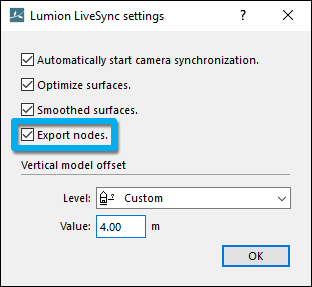
**4.3.2:** Export the *proxy objects* to .DAE format with the *Export nodes* tickbox ticked:

**4.3.3: ArchiCAD 20 and older:** Export the *proxy objects* to .3DS format with the default export settings:
*File* -\> *Save as...* -\> .3DS format
**4.3.4:** Follow step 2.1 or 2.2 above.
## **4.4: Guidelines for** ***Autodesk AutoCAD***
**4.4.1: Lumion 8.5 and newer:** The most reliable way to export *proxy objects* is to have *block references* in the places where *Nodes* should be exported. To do so, create a (*proxy*) box and turn it into a *block reference* by typing the command *Block*. Once that is done, you can copy and paste the box as many times as you need. Then install *Lumion LiveSync for Autodesk AutoCAD* and export the *proxy objects* via the Collada .DAE export method with 'Export Nodes' turned on in the export settings of the plug-in:
- **Download Link:** [Download Lumion LiveSync for *Autodesk AutoCAD*](https://support.lumion.com/knowledge-base/api/v2/help_center/en-us/articles/360041424634.json?hsLang=en-us)
**4.4.2: Lumion 8.3 and older:** Make sure that your *proxy objects* are *Mass Elements*, not *3D Solids*, and then save the *proxy objects* to .DWG format. Then quit *Lumion* and install the *DWG plug-in* for *Lumion*:
- **Download Link:** [Download the Lumion DWG plug-in](https://support.lumion.com/knowledge-base/api/v2/help_center/en-us/articles/360007649393.json?hsLang=en-us)
**4.4.3:** Follow step 2.1 or 2.2 above.
## **4.5: Guidelines for *Rhino***
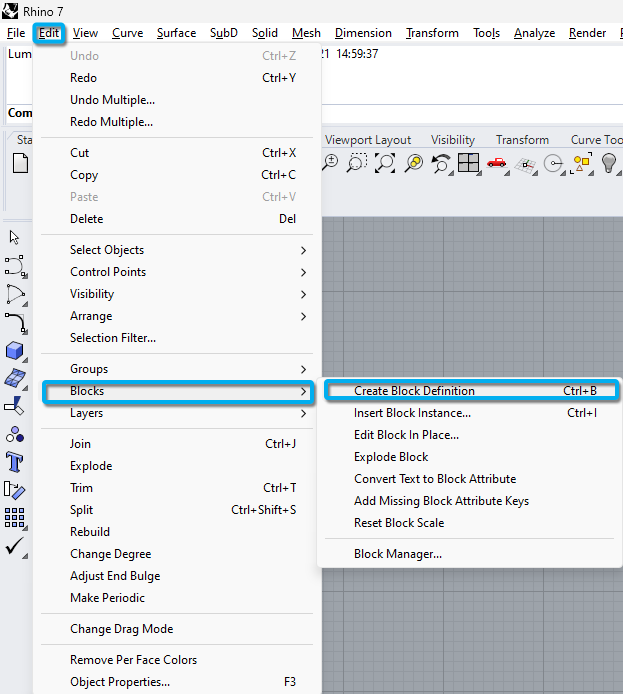
**4.5.1:** Assign a *Block Definition* to a cube:
*Edit* -\> *Blocks* -\> *Create Block Definition*
Duplicate the *Block Definition* objects as desired in the *Rhino* model.
**4.5.2: Rhino 6.10 and newer:** Install the *Lumion* plug-in for *Rhino*:
- **Knowledge Base:** [Download *Lumion LiveSync for Rhino*](https://support.lumion.com/knowledge-base/api/v2/help_center/en-us/articles/360010160093.json?hsLang=en-us)
Export the *proxy objects* to .DAE format with the *Export nodes* tickbox ticked:

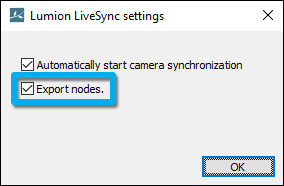

**4.5.3: Rhino 5:** Follow these instructions to export the model to .DAE format:
- **Knowledge Base:** [Model import guidelines for Rhino](https://support.lumion.com/knowledge-base/api/v2/help_center/en-us/articles/360007790353.json?hsLang=en-us)
**4.5.4:** Follow step 2.1 or 2.2 above.
## **4.6: Guidelines for *Vectorworks***
**4.6.1: Vectorworks 2019 SP3 or newer:** Install the *Lumion* plug-in for *Vectorworks*:
- **Knowledge Base:** [Download Lumion LiveSync for Vectorworks](https://support.lumion.com/knowledge-base/api/v2/help_center/en-us/articles/360016412674.json?hsLang=en-us)
**4.6.2:** Create cones to use as proxy objects.
**4.6.3:** Export the *proxy objects* to .DAE format with the plug-in.
**4.6.4:** Follow step 2.1 or 2.2 above.
## **4.7: Guidelines for** ***3ds Max***
**4.7.1:** Export the *proxy objects* to .3DS format with the default export settings.
**4.7.2:** Follow step 2.1 or 2.2 above.
## **4.8: Guidelines for** ***AllPlan***
**4.8.1:** Export the *AllPlan* *proxy* objects to .SKP (*SketchUp*) format:
- **Knowledge Base:** [Model import guidelines for Allplan](https://support.lumion.com/knowledge-base/api/v2/help_center/en-us/articles/360007794193.json?hsLang=en-us)
**4.8.2:** Then open the .SKP file in *SketchUp* and follow the instructions in section 3 above.
## **4.9: Guidelines for *BricsCAD***
**4.9.1: Lumion 8.5 and newer:** The most reliable way to export *proxy objects* is to have *block references* in the places where *Nodes* should be exported, not raw geometry. To do so, create a (*proxy*) box and turn it into a *block reference* by typing the command *Block*. In the pop-up window, select '*Convert to block'.*
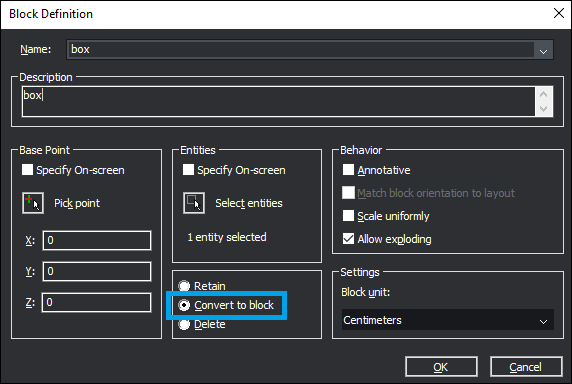
Once that is done, you can copy and paste the box as many times as you need. Then install *Lumion LiveSync for BricsCAD* and export the *proxy objects* via the Collada .DAE export method with 'Export Nodes' turned on in the export settings of the plug-in:
- **Download Link:** [Download Lumion LiveSync for BricsCAD](https://support.lumion.com/knowledge-base/api/v2/help_center/en-us/articles/360017006720.json?hsLang=en-us)
**4.9.2:** Follow step 2.1 or 2.2 above.
- [Visit our other Sections](https://support.lumion.com/knowledge-base/visit-our-other-sections?hsLang=en-us)
- [Contact Us](https://support.lumion.com/knowledge-base/contact-us?hsLang=en-us)
- [Lumion Account](https://support.lumion.com/knowledge-base/lumion-account?hsLang=en-us)
- [Latest News](https://support.lumion.com/knowledge-base/latest-news?hsLang=en-us#main-content)
- [Major Known Issues](https://support.lumion.com/knowledge-base/latest-news?hsLang=en-us#major-known-issues)
- [Lumion 2025: Major Version Release Details](https://support.lumion.com/knowledge-base/latest-news?hsLang=en-us#lumion-2025-major-version-release-details)
- [Lumion 2024: Major Version Release Details](https://support.lumion.com/knowledge-base/latest-news?hsLang=en-us#lumion-2024-major-version-release-details)
- [Lumion 2023: Major Version Release Details](https://support.lumion.com/knowledge-base/latest-news?hsLang=en-us#lumion-2023-major-version-release-details)
- [Lumion 2023: Update Release Notes](https://support.lumion.com/knowledge-base/latest-news?hsLang=en-us#lumion-2023-update-release-notes)
- [Lumion 12](https://support.lumion.com/knowledge-base/latest-news?hsLang=en-us#lumion-12)
- [Lumion 11](https://support.lumion.com/knowledge-base/latest-news?hsLang=en-us#lumion-11)
- [Lumion 10](https://support.lumion.com/knowledge-base/latest-news?hsLang=en-us#lumion-10)
- [Sales Questions](https://support.lumion.com/knowledge-base/sales-questions?hsLang=en-us)
- [Subscriptions](https://support.lumion.com/knowledge-base/subscriptions?hsLang=en-us)
- [New User Questions](https://support.lumion.com/knowledge-base/new-user-questions?hsLang=en-us)
- [Learning Resources](https://support.lumion.com/knowledge-base/learning-resources?hsLang=en-us)
- [System Requirements Questions](https://support.lumion.com/knowledge-base/system-requirements-questions?hsLang=en-us#main-content)
- [Determining the 'Complexity' of your Projects](https://support.lumion.com/knowledge-base/system-requirements-questions?hsLang=en-us#determining-the-complexity-of-your-projects)
- [System Messages from Lumion](https://support.lumion.com/knowledge-base/system-requirements-questions?hsLang=en-us#system-messages-from-lumion)
- [Requirements for Prior Versions](https://support.lumion.com/knowledge-base/system-requirements-questions?hsLang=en-us#requirements-for-prior-versions)
- [Download & Installation Questions](https://support.lumion.com/knowledge-base/download-installation-questions?hsLang=en-us#main-content)
- [Download/Installation: General Questions](https://support.lumion.com/knowledge-base/download-installation-questions?hsLang=en-us#download-installation-general-questions)
- [Download Questions](https://support.lumion.com/knowledge-base/download-installation-questions?hsLang=en-us#download-questions)
- [Installation Questions](https://support.lumion.com/knowledge-base/download-installation-questions?hsLang=en-us#installation-questions)
- [Lumion Pro Updater](https://support.lumion.com/knowledge-base/download-installation-questions?hsLang=en-us#lumion-pro-updater)
- [Plugins to CAD software](https://support.lumion.com/knowledge-base/download-installation-questions?hsLang=en-us#plugins-to-cad-software)
- [License and General Product Questions](https://support.lumion.com/knowledge-base/license-and-general-product-questions?hsLang=en-us#main-content)
- [License System Messages from Lumion](https://support.lumion.com/knowledge-base/license-and-general-product-questions?hsLang=en-us#license-system-messages-from-lumion)
- [Import & Export Questions](https://support.lumion.com/knowledge-base/import-export-questions?hsLang=en-us#main-content)
- [Model Import Guidelines](https://support.lumion.com/knowledge-base/import-export-questions?hsLang=en-us#model-import-guidelines)
- [Lumion LiveSync and import plugins](https://support.lumion.com/knowledge-base/import-export-questions?hsLang=en-us#lumion-livesync-and-import-plugins)
- [System Messages from Lumion when importing](https://support.lumion.com/knowledge-base/import-export-questions?hsLang=en-us#system-messages-from-lumion-when-importing)
- [General Questions](https://support.lumion.com/knowledge-base/general-questions?hsLang=en-us#main-content)
- [Keyboard Shortcuts in Lumion](https://support.lumion.com/knowledge-base/general-questions?hsLang=en-us#keyboard-shortcuts-in-lumion)
- [Upgrading and Updating your Lumion Version](https://support.lumion.com/knowledge-base/general-questions?hsLang=en-us#upgrading-and-updating-your-lumion-version)
- [Using Lumion 2023](https://support.lumion.com/knowledge-base/general-questions?hsLang=en-us#using-lumion-2023)
- [System Messages from Lumion](https://support.lumion.com/knowledge-base/general-questions?hsLang=en-us#system-messages-from-lumion)
- [Build Mode Questions](https://support.lumion.com/knowledge-base/build-mode-questions?hsLang=en-us#main-content)
- [Landscape and Terrains](https://support.lumion.com/knowledge-base/build-mode-questions?hsLang=en-us#landscape-and-terrains)
- [OpenStreetMap](https://support.lumion.com/knowledge-base/build-mode-questions?hsLang=en-us#openstreetmap)
- [Lighting: Sun and Artificial Lights](https://support.lumion.com/knowledge-base/build-mode-questions?hsLang=en-us#lighting-sun-and-artificial-lights)
- [Questions mainly for older versions than Lumion 12](https://support.lumion.com/knowledge-base/build-mode-questions?hsLang=en-us#questions-mainly-for-older-versions-than-lumion-12)
- [Library Content](https://support.lumion.com/knowledge-base/library-content?hsLang=en-us#main-content)
- [Library Content in Lumion 2026](https://support.lumion.com/knowledge-base/library-content?hsLang=en-us#library-content-in-lumion-2026)
- [Library Content in Lumion 2025](https://support.lumion.com/knowledge-base/library-content?hsLang=en-us#library-content-in-lumion-2025)
- [Library Content in Lumion 2024](https://support.lumion.com/knowledge-base/library-content?hsLang=en-us#library-content-in-lumion-2024)
- [Library Content in Lumion 2023](https://support.lumion.com/knowledge-base/library-content?hsLang=en-us#library-content-in-lumion-2023)
- [Library Content in Lumion 12](https://support.lumion.com/knowledge-base/library-content?hsLang=en-us#library-content-in-lumion-12)
- [Movie & Photo Mode Questions](https://support.lumion.com/knowledge-base/movie-photo-mode-questions?hsLang=en-us#main-content)
- [Photo Mode](https://support.lumion.com/knowledge-base/movie-photo-mode-questions?hsLang=en-us#photo-mode)
- [Movie Mode](https://support.lumion.com/knowledge-base/movie-photo-mode-questions?hsLang=en-us#movie-mode)
- [Animation in Movie Mode](https://support.lumion.com/knowledge-base/movie-photo-mode-questions?hsLang=en-us#animation-in-movie-mode)
- [Effects in Photo or Movie Mode](https://support.lumion.com/knowledge-base/movie-photo-mode-questions?hsLang=en-us#effects-in-photo-or-movie-mode)
- [Reflections](https://support.lumion.com/knowledge-base/movie-photo-mode-questions?hsLang=en-us#reflections)
- [Material Questions](https://support.lumion.com/knowledge-base/material-questions?hsLang=en-us#main-content)
- [Materials in versions 12 and earlier](https://support.lumion.com/knowledge-base/material-questions?hsLang=en-us#materials-in-versions-12-and-earlier)
- [Using LiveSync for Revit and a Section Box](https://support.lumion.com/knowledge-base/material-questions?hsLang=en-us#using-livesync-for-revit-and-a-section-box)
- [Rendering Questions](https://support.lumion.com/knowledge-base/rendering-questions?hsLang=en-us#main-content)
- [General Rendering Questions](https://support.lumion.com/knowledge-base/rendering-questions?hsLang=en-us#general-rendering-questions)
- [Rendering of Photos](https://support.lumion.com/knowledge-base/rendering-questions?hsLang=en-us#rendering-of-photos)
- [Rendering of Clips and Movies](https://support.lumion.com/knowledge-base/rendering-questions?hsLang=en-us#rendering-of-clips-and-movies)
- [Tips to getting the best renders](https://support.lumion.com/knowledge-base/rendering-questions?hsLang=en-us#tips-to-getting-the-best-renders)
- [Rendering Performance](https://support.lumion.com/knowledge-base/rendering-questions?hsLang=en-us#rendering-performance)
- [Technical Issues when Rendering](https://support.lumion.com/knowledge-base/rendering-questions?hsLang=en-us#technical-issues-when-rendering)
- [Panorama Mode Questions](https://support.lumion.com/knowledge-base/panorama-mode-questions?hsLang=en-us#main-content)
- [Technical questions when rendering with Panorama Mode](https://support.lumion.com/knowledge-base/panorama-mode-questions?hsLang=en-us#technical-questions-when-rendering-with-panorama-mode)
- [File & BackUp Questions](https://support.lumion.com/knowledge-base/file-backup-questions?hsLang=en-us#main-content)
- [Saving and Backup](https://support.lumion.com/knowledge-base/file-backup-questions?hsLang=en-us#saving-and-backup)
- [File Saving Issues](https://support.lumion.com/knowledge-base/file-backup-questions?hsLang=en-us#file-saving-issues)
- [Lumion-Documents](https://support.lumion.com/knowledge-base/file-backup-questions?hsLang=en-us#lumion-documents)
- [Transfer, Move or Migrate Files](https://support.lumion.com/knowledge-base/file-backup-questions?hsLang=en-us#transfer-move-or-migrate-files)
- [Troubleshooting](https://support.lumion.com/knowledge-base/troubleshooting?hsLang=en-us#main-content)
- [Reports about your PC](https://support.lumion.com/knowledge-base/troubleshooting?hsLang=en-us#reports-about-your-pc)
- [Photo and Movie Mode Issues](https://support.lumion.com/knowledge-base/troubleshooting?hsLang=en-us#photo-and-movie-mode-issues)
- [Rendering Issues](https://support.lumion.com/knowledge-base/troubleshooting?hsLang=en-us#rendering-issues)
- [Error Messages from Lumion](https://support.lumion.com/knowledge-base/troubleshooting?hsLang=en-us#error-messages-from-lumion)
- [Hardware related Issues](https://support.lumion.com/knowledge-base/troubleshooting?hsLang=en-us#hardware-related-issues)
- [Other Troubleshooting Issues](https://support.lumion.com/knowledge-base/troubleshooting?hsLang=en-us#other-troubleshooting-issues)
- [Article Developments](https://support.lumion.com/knowledge-base/article-developments?hsLang=en-us#main-content)
- [Devs - Multi‑Image Button Viewer](https://support.lumion.com/knowledge-base/article-developments?hsLang=en-us#devs-multi-image-button-viewer)
[](https://lumion.com/)
[mailto:email@email.com](mailto:email@email.com)
Copyright © 2026, Lumion - Act3D B.V.
#### Product
[Plans and pricing](https://lumion.com/product/buy)
[Discover Lumion](https://lumion.com/product/discover-lumion)
[Compatibility](https://lumion.com/compatibility/)
[System Requirements](https://lumion.com/product/system-requirements)
[Find a reseller](https://lumion.com/about/find-reseller)
[Free trial](https://lumion.com/product/free-trial)
#### Solutions
[Architectural design](https://lumion.com/product/architectural-design)
[Interior design](https://lumion.com/product/interior-design)
[Landscape architecture](https://lumion.com/product/landscape-architecture)
[Urban planning](https://lumion.com/product/urban-planning)
[3D rendering](https://lumion.com/product/3d-rendering-software)
[Education](https://lumion.com/product/educational-licenses)
#### Compatibility
[Trimble SketchUp](https://lumion.com/compatibility/sketchup-rendering)
[Autodesk Revit](https://lumion.com/compatibility/revit-rendering)
[Graphisoft ArchiCAD](https://lumion.com/compatibility/archicad-rendering)
[Rhinoceros](https://lumion.com/compatibility/rhino-rendering)
[Autodesk Autocad](https://lumion.com/compatibility/autocad-rendering)
[Autodesk FormIt Pro](https://lumion.com/compatibility/lumion-for-autodesk-formit-pro)
[Nemetschek Allplan](https://lumion.com/compatibility/allplan-rendering)
[Nemetschek Vectorworks](https://lumion.com/compatibility/vectorworks-rendering)
[BricsCAD](https://lumion.com/compatibility/bricscad-rendering)
[3D Studio Max](https://lumion.com/compatibility/3ds-max-rendering)
#### Resources
[Made with Lumion](https://lumion.com/made-with-lumion)
[Tutorials](https://support.lumion.com/video-tutorials?hsLang=en-us)
[Support and learning](https://support.lumion.com/knowledge-base/api/v2/help_center/en-us/articles/360044608053.json?hsLang=en-us)
[Downloads](https://support.lumion.com/downloads?hsLang=en-us)
[Community](https://community.lumion.com/index.php)
#### About
[Our Story](https://lumion.com/about)
[We're hiring!](https://lumion.com/about/careers)
[News](https://lumion.com/news)
[Contact us](https://lumion.com/about/contact)
[Terms & conditions](https://lumion.com/legal/terms-of-service) [EULA](https://lumion.com/legal/eula) [Privacy statement](https://lumion.com/legal/privacy-statement) [CEIP](https://lumion.com/legal/ceip) [Disclaimer](https://lumion.com/legal/disclaimer) © 2026 Lumion