---
title: Is Lumion compatible with remote desktop or cloud services?
description: Remote Desktop and Virtual Machine Environments for Lumion.
---
Solutions
[Architectural design All you need to bring your residential, commercial or institutional designs to life](https://lumion.com/product/architectural-design) [Landscape architecture Beautiful terrains and fine-detailed nature for any climate or season](https://lumion.com/product/landscape-architecture)
[Interior design Realistic light, high-quality textures, and an extensive asset library](https://lumion.com/product/interior-design) [Students and Faculties Lumion is free for students, educators, and faculties around the world](https://lumion.com/product/educational-licenses)
[SketchUp](https://lumion.com/compatibility/sketchup-rendering) [Revit](https://lumion.com/compatibility/revit-rendering) [ArchiCAD](https://lumion.com/compatibility/archicad-rendering) [Rhino](https://lumion.com/compatibility/rhino-rendering) [Autocad](https://lumion.com/compatibility/autocad-rendering) [See more](https://lumion.com/compatibility/)
Product
[Discover Axogram New Live architectural diagramming](https://lumion.com/product/axogram) [Lumion Cloud Where design meets collaboration](https://lumion.com/product/lumion-cloud)
[Lumion Pro Advanced visualization solution](https://lumion.com/product/lumion-pro) [Discover AI tools New AI built for architectural work](https://lumion.com/product/ai)
[Lumion Pro 2026.1 is out now! 🚀](https://lumion.com/product/latest-version-pro) [Compatibility](https://lumion.com/compatibility/) [System Requirements](https://lumion.com/product/system-requirements) [Roadmap](https://lumion.com/product/roadmap)
[Pricing](https://lumion.com/product/buy) Resources
[Made with Lumion Get inspired by the stories behind the designs](https://lumion.com/made-with-lumion)
[Tips & Guides Make the most out of Lumion with helpful guides and tutorials](https://lumion.com/tips-guides)
[Knowledge base](https://support.lumion.com/knowledge-base?hsLang=en-us) [Community](https://community.lumion.com/index.php) [Downloads](https://support.lumion.com/downloads?hsLang=en-us)
About
[Who we are Learn about our story and mission](https://lumion.com/about) [Careers - We're hiring Let's build the future of architectural visualization](https://lumion.com/about/careers)
[News Discover the latest product news and more](https://lumion.com/news)
[Find your local reseller](https://lumion.com/about/find-reseller) [Contact us](https://lumion.com/about/contact)
[](http://lumion.com)
[My Account](https://account.lumion.com)
Solutions
[Architectural design](https://lumion.com/product/architectural-design) [Interior design](https://lumion.com/product/interior-design) [Landscape architecture](https://lumion.com/product/landscape-architecture) [Students and Faculties](https://lumion.com/product/educational-licenses)
---
[SketchUp](https://lumion.com/compatibility/sketchup-rendering) [Revit](https://lumion.com/compatibility/revit-rendering) [ArchiCAD](https://lumion.com/compatibility/archicad-rendering) [Rhino](https://lumion.com/compatibility/rhino-rendering) [Autocad](https://lumion.com/compatibility/autocad-rendering) [See more](https://lumion.com/compatibility/)
Product
[Axogram New](https://lumion.com/product/axogram) [Lumion Cloud](https://lumion.com/product/lumion-cloud) [Lumion Pro](https://lumion.com/product/lumion-pro) [Discover AI tools New](https://lumion.com/product/ai)
---
[Lumion Pro 2026.1 is out now! 🚀](https://lumion.com/product/latest-version-pro) [Compatibility](https://lumion.com/compatibility/) [System Requirements](https://lumion.com/product/system-requirements) [Roadmap](https://lumion.com/product/roadmap)
[Pricing](https://lumion.com/product/buy) Resources
[Made with Lumion](https://lumion.com/made-with-lumion) [Tips & Guides](https://lumion.com/tips-guides)
---
[Knowledge base](https://support.lumion.com/knowledge-base?hsLang=en-us) [Community](https://community.lumion.com/index.php) [Downloads](https://support.lumion.com/downloads?hsLang=en-us)
About
[Who we are](https://lumion.com/about) [Careers - We're hiring](https://lumion.com/about/careers) [News](https://lumion.com/news)
---
[Find your local reseller](https://lumion.com/about/find-reseller) [Contact us](https://lumion.com/about/contact)
[My Account](https://account.lumion.com)
[Submit a request](https://support.lumion.com/hc/en-us/requests/new?hsLang=en-us)
Lumion Knowledge Base
How can we help?
- There are no suggestions because the search field is empty.
[Skip to content](https://support.lumion.com/knowledge-base/api/v2/help_center/en-us/articles/360003455374.json#main-content)
English - United States
Show submenu for translations

Open main navigation
Close main navigation
- English - United States
Show submenu for translations
- Contact us
Contact us
How can we help you?
- There are no suggestions because the search field is empty.
1. [Knowledge Base](https://support.lumion.com/knowledge-base?hsLang=en-us)
2. [System Requirements Questions](https://support.lumion.com/knowledge-base/system-requirements-questions?hsLang=en-us)
# Is Lumion compatible with remote desktop or cloud services?
### Links to Sections:
[A. What is a remote desktop or cloud service?](https://support.lumion.com/knowledge-base/api/v2/help_center/en-us/articles/360003455374.json#anchor2)
[B. Compatibility](https://support.lumion.com/knowledge-base/api/v2/help_center/en-us/articles/360003455374.json#anchor3)
[C. What are the benefits?](https://support.lumion.com/knowledge-base/api/v2/help_center/en-us/articles/360003455374.json#anchor4)
[D. Important things to keep in mind while considering a cloud service](https://support.lumion.com/knowledge-base/api/v2/help_center/en-us/articles/360003455374.json#anchor5)
[E. Applications and Services Available - 1. Remote desktop](https://support.lumion.com/knowledge-base/api/v2/help_center/en-us/articles/360003455374.json#anchor6)
[E. Applications and Services Available - 2. Cloud services](https://support.lumion.com/knowledge-base/api/v2/help_center/en-us/articles/360003455374.json#anchor7)
### **A. What is a remote desktop or cloud service?**
A remote desktop or cloud service is a computer you can log into and control over the internet (host).
- The host computer sends a live video feed of what is on screen to your computer.
- The computer you remote control could be one that you own, or it could be a computer you rent from a cloud service provider.
- You would do so to get access to higher-performance hardware or additional resources.
- You might find that the words remote desktop or cloud service are sometimes used interchangeably.
- You might use one or the other to help in creating your *Project* (using *Build Mode*, *Photo*, and *Movie Mode*). Or rendering your *Photos* and *Movies* once you have finalized things. Or both create and render.
**Note:** Lumion Cloud is **not** a cloud service for hosting Lumion.
**Disclaimer:** *Lumion* does not sponsor or collaborate with any of the software companies or cloud service providers listed in this article.
This article serves as a general guide and is for information purposes only.
*Lumion* is only guaranteed to function as advertised and as stipulated on the [EULA](https://lumion.com/eula.html) if it is installed on a local computer that matches or exceeds *Lumion's* [system requirements](https://lumion.com/requirements.html). If you experience issues with *Lumion*, our technical support team will not be able to help, as we do not own or have access to the remote system or cloud environment.
### **B. Compatibility**
*Lumion* can be remotely accessed through a few applications.
**Important:** Not all virtual desktop offerings you find online can run *Lumion*. Many of them do not meet our [hardware requirements](https://lumion.com/requirements.html) or they are configured in a way that does not support *Lumion*.
Essentially, it requires a fast internet connection and cloud software that **prioritizes low-latency connections and fast video encoding and streaming**.
This would ensure that each click on your PC results in an immediate reaction on screen from the video feed of the computer you are accessing. See Section D. below.
### **C. What are the benefits?**
#### 1. Benefits of using a remote desktop
- You will be aware of some, especially since 2020.
- You can work remotely from the office, either at home or some other location.
- You still get access to your folders and files on the PCs that are running in the office.
- You can continue using your 3D modeling and BIM software and *Lumion*.
#### 2. Benefits of using a cloud desktop service
- Cloud computing gives you temporary access to a more powerful system.
- The system may be more scalable, allowing for access to multiple more powerful graphics systems. Note that *Lumion* still needs to be installed on each to access the graphics card.
- If your local computer only meets *Lumion's* [minimum requirements](https://lumion.com/requirements.html), accessing a more powerful computer remotely might be useful in certain situations to accelerate your workflow or significantly reduce the time to render.
[Top of page](https://support.lumion.com/knowledge-base/api/v2/help_center/en-us/articles/360003455374.json#anchor1)
### **D. Important things to keep in mind while considering a cloud service**
#### 1. You will need to install *Lumion* on it:
When you rent and remote control a computer through a cloud service, the Windows environment will be fresh and will only have the bare minimum installed. You would need to install your Lumion product onto that computer, and the duration of that process will count towards your rental cost.
#### 2. Internet speed & geographic location:
Using *Lumion* while remote controlling a computer over the internet requires a very reliable and fast connection for both you and the host computer.
The location of the host computers (or servers) should also be near you geographically. For example: If you live in Europe and use a cloud service that has its servers in the US, you will experience a delay in the reaction to your mouse clicks and key presses resulting in an overall sluggish experience. This happens because the distance between computers results in the signal taking longer to travel between them.
#### 3. Low-latency video encoding:
Cloud software and providers that prioritize low-latency through fast video encoding and streaming work best with *Lumion*.
This will ensure that every click on your PC results in an immediate reaction on screen from the video feed of the cloud computer you are accessing. As a core part of *Lumion* is creating your scene in *Build Mode*, and customizing the effects in *Photo Mode* or *Movie Mode*, you expect to see quick and fast reactions to your clicks.
#### 4. VM configuration:
Cloud providers who configure their services with Virtual Machines must check if their configuration supports *Lumion*. *Lumion* requires direct and exclusive access to a graphics card and for specific ports to be open in order to operate.
**Note:** If you find a cloud service that is compatible with *Lumion*, then *Lumion* works best if you start it via the remote desktop connection. If *Lumion* is already running when you start a remote desktop connection, the mouse sensitivity might be too high.
[Top of page](https://support.lumion.com/knowledge-base/api/v2/help_center/en-us/articles/360003455374.json#anchor1)
### **E. Applications and Services Available:**
### **1. Remote desktop: Programs to remote control a computer you own that works well with *Lumion***
If you own a powerful computer and wish to remote control it over the internet, here are some programs you could use. It's important to test these programs for yourself, as individual circumstances might change the experience you get.
#### 1.1 Requirements:
You install a remote desktop on your PC and connect it to the other PC. In some cases, the remote desktop may require an installation at both places.
- Everything is installed at the office. However, you are best to install *Lumion* on your home PC if the hardware is at least the same as the office.
- Installing elsewhere may require specific permission from your bosses.
- The software and the *License Key* are owned by the company that you work for or contract to.
- You need to apply due diligence and security to any emails and the software whilst *Lumion* is installed elsewhere.
- It is **essential** to have a fast internet connection.
- Our *LiveSync* technology interfacing to your 3d modeling/BIM does not require any other special connections, and in general things like Autodesk BIM360 will continue to work as if you were working on local files.
### **1.2 Best results:**
#### 1.2.1 Parsec:
Parsec is software that you can install on 2 or more computers you own. For example, you can install it on your own work PC and remote control it from anywhere using another PC or Mac you own.
It prioritizes low-latency connections and has fast streaming technology to ensure a smooth experience while remotely controlling your work PC. Parsec has a free version and also a paid version for professionals and teams.
- **External Link:** [Parsec](https://parsecgaming.com/)
### **1.3 Somewhat usable:**
#### 1.3.1 Microsoft Remote Desktop:
Microsoft Remote Desktop is a free app that works for some users and is similar to the program 'Windows Remote Desktop*'* that is built into Windows 10 Pro. The app is used to connect to a remote PC or virtual apps and desktops.
The mouse sensitivity issue observed in *Lumion* *8.5* and older versions when accessing *Lumion* via Windows Remote Desktop (Connection) has been resolved in *Lumion 9.0* and newer versions.
However, Windows Remote Desktop (Connection) is not recommended as it may have a high delay and may result in glitches. Please test it thoroughly before deciding to use it.
- **External Link:** [Microsoft Remote Desktop (app)](https://www.microsoft.com/en-us/p/microsoft-remote-desktop/9wzdncrfj3ps?activetab=pivot:overviewtab)
#### 1.3.2 TeamViewer
Some remote desktop applications, such as TeamViewer might let you start the rendering procedure, but we don't recommend building your *Project* with it.
Navigating around your scene and moving objects, etc, will not work as expected due to the delay and mouse sensitivity issues. We advise anyone who is interested in accessing *Lumion* via TeamViewer to first test it out. It has a free version and also a version for professionals.
- **External Link:** [TeamViewer](https://www.teamviewer.com/en/)
[Top of page](https://support.lumion.com/knowledge-base/api/v2/help_center/en-us/articles/360003455374.json#anchor1)
### **2. Cloud services: Rented computers and services that work with *Lumion***
#### 2.1 Shadow:
Shadow is a paid service that provides desktop environments that can be rented and remote-controlled from your home computer.
It uses a fast low-latency streaming technology, ensuring a fast response time and a good *Lumion* experience. Shadow has servers in the US and Europe.
- **External Link:** [Shadow](https://shadow.tech)
#### 2.2 Designair:
Designair is a paid Desktop-as-a-Service (DaaS) platform that provides NVIDIA GPU-powered virtual workstations for architectural design and visualization workflows.
The service uses Amazon's DCV streaming technology and operates from 25 locations globally, allowing you to access cloud-based workstations from regions closer to your physical location. The platform is also ISO 27001 certified and offers usage-based billing.
If you want to test the service with your own *Projects*, a free trial was also available at the time of testing. Different workstation tiers are available depending on your workload requirements.
In addition to virtual workstations, services such as file storage, servers, and user management tools are also available. Additional connectivity options, including site-to-site integrations, were available at the time of testing.
- **External Link:** [Designair](https://www.designair.io/)
#### 2.3 iRender:
iRender is a paid service based in Vietnam that provides access to powerful PCs with CPUs and GPUs that meet *Lumion's* 'High-End' requirements.
Getting set up with iRender takes a few steps. They have quick and friendly customer service that can help you throughout the process.
If you are in Europe or North America, the connection to the iRender machines will have a delay.
If, for example, you need to render a very long movie in 4K and your local PC would take too long, we recommend that you create the *Scene* and apply the *Effects* with your local PC and then do the final render through iRender. If, however, you live in Asia, then iRender should provide a smooth *Lumion* experience whilst creating a *Project*.
- **External Link:** [iRender](https://irendering.net/)
#### 2.4 Vagon:
Vagon offers a variety of virtual machines that can be accessed from any device. Their application works can be accessed via your browser - however, for best results, it's highly recommended to use their desktop application.
The paid solutions they offer range from individual accounts or teams to corporate level features, and the device performance meets the 'Recommended' requirements of Lumion for the following configurations:
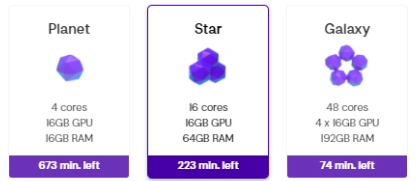
Other configurations are also available, but not recommended due to various system requirements. Note that a minimum drive space of 200GB should be allocated when setting up the machines.
- **External Link:** [Vagon](https://vagon.io/)
### **3. Services that might not work well with *Lumion*:**
**Note:** The *Lumion* team has not tested other cloud desktop access services such as: Splashtop, WMWare Fusion, VMWare VDI, ZenApp, Nvidia GRID, RTX Server, XenServer, XenDesktop, HP zCentral Remote Boost, and others not included in those mentioned in Section E.
We do get inquiries from customers trying to use the above, and have found there can be issues as they do not fully meet the requirements mentioned earlier.
[Top of page](https://support.lumion.com/knowledge-base/api/v2/help_center/en-us/articles/360003455374.json#anchor1)
If you need further advice or assistance with an existing remote desktop or cloud service, please *Contact Us*:
[Contact Us](https://support.lumion.com/hc/en-us/articles/360041760194?hsLang=en-us)
- [Visit our other Sections](https://support.lumion.com/knowledge-base/visit-our-other-sections?hsLang=en-us)
- [Contact Us](https://support.lumion.com/knowledge-base/contact-us?hsLang=en-us)
- [Lumion Account](https://support.lumion.com/knowledge-base/lumion-account?hsLang=en-us)
- [Latest News](https://support.lumion.com/knowledge-base/latest-news?hsLang=en-us#main-content)
- [Major Known Issues](https://support.lumion.com/knowledge-base/latest-news?hsLang=en-us#major-known-issues)
- [Lumion 2025: Major Version Release Details](https://support.lumion.com/knowledge-base/latest-news?hsLang=en-us#lumion-2025-major-version-release-details)
- [Lumion 2024: Major Version Release Details](https://support.lumion.com/knowledge-base/latest-news?hsLang=en-us#lumion-2024-major-version-release-details)
- [Lumion 2023: Major Version Release Details](https://support.lumion.com/knowledge-base/latest-news?hsLang=en-us#lumion-2023-major-version-release-details)
- [Lumion 2023: Update Release Notes](https://support.lumion.com/knowledge-base/latest-news?hsLang=en-us#lumion-2023-update-release-notes)
- [Lumion 12](https://support.lumion.com/knowledge-base/latest-news?hsLang=en-us#lumion-12)
- [Lumion 11](https://support.lumion.com/knowledge-base/latest-news?hsLang=en-us#lumion-11)
- [Lumion 10](https://support.lumion.com/knowledge-base/latest-news?hsLang=en-us#lumion-10)
- [Sales Questions](https://support.lumion.com/knowledge-base/sales-questions?hsLang=en-us)
- [Subscriptions](https://support.lumion.com/knowledge-base/subscriptions?hsLang=en-us)
- [New User Questions](https://support.lumion.com/knowledge-base/new-user-questions?hsLang=en-us)
- [Learning Resources](https://support.lumion.com/knowledge-base/learning-resources?hsLang=en-us)
- [System Requirements Questions](https://support.lumion.com/knowledge-base/system-requirements-questions?hsLang=en-us#main-content)
- [Determining the 'Complexity' of your Projects](https://support.lumion.com/knowledge-base/system-requirements-questions?hsLang=en-us#determining-the-complexity-of-your-projects)
- [System Messages from Lumion](https://support.lumion.com/knowledge-base/system-requirements-questions?hsLang=en-us#system-messages-from-lumion)
- [Requirements for Prior Versions](https://support.lumion.com/knowledge-base/system-requirements-questions?hsLang=en-us#requirements-for-prior-versions)
- [Download & Installation Questions](https://support.lumion.com/knowledge-base/download-installation-questions?hsLang=en-us#main-content)
- [Download/Installation: General Questions](https://support.lumion.com/knowledge-base/download-installation-questions?hsLang=en-us#download-installation-general-questions)
- [Download Questions](https://support.lumion.com/knowledge-base/download-installation-questions?hsLang=en-us#download-questions)
- [Installation Questions](https://support.lumion.com/knowledge-base/download-installation-questions?hsLang=en-us#installation-questions)
- [Lumion Pro Updater](https://support.lumion.com/knowledge-base/download-installation-questions?hsLang=en-us#lumion-pro-updater)
- [Plugins to CAD software](https://support.lumion.com/knowledge-base/download-installation-questions?hsLang=en-us#plugins-to-cad-software)
- [License and General Product Questions](https://support.lumion.com/knowledge-base/license-and-general-product-questions?hsLang=en-us#main-content)
- [License System Messages from Lumion](https://support.lumion.com/knowledge-base/license-and-general-product-questions?hsLang=en-us#license-system-messages-from-lumion)
- [Import & Export Questions](https://support.lumion.com/knowledge-base/import-export-questions?hsLang=en-us#main-content)
- [Model Import Guidelines](https://support.lumion.com/knowledge-base/import-export-questions?hsLang=en-us#model-import-guidelines)
- [Lumion LiveSync and import plugins](https://support.lumion.com/knowledge-base/import-export-questions?hsLang=en-us#lumion-livesync-and-import-plugins)
- [System Messages from Lumion when importing](https://support.lumion.com/knowledge-base/import-export-questions?hsLang=en-us#system-messages-from-lumion-when-importing)
- [General Questions](https://support.lumion.com/knowledge-base/general-questions?hsLang=en-us#main-content)
- [Keyboard Shortcuts in Lumion](https://support.lumion.com/knowledge-base/general-questions?hsLang=en-us#keyboard-shortcuts-in-lumion)
- [Upgrading and Updating your Lumion Version](https://support.lumion.com/knowledge-base/general-questions?hsLang=en-us#upgrading-and-updating-your-lumion-version)
- [Using Lumion 2023](https://support.lumion.com/knowledge-base/general-questions?hsLang=en-us#using-lumion-2023)
- [System Messages from Lumion](https://support.lumion.com/knowledge-base/general-questions?hsLang=en-us#system-messages-from-lumion)
- [Build Mode Questions](https://support.lumion.com/knowledge-base/build-mode-questions?hsLang=en-us#main-content)
- [Landscape and Terrains](https://support.lumion.com/knowledge-base/build-mode-questions?hsLang=en-us#landscape-and-terrains)
- [OpenStreetMap](https://support.lumion.com/knowledge-base/build-mode-questions?hsLang=en-us#openstreetmap)
- [Lighting: Sun and Artificial Lights](https://support.lumion.com/knowledge-base/build-mode-questions?hsLang=en-us#lighting-sun-and-artificial-lights)
- [Questions mainly for older versions than Lumion 12](https://support.lumion.com/knowledge-base/build-mode-questions?hsLang=en-us#questions-mainly-for-older-versions-than-lumion-12)
- [Library Content](https://support.lumion.com/knowledge-base/library-content?hsLang=en-us#main-content)
- [Library Content in Lumion 2026](https://support.lumion.com/knowledge-base/library-content?hsLang=en-us#library-content-in-lumion-2026)
- [Library Content in Lumion 2025](https://support.lumion.com/knowledge-base/library-content?hsLang=en-us#library-content-in-lumion-2025)
- [Library Content in Lumion 2024](https://support.lumion.com/knowledge-base/library-content?hsLang=en-us#library-content-in-lumion-2024)
- [Library Content in Lumion 2023](https://support.lumion.com/knowledge-base/library-content?hsLang=en-us#library-content-in-lumion-2023)
- [Library Content in Lumion 12](https://support.lumion.com/knowledge-base/library-content?hsLang=en-us#library-content-in-lumion-12)
- [Movie & Photo Mode Questions](https://support.lumion.com/knowledge-base/movie-photo-mode-questions?hsLang=en-us#main-content)
- [Photo Mode](https://support.lumion.com/knowledge-base/movie-photo-mode-questions?hsLang=en-us#photo-mode)
- [Movie Mode](https://support.lumion.com/knowledge-base/movie-photo-mode-questions?hsLang=en-us#movie-mode)
- [Animation in Movie Mode](https://support.lumion.com/knowledge-base/movie-photo-mode-questions?hsLang=en-us#animation-in-movie-mode)
- [Effects in Photo or Movie Mode](https://support.lumion.com/knowledge-base/movie-photo-mode-questions?hsLang=en-us#effects-in-photo-or-movie-mode)
- [Reflections](https://support.lumion.com/knowledge-base/movie-photo-mode-questions?hsLang=en-us#reflections)
- [Material Questions](https://support.lumion.com/knowledge-base/material-questions?hsLang=en-us#main-content)
- [Materials in versions 12 and earlier](https://support.lumion.com/knowledge-base/material-questions?hsLang=en-us#materials-in-versions-12-and-earlier)
- [Using LiveSync for Revit and a Section Box](https://support.lumion.com/knowledge-base/material-questions?hsLang=en-us#using-livesync-for-revit-and-a-section-box)
- [Rendering Questions](https://support.lumion.com/knowledge-base/rendering-questions?hsLang=en-us#main-content)
- [General Rendering Questions](https://support.lumion.com/knowledge-base/rendering-questions?hsLang=en-us#general-rendering-questions)
- [Rendering of Photos](https://support.lumion.com/knowledge-base/rendering-questions?hsLang=en-us#rendering-of-photos)
- [Rendering of Clips and Movies](https://support.lumion.com/knowledge-base/rendering-questions?hsLang=en-us#rendering-of-clips-and-movies)
- [Tips to getting the best renders](https://support.lumion.com/knowledge-base/rendering-questions?hsLang=en-us#tips-to-getting-the-best-renders)
- [Rendering Performance](https://support.lumion.com/knowledge-base/rendering-questions?hsLang=en-us#rendering-performance)
- [Technical Issues when Rendering](https://support.lumion.com/knowledge-base/rendering-questions?hsLang=en-us#technical-issues-when-rendering)
- [Panorama Mode Questions](https://support.lumion.com/knowledge-base/panorama-mode-questions?hsLang=en-us#main-content)
- [Technical questions when rendering with Panorama Mode](https://support.lumion.com/knowledge-base/panorama-mode-questions?hsLang=en-us#technical-questions-when-rendering-with-panorama-mode)
- [File & BackUp Questions](https://support.lumion.com/knowledge-base/file-backup-questions?hsLang=en-us#main-content)
- [Saving and Backup](https://support.lumion.com/knowledge-base/file-backup-questions?hsLang=en-us#saving-and-backup)
- [File Saving Issues](https://support.lumion.com/knowledge-base/file-backup-questions?hsLang=en-us#file-saving-issues)
- [Lumion-Documents](https://support.lumion.com/knowledge-base/file-backup-questions?hsLang=en-us#lumion-documents)
- [Transfer, Move or Migrate Files](https://support.lumion.com/knowledge-base/file-backup-questions?hsLang=en-us#transfer-move-or-migrate-files)
- [Troubleshooting](https://support.lumion.com/knowledge-base/troubleshooting?hsLang=en-us#main-content)
- [Reports about your PC](https://support.lumion.com/knowledge-base/troubleshooting?hsLang=en-us#reports-about-your-pc)
- [Photo and Movie Mode Issues](https://support.lumion.com/knowledge-base/troubleshooting?hsLang=en-us#photo-and-movie-mode-issues)
- [Rendering Issues](https://support.lumion.com/knowledge-base/troubleshooting?hsLang=en-us#rendering-issues)
- [Error Messages from Lumion](https://support.lumion.com/knowledge-base/troubleshooting?hsLang=en-us#error-messages-from-lumion)
- [Hardware related Issues](https://support.lumion.com/knowledge-base/troubleshooting?hsLang=en-us#hardware-related-issues)
- [Other Troubleshooting Issues](https://support.lumion.com/knowledge-base/troubleshooting?hsLang=en-us#other-troubleshooting-issues)
- [Article Developments](https://support.lumion.com/knowledge-base/article-developments?hsLang=en-us#main-content)
- [Devs - Multi‑Image Button Viewer](https://support.lumion.com/knowledge-base/article-developments?hsLang=en-us#devs-multi-image-button-viewer)
[](https://lumion.com/)
[mailto:email@email.com](mailto:email@email.com)
Copyright © 2026, Lumion - Act3D B.V.
#### Product
[Plans and pricing](https://lumion.com/product/buy)
[Discover Lumion](https://lumion.com/product/discover-lumion)
[Compatibility](https://lumion.com/compatibility/)
[System Requirements](https://lumion.com/product/system-requirements)
[Find a reseller](https://lumion.com/about/find-reseller)
[Free trial](https://lumion.com/product/free-trial)
#### Solutions
[Architectural design](https://lumion.com/product/architectural-design)
[Interior design](https://lumion.com/product/interior-design)
[Landscape architecture](https://lumion.com/product/landscape-architecture)
[Urban planning](https://lumion.com/product/urban-planning)
[3D rendering](https://lumion.com/product/3d-rendering-software)
[Education](https://lumion.com/product/educational-licenses)
#### Compatibility
[Trimble SketchUp](https://lumion.com/compatibility/sketchup-rendering)
[Autodesk Revit](https://lumion.com/compatibility/revit-rendering)
[Graphisoft ArchiCAD](https://lumion.com/compatibility/archicad-rendering)
[Rhinoceros](https://lumion.com/compatibility/rhino-rendering)
[Autodesk Autocad](https://lumion.com/compatibility/autocad-rendering)
[Autodesk FormIt Pro](https://lumion.com/compatibility/lumion-for-autodesk-formit-pro)
[Nemetschek Allplan](https://lumion.com/compatibility/allplan-rendering)
[Nemetschek Vectorworks](https://lumion.com/compatibility/vectorworks-rendering)
[BricsCAD](https://lumion.com/compatibility/bricscad-rendering)
[3D Studio Max](https://lumion.com/compatibility/3ds-max-rendering)
#### Resources
[Made with Lumion](https://lumion.com/made-with-lumion)
[Tutorials](https://support.lumion.com/video-tutorials?hsLang=en-us)
[Support and learning](https://support.lumion.com/knowledge-base/api/v2/help_center/en-us/articles/360044608053.json?hsLang=en-us)
[Downloads](https://support.lumion.com/downloads?hsLang=en-us)
[Community](https://community.lumion.com/index.php)
#### About
[Our Story](https://lumion.com/about)
[We're hiring!](https://lumion.com/about/careers)
[News](https://lumion.com/news)
[Contact us](https://lumion.com/about/contact)
[Terms & conditions](https://lumion.com/legal/terms-of-service) [EULA](https://lumion.com/legal/eula) [Privacy statement](https://lumion.com/legal/privacy-statement) [CEIP](https://lumion.com/legal/ceip) [Disclaimer](https://lumion.com/legal/disclaimer) © 2026 Lumion