---
title: How do you resolve antivirus and firewall problems?
description: Knowledge Base
---
Solutions
[Architectural design All you need to bring your residential, commercial or institutional designs to life](https://lumion.com/product/architectural-design) [Landscape architecture Beautiful terrains and fine-detailed nature for any climate or season](https://lumion.com/product/landscape-architecture)
[Interior design Realistic light, high-quality textures, and an extensive asset library](https://lumion.com/product/interior-design) [Students and Faculties Lumion is free for students, educators, and faculties around the world](https://lumion.com/product/educational-licenses)
[SketchUp](https://lumion.com/compatibility/sketchup-rendering) [Revit](https://lumion.com/compatibility/revit-rendering) [ArchiCAD](https://lumion.com/compatibility/archicad-rendering) [Rhino](https://lumion.com/compatibility/rhino-rendering) [Autocad](https://lumion.com/compatibility/autocad-rendering) [See more](https://lumion.com/compatibility/)
Product
[Discover Axogram New Live architectural diagramming](https://lumion.com/product/axogram) [Lumion Cloud Where design meets collaboration](https://lumion.com/product/lumion-cloud)
[Lumion Pro Advanced visualization solution](https://lumion.com/product/lumion-pro) [Discover AI tools New AI built for architectural work](https://lumion.com/product/ai)
[Lumion Pro 2026.1 is out now! 🚀](https://lumion.com/product/latest-version-pro) [Compatibility](https://lumion.com/compatibility/) [System Requirements](https://lumion.com/product/system-requirements) [Roadmap](https://lumion.com/product/roadmap)
[Pricing](https://lumion.com/product/buy) Resources
[Made with Lumion Get inspired by the stories behind the designs](https://lumion.com/made-with-lumion)
[Tips & Guides Make the most out of Lumion with helpful guides and tutorials](https://lumion.com/tips-guides)
[Knowledge base](https://support.lumion.com/knowledge-base?hsLang=en-us) [Community](https://community.lumion.com/index.php) [Downloads](https://support.lumion.com/downloads?hsLang=en-us)
About
[Who we are Learn about our story and mission](https://lumion.com/about) [Careers - We're hiring Let's build the future of architectural visualization](https://lumion.com/about/careers)
[News Discover the latest product news and more](https://lumion.com/news)
[Find your local reseller](https://lumion.com/about/find-reseller) [Contact us](https://lumion.com/about/contact)
[](http://lumion.com)
[My Account](https://account.lumion.com)
Solutions
[Architectural design](https://lumion.com/product/architectural-design) [Interior design](https://lumion.com/product/interior-design) [Landscape architecture](https://lumion.com/product/landscape-architecture) [Students and Faculties](https://lumion.com/product/educational-licenses)
---
[SketchUp](https://lumion.com/compatibility/sketchup-rendering) [Revit](https://lumion.com/compatibility/revit-rendering) [ArchiCAD](https://lumion.com/compatibility/archicad-rendering) [Rhino](https://lumion.com/compatibility/rhino-rendering) [Autocad](https://lumion.com/compatibility/autocad-rendering) [See more](https://lumion.com/compatibility/)
Product
[Axogram New](https://lumion.com/product/axogram) [Lumion Cloud](https://lumion.com/product/lumion-cloud) [Lumion Pro](https://lumion.com/product/lumion-pro) [Discover AI tools New](https://lumion.com/product/ai)
---
[Lumion Pro 2026.1 is out now! 🚀](https://lumion.com/product/latest-version-pro) [Compatibility](https://lumion.com/compatibility/) [System Requirements](https://lumion.com/product/system-requirements) [Roadmap](https://lumion.com/product/roadmap)
[Pricing](https://lumion.com/product/buy) Resources
[Made with Lumion](https://lumion.com/made-with-lumion) [Tips & Guides](https://lumion.com/tips-guides)
---
[Knowledge base](https://support.lumion.com/knowledge-base?hsLang=en-us) [Community](https://community.lumion.com/index.php) [Downloads](https://support.lumion.com/downloads?hsLang=en-us)
About
[Who we are](https://lumion.com/about) [Careers - We're hiring](https://lumion.com/about/careers) [News](https://lumion.com/news)
---
[Find your local reseller](https://lumion.com/about/find-reseller) [Contact us](https://lumion.com/about/contact)
[My Account](https://account.lumion.com)
[Submit a request](https://support.lumion.com/hc/en-us/requests/new?hsLang=en-us)
Lumion Knowledge Base
How can we help?
- There are no suggestions because the search field is empty.
[Skip to content](https://support.lumion.com/knowledge-base/api/v2/help_center/en-us/articles/360008351733.json#main-content)
English - United States
Show submenu for translations

Open main navigation
Close main navigation
- English - United States
Show submenu for translations
- Contact us
Contact us
How can we help you?
- There are no suggestions because the search field is empty.
1. [Knowledge Base](https://support.lumion.com/knowledge-base?hsLang=en-us)
2. [System Requirements Questions](https://support.lumion.com/knowledge-base/system-requirements-questions?hsLang=en-us)
# How do you resolve antivirus and firewall problems?
## **Here's how:**
## **1. If you have successfully installed Lumion:**
### **A: Exclusions to antivirus and security software**
**1.1:** Please add exclusions (see section 1.3 below) to **all** of the PCs antivirus and security software.
If you need help with this step, please contact the manufacturers' website for help with your antivirus/security software.
**1.2:** Ensure to add exclusions (see section 1.3 below) in *Windows Defender Antivirus*:
- **Knowledge Base:** [How do you add an exclusion for Lumion in Windows Defender and Windows Firewall?](https://support.lumion.com/knowledge-base/api/v2/help_center/en-us/articles/360008184594.json?hsLang=en-us)
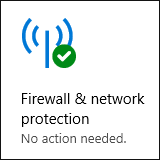 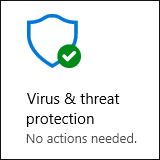
**1.3:** The exclusions should include:
**1.3.1:** The installation folder - usually *\[install drive:\\\]Program Files\\Lumion \[version\].*
**1.3.2:** The ***Lumion.exe*** file in the install folder as in 1.3.1 above.
**1.3.3:** The **folder and subfolders** for user data in Documents. Being *Documents\\Lumion \[version\]*. Also found at *C:\\Users\\\[yourUserName\]\\Documents\\Lumion \[version\].* Where \[yourUserName\] is the name of your Windows login account\\profile.
**1.4:** **Reboot** your PC after adding the exclusions. This is **important** to enable the changes.
### **B: Exclusions to the Firewall:**
**1.1:** Please add an exclusion for ***Lumion.exe*** in **all** third-party firewalls.
If you need help with this step, please contact the manufacturer for help with your firewall software.
**1.2:** Ensure to add an exclusion for ***Lumion.exe*** in *Windows Defender Firewall.*
**1.3:** If you can't add an exclusion for Lumion, please make sure that Lumion is allowed to access the following domains and ports in any third-party firewall and security software you are using:
- **Knowledge Base:** [Which domains and ports does Lumion need access to?](https://support.lumion.com/knowledge-base/api/v2/help_center/en-us/articles/360003455414.json?hsLang=en-us)
**Note:** If the issue is that Lumion is unable to connect to its servers then these steps in B: are a requirement.
## **2. Other Steps (if needed):**
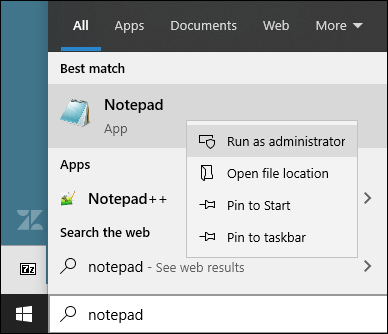
**2.1:** If the problem persists, something on your PC might be blocking access via the 'hosts' file. To find out if that is the case, please type 'Notepad' in the Windows search field.
**2.2:** Right-click on the 'Notepad' entry and select '**Run as administrator**':
**2.3:** Then open the '**hosts**' file from *C:\\Windows\\System32\\drivers\\etc\\* (not 'hosts.ics'), remove all lines that contain the word 'lumion' and save the 'hosts' file again.
**Do not** save it with a file extension, for example hosts.txt. And make sure you are an **Administrator**.
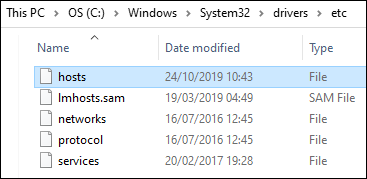
**2.4:** Can't see the file 'hosts' in the folder?
- On the View tab of Windows File Explorer, check the box 'Hidden Items'

- If you still cannot see the 'hosts' file, click 'Options' on the View tab of Windows File Explorer.
- - Then in the resulting dialog, click the View tab
In the list uncheck the option 'Hide protected Operating System Files'
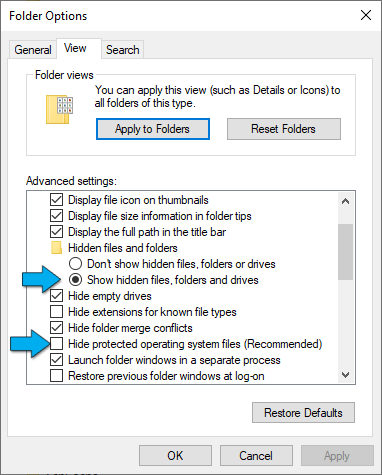
**2.5:** If this does not resolve the problem, we can take a look at the software that is installed on your PC to see if you missed some other security software that might be blocking access.
To get started, please forward the following to us in a new Support Request:
1. A screenshot of any error messages from Lumion.
2. Screenshots of the exclusions for 'Lumion.exe' that you have added to your firewall/security software as per steps 1.1 to 1.3 above.
3. An *Error Log* (if Lumion has been working and the log is available):
**• Knowledge Base:** [How do you provide a Lumion Error and/or Importers Log file?](https://support.lumion.com/hc/en-us/search/click?data=BAh7DjoHaWRsKwghJuHRUwA6D2FjY291bnRfaWRpA0uAIjoJdHlwZUkiDGFydGljbGUGOgZFVDoIdXJsSSJ7aHR0cHM6Ly9zdXBwb3J0Lmx1bWlvbi5jb20vaGMvZW4tdXMvYXJ0aWNsZXMvMzYwMDAzNDc5MDczLUhvdy1kby15b3UtcHJvdmlkZS1hLUx1bWlvbi1FcnJvci1hbmQtb3ItSW1wb3J0ZXJzLUxvZy1maWxlLQY7CFQ6DnNlYXJjaF9pZEkiKTQyNTUyNTVlLTgxOGYtNDkyYy04NDM5LTM2YzY3ZTA1ZTUwYgY7CEY6CXJhbmtpBjoLbG9jYWxlSSIKZW4tdXMGOwhUOgpxdWVyeUkiDmVycm9yIGxvZwY7CFQ6EnJlc3VsdHNfY291bnRpZQ%3D%3D--18504649ffb0580798318e244d8c03681b614504&hsLang=en-us)
4. A System Information file:
**• Knowledge Base:** [How do you generate a Microsoft System Information report?](https://support.lumion.com/hc/en-us/search/click?data=BAh7DjoHaWRsKwirHaHSUwA6D2FjY291bnRfaWRpA0uAIjoJdHlwZUkiDGFydGljbGUGOgZFVDoIdXJsSSJ5aHR0cHM6Ly9zdXBwb3J0Lmx1bWlvbi5jb20vaGMvZW4tdXMvYXJ0aWNsZXMvMzYwMDE2MDU5ODE5LUhvdy1kby15b3UtZ2VuZXJhdGUtYS1NaWNyb3NvZnQtU3lzdGVtLUluZm9ybWF0aW9uLXJlcG9ydC0GOwhUOg5zZWFyY2hfaWRJIik2ODMyYTg5Zi04MTRmLTQ0ZGUtOGVlNy0xOTY5MDQ5ZjI5YzcGOwhGOglyYW5raQY6C2xvY2FsZUkiCmVuLXVzBjsIVDoKcXVlcnlJIgkubmZvBjsIVDoScmVzdWx0c19jb3VudGkH--714c0c5b548e429a10cd703b7ff50395c5056230&hsLang=en-us)
[Contact Us](https://support.lumion.com/knowledge-base/api/v2/help_center/en-us/articles/360041760194.json?hsLang=en-us)
## **3. If you are trying to download or install Lumion:**
**3.1:** Please add exclusions for the *Installer* file '*Lumion\_\[version\]\_Download.exe*' and the installer folder (Windows default: the Downloads folder *C:\\Users\\\[yourWindowsUsername\]\\Downloads*) in **all** third-party firewall and antivirus and security software you are using.
If you need help with this step, please contact the manufacturer for help with your firewall/antivirus/security software.
**3.2:** Please add an exclusion for the *Installer* file '*Lumion\_\[version\]\_Download.exe*' in *Windows Defender Antivirus* and *Windows Firewall*:
- **Knowledge Base:** [How do you add an exclusion for Lumion in Windows Defender and Windows Firewall?](https://support.lumion.com/knowledge-base/api/v2/help_center/en-us/articles/360008184594.json?hsLang=en-us)
 
Then, run the *Installer* as an administrator and check to see if the issue persists.
**3.3:** Make sure that the *Installer* file '*Lumion\_\[version\]\_Download.exe*' is allowed to access the following domains and ports in any third-party firewall and security software you are using:
- **Knowledge Base:** [Which domains and ports does Lumion need access to?](https://support.lumion.com/knowledge-base/api/v2/help_center/en-us/articles/360003455414.json?hsLang=en-us)
**3.4:** If this does not resolve the problem, we can take a look at the software that is installed on your PC to see if you missed some other security software that might be blocking access.
To get started, please forward the following to us in a new Support Request:
1. Screenshots of the exclusions for the *Installer* that you have added to your firewall/security software as per the steps above.
2. The *logfile.txt* file that will be in the same location where you ran the *Installer.*
3. And lastly, a System Information file:
**• Knowledge Base:** [How do you generate a Microsoft System Information report?](https://support.lumion.com/hc/en-us/search/click?data=BAh7DjoHaWRsKwirHaHSUwA6D2FjY291bnRfaWRpA0uAIjoJdHlwZUkiDGFydGljbGUGOgZFVDoIdXJsSSJ5aHR0cHM6Ly9zdXBwb3J0Lmx1bWlvbi5jb20vaGMvZW4tdXMvYXJ0aWNsZXMvMzYwMDE2MDU5ODE5LUhvdy1kby15b3UtZ2VuZXJhdGUtYS1NaWNyb3NvZnQtU3lzdGVtLUluZm9ybWF0aW9uLXJlcG9ydC0GOwhUOg5zZWFyY2hfaWRJIik2ODMyYTg5Zi04MTRmLTQ0ZGUtOGVlNy0xOTY5MDQ5ZjI5YzcGOwhGOglyYW5raQY6C2xvY2FsZUkiCmVuLXVzBjsIVDoKcXVlcnlJIgkubmZvBjsIVDoScmVzdWx0c19jb3VudGkH--714c0c5b548e429a10cd703b7ff50395c5056230&hsLang=en-us)
- [Visit our other Sections](https://support.lumion.com/knowledge-base/visit-our-other-sections?hsLang=en-us)
- [Contact Us](https://support.lumion.com/knowledge-base/contact-us?hsLang=en-us)
- [Lumion Account](https://support.lumion.com/knowledge-base/lumion-account?hsLang=en-us)
- [Latest News](https://support.lumion.com/knowledge-base/latest-news?hsLang=en-us#main-content)
- [Major Known Issues](https://support.lumion.com/knowledge-base/latest-news?hsLang=en-us#major-known-issues)
- [Lumion 2025: Major Version Release Details](https://support.lumion.com/knowledge-base/latest-news?hsLang=en-us#lumion-2025-major-version-release-details)
- [Lumion 2024: Major Version Release Details](https://support.lumion.com/knowledge-base/latest-news?hsLang=en-us#lumion-2024-major-version-release-details)
- [Lumion 2023: Major Version Release Details](https://support.lumion.com/knowledge-base/latest-news?hsLang=en-us#lumion-2023-major-version-release-details)
- [Lumion 2023: Update Release Notes](https://support.lumion.com/knowledge-base/latest-news?hsLang=en-us#lumion-2023-update-release-notes)
- [Lumion 12](https://support.lumion.com/knowledge-base/latest-news?hsLang=en-us#lumion-12)
- [Lumion 11](https://support.lumion.com/knowledge-base/latest-news?hsLang=en-us#lumion-11)
- [Lumion 10](https://support.lumion.com/knowledge-base/latest-news?hsLang=en-us#lumion-10)
- [Sales Questions](https://support.lumion.com/knowledge-base/sales-questions?hsLang=en-us)
- [Subscriptions](https://support.lumion.com/knowledge-base/subscriptions?hsLang=en-us)
- [New User Questions](https://support.lumion.com/knowledge-base/new-user-questions?hsLang=en-us)
- [Learning Resources](https://support.lumion.com/knowledge-base/learning-resources?hsLang=en-us)
- [System Requirements Questions](https://support.lumion.com/knowledge-base/system-requirements-questions?hsLang=en-us#main-content)
- [Determining the 'Complexity' of your Projects](https://support.lumion.com/knowledge-base/system-requirements-questions?hsLang=en-us#determining-the-complexity-of-your-projects)
- [System Messages from Lumion](https://support.lumion.com/knowledge-base/system-requirements-questions?hsLang=en-us#system-messages-from-lumion)
- [Requirements for Prior Versions](https://support.lumion.com/knowledge-base/system-requirements-questions?hsLang=en-us#requirements-for-prior-versions)
- [Download & Installation Questions](https://support.lumion.com/knowledge-base/download-installation-questions?hsLang=en-us#main-content)
- [Download/Installation: General Questions](https://support.lumion.com/knowledge-base/download-installation-questions?hsLang=en-us#download-installation-general-questions)
- [Download Questions](https://support.lumion.com/knowledge-base/download-installation-questions?hsLang=en-us#download-questions)
- [Installation Questions](https://support.lumion.com/knowledge-base/download-installation-questions?hsLang=en-us#installation-questions)
- [Lumion Pro Updater](https://support.lumion.com/knowledge-base/download-installation-questions?hsLang=en-us#lumion-pro-updater)
- [Plugins to CAD software](https://support.lumion.com/knowledge-base/download-installation-questions?hsLang=en-us#plugins-to-cad-software)
- [License and General Product Questions](https://support.lumion.com/knowledge-base/license-and-general-product-questions?hsLang=en-us#main-content)
- [License System Messages from Lumion](https://support.lumion.com/knowledge-base/license-and-general-product-questions?hsLang=en-us#license-system-messages-from-lumion)
- [Import & Export Questions](https://support.lumion.com/knowledge-base/import-export-questions?hsLang=en-us#main-content)
- [Model Import Guidelines](https://support.lumion.com/knowledge-base/import-export-questions?hsLang=en-us#model-import-guidelines)
- [Lumion LiveSync and import plugins](https://support.lumion.com/knowledge-base/import-export-questions?hsLang=en-us#lumion-livesync-and-import-plugins)
- [System Messages from Lumion when importing](https://support.lumion.com/knowledge-base/import-export-questions?hsLang=en-us#system-messages-from-lumion-when-importing)
- [General Questions](https://support.lumion.com/knowledge-base/general-questions?hsLang=en-us#main-content)
- [Keyboard Shortcuts in Lumion](https://support.lumion.com/knowledge-base/general-questions?hsLang=en-us#keyboard-shortcuts-in-lumion)
- [Upgrading and Updating your Lumion Version](https://support.lumion.com/knowledge-base/general-questions?hsLang=en-us#upgrading-and-updating-your-lumion-version)
- [Using Lumion 2023](https://support.lumion.com/knowledge-base/general-questions?hsLang=en-us#using-lumion-2023)
- [System Messages from Lumion](https://support.lumion.com/knowledge-base/general-questions?hsLang=en-us#system-messages-from-lumion)
- [Build Mode Questions](https://support.lumion.com/knowledge-base/build-mode-questions?hsLang=en-us#main-content)
- [Landscape and Terrains](https://support.lumion.com/knowledge-base/build-mode-questions?hsLang=en-us#landscape-and-terrains)
- [OpenStreetMap](https://support.lumion.com/knowledge-base/build-mode-questions?hsLang=en-us#openstreetmap)
- [Lighting: Sun and Artificial Lights](https://support.lumion.com/knowledge-base/build-mode-questions?hsLang=en-us#lighting-sun-and-artificial-lights)
- [Questions mainly for older versions than Lumion 12](https://support.lumion.com/knowledge-base/build-mode-questions?hsLang=en-us#questions-mainly-for-older-versions-than-lumion-12)
- [Library Content](https://support.lumion.com/knowledge-base/library-content?hsLang=en-us#main-content)
- [Library Content in Lumion 2026](https://support.lumion.com/knowledge-base/library-content?hsLang=en-us#library-content-in-lumion-2026)
- [Library Content in Lumion 2025](https://support.lumion.com/knowledge-base/library-content?hsLang=en-us#library-content-in-lumion-2025)
- [Library Content in Lumion 2024](https://support.lumion.com/knowledge-base/library-content?hsLang=en-us#library-content-in-lumion-2024)
- [Library Content in Lumion 2023](https://support.lumion.com/knowledge-base/library-content?hsLang=en-us#library-content-in-lumion-2023)
- [Library Content in Lumion 12](https://support.lumion.com/knowledge-base/library-content?hsLang=en-us#library-content-in-lumion-12)
- [Movie & Photo Mode Questions](https://support.lumion.com/knowledge-base/movie-photo-mode-questions?hsLang=en-us#main-content)
- [Photo Mode](https://support.lumion.com/knowledge-base/movie-photo-mode-questions?hsLang=en-us#photo-mode)
- [Movie Mode](https://support.lumion.com/knowledge-base/movie-photo-mode-questions?hsLang=en-us#movie-mode)
- [Animation in Movie Mode](https://support.lumion.com/knowledge-base/movie-photo-mode-questions?hsLang=en-us#animation-in-movie-mode)
- [Effects in Photo or Movie Mode](https://support.lumion.com/knowledge-base/movie-photo-mode-questions?hsLang=en-us#effects-in-photo-or-movie-mode)
- [Reflections](https://support.lumion.com/knowledge-base/movie-photo-mode-questions?hsLang=en-us#reflections)
- [Material Questions](https://support.lumion.com/knowledge-base/material-questions?hsLang=en-us#main-content)
- [Materials in versions 12 and earlier](https://support.lumion.com/knowledge-base/material-questions?hsLang=en-us#materials-in-versions-12-and-earlier)
- [Using LiveSync for Revit and a Section Box](https://support.lumion.com/knowledge-base/material-questions?hsLang=en-us#using-livesync-for-revit-and-a-section-box)
- [Rendering Questions](https://support.lumion.com/knowledge-base/rendering-questions?hsLang=en-us#main-content)
- [General Rendering Questions](https://support.lumion.com/knowledge-base/rendering-questions?hsLang=en-us#general-rendering-questions)
- [Rendering of Photos](https://support.lumion.com/knowledge-base/rendering-questions?hsLang=en-us#rendering-of-photos)
- [Rendering of Clips and Movies](https://support.lumion.com/knowledge-base/rendering-questions?hsLang=en-us#rendering-of-clips-and-movies)
- [Tips to getting the best renders](https://support.lumion.com/knowledge-base/rendering-questions?hsLang=en-us#tips-to-getting-the-best-renders)
- [Rendering Performance](https://support.lumion.com/knowledge-base/rendering-questions?hsLang=en-us#rendering-performance)
- [Technical Issues when Rendering](https://support.lumion.com/knowledge-base/rendering-questions?hsLang=en-us#technical-issues-when-rendering)
- [Panorama Mode Questions](https://support.lumion.com/knowledge-base/panorama-mode-questions?hsLang=en-us#main-content)
- [Technical questions when rendering with Panorama Mode](https://support.lumion.com/knowledge-base/panorama-mode-questions?hsLang=en-us#technical-questions-when-rendering-with-panorama-mode)
- [File & BackUp Questions](https://support.lumion.com/knowledge-base/file-backup-questions?hsLang=en-us#main-content)
- [Saving and Backup](https://support.lumion.com/knowledge-base/file-backup-questions?hsLang=en-us#saving-and-backup)
- [File Saving Issues](https://support.lumion.com/knowledge-base/file-backup-questions?hsLang=en-us#file-saving-issues)
- [Lumion-Documents](https://support.lumion.com/knowledge-base/file-backup-questions?hsLang=en-us#lumion-documents)
- [Transfer, Move or Migrate Files](https://support.lumion.com/knowledge-base/file-backup-questions?hsLang=en-us#transfer-move-or-migrate-files)
- [Troubleshooting](https://support.lumion.com/knowledge-base/troubleshooting?hsLang=en-us#main-content)
- [Reports about your PC](https://support.lumion.com/knowledge-base/troubleshooting?hsLang=en-us#reports-about-your-pc)
- [Photo and Movie Mode Issues](https://support.lumion.com/knowledge-base/troubleshooting?hsLang=en-us#photo-and-movie-mode-issues)
- [Rendering Issues](https://support.lumion.com/knowledge-base/troubleshooting?hsLang=en-us#rendering-issues)
- [Error Messages from Lumion](https://support.lumion.com/knowledge-base/troubleshooting?hsLang=en-us#error-messages-from-lumion)
- [Hardware related Issues](https://support.lumion.com/knowledge-base/troubleshooting?hsLang=en-us#hardware-related-issues)
- [Other Troubleshooting Issues](https://support.lumion.com/knowledge-base/troubleshooting?hsLang=en-us#other-troubleshooting-issues)
- [Article Developments](https://support.lumion.com/knowledge-base/article-developments?hsLang=en-us#main-content)
- [Devs - Multi‑Image Button Viewer](https://support.lumion.com/knowledge-base/article-developments?hsLang=en-us#devs-multi-image-button-viewer)
[](https://lumion.com/)
[mailto:email@email.com](mailto:email@email.com)
Copyright © 2026, Lumion - Act3D B.V.
#### Product
[Plans and pricing](https://lumion.com/product/buy)
[Discover Lumion](https://lumion.com/product/discover-lumion)
[Compatibility](https://lumion.com/compatibility/)
[System Requirements](https://lumion.com/product/system-requirements)
[Find a reseller](https://lumion.com/about/find-reseller)
[Free trial](https://lumion.com/product/free-trial)
#### Solutions
[Architectural design](https://lumion.com/product/architectural-design)
[Interior design](https://lumion.com/product/interior-design)
[Landscape architecture](https://lumion.com/product/landscape-architecture)
[Urban planning](https://lumion.com/product/urban-planning)
[3D rendering](https://lumion.com/product/3d-rendering-software)
[Education](https://lumion.com/product/educational-licenses)
#### Compatibility
[Trimble SketchUp](https://lumion.com/compatibility/sketchup-rendering)
[Autodesk Revit](https://lumion.com/compatibility/revit-rendering)
[Graphisoft ArchiCAD](https://lumion.com/compatibility/archicad-rendering)
[Rhinoceros](https://lumion.com/compatibility/rhino-rendering)
[Autodesk Autocad](https://lumion.com/compatibility/autocad-rendering)
[Autodesk FormIt Pro](https://lumion.com/compatibility/lumion-for-autodesk-formit-pro)
[Nemetschek Allplan](https://lumion.com/compatibility/allplan-rendering)
[Nemetschek Vectorworks](https://lumion.com/compatibility/vectorworks-rendering)
[BricsCAD](https://lumion.com/compatibility/bricscad-rendering)
[3D Studio Max](https://lumion.com/compatibility/3ds-max-rendering)
#### Resources
[Made with Lumion](https://lumion.com/made-with-lumion)
[Tutorials](https://support.lumion.com/video-tutorials?hsLang=en-us)
[Support and learning](https://support.lumion.com/knowledge-base/api/v2/help_center/en-us/articles/360044608053.json?hsLang=en-us)
[Downloads](https://support.lumion.com/downloads?hsLang=en-us)
[Community](https://community.lumion.com/index.php)
#### About
[Our Story](https://lumion.com/about)
[We're hiring!](https://lumion.com/about/careers)
[News](https://lumion.com/news)
[Contact us](https://lumion.com/about/contact)
[Terms & conditions](https://lumion.com/legal/terms-of-service) [EULA](https://lumion.com/legal/eula) [Privacy statement](https://lumion.com/legal/privacy-statement) [CEIP](https://lumion.com/legal/ceip) [Disclaimer](https://lumion.com/legal/disclaimer) © 2026 Lumion