---
title: "Lumion 11.0: Release notes"
description: Knowledge Base
---
Solutions
[Architectural design All you need to bring your residential, commercial or institutional designs to life](https://lumion.com/product/architectural-design) [Landscape architecture Beautiful terrains and fine-detailed nature for any climate or season](https://lumion.com/product/landscape-architecture)
[Interior design Realistic light, high-quality textures, and an extensive asset library](https://lumion.com/product/interior-design) [Students and Faculties Lumion is free for students, educators, and faculties around the world](https://lumion.com/product/educational-licenses)
[SketchUp](https://lumion.com/compatibility/sketchup-rendering) [Revit](https://lumion.com/compatibility/revit-rendering) [ArchiCAD](https://lumion.com/compatibility/archicad-rendering) [Rhino](https://lumion.com/compatibility/rhino-rendering) [Autocad](https://lumion.com/compatibility/autocad-rendering) [See more](https://lumion.com/compatibility/)
Product
[Discover Axogram New Live architectural diagramming](https://lumion.com/product/axogram) [Lumion Cloud Where design meets collaboration](https://lumion.com/product/lumion-cloud)
[Lumion Pro Advanced visualization solution](https://lumion.com/product/lumion-pro) [Discover AI tools New AI built for architectural work](https://lumion.com/product/ai)
[Lumion Pro 2026.1 is out now! 🚀](https://lumion.com/product/latest-version-pro) [Compatibility](https://lumion.com/compatibility/) [System Requirements](https://lumion.com/product/system-requirements) [Roadmap](https://lumion.com/product/roadmap)
[Pricing](https://lumion.com/product/buy) Resources
[Made with Lumion Get inspired by the stories behind the designs](https://lumion.com/made-with-lumion)
[Tips & Guides Make the most out of Lumion with helpful guides and tutorials](https://lumion.com/tips-guides)
[Knowledge base](https://support.lumion.com/knowledge-base?hsLang=en-us) [Community](https://community.lumion.com/index.php) [Downloads](https://support.lumion.com/downloads?hsLang=en-us)
About
[Who we are Learn about our story and mission](https://lumion.com/about) [Careers - We're hiring Let's build the future of architectural visualization](https://lumion.com/about/careers)
[News Discover the latest product news and more](https://lumion.com/news)
[Find your local reseller](https://lumion.com/about/find-reseller) [Contact us](https://lumion.com/about/contact)
[](http://lumion.com)
[My Account](https://account.lumion.com)
Solutions
[Architectural design](https://lumion.com/product/architectural-design) [Interior design](https://lumion.com/product/interior-design) [Landscape architecture](https://lumion.com/product/landscape-architecture) [Students and Faculties](https://lumion.com/product/educational-licenses)
---
[SketchUp](https://lumion.com/compatibility/sketchup-rendering) [Revit](https://lumion.com/compatibility/revit-rendering) [ArchiCAD](https://lumion.com/compatibility/archicad-rendering) [Rhino](https://lumion.com/compatibility/rhino-rendering) [Autocad](https://lumion.com/compatibility/autocad-rendering) [See more](https://lumion.com/compatibility/)
Product
[Axogram New](https://lumion.com/product/axogram) [Lumion Cloud](https://lumion.com/product/lumion-cloud) [Lumion Pro](https://lumion.com/product/lumion-pro) [Discover AI tools New](https://lumion.com/product/ai)
---
[Lumion Pro 2026.1 is out now! 🚀](https://lumion.com/product/latest-version-pro) [Compatibility](https://lumion.com/compatibility/) [System Requirements](https://lumion.com/product/system-requirements) [Roadmap](https://lumion.com/product/roadmap)
[Pricing](https://lumion.com/product/buy) Resources
[Made with Lumion](https://lumion.com/made-with-lumion) [Tips & Guides](https://lumion.com/tips-guides)
---
[Knowledge base](https://support.lumion.com/knowledge-base?hsLang=en-us) [Community](https://community.lumion.com/index.php) [Downloads](https://support.lumion.com/downloads?hsLang=en-us)
About
[Who we are](https://lumion.com/about) [Careers - We're hiring](https://lumion.com/about/careers) [News](https://lumion.com/news)
---
[Find your local reseller](https://lumion.com/about/find-reseller) [Contact us](https://lumion.com/about/contact)
[My Account](https://account.lumion.com)
[Submit a request](https://support.lumion.com/hc/en-us/requests/new?hsLang=en-us)
Lumion Knowledge Base
How can we help?
- There are no suggestions because the search field is empty.
[Skip to content](https://support.lumion.com/knowledge-base/api/v2/help_center/en-us/articles/360017162060.json#main-content)
English - United States
Show submenu for translations

Open main navigation
Close main navigation
- English - United States
Show submenu for translations
- Contact us
Contact us
How can we help you?
- There are no suggestions because the search field is empty.
1. [Knowledge Base](https://support.lumion.com/knowledge-base?hsLang=en-us)
2. [Latest News](https://support.lumion.com/knowledge-base/latest-news?hsLang=en-us)
3. [Lumion 11](https://support.lumion.com/knowledge-base/latest-news?hsLang=en-us#lumion-11)
# Lumion 11.0: Release notes
## **Lumion 11.0: Release Notes**
- **Link to section below:** [1. New feature highlights](https://support.lumion.com/knowledge-base/api/v2/help_center/en-us/articles/360017162060.json#h_5fed70b0-89c0-4675-ab23-dbda7a09a4f7)
- **Link to section below:** [2. Other new features & improvements](https://support.lumion.com/knowledge-base/api/v2/help_center/en-us/articles/360017162060.json#h_51dfe116-ad84-44cf-95c3-3be43131e52a)
- **Link to section below:** [3. Changes & resolved errors](https://support.lumion.com/knowledge-base/api/v2/help_center/en-us/articles/360017162060.json#h_5c1b4a46-6c7a-4e60-908f-432d368d20ce)
Features, models and materials with the asterisk (\*) character are only available in *Lumion 11.0 Pro*.
Refer also to the *Compare versions table - Comparison* tab:
- **Lumion website**: [Lumion 11.0 Features](https://lumion.com/specifications.html)
Please note that *Projects* and models saved in version 11.0 cannot be opened in older versions of *Lumion*.
## **1. New feature highlights**
### **1.1: *Orthographic View Effect*:**
(*Photo Mode, Movie Mode: Camera Category*)
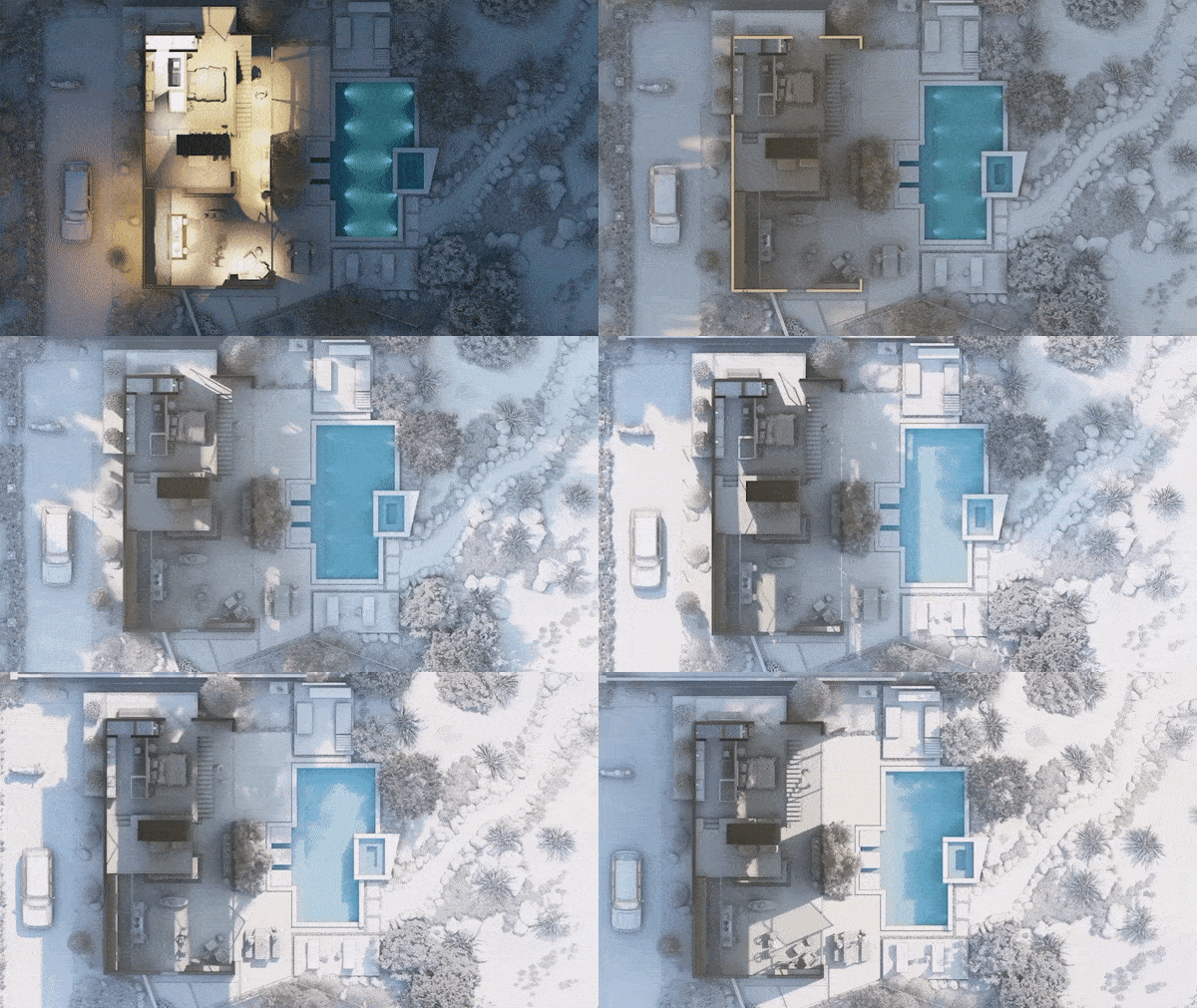
Plan views. Section views. From elevations to isometric.
At each stage of the design process, the new *Orthographic View* feature in Lumion 11 lets you embed life, color, and texture into all of your technical renderings. Instantly transform your standard documents into polished, one-of-a-kind images and videos, and maintain continuity with your other renderings without having to rely on other software.
You can make exciting, lively plans, sections, elevations, and isometric views in just a few clicks, and express the simple yet beautiful perspectives of your vision throughout the design process.
### **1.2: *Animated Phasing Effect* \***
(*Movie Mode: Animation Category*)
Begin with a blank landscape. Slowly, trees rise from the ground. The walls of a residential home materialize as if out of thin air, and the living room, bedroom, and kitchen furniture fall into place from the sky.
With the new *Animated Phasing Effect*, you can show the process behind your designs' development or construction through the power of animation. Apply different transitions, make parts of your building appear and disappear, and highlight what makes your building creative and unique.
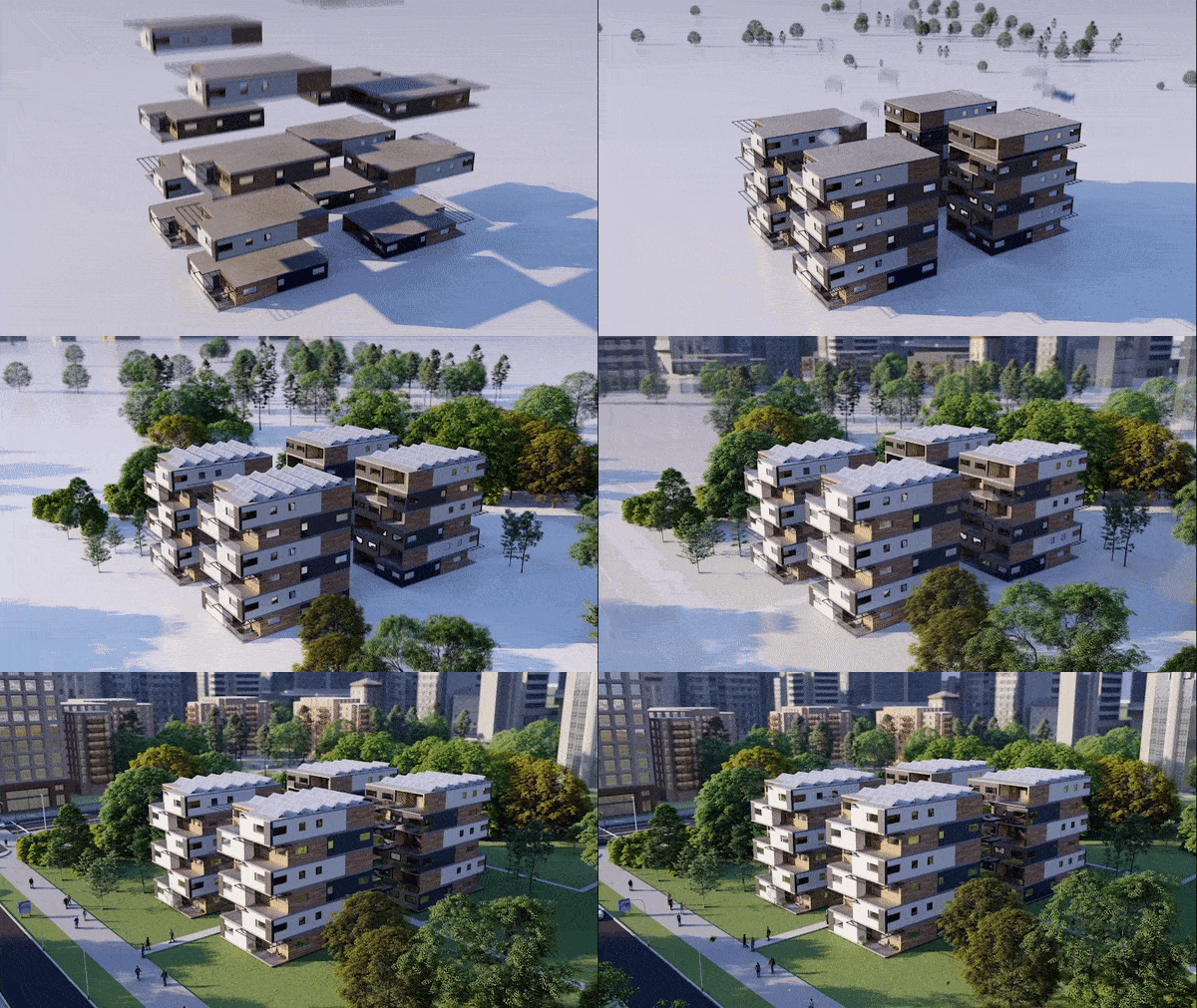
Model provided by Centric Bamboo and Gorilla Design.
### **1.3: *Rain streaks* \***
(*Photo Mode, Movie Mode, Panorama Mode: Precipitation Effect - Weather Category*)
Capture the mood of a rainy day with the new rain streaks option as part of the *Precipitation Effect*.
With only a slight movement of the slider, dozens of dynamic, intelligent raindrops move down glass surfaces.
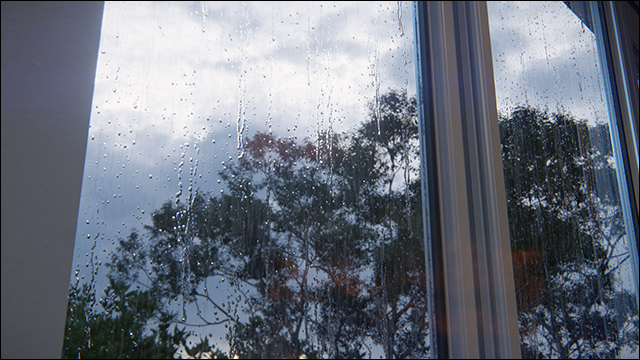
Raindrops are first enabled as a setting on a *PureGlass Material* (Pro only).
See also section *2. Other New Features & Improvements* -\> *Material Editor* -\> *[2.15: PureGlass](https://support.lumion.com/knowledge-base/api/v2/help_center/en-us/articles/360017162060.json#h_01EQ7ASW9ZE18701AZX5NDD9P4)*
### **1.4: *Volumetric fire* \***
(*Build Mode: Content Library -\> Effects -\>Fire* )
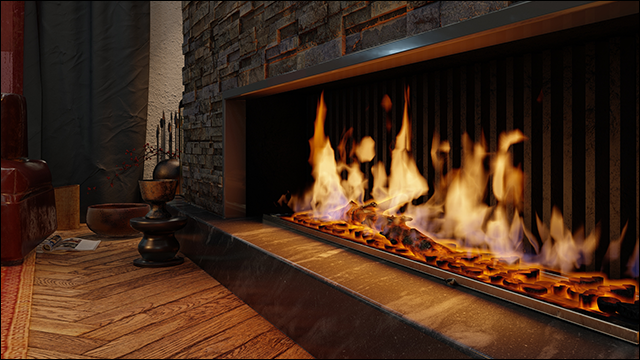
The soft glow of fire tends to draw people together, and in *Lumion* 11, you can tap into the warm and welcoming atmosphere of fire with the new volumetric fire object. Simply add the new *Volumetric Fire* to cast a feeling of coziness and warmth to your interior and exterior renders, creating an uplifting mood that naturally attracts your audience into the space.
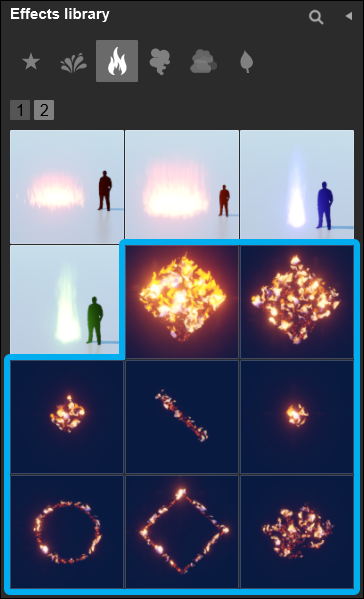
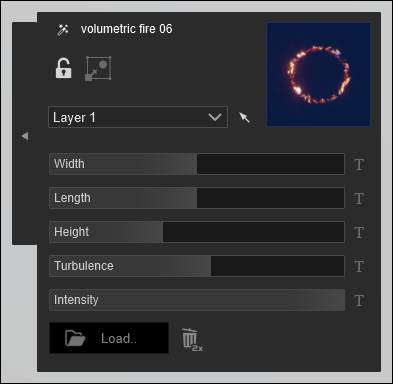
*Volumetric Fire* supports custom shapes and colors by importing a custom texture. Size, turbulence and intensity can be adjusted in the object properties window.
### **1.5: Micro shadows for *Spotlights***
When you turn on the *Fine-Detail shadows* in *Lumion* 11 via the *Shadow Effect*, the new micro shadows for *Spotlights* will be active and infuse a soft gradient of shadow into all of the tiniest details wherever you shine a *Spotlight*.
### **1.6: Improved grass lighting**
(*Build Mode: Landscape* tab, *Materials Editor: 3D Grass Material*)
In *Lumion* 11, the new improved grass lighting technology helps connect your building design to the earth where it stands, turning the visual experience of your renderings into a sensory one.
Without any effort required from you, all the grass materials, including the customizable *3D Grass Material* and the *Landscape Grass*, look as if they’re softer and more representative of real-life landscapes.
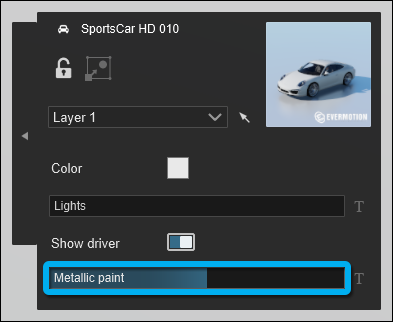
### **1.7: *Metallic paint* car shader \***
(*Build Mode: Content Library -\> Transport -\> Object Properties*)
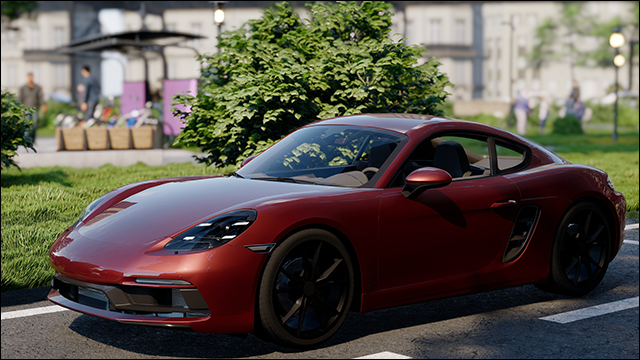
With the new metallic car shader in *Lumion* 11 *Pro*, the cars in your renders take on an impressive realistic quality, making them barely distinguishable from the real thing. Every element, every light in your render is reflected in the car’s chassis and windows, instantly and organically integrating the car into the project’s surroundings.
### **1.8: New objects in the *Object Library: 401 in total* \***
(108 objects are now unlocked in *Lumion* (Normal)
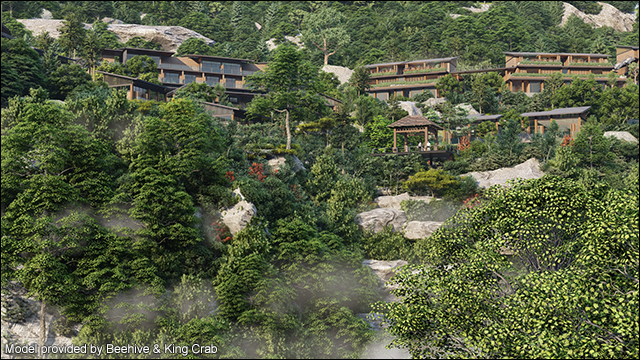
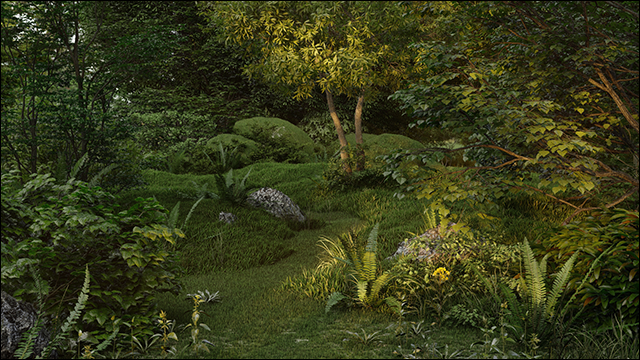
- *Fine-detail Nature* models: 61, consisting of plants (27) and trees (34).
*Nature*: 65, including grasses and weeds.
- *Transport* models: 12 (HD cars).
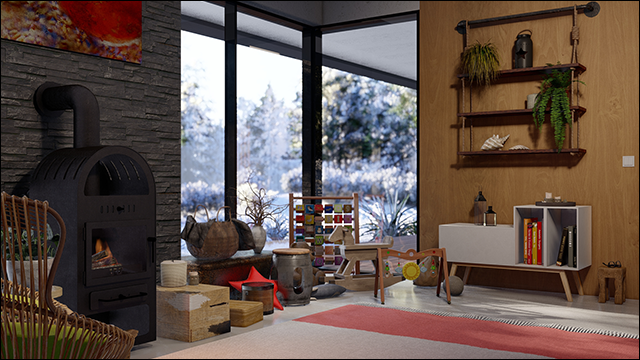
- *Interior* objects: 177, including light switches and sockets.
- *3D people and animals*: 49, consisting of 33 high-quality animated and 16 new high detail static characters.
- *Exterior* objects: 29, including furniture, lighting and signs (among others).
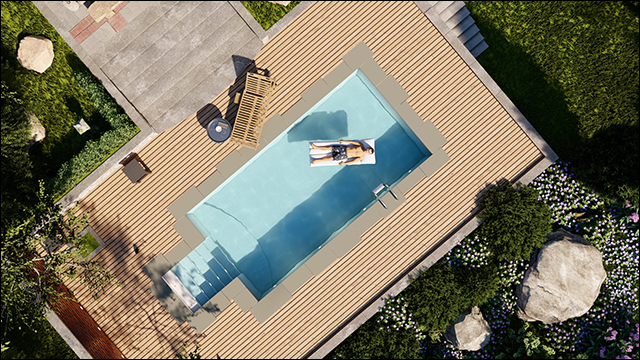
- *Special effects* objects: 8 for the new *Volumetric Fire* object.
- All of the new objects are HD quality, and the new additions bring the total number of items in the *Lumion* 11 *Pro* content library to 6,224 \*.
- *Lumion* has approximately 33% of the models from the full *Lumion Pro Model Library*.
### **1.9: New materials and *Effects* Library \***
(*Lumion Materials Library*)
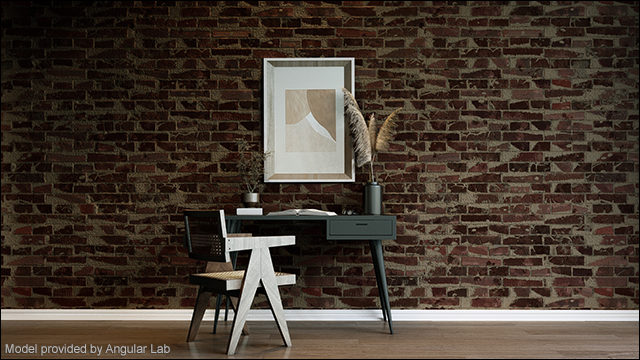
*Lumion* 11 comes with 63 new, beautifully realistic materials covering a range of interior and exterior materials. Now, you have more options when showing exterior views of your design surrounded by captivating, beautiful environments. All of the new materials include *Displacement Mapping*.
The new materials in *Lumion* 11 include:
**Indoor**
**Outdoor**
**Various**
- Fabric: 10
- Leather: 3
- Plaster: 1
- Stone: 1
- Tiles: 3
- Wood: 8
- Asphalt: 2
- Bricks: 5
- Concrete: 1
- Plaster: 1
- Stone: 8
- Wood: 11
- Rock: 1
- Soil: 8
With the new additions, the total number of materials in *Lumion* 11 *Pro* is 1292 \*.
**1.9.1:** *Real Skies Effect*: added 11 new Real Skies. Cloudy: 1, Evening: 3, Overcast: 6, Clear: 1.
### **1.10: Satellite maps in *OpenStreetMap* \***
(*Build Mode: Landscape* tab -\>*OpenStreetMap*)
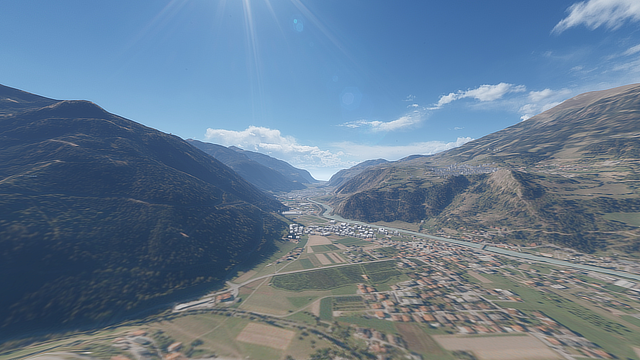
Render an entire real-life city. The elevations of its terrain. And all the minor details that make up the landscape around it.
The *OpenStreetMap* feature takes another leap forward in *Lumion* 11 *Pro*, to include beautifully detailed satellite maps. With these, you get real-world terrain, rivers, farmland, and more are all available, from all over the world, in just a click as you download the *OpenStreetMap* for your building location.
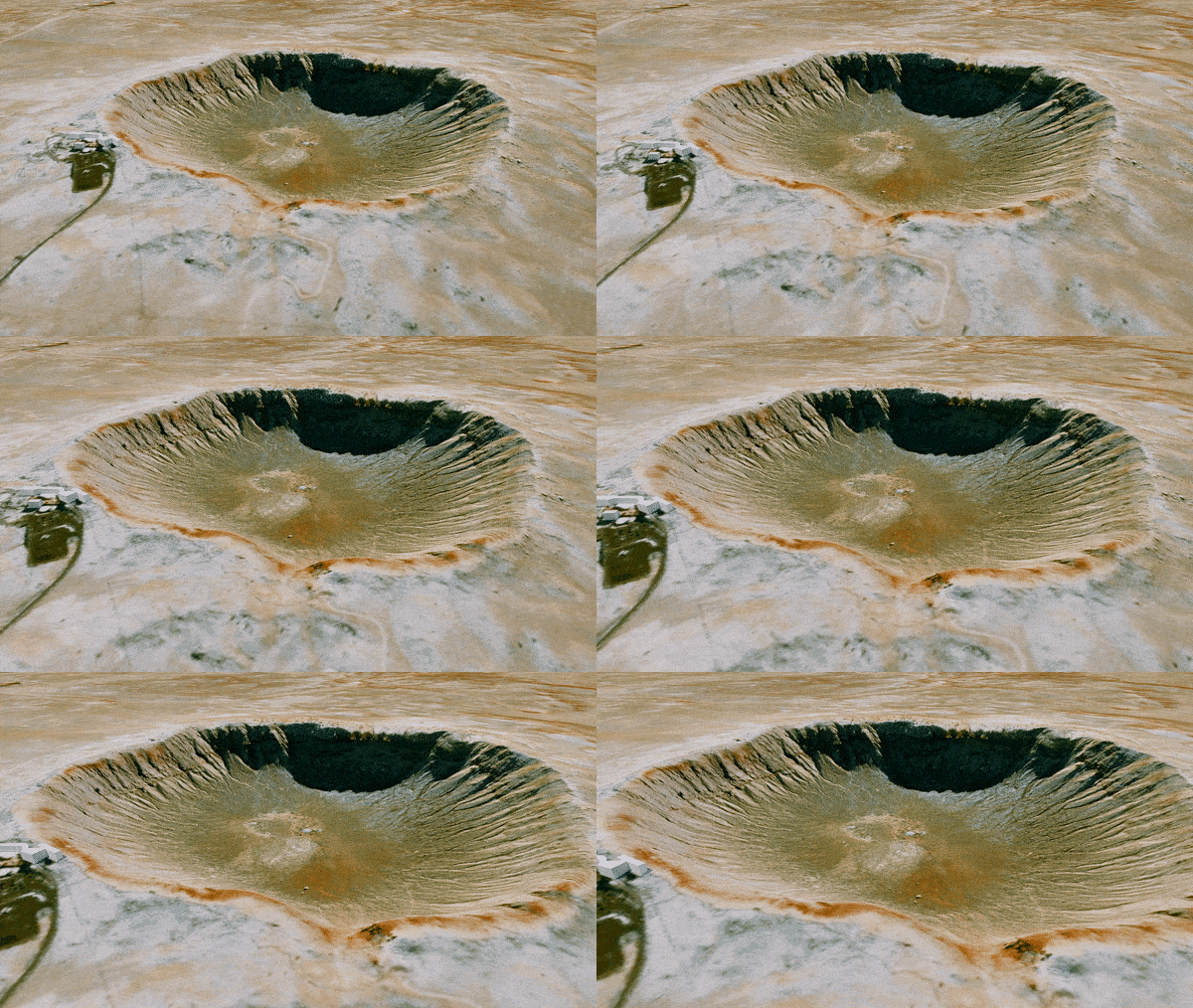
In *Lumion* 11 we also now have filtered heightmaps from a new source (ESRI). This helps prevent or reduce the change in height because some buildings would contribute to the heightmap.
### **1.11: *Custom IES Spotlights***
(*Build Mode: Content Library -\> Spotlights -\> Object Properties*)
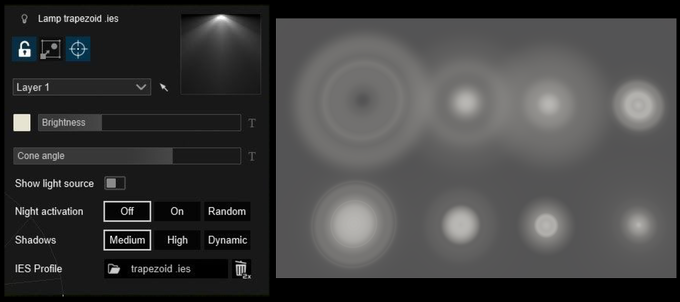
In *Lumion* 11, you can now import your own custom IES spotlight files to connect your *Spotlight* objects with the Illuminating Engineering Society (IES) lighting profiles.
With *custom IES Spotlights,* you no longer have to tweak and customize your *Spotlights*; simply load the relevant IES profile and recreate the exact lighting arrangement you need, illuminating the best parts of your *Project*.
### **1.12: *Lumion LiveSync for BricsCAD* plug-in**
(*Build Mode, Photo Mode*)
*Lumion LiveSync* lets you create a seamless, real-time rendering connection between the leading CAD programs and *Lumion*, including SketchUp, Revit, ArchiCAD, Rhino, Vectorworks and AutoCAD. With *LiveSync*, it’s possible to get a feeling of your work-in-progress model immersed in its natural environment, cast under photorealistic skies and lifelike weather, and illuminated with diverse lighting conditions.
*Lumion LiveSync* continues to extend to new CAD packages as part of its functionality, and the latest in this long list of real-time rendering possibilities is *LiveSync for BricsCAD,* available in *Lumion* 11.
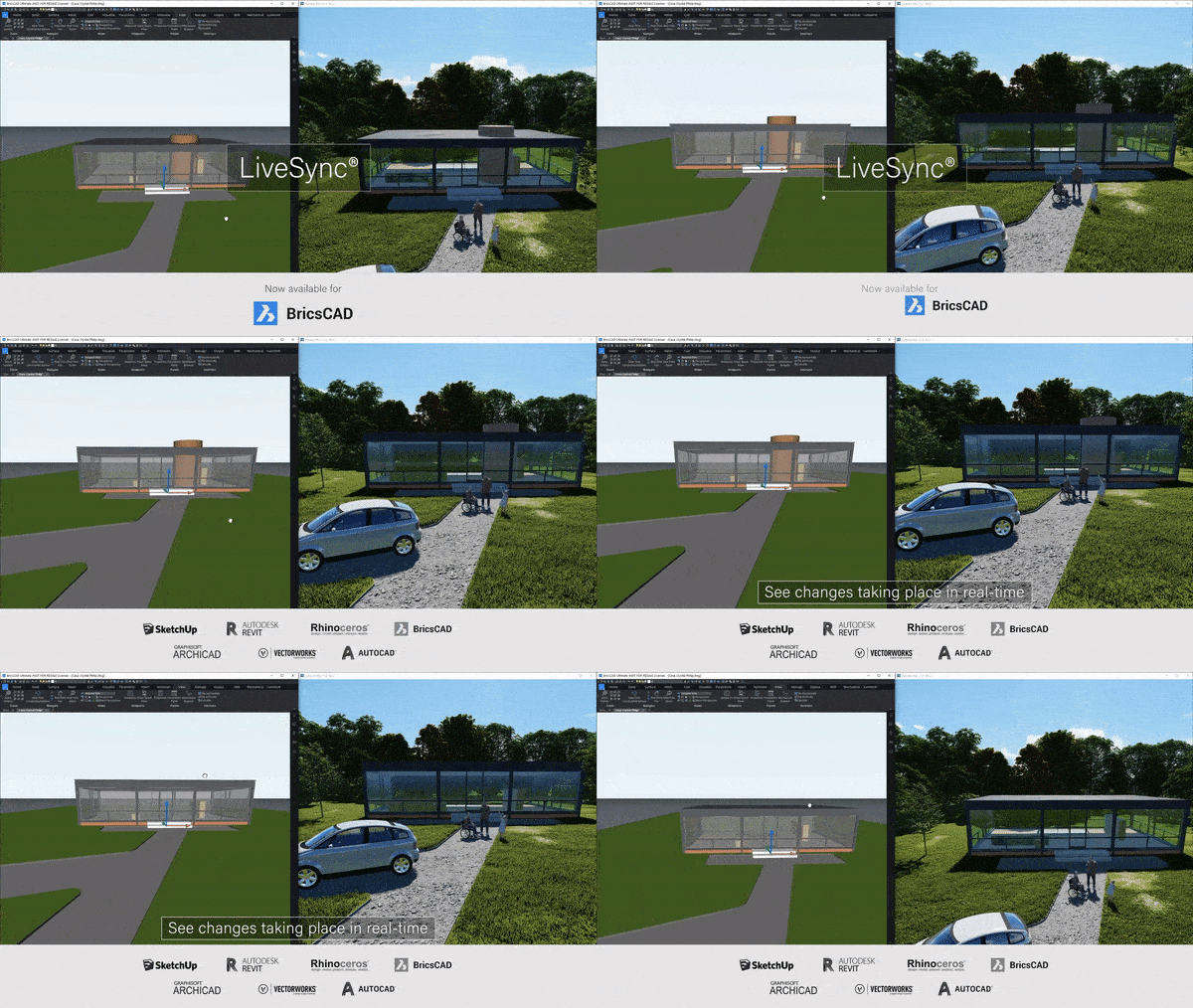
*Lumion LiveSync for BricsCAD* supports BricsCAD 18, 19, 20, 21 and newer and is available here:
- **Download Link:** [Download Lumion LiveSync for BrisCAD](https://support.lumion.com/knowledge-base/api/v2/help_center/en-us/articles/360017006720.json?hsLang=en-us)
- **Knowledge Base:** [Model import guidelines for BricsCAD](https://support.lumion.com/knowledge-base/api/v2/help_center/en-us/articles/360017161940.json?hsLang=en-us)
### **1.13: *RAL color picker***
(*Build Mode*)
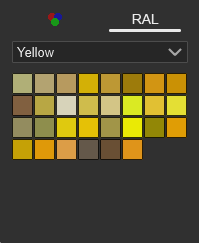
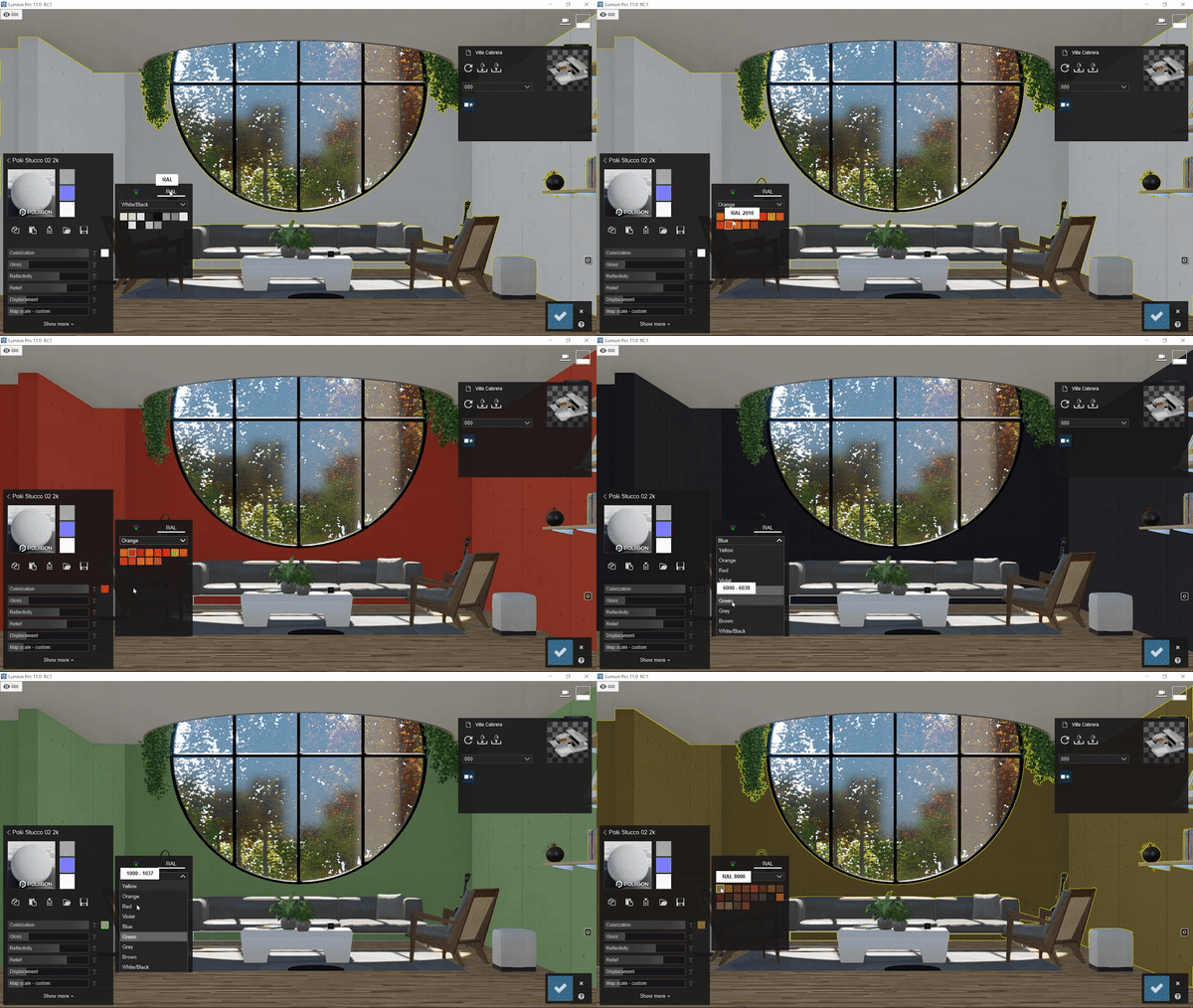
*Lumion* 11 now features a *RAL color picker* to ease your color selection and accurately connect it to the European RAL color standard.
The RAL color picker is part of the *Color Selector* interface - see also the changes below in **section 1.18.1**.
### **1.14: *High-quality theater preview***
(*Photo Mode, Movie Mode, Panorama Mode*)
Get even closer to the final look and feel of your rendering with the updated high-quality preview. In *Lumion* 11, you can now see the high-quality preview for the *Lumion Theater Mode* and the *Lumion Viewer*.
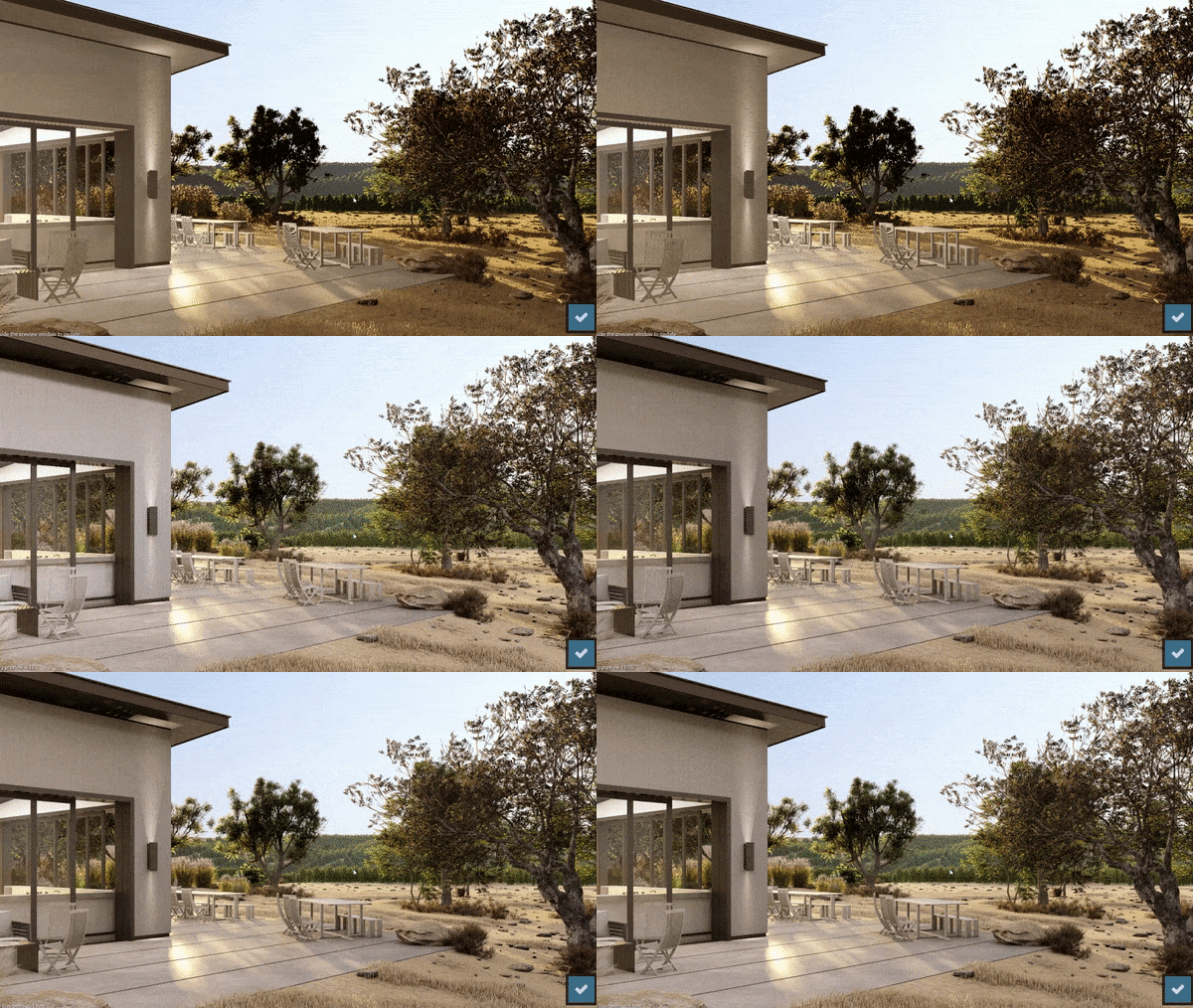
Model provided by Ten Over Studio.
High-quality preview in *Theater Mode* works as follows:
- When you go from *Movie Mode* to *Theater Mode*, then the high-quality preview will only trigger when the animation is not running. Click on the screen to update like you do when in *Preview*.
- A high-quality preview is not available when you go from *Build Mode* to *Theater Mode*.
- *High-quality preview* is now supported for this *Mode* using the function key F11.
- *Lumion Viewer*: High-quality preview can be triggered the same as in *Lumion* when in *Theater Mode*.
### **1.15: *Artistic panorama effects***
(*Panorama Mode*)
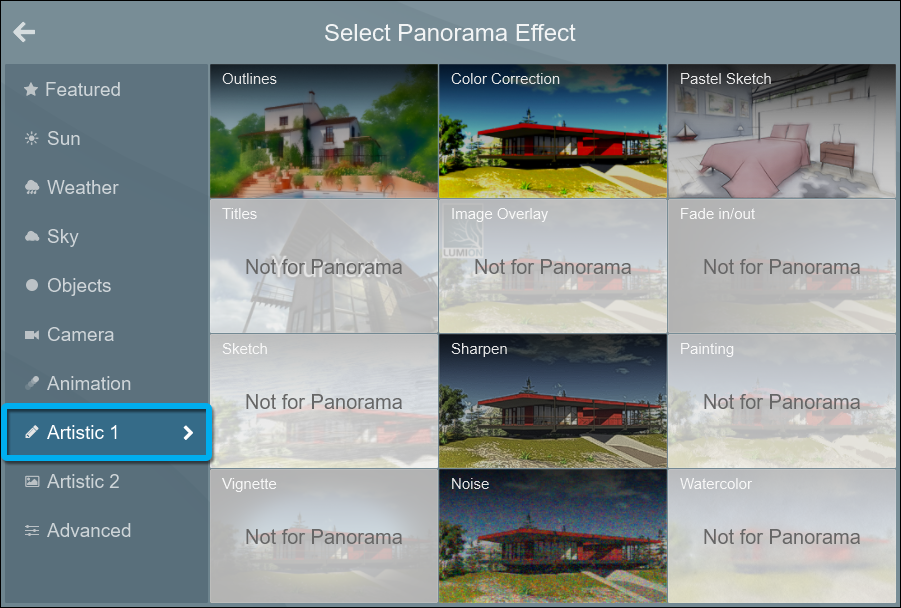
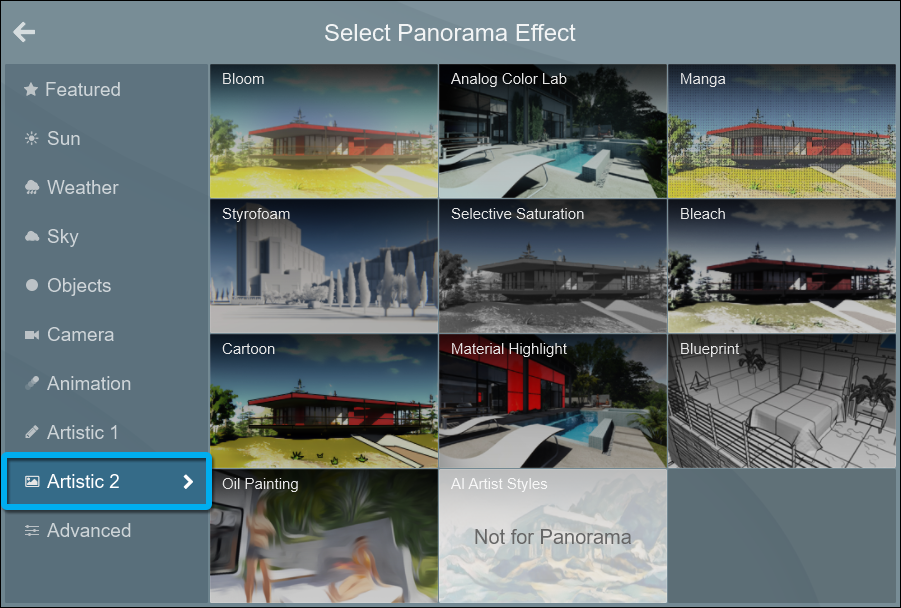
Transport your client into the living room of a residential sketch; experience the height of your commercial building with a fun painting *Effects* applied.
In *Lumion* 11, you can now apply several artistic *Effects* to your *360 Panoramas* (VR - still image and *MyLumion* *360 Panorama*).
Example:
- **360 Panorama:** [Model provided by Obra Visual](https://view.mylumion.com/?p=hq3y27wtwz2scqne)
[](https://view.mylumion.com/?p=hq3y27wtwz2scqne)
### **1.16: Basic tutorials for new users**
(*Build Mode*)
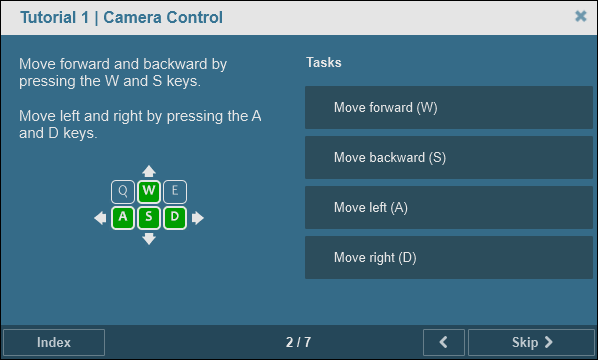
First time using *Lumion*? No worries! For over a decade, architects have celebrated *Lumion* as a stunningly simple learning experience, and building on that theme, *Lumion* 11 now features an in-program tutorial for new users to help reduce (and virtually eliminate) the already-short learning curve of *Lumion*.
### **1.17: Updated user interface**
(*Build Mode, Photo Mode, Movie Mode, Panorama Mode*)
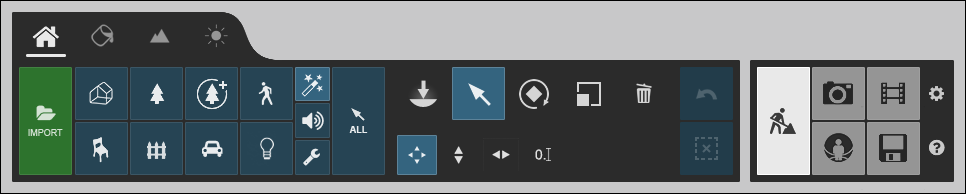
Ease and enjoyment are two qualities native to the *Lumion* rendering experience, and in *Lumion* 11, the updated user interface ensures a logical and intuitive flow as you work in the *Lumion Editor* or render out a *Photo*, *Movie* or a *360 Panorama*.
### **1.18: Smooth workflow improvements**
In *Lumion* 11, you can enjoy several workflow improvements to help streamline your rendering projects, including:
**1.18.1: Updated *Color Selector***
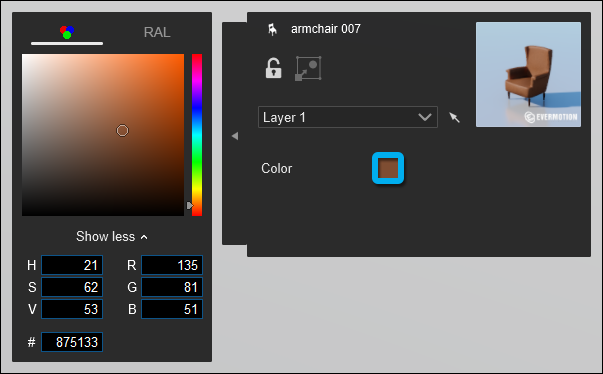
The interface has changed to a colored button to show the *Color Palette* (previously the *Color Palette* was fully displayed).
In the new *Color Palette*, you can input HSV, RGB or Hexadecimal values, or select the color using the mouse. Also, you can paste a #Hex value either to the *# (Hex)* field or to the *Color Selector* icon directly.
**1.18.2: *Custom value input***
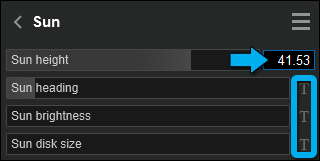
Sliders now have a type-in value. See also the section below: **Miscellaneous - 2.23: Sliders**.
**1.18.3: Sliders can now snap to set values**
- Snapping for rotation-related sliders. For example, all rotation sliders for an object will snap to -180°, -90°, 0°, 90° and 180°.
- The *Scale* slider now has snapping.
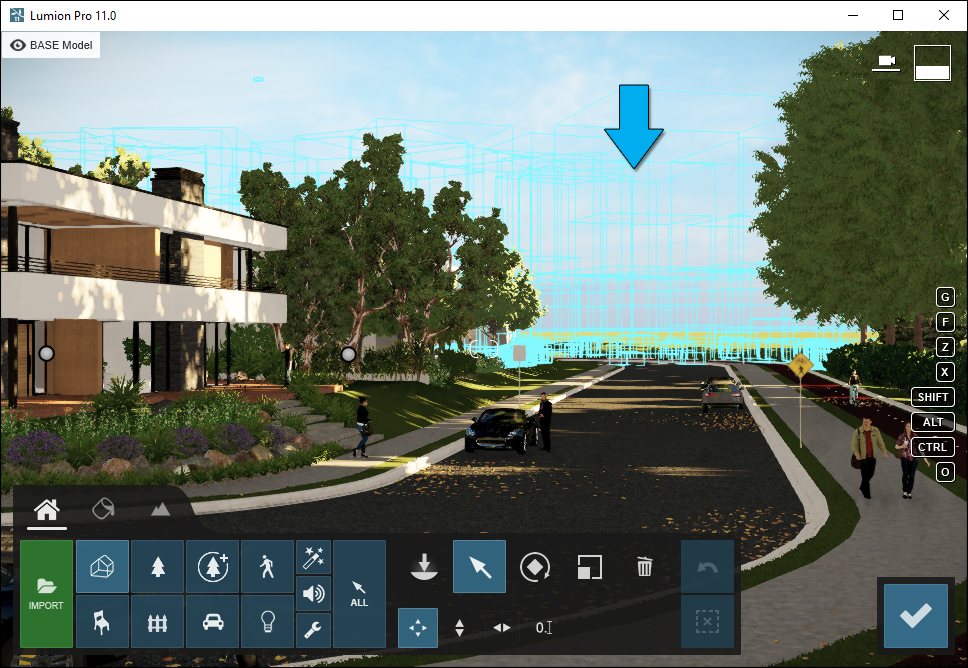
**1.18.4: Use *proxies*** (*Build Mode, Photo Mode, Movie Mode, Panorama Mode*)
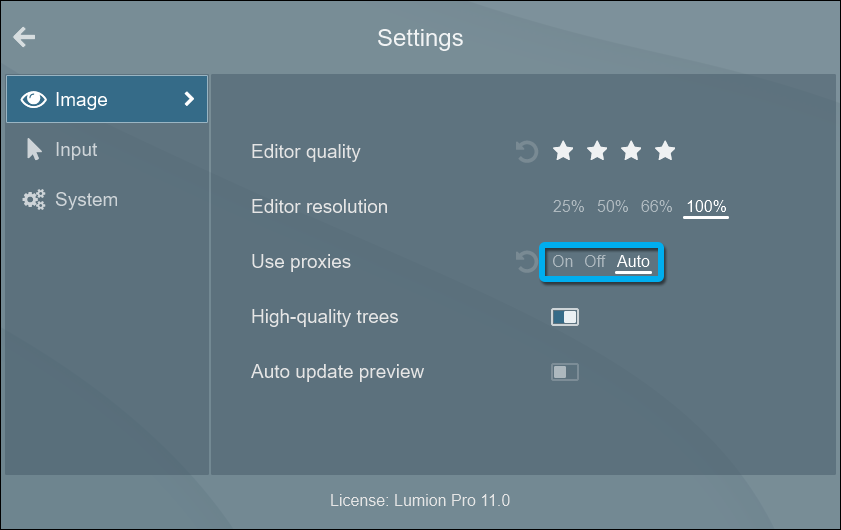
When speed is of the essence, the new *Use proxies* setting helps you get the most performance out of *Lumion* 11 when building large and complex *Projects*.
From the *Settings* screen select:
- **Off:** No *Proxies*.
- **On:** When the framerate dips below 24 frames per second, objects in the scene will temporarily be replaced with *Proxies* (turquoise wireframe boxes) to improve the framerate.
- **Automatic:** When the camera moves or rotates and the framerate dips below 24 frames per second, objects in the *Project* will temporarily be replaced with *Proxies* to improve the framerate.
### **1.19: Foundation change** (*All modes*)
We have always taken a stand on hardware and tech developments, innovating in a direction to allow you to add more life and personality to your renders with breathtaking simplicity. For *Lumion* 11, some very basic, foundational elements of *Lumion* have changed, though you won’t directly experience these changes in this version.
## **2. Other new features & improvements**
### ***Build*** ***Mode***
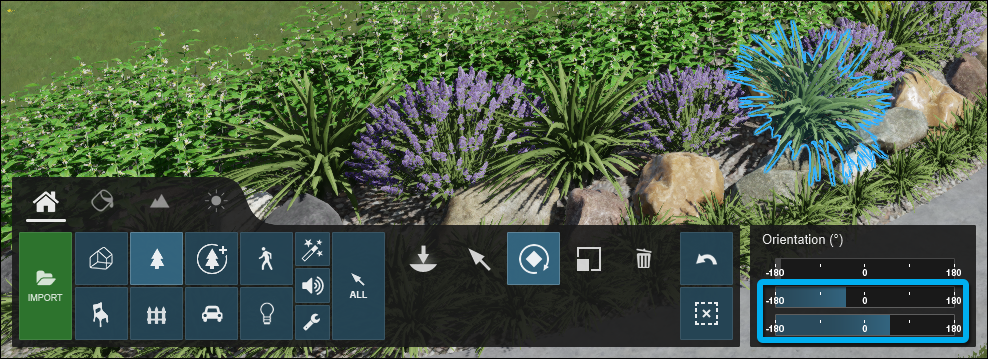
**2.1: Nature** **category** **objects**
In *Lumion* 11, the option to *Pitch* and *Bank* has been added, just like you can do with *Fine-detail nature* objects.
**2.2: *Mass Placement***
- *Mass Placement*: The *Force Height On Landscape* option is now enabled by default.
**2.3: *OpenStreetMap***
- *Buildings*: Curved domes have been optimized.
- *Heightmaps*: Better quality *Heightmaps* have been sourced from ESRI in order to reduce the impact of other objects on the sea level and ground.
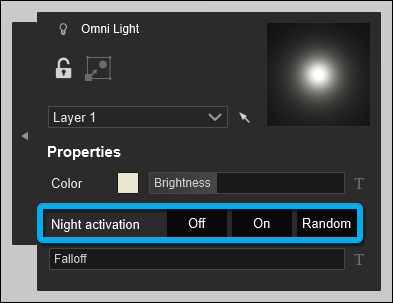
**2.4: *Lights***
*Omni lights* now also include a *Nighttime activation* option.
The *Nighttime Activation* start time has been tweaked a little so that it starts with a slightly higher sun position compared to earlier versions. It now starts at an angle of 3.5° instead of 2.5°.
**2.5: *Randomize size***
You can now set a custom value between 0% and 50% as the *Randomize size* value.
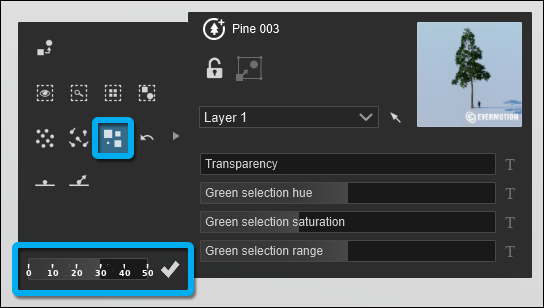
**2.6: *Layers***
Clicking on a hidden *Layer* will unhide the *Layer* and also make it the selected *Layer*.
This now has the same behavior as a *Layer* that was unhidden - it will be selected.
Note that this works when you click on the *Layer* name and not on the *Hide/Unhide* button.
### ***Movie*, *Photo,* and *Panorama Mode***
**2.7: Converting thumbnail images is no longer required** (*Photo Mode*)
Entering *Photo Mode* will no longer show the 'Converting thumbnail images' screen when *Photos* are created outside *Photo Mode* by using the CTRL + 1 2 3 ... 0 hotkeys.
**2.8: Visual feedback when storing a *Photo* in *Build Mode*** (*Build Mode*, *Photo Mode*, *Movie Mode*, *Panorama Mode*, *Theater Mode*, and *Record Mode*, and any edit mode within *Effects*)
As visual feedback, a screen flash is now shown consistently for any screen where it is possible to use the CTRL + 1 2 3 ... 0 hotkeys to take a snapshot with the camera.
**2.9: Drag and drop camera *Keyframe* slots (***Movie Mode: Clip Editor*)
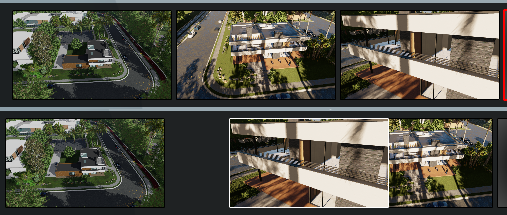
You can now rearrange camera *Keyframe* slots by drag and drop in the *Clip Editor* as you do in the *Movie Editor*.
**2.10: The *Lumion* camera can now be set to vertical - 90 degrees** (*Build Mode, Photo Mode, Clip Editor Mode, 360 Panorama Mode*)
The camera can now look completely up or down achieving a 90-degree vertical angle. In previous versions, this was limited to 85 degrees.
**2.11: Improved *near clipping***
Improved near clipping. It will only take the height of the *Lumion Landscape* into account that is above 0 meters/feet.
### ***Material Editor***
**2.12: Textures**
Textures are now automatically converted internally to .DDS format with BC7 compression for better performance and more efficient graphics card memory utilization.
The automated conversion happens when:
- Importing a custom texture for materials and *Effects*.
- Importing a model with embedded textures.
- Loading an .LS *Project* file. Only textures that are embedded in *Imported Models* will be converted.
And provided that the following conditions are met:
- The texture is not a .TGA or .DDS file.
- The texture width and height are between 256 and 16,384 pixels.
- The texture width and height are divisible by 4, for example, 600 x 880 pixels.
**2.13: *Standard Materials***
- The *Gloss* slider now has a broader range between the maximum *Gloss* and minimum *Gloss* values. This mostly affects the lower end of the slider range.
**2.14: *Material Library***
- The 50 MB file size restriction for *Video Textures* has been removed.
- The *Material Library* opens much quicker when selecting a surface compared to *Lumion* 10.5 for *Imported Models* with many surfaces.
- *3D Grass Material* and *Fur Material*: The tessellation of surfaces used for these materials has been optimized. Depending on the surface, this can potentially save thousands of *3D Points* compared to the older *Lumion* versions.
**2.15: *PureGlass Material***
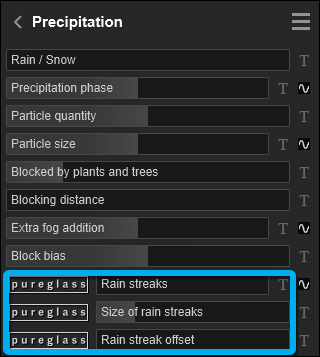
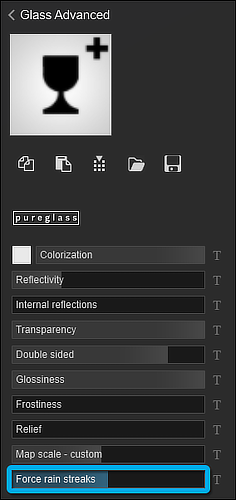
*Force Rain Streaks*: When the *Precipitation Effect* is applied to a *Photo*, *Clip*, or *Panorama Viewpoint* this property will allow the glass surface to:
- Always receive raindrops,
- Receive raindrops for only parts of the surface not blocked by other geometry,
- Never receive raindrops.
See also **1.3: *Rain streaks*.**
### **Importing & exporting**
**2.16: A complex newly *Imported Model* will be deselected.**
After importing and placing an *Imported Model* containing more than 1 million *3D Points*, the model is no longer automatically selected in *Place Mode*.
### **Loading & saving**
**2.17: *Merge* for *Photos*, *Clips* and *360 Panoramas*.**
It is now possible to add *Photos*, *Clips* and *360 Panoramas* to the current *Project* or to replace the ones in the current *Project*. The interface has also been updated to allow for a separate *Merge* of *Photos*, *Clips* or *360 Panoramas*.
### ***Effects*:**
**2.18: Automatic numbering for *Effects***
- Some *Effects* like *Variation Control* and *Animate light color* can be applied more than once in the *Effect Stack*. For easier identification, the *Effects* will be numbered, instead of having the same name for every instance of the *Effect*.
**2.19: *Reflection Effect***
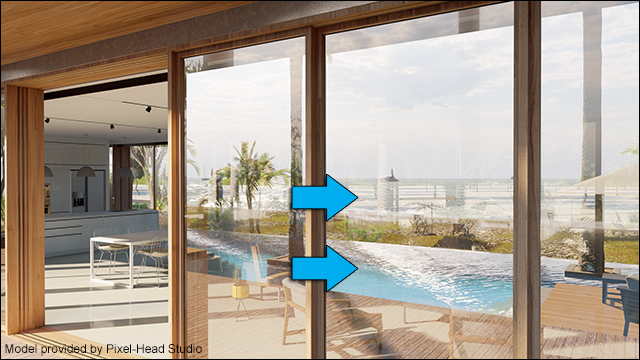
The *Water Material*, the *Ocean* and *Water Planes* are now reflected in *Planar Reflections*.
### **New example *Projects* and *Templates***
**2.20: *Example Projects***
*Lumion* 11 includes 6 new *Example Projects* and 3 existing *Example Projects* have been significantly revised.
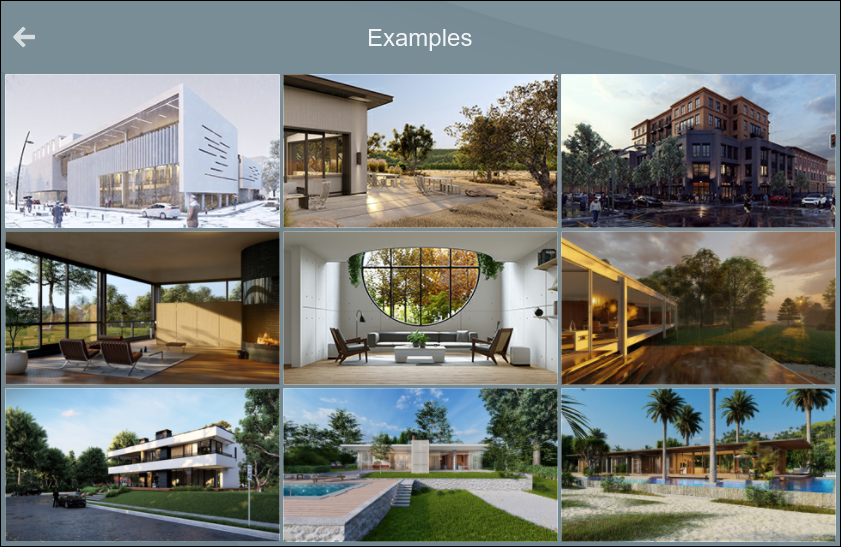
Learn about:
- *Museum development*
- Winter settings and showing life with animated people.
- *Valley winery*:
- *Animated Phasing Effect* and creating a crisp autumn setting, use of *Styles*.
- *Downtown development*
- Urban scenes, animating people and cars, and evening lighting.
- *Beach house*
- Oceanfront settings, interior, and exterior lighting, and crafting a beautiful sunset.
- *Glass House*
- Outdoor vistas, *Volumetric Fire*, lighting, and more.
- *Villa in Casale*
- Residential environments, poolside views, and using the *Lumion Content Library*.
- *Villa Cabrera*
- Sketch effects, Orthographic views, and crafting a sunny day.
- *Residential home*
- Photo matching and animating cars and people.
- *Farnsworth house*
- Weather *Effects*, rain streaks, orthographic views, and sketch outlines.
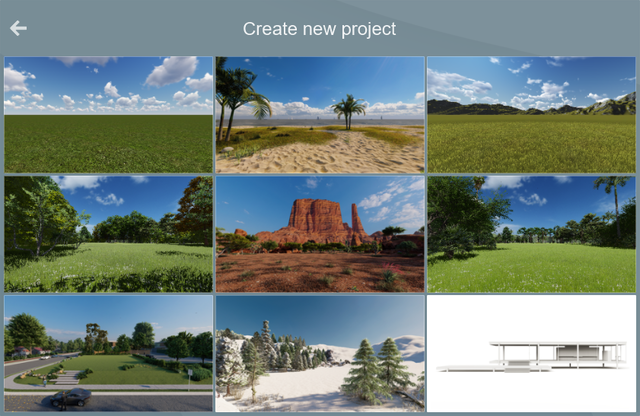
**2.21: *Templates***
In addition, 3 new *Templates* have been added: beach, desert, and winter.
The white template now has a white sky and a preconfigured *Photo*.
### **Miscellaneous**
**2.22: Sliders**
- Values from sliders can now be copied to and pasted from the clipboard (CTRL + C and CTRL + V).
- Undo/Redo (CTRL + Z and CTRL + Y). When you do something else than editing the slider, the undo stack will be reset.
- A dedicated type-in value button has been added next to sliders (see also section **1.18.2 Custom Input Value**).
- Snapping has been implemented (see also section **1.18.3: Sliders can now snap to set values**).
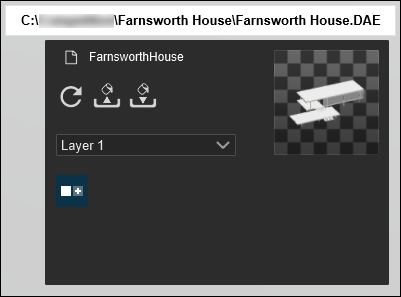
**2.23: Interface**
The model file path is now displayed when you place the mouse cursor over the model name in the *Object Properties* window:
**2.24: Performance boost**
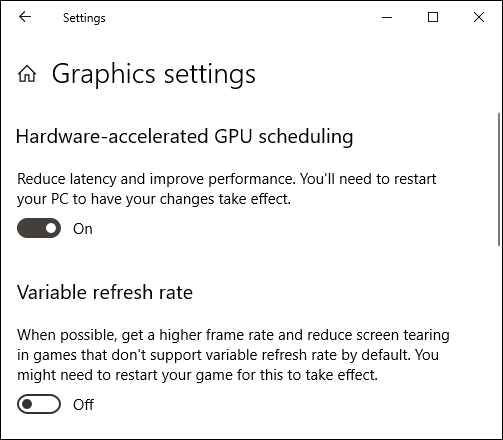
Some users might benefit from the 'Hardware-accelerated GPU scheduling' that was introduced by Microsoft in the Windows 10, 2004 update (also known as the May 2020 update).
Enabling this feature can improve render times in *Lumion* 11 and newer versions by up to 20%.
Complex *Projects* typically gain the most from this feature.
To learn how to benefit from this feature, please check if your system meets the requirements in section 5 in the article below:
- **Knowledge Base:** [How do you install the latest system software required to run Lumion?](https://support.lumion.com/knowledge-base/api/v2/help_center/en-us/articles/360003475613.json?hsLang=en-us)
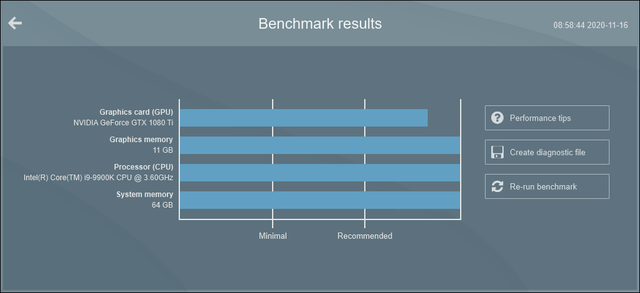
**2.25: *Benchmark***
The *Lumion* *Benchmark* has been revised to reflect the new minimum and recommended levels of performance for the system.
- **Lumion website:** [Lumion 11 System Requirements](https://lumion.com/requirements.html)
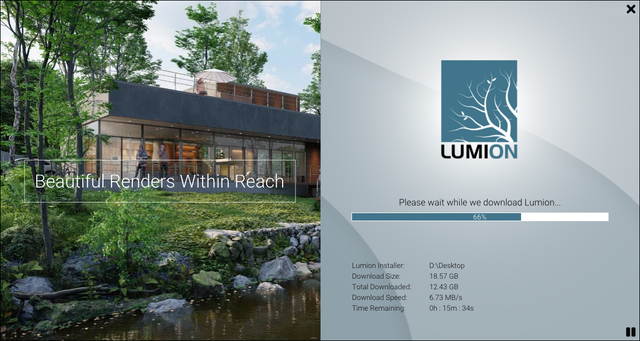
**2.26:*Download Manager***
The *Download Manager* has a new interface and now downloads larger files instead of merging many smaller files every so often. This should help avoid some issues with antivirus software blocking file parts. The download speed has also improved in most cases.
## **3. Changes & Resolved Errors**
### **3.1: *Build Mode and Object Library***
- *Theater Mode*: You can now enter *Theater Mode* via *Build with Effects* using the function key F11.
- *Mass Placement*: The text capitalization in the tooltip for *Force height on ground* has been amended.
- *Fine-detail nature trees*: When the *Setting* for *High Quality trees* is disabled and a *Fine-detail nature* tree is on a hidden *Layer*, the low-detail 'billboarded' representation of the tree is always hidden.
- *Build with Effects*: The position of the *Reflection Control* object is now correct.
- *Build with Effects*: When entering *Build with Effects*, *Select Mode* on the *Toolbar* is active by default.
- *Camera*: For the *Near Clipping Plane* the camera will now only take the height of the *Landscape* into account that is above 0.00 m. The camera adjusts the *Near Clipping Plane* to minimize surface flickering (Z-fighting) issues by decreasing the distance between the *Near* and *Far Clipping Planes*, with the assumption that if you are high up in the air with the camera, you will want to see far away, where surface flickering issues will occur.
- The *Wind Direction* and *Wind Speed* sliders from the *Ocean* settings interface in *Build Mode --\> Landscape* have been moved to *Build Mode -\> Weather*.
- *Wind*: *Wind Direction* and *Wind Speed* are now global and will affect the following objects:
- *Ocean*
- *Landscape Grass*
- Trees and most plant objects
- *Fine-detail nature* objects
- *Leaves Materials* (and *Standard Materials* with *Foliage*).
- *3D Grass Material*
- *Groups*: Loading *Groups* will no longer snap to the world center (0,0,0) after you previously canceled the loading of a group.
- *Groups*: *Place object on nodes* is now disabled when editing a *Group*.
- *Landscape Grass*: It is no longer possible to accidentally change the thumbnail images of the scatter objects (rocks, flowers etc).
- *Shadows*: *Shadows* are now updated in an improved way in *Build Mode* when *Projected Reflections* are updated.
- *Ocean*: The vertical offset on the border of the 2x2km terrain and the 10x10km has been removed.
- *Landscape \> Height*: The rate of change when using the *Smooth* tool has been increased.
- *Weather Mode*: The area around the *Sun height gizmo* where the mouse over is detected is larger relative to the button/gizmo to ensure that the position of the sun can be adjusted easier.
- *Animated people & animals*: These objects can now still be selected when the camera is very close, even when the camera is intersecting the model.
***Object library*:**
- *Thumbnail size toggle button*: A new toggle button had been added to the *Object Library* interface so you can switch between large and small thumbnails. Previously in *Lumion* 10 and older versions, the toggle button was in *Settings*.
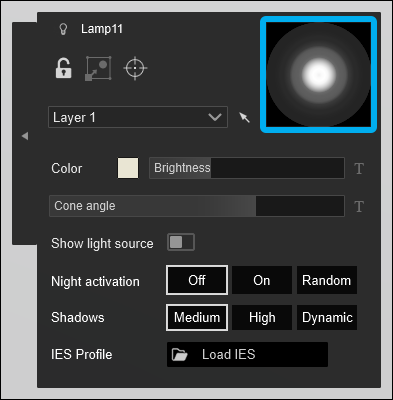
- *Spotlights*: You can now hold down the ALT key with the mouse cursor over the *Spotlight* thumbnail image in the *Object Properties* window to see the top-down preview of the IES light profile.
- *Spotlights -\> Target Lights*: A *Cancel* button has been added to this function and you can now also use the Escape key to cancel the *Target Light*.
- *Objects -\> Effects*: A *Color pick icon* is now displayed for *Fog*, *Smoke*, *Fire,* and *Leaves* objects.

- *People - 3D - Static*: A new subcategory in the *People and animals* category with static high detail character models has been added.
- *People - 3D - Static*: Old static girls and boys character models have been moved to this new *Category*.
- *People - 3D - Silhouettes*: The color for the models in this category are now gamma corrected.
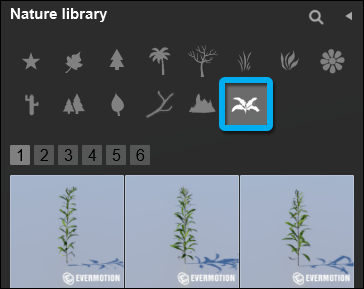
- *Weeds*: These new models were added to a dedicated *Weeds* subcategory in the *Nature Category.*
- The darkness and glossiness of some objects were adjusted. Some object libraries might look a little bit different due to tweaks in the renderer. Dark colors are a bit darker. Bright objects will look similar. Glossiness is calculated a little differently which can make some objects appear a little bit more shiny or dull, depending.
- *Replace Selection*: An *Object* replaced with one from the *Object Library* will retain the settings it had previously, rather than being reset. For example, its *Color* and *Night Activation* settings. This applies to *Lights, Vehicles, Nature, Indoor, Outdoor, Sound*.
- The indoor object *teapot\_008* has been renamed to *electric\_tea\_kettle\_001*.
- An issue where the shadow cast by an object from the *Content Library* would not use the transparency mask if any was in the model has now been resolved.
- *Utilities - Measure Tool*: All nodes in a measurement object will move to the same *Layer* when you change the *Layer* for one of its nodes.
- *Smoke Effects* objects now show better when they are being moved around with the mouse cursor.
- *Outdoor Category* -\> *Outdoor Object Icon*: A new matching icon has been created.
### **3.2: *Photo Mode*, *Movie Mode* &** ***Panorama Mode***
***Photo Mode***
- A very rare issue where opening an .LS *Project* file and entering *Photo Mode* would get stuck at the *All photo thumbnails have been created* screen has been fixed.
***Movie Mode***
- *Theater Mode*: It is no longer possible to enter *Theater Mode* using the hotkey F11 when there are no *Clips* in *Movie Mode*.
- *Movie Editor Timeline*: It is no longer possible to drag the time position before the start of the timeline.
- *Mass Move Effect*: Wheels from cars now rotate in the correct direction for all vehicles.
- The *Sky Drop Effect* has been replaced with the *Animated Phasing Effect* (but is still available for existing *Projects* prior to *Lumion* 11).
***Photo* &** ***Movie Mode***
- *Custom Output Maps* -\> *People - 3D - Silhouettes*: Static silhouette models of people and animals are now included in all *Custom Output Map* types.
***Photo Mode*, *Movie Mode* & *Panorama Mode***
- *Fine Detail Shadows* are now disabled in *Preview* when the *Editor Quality* is set to no shadows in the *Settings -\> Image -\> Editor Quality -\> 1-star (Low quality)*.
### **3.3: *Materials***
- *Standard Material*: Transparency is now rendered at full quality when creating a *High-quality Preview* for *Photo Mode*, *Movie Mode,* and *Theater Mode*.
- *Standard Material*: The *Displacement* slider value will now reset to 0 as expected when deleting a *Custom Displacement Map*.
- *Standard Material*: The tooltip now shows the name of the imported .MP4 file for *Video Textures*.
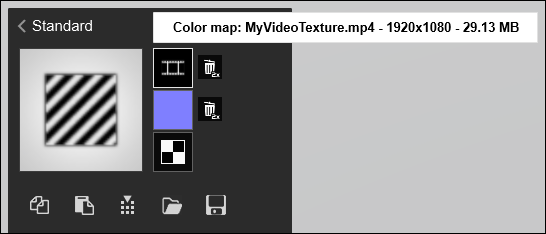
- Imported texture: Importing extremely large textures from 24,576x24,576 pixels and up, no longer results in resize errors and/or crashes.
### **3.4: *Effects* & *Styles***
- *Mass Move Effect*: The playback performance in *Movie Mode* has been improved.
- *Reflection Effect*: It is now possible to change the *Reflection Threshold* when editing the *Reflection Planes*.

- *Featured Effects:* The interface for selecting an *Effect* has been updated:
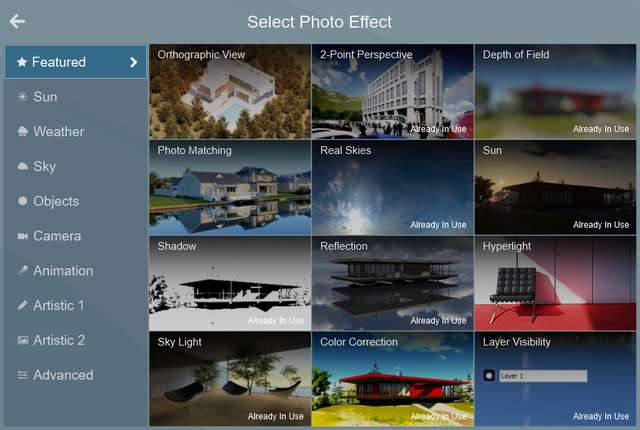
- *Reflection Planes* from the current *Project* are now cleared when opening a new *Project*.
- *Fine-Detail nature* objects are now reflected correctly in *Planar Reflections*.
- *Precipitation Effect*: When *Blocked by plants* is set to 0, precipitation is now completely unblocked.
- *Cartoon Effect*: *Outline transparency* and *Fill to white* are now unlinked from each other when one of the two is keyframed.
- *Shadow Effect*: It is now possible to type in the *Sun shadow range*. using the *Type In value* field or by double-clicking the slider.
- *Shadow Effect*: The minimum *Sun shadow range* is now 100m/328 feet. Previously it was 156m/511.8 feet.
- *Sky Drop Effect*: This has been removed. The *Phasing Effect* now has a sky drop function among many other effects. Loading older version *Projects* with the *Sky Drop Effect* still works as it used to. We recommend updating the animation to using the new *Phasing Effect* where possible.
- *Styrofoam Effect*: When the *Effect* has been removed from the *Effect Stack*, the *Projected Reflections* in the preview will now update.
- *Real Skies Effect*: The *Real Skies* thumbnail image in the *Effect* shows the correct logo.
- *Reflection Effect*: *Reflection planes* are now assigned properly to *Water Planes* when they have been scaled.
- *Blueprint Effect*: The *Grid Scale* now matches world sizes and is now in the range of 0.1m to 10m (0.3281 ft to 32.81 ft).
- *Water Effect*: Disabling the *Underwater* or *Ocean* setting no longer darkens the *Lumion Landscape*.
- *Sky and Clouds Effect*: The *Cloud direction* slider now uses degrees (-180 to 180).
### **3.5: Save, load, and recovery**
- *Merge*: Merging *Clips* will no longer create black thumbnail images for those *Clips*.
- *Merge*: Merging now reports the correct number of cameras per category (*Photos*, *Clips*, *Panoramas*).
### **3.6: Importing and Exporting**
- Removing a model from the *Imported Model Library* and then re-importing the same-named model again in a *Custom Category* now works correctly.
- .DDS texture files: *Lumion* no longer crashes when importing an invalid .DDS texture. Instead, it will show a warning message and then not load the texture.
- *Lumion* now respects the aspect ratio of a texture when it is automatically resized if the width or height is larger than 16,384 pixels.
- Import error screen: The correct [Lumion Support](https://support.lumion.com?hsLang=en-us) webpage address is now displayed in case of import errors.
- It is no longer possible to use third-party *SpeedTree* models in *Lumion* by placing them in the *Trees* folder.
- The *Lumion LiveSync for Revit* plug-in no longer supports Revit 2015.
### **3.7: Miscellaneous**
- **Windows version**: *Lumion* 11 will only run on the Windows 10 operating system.
- **Graphics card driver version check**: When starting Lumion, the driver version of the graphics card are checked. For NVIDIA graphics cards it checks if the drivers are at version 416.16 or newer. For AMD graphics cards it checks if the drivers are at version 18.8.2 (Adrenalin) or newer. This is required for compatibility with *Lumion* 11.0 or newer.
- *Crash Report*: When Lumion crashes it now creates a crash file and will give the user the option to send the crash file, and (optionally) a description and a contact email address.
- **Microsoft VC Redistributable**: *Lumion* 11 now has only one Microsoft VC Redistributable (Redist2015-2019) package instead of multiple separate packages (Redist 2008, Redist 2010, Redist 2012, Redist 2015 and Redist 2017).
- **AMD graphics cards**: The view does not turn black anymore when the camera moves close to the tree-cluster objects *TreeClusters2\_Broadleaf\_Circle* and *TreeClusters2\_Pine\_Circle*.
- *Lumion Installer*: Lumion banner scaling is now working for 4K screens.
- A new thumbnail image for the *Questionmark* objects has been created.
### **3.8 Interface:**
- *Camera Guide*: In *Photo, Movie, and Panorama Modes* the camera guides (rule of thirds) will be shown when adjusting the camera by using the middle mouse button. Previously, in version 10, it was only when holding down the right mouse button.
- *Create a new Project* with *Import a model*: The *Import Model* option has been removed.
- *Main Menu*: The \`?\` icon for onscreen *Help* now also functions as a button to start the *Guided Tutorials* in *Build Mode*. In all other modes, it will pop up a window with a link to Lumion online video tutorials.
- The *Paint Tile Size slider* in *Landscape Mode* now has a title.
- Various minor interface changes.
### **3.9: Features also now in *Lumion* 11 (Standard)**
These are features that were available previously only in *Lumion Pro*.
***Effects*:**
- *Real Skies Effect*: The nighttime *Real Skies*.
- *Photo Matching Effect*.
- *Variation Control Effect*.
- *Tilt Shift Effect*.
- *Outlines Effect*.
***Build Mode* - *Object Library*:**
- *Grid*.
- *Measure*.
- *Text Simple*.
***Importing*:**
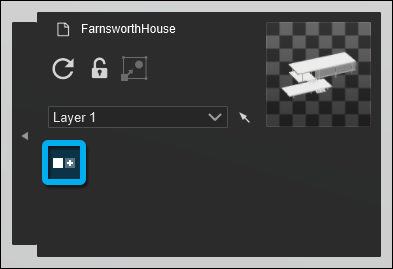
- *Imported Models*: The option to add *Variations*.
### **From the Team:**
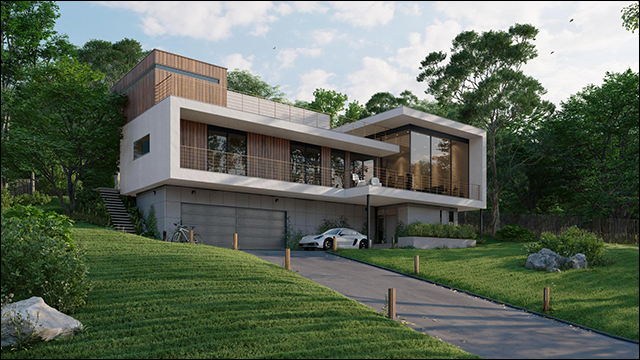
Enjoy learning and using *Lumion* 11.
## 
- [Visit our other Sections](https://support.lumion.com/knowledge-base/visit-our-other-sections?hsLang=en-us)
- [Contact Us](https://support.lumion.com/knowledge-base/contact-us?hsLang=en-us)
- [Lumion Account](https://support.lumion.com/knowledge-base/lumion-account?hsLang=en-us)
- [Latest News](https://support.lumion.com/knowledge-base/latest-news?hsLang=en-us#main-content)
- [Major Known Issues](https://support.lumion.com/knowledge-base/latest-news?hsLang=en-us#major-known-issues)
- [Lumion 2025: Major Version Release Details](https://support.lumion.com/knowledge-base/latest-news?hsLang=en-us#lumion-2025-major-version-release-details)
- [Lumion 2024: Major Version Release Details](https://support.lumion.com/knowledge-base/latest-news?hsLang=en-us#lumion-2024-major-version-release-details)
- [Lumion 2023: Major Version Release Details](https://support.lumion.com/knowledge-base/latest-news?hsLang=en-us#lumion-2023-major-version-release-details)
- [Lumion 2023: Update Release Notes](https://support.lumion.com/knowledge-base/latest-news?hsLang=en-us#lumion-2023-update-release-notes)
- [Lumion 12](https://support.lumion.com/knowledge-base/latest-news?hsLang=en-us#lumion-12)
- [Lumion 11](https://support.lumion.com/knowledge-base/latest-news?hsLang=en-us#lumion-11)
- [Lumion 10](https://support.lumion.com/knowledge-base/latest-news?hsLang=en-us#lumion-10)
- [Sales Questions](https://support.lumion.com/knowledge-base/sales-questions?hsLang=en-us)
- [Subscriptions](https://support.lumion.com/knowledge-base/subscriptions?hsLang=en-us)
- [New User Questions](https://support.lumion.com/knowledge-base/new-user-questions?hsLang=en-us)
- [Learning Resources](https://support.lumion.com/knowledge-base/learning-resources?hsLang=en-us)
- [System Requirements Questions](https://support.lumion.com/knowledge-base/system-requirements-questions?hsLang=en-us#main-content)
- [Determining the 'Complexity' of your Projects](https://support.lumion.com/knowledge-base/system-requirements-questions?hsLang=en-us#determining-the-complexity-of-your-projects)
- [System Messages from Lumion](https://support.lumion.com/knowledge-base/system-requirements-questions?hsLang=en-us#system-messages-from-lumion)
- [Requirements for Prior Versions](https://support.lumion.com/knowledge-base/system-requirements-questions?hsLang=en-us#requirements-for-prior-versions)
- [Download & Installation Questions](https://support.lumion.com/knowledge-base/download-installation-questions?hsLang=en-us#main-content)
- [Download/Installation: General Questions](https://support.lumion.com/knowledge-base/download-installation-questions?hsLang=en-us#download-installation-general-questions)
- [Download Questions](https://support.lumion.com/knowledge-base/download-installation-questions?hsLang=en-us#download-questions)
- [Installation Questions](https://support.lumion.com/knowledge-base/download-installation-questions?hsLang=en-us#installation-questions)
- [Lumion Pro Updater](https://support.lumion.com/knowledge-base/download-installation-questions?hsLang=en-us#lumion-pro-updater)
- [Plugins to CAD software](https://support.lumion.com/knowledge-base/download-installation-questions?hsLang=en-us#plugins-to-cad-software)
- [License and General Product Questions](https://support.lumion.com/knowledge-base/license-and-general-product-questions?hsLang=en-us#main-content)
- [License System Messages from Lumion](https://support.lumion.com/knowledge-base/license-and-general-product-questions?hsLang=en-us#license-system-messages-from-lumion)
- [Import & Export Questions](https://support.lumion.com/knowledge-base/import-export-questions?hsLang=en-us#main-content)
- [Model Import Guidelines](https://support.lumion.com/knowledge-base/import-export-questions?hsLang=en-us#model-import-guidelines)
- [Lumion LiveSync and import plugins](https://support.lumion.com/knowledge-base/import-export-questions?hsLang=en-us#lumion-livesync-and-import-plugins)
- [System Messages from Lumion when importing](https://support.lumion.com/knowledge-base/import-export-questions?hsLang=en-us#system-messages-from-lumion-when-importing)
- [General Questions](https://support.lumion.com/knowledge-base/general-questions?hsLang=en-us#main-content)
- [Keyboard Shortcuts in Lumion](https://support.lumion.com/knowledge-base/general-questions?hsLang=en-us#keyboard-shortcuts-in-lumion)
- [Upgrading and Updating your Lumion Version](https://support.lumion.com/knowledge-base/general-questions?hsLang=en-us#upgrading-and-updating-your-lumion-version)
- [Using Lumion 2023](https://support.lumion.com/knowledge-base/general-questions?hsLang=en-us#using-lumion-2023)
- [System Messages from Lumion](https://support.lumion.com/knowledge-base/general-questions?hsLang=en-us#system-messages-from-lumion)
- [Build Mode Questions](https://support.lumion.com/knowledge-base/build-mode-questions?hsLang=en-us#main-content)
- [Landscape and Terrains](https://support.lumion.com/knowledge-base/build-mode-questions?hsLang=en-us#landscape-and-terrains)
- [OpenStreetMap](https://support.lumion.com/knowledge-base/build-mode-questions?hsLang=en-us#openstreetmap)
- [Lighting: Sun and Artificial Lights](https://support.lumion.com/knowledge-base/build-mode-questions?hsLang=en-us#lighting-sun-and-artificial-lights)
- [Questions mainly for older versions than Lumion 12](https://support.lumion.com/knowledge-base/build-mode-questions?hsLang=en-us#questions-mainly-for-older-versions-than-lumion-12)
- [Library Content](https://support.lumion.com/knowledge-base/library-content?hsLang=en-us#main-content)
- [Library Content in Lumion 2026](https://support.lumion.com/knowledge-base/library-content?hsLang=en-us#library-content-in-lumion-2026)
- [Library Content in Lumion 2025](https://support.lumion.com/knowledge-base/library-content?hsLang=en-us#library-content-in-lumion-2025)
- [Library Content in Lumion 2024](https://support.lumion.com/knowledge-base/library-content?hsLang=en-us#library-content-in-lumion-2024)
- [Library Content in Lumion 2023](https://support.lumion.com/knowledge-base/library-content?hsLang=en-us#library-content-in-lumion-2023)
- [Library Content in Lumion 12](https://support.lumion.com/knowledge-base/library-content?hsLang=en-us#library-content-in-lumion-12)
- [Movie & Photo Mode Questions](https://support.lumion.com/knowledge-base/movie-photo-mode-questions?hsLang=en-us#main-content)
- [Photo Mode](https://support.lumion.com/knowledge-base/movie-photo-mode-questions?hsLang=en-us#photo-mode)
- [Movie Mode](https://support.lumion.com/knowledge-base/movie-photo-mode-questions?hsLang=en-us#movie-mode)
- [Animation in Movie Mode](https://support.lumion.com/knowledge-base/movie-photo-mode-questions?hsLang=en-us#animation-in-movie-mode)
- [Effects in Photo or Movie Mode](https://support.lumion.com/knowledge-base/movie-photo-mode-questions?hsLang=en-us#effects-in-photo-or-movie-mode)
- [Reflections](https://support.lumion.com/knowledge-base/movie-photo-mode-questions?hsLang=en-us#reflections)
- [Material Questions](https://support.lumion.com/knowledge-base/material-questions?hsLang=en-us#main-content)
- [Materials in versions 12 and earlier](https://support.lumion.com/knowledge-base/material-questions?hsLang=en-us#materials-in-versions-12-and-earlier)
- [Using LiveSync for Revit and a Section Box](https://support.lumion.com/knowledge-base/material-questions?hsLang=en-us#using-livesync-for-revit-and-a-section-box)
- [Rendering Questions](https://support.lumion.com/knowledge-base/rendering-questions?hsLang=en-us#main-content)
- [General Rendering Questions](https://support.lumion.com/knowledge-base/rendering-questions?hsLang=en-us#general-rendering-questions)
- [Rendering of Photos](https://support.lumion.com/knowledge-base/rendering-questions?hsLang=en-us#rendering-of-photos)
- [Rendering of Clips and Movies](https://support.lumion.com/knowledge-base/rendering-questions?hsLang=en-us#rendering-of-clips-and-movies)
- [Tips to getting the best renders](https://support.lumion.com/knowledge-base/rendering-questions?hsLang=en-us#tips-to-getting-the-best-renders)
- [Rendering Performance](https://support.lumion.com/knowledge-base/rendering-questions?hsLang=en-us#rendering-performance)
- [Technical Issues when Rendering](https://support.lumion.com/knowledge-base/rendering-questions?hsLang=en-us#technical-issues-when-rendering)
- [Panorama Mode Questions](https://support.lumion.com/knowledge-base/panorama-mode-questions?hsLang=en-us#main-content)
- [Technical questions when rendering with Panorama Mode](https://support.lumion.com/knowledge-base/panorama-mode-questions?hsLang=en-us#technical-questions-when-rendering-with-panorama-mode)
- [File & BackUp Questions](https://support.lumion.com/knowledge-base/file-backup-questions?hsLang=en-us#main-content)
- [Saving and Backup](https://support.lumion.com/knowledge-base/file-backup-questions?hsLang=en-us#saving-and-backup)
- [File Saving Issues](https://support.lumion.com/knowledge-base/file-backup-questions?hsLang=en-us#file-saving-issues)
- [Lumion-Documents](https://support.lumion.com/knowledge-base/file-backup-questions?hsLang=en-us#lumion-documents)
- [Transfer, Move or Migrate Files](https://support.lumion.com/knowledge-base/file-backup-questions?hsLang=en-us#transfer-move-or-migrate-files)
- [Troubleshooting](https://support.lumion.com/knowledge-base/troubleshooting?hsLang=en-us#main-content)
- [Reports about your PC](https://support.lumion.com/knowledge-base/troubleshooting?hsLang=en-us#reports-about-your-pc)
- [Photo and Movie Mode Issues](https://support.lumion.com/knowledge-base/troubleshooting?hsLang=en-us#photo-and-movie-mode-issues)
- [Rendering Issues](https://support.lumion.com/knowledge-base/troubleshooting?hsLang=en-us#rendering-issues)
- [Error Messages from Lumion](https://support.lumion.com/knowledge-base/troubleshooting?hsLang=en-us#error-messages-from-lumion)
- [Hardware related Issues](https://support.lumion.com/knowledge-base/troubleshooting?hsLang=en-us#hardware-related-issues)
- [Other Troubleshooting Issues](https://support.lumion.com/knowledge-base/troubleshooting?hsLang=en-us#other-troubleshooting-issues)
- [Article Developments](https://support.lumion.com/knowledge-base/article-developments?hsLang=en-us#main-content)
- [Devs - Multi‑Image Button Viewer](https://support.lumion.com/knowledge-base/article-developments?hsLang=en-us#devs-multi-image-button-viewer)
[](https://lumion.com/)
[mailto:email@email.com](mailto:email@email.com)
Copyright © 2026, Lumion - Act3D B.V.
#### Product
[Plans and pricing](https://lumion.com/product/buy)
[Discover Lumion](https://lumion.com/product/discover-lumion)
[Compatibility](https://lumion.com/compatibility/)
[System Requirements](https://lumion.com/product/system-requirements)
[Find a reseller](https://lumion.com/about/find-reseller)
[Free trial](https://lumion.com/product/free-trial)
#### Solutions
[Architectural design](https://lumion.com/product/architectural-design)
[Interior design](https://lumion.com/product/interior-design)
[Landscape architecture](https://lumion.com/product/landscape-architecture)
[Urban planning](https://lumion.com/product/urban-planning)
[3D rendering](https://lumion.com/product/3d-rendering-software)
[Education](https://lumion.com/product/educational-licenses)
#### Compatibility
[Trimble SketchUp](https://lumion.com/compatibility/sketchup-rendering)
[Autodesk Revit](https://lumion.com/compatibility/revit-rendering)
[Graphisoft ArchiCAD](https://lumion.com/compatibility/archicad-rendering)
[Rhinoceros](https://lumion.com/compatibility/rhino-rendering)
[Autodesk Autocad](https://lumion.com/compatibility/autocad-rendering)
[Autodesk FormIt Pro](https://lumion.com/compatibility/lumion-for-autodesk-formit-pro)
[Nemetschek Allplan](https://lumion.com/compatibility/allplan-rendering)
[Nemetschek Vectorworks](https://lumion.com/compatibility/vectorworks-rendering)
[BricsCAD](https://lumion.com/compatibility/bricscad-rendering)
[3D Studio Max](https://lumion.com/compatibility/3ds-max-rendering)
#### Resources
[Made with Lumion](https://lumion.com/made-with-lumion)
[Tutorials](https://support.lumion.com/video-tutorials?hsLang=en-us)
[Support and learning](https://support.lumion.com/knowledge-base/api/v2/help_center/en-us/articles/360044608053.json?hsLang=en-us)
[Downloads](https://support.lumion.com/downloads?hsLang=en-us)
[Community](https://community.lumion.com/index.php)
#### About
[Our Story](https://lumion.com/about)
[We're hiring!](https://lumion.com/about/careers)
[News](https://lumion.com/news)
[Contact us](https://lumion.com/about/contact)
[Terms & conditions](https://lumion.com/legal/terms-of-service) [EULA](https://lumion.com/legal/eula) [Privacy statement](https://lumion.com/legal/privacy-statement) [CEIP](https://lumion.com/legal/ceip) [Disclaimer](https://lumion.com/legal/disclaimer) © 2026 Lumion