---
title: "Lumion 10.0: Release notes"
description: Knowledge Base
---
Solutions
[Architectural design All you need to bring your residential, commercial or institutional designs to life](https://lumion.com/product/architectural-design) [Landscape architecture Beautiful terrains and fine-detailed nature for any climate or season](https://lumion.com/product/landscape-architecture)
[Interior design Realistic light, high-quality textures, and an extensive asset library](https://lumion.com/product/interior-design) [Students and Faculties Lumion is free for students, educators, and faculties around the world](https://lumion.com/product/educational-licenses)
[SketchUp](https://lumion.com/compatibility/sketchup-rendering) [Revit](https://lumion.com/compatibility/revit-rendering) [ArchiCAD](https://lumion.com/compatibility/archicad-rendering) [Rhino](https://lumion.com/compatibility/rhino-rendering) [Autocad](https://lumion.com/compatibility/autocad-rendering) [See more](https://lumion.com/compatibility/)
Product
[Discover Axogram New Live architectural diagramming](https://lumion.com/product/axogram) [Lumion Cloud Where design meets collaboration](https://lumion.com/product/lumion-cloud)
[Lumion Pro Advanced visualization solution](https://lumion.com/product/lumion-pro) [Discover AI tools New AI built for architectural work](https://lumion.com/product/ai)
[Lumion Pro 2026.1 is out now! 🚀](https://lumion.com/product/latest-version-pro) [Compatibility](https://lumion.com/compatibility/) [System Requirements](https://lumion.com/product/system-requirements) [Roadmap](https://lumion.com/product/roadmap)
[Pricing](https://lumion.com/product/buy) Resources
[Made with Lumion Get inspired by the stories behind the designs](https://lumion.com/made-with-lumion)
[Tips & Guides Make the most out of Lumion with helpful guides and tutorials](https://lumion.com/tips-guides)
[Knowledge base](https://support.lumion.com/knowledge-base?hsLang=en-us) [Community](https://community.lumion.com/index.php) [Downloads](https://support.lumion.com/downloads?hsLang=en-us)
About
[Who we are Learn about our story and mission](https://lumion.com/about) [Careers - We're hiring Let's build the future of architectural visualization](https://lumion.com/about/careers)
[News Discover the latest product news and more](https://lumion.com/news)
[Find your local reseller](https://lumion.com/about/find-reseller) [Contact us](https://lumion.com/about/contact)
[](http://lumion.com)
[My Account](https://account.lumion.com)
Solutions
[Architectural design](https://lumion.com/product/architectural-design) [Interior design](https://lumion.com/product/interior-design) [Landscape architecture](https://lumion.com/product/landscape-architecture) [Students and Faculties](https://lumion.com/product/educational-licenses)
---
[SketchUp](https://lumion.com/compatibility/sketchup-rendering) [Revit](https://lumion.com/compatibility/revit-rendering) [ArchiCAD](https://lumion.com/compatibility/archicad-rendering) [Rhino](https://lumion.com/compatibility/rhino-rendering) [Autocad](https://lumion.com/compatibility/autocad-rendering) [See more](https://lumion.com/compatibility/)
Product
[Axogram New](https://lumion.com/product/axogram) [Lumion Cloud](https://lumion.com/product/lumion-cloud) [Lumion Pro](https://lumion.com/product/lumion-pro) [Discover AI tools New](https://lumion.com/product/ai)
---
[Lumion Pro 2026.1 is out now! 🚀](https://lumion.com/product/latest-version-pro) [Compatibility](https://lumion.com/compatibility/) [System Requirements](https://lumion.com/product/system-requirements) [Roadmap](https://lumion.com/product/roadmap)
[Pricing](https://lumion.com/product/buy) Resources
[Made with Lumion](https://lumion.com/made-with-lumion) [Tips & Guides](https://lumion.com/tips-guides)
---
[Knowledge base](https://support.lumion.com/knowledge-base?hsLang=en-us) [Community](https://community.lumion.com/index.php) [Downloads](https://support.lumion.com/downloads?hsLang=en-us)
About
[Who we are](https://lumion.com/about) [Careers - We're hiring](https://lumion.com/about/careers) [News](https://lumion.com/news)
---
[Find your local reseller](https://lumion.com/about/find-reseller) [Contact us](https://lumion.com/about/contact)
[My Account](https://account.lumion.com)
[Submit a request](https://support.lumion.com/hc/en-us/requests/new?hsLang=en-us)
[](https://lumion.com/) [Login](https://account.lumion.com/)
[](https://lumion.com/)
## Main menu
Solutions
Product
[Pricing](https://lumion.com/product/buy)
Resources
About
[Submit a request](https://support.lumion.com/hc/en-us/requests/new?hsLang=en-us)
[Login](https://account.lumion.com/)
Start for free
Back
### Solutions
[Architectural design](https://lumion.com/product/architectural-design) [Interior design](https://lumion.com/product/interior-design) [Landscape architecture](https://lumion.com/product/landscape-architecture) [Students and Faculties](https://lumion.com/product/educational-licenses)
---
[SketchUp](https://lumion.com/compatibility/sketchup-rendering) [Revit](https://lumion.com/compatibility/revit-rendering) [ArchiCAD](https://lumion.com/compatibility/archicad-rendering) [Rhino](https://lumion.com/compatibility/rhino-rendering) [Autocad](https://lumion.com/compatibility/autocad-rendering) [See more](https://lumion.com/compatibility/)
Back
### Product
[Axogram — New](https://lumion.com/product/axogram) [Lumion Cloud](https://lumion.com/product/lumion-cloud) [Lumion Pro](https://lumion.com/product/lumion-pro) [Discover AI tools — New](https://lumion.com/product/ai)
---
[Lumion Pro 2026.1 is out now! 🚀](https://lumion.com/product/latest-version-pro) [Compatibility](https://lumion.com/compatibility/) [System Requirements](https://lumion.com/product/system-requirements) [Roadmap](https://lumion.com/product/roadmap)
Back
### Resources
[Made with Lumion](https://lumion.com/made-with-lumion) [Tips & Guides](https://lumion.com/tips-guides)
---
[Knowledge base](https://support.lumion.com/knowledge-base?hsLang=en-us) [Community](https://community.lumion.com/index.php) [Downloads](https://support.lumion.com/downloads?hsLang=en-us)
Back
### About
[Who we are](https://lumion.com/about) [Careers - We're hiring](https://lumion.com/about/careers) [News](https://lumion.com/news)
---
[Find your local reseller](https://lumion.com/about/find-reseller) [Contact us](https://lumion.com/about/contact)
Back
### Start for free
[Lumion Pro](https://lumion.com/product/free-trial#request-trial) [Lumion Cloud](https://lumion.com/product/lumion-cloud#start) [Axogram](https://lumion.com/product/axogram#plans-pricing)
Lumion Knowledge Base
How can we help?
- There are no suggestions because the search field is empty.
[Skip to content](https://support.lumion.com/knowledge-base/api/v2/help_center/en-us/articles/360037233473.json#main-content)
English - United States
Show submenu for translations

Open main navigation
Close main navigation
- English - United States
Show submenu for translations
- Contact us
Contact us
How can we help you?
- There are no suggestions because the search field is empty.
1. [Knowledge Base](https://support.lumion.com/knowledge-base?hsLang=en-us)
2. [Latest News](https://support.lumion.com/knowledge-base/latest-news?hsLang=en-us)
3. [Lumion 10](https://support.lumion.com/knowledge-base/latest-news?hsLang=en-us#lumion-10)
# Lumion 10.0: Release notes
## 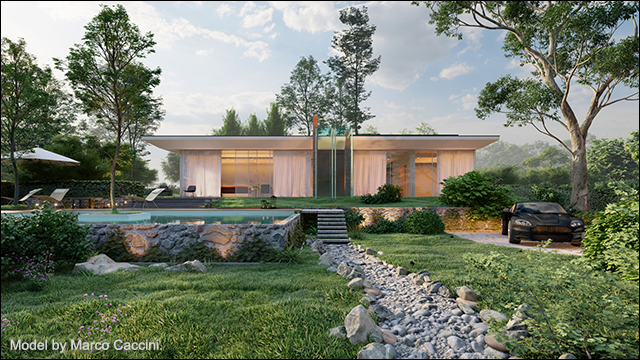
## **Lumion 10.0: Release Notes**
- **Link to section below:** [1. New Feature Highlights](https://support.lumion.com/knowledge-base/api/v2/help_center/en-us/articles/360037233473.json#h_5fed70b0-89c0-4675-ab23-dbda7a09a4f7)
- **Link to section below:** [2. Other New Features & Improvements](https://support.lumion.com/knowledge-base/api/v2/help_center/en-us/articles/360037233473.json#h_51dfe116-ad84-44cf-95c3-3be43131e52a)
- **Link to section below:** [3. Changes & Resolved Errors](https://support.lumion.com/knowledge-base/api/v2/help_center/en-us/articles/360037233473.json#h_5c1b4a46-6c7a-4e60-908f-432d368d20ce)
**Compatibility**
- Please note that projects and models saved in version 10.0 can't be opened in older versions of *Lumion*.
- Please click on the following link to see how to open projects from older versions of *Lumion* in *Lumion* 10:
- **Knowledge Base:** [Lumion 10.0: Everything you need to know](https://support.lumion.com/knowledge-base/api/v2/help_center/en-us/articles/360036729534.json?hsLang=en-us)
**Note:** Features, models and materials with the asterisk (\*) character are only available in *Lumion 10.0 Pro*.
## **1. New Feature Highlights**
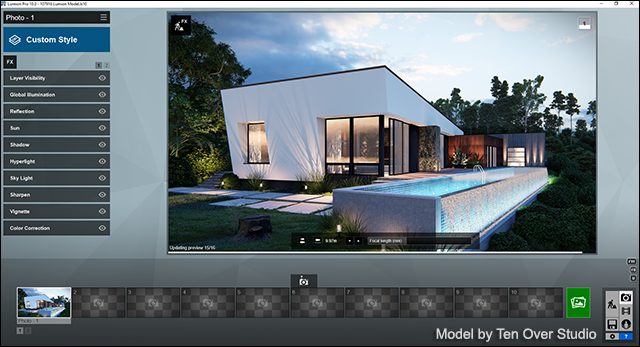
**1.1: High-quality preview** (*Photo Mode, Movie Mode, Panorama Mode*)
The new high-quality preview in Lumion 10 lets you see the highest available quality preview of your project before you render. A toggle button on the *Settings* screen (and the F6 key) lets you toggle between automatic updates and manual updates (i.e. clicking inside the 3D view).
[Video: High-quality Preview](https://youtu.be/FNCYg-XFXSI)
**
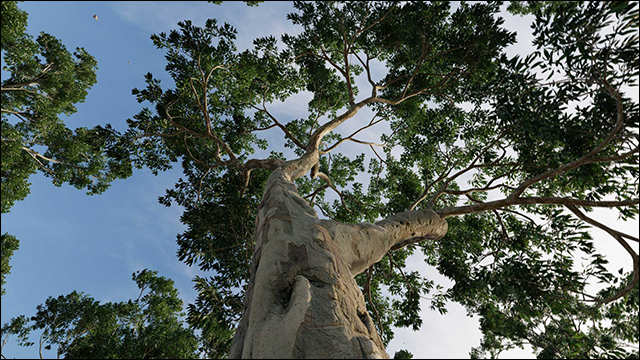
**1.2: Fine-detail Nature \*** (*Lumion Object Library*: *Fine-detail Nature Category*)
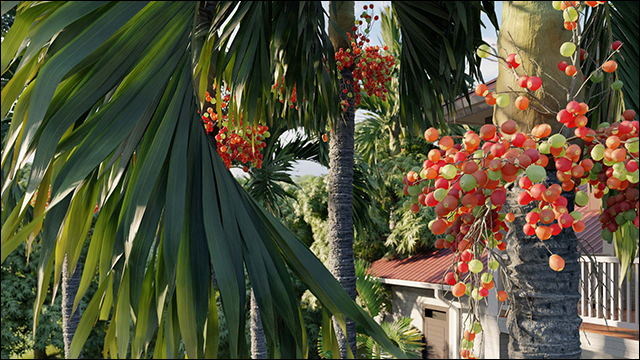
The 62 new *Fine-detail Nature* models in *Lumion* 10 are the most detail-rich, beautiful 3D tree and plant models available in the *Lumion Object Library*. The new *Fine-detail Nature* models are much richer than the standard nature models and other trees you can find in Lumion. We recommend using the *Fine-detail Nature* models *sparingly*.
[Video: Fine-detail Nature](https://youtu.be/U1PtESREtVQ)
**1.3: Displacement mapping** (*Material Editor: Lumion Materials Library*)
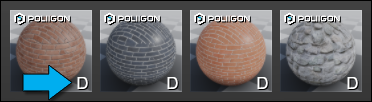
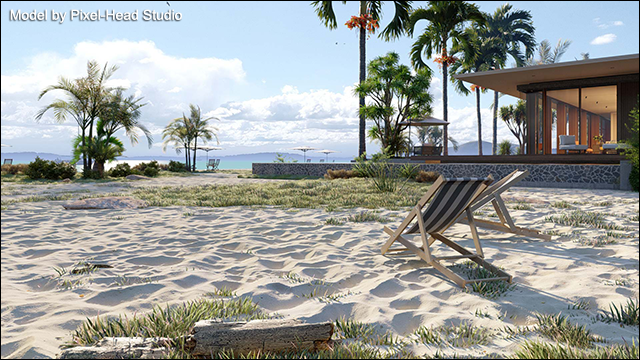
With the addition of displacement mapping to 167 materials in Lumion 10, your audience will be able to feel the grain of your chosen wood, the rough surface of bricks, the bumpy texture of gravel.
The 'D' icon means that the material includes a *Displacement Map*:
[Video: Displacement mapping](https://youtu.be/LMBhOXxv5SQ)
****
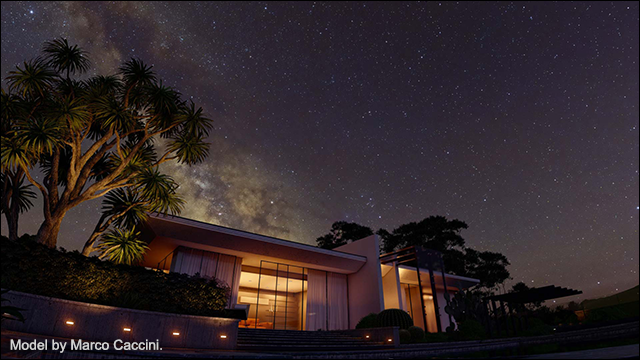
**1.4: *Real Skies Effect* at night \*** (*Movie and Photo Mode*: *Sky Effects Category*)
When looking up at the night sky and its thousand dazzling stars, it’s easy to feel a sense of wonder and beauty toward your surroundings. This is the feeling we wanted to help architects create when showing their designs. Five (5) high-quality night skies are included in *Lumion* 10 *Pro*.
[Real Skies at night](https://www.youtube.com/watch?v=G_C-XM9bbWU&feature=youtu.be)
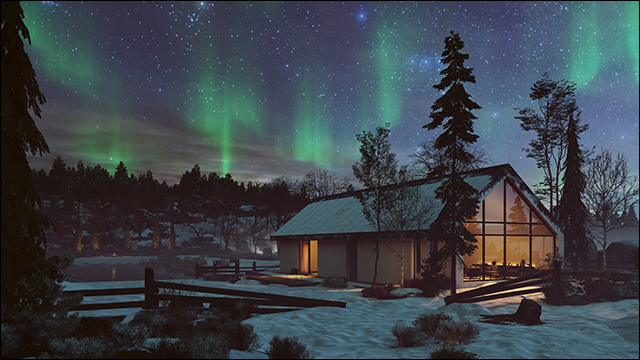
**1.5: Aurora Borealis Effect \*** (*Movie and Photo Mode*: *Sky Effects Category*)
Give an ethereal and artistic flavor to your renders by showing your designs under an orchestra of color and beauty with the new *Aurora Borealis Effect*.
[Video: Aurora Borealis](https://www.youtube.com/watch?v=G_C-XM9bbWU)
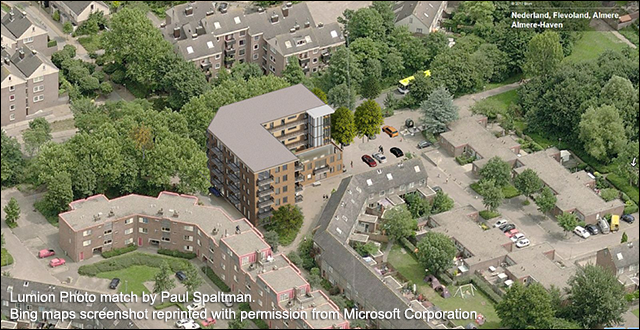
**1.6: Photo Matching Effect \*** (*Photo Mode*: *Camera Effects Category*)
Photograph a view. Match it to your design. Now, you can place your 3D model in the context provided by a real-life photograph. Whether showing clients a realistic property view or for compliance with authorities, you can match your design to many types of photographed backgrounds.
[Video: Photo Matching](https://www.youtube.com/watch?v=ouhB6fYRhbg)
**
**1.7: Heightmaps for OSM \*** (*Build Mode: Landscape* tab -\>*OpenStreetMaps*)
Real-life elevations are now within reach in Lumion 10. With the new Heightmaps for *OpenStreetMap*, you can recreate the actual elevations surrounding your project, from small, gradual climbs to mountainous, jagged peaks.
[Video: Heightmaps for OSM](https://youtu.be/Msjkpy7Pn9o)

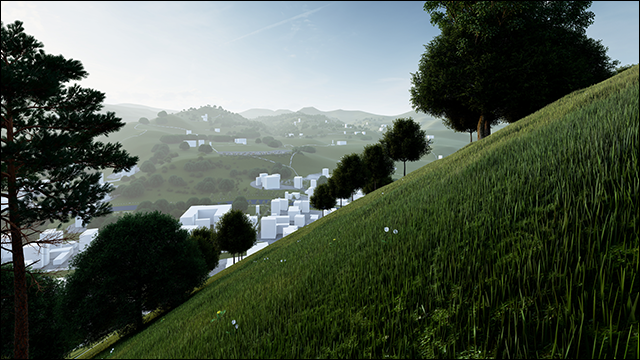
**1.8: AI Artist Styles *(1)*** (*Artistic 2 Effects Category*)
With *AI Artist Styles*, an experimental neural network feature in Lumion 10, you can see an interpretation of your design with the unique painting style of legendary artists, including the styles of Monet, Kandinsky, Picasso and others. *(1) Minimum 16GB of system memory required.*
[Video: AI Artist Styles](https://youtu.be/3WrPOFirYtU)
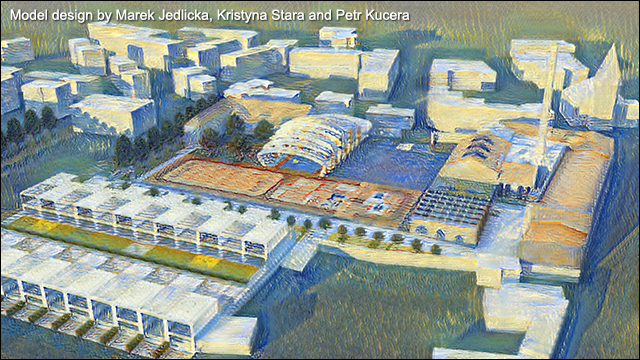
**1.9: 364 new objects in the *Object Library* \*** (104 objects are now unlocked in *Lumion* (Standard))
[Video: New objects in the Content Library](https://youtu.be/7WtsuBxjek8)
- 62 *Fine-detail Nature* models, including plants and trees.
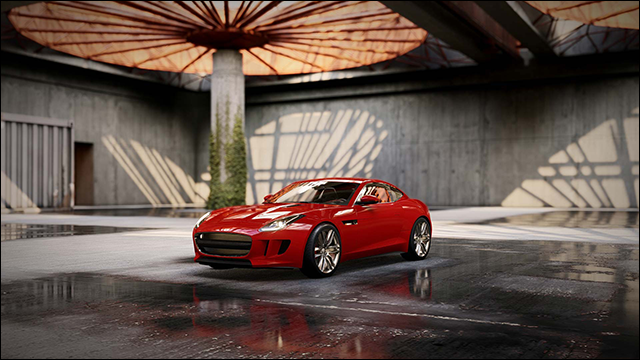
- 11 vehicles, including sports cars and an SUV.
**
- 180 interior objects, including seating, kitchen, tables and more.
*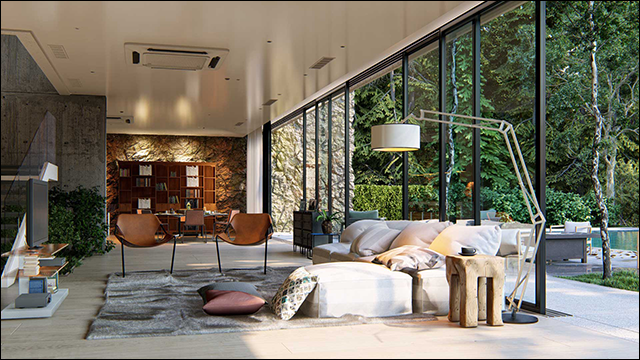*
- 30 high-quality animated 3D people, including men, women, elderly people, bicyclists and a pet dog.
- 81 exterior objects, including furniture, lights and buildings with detailed geometry and accurate shadows.
- All of the new objects are HD quality, and the new additions bring the total number of items in the *Lumion* 10 *Pro* content library to 5,758\*.
- *Lumion* has approximately 33% of the models from the full *Lumion Pro Model Library*.
**1.10: New materials \*** (*Lumion Materials Library*)
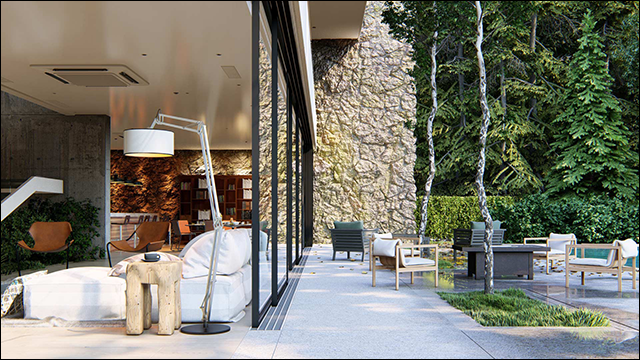
Along with the *Displacement Mapping* that was added to 133 current materials, you can find 34 new, beautifully realistic materials, including soil, rock and other exterior materials. Now, you have more options when showing exterior views of your design surrounded by captivating, beautiful outdoor environments. All of the new materials include *Displacement Mapping*.
[Video: New materials](https://youtu.be/M3uSHOz9LdI)
Some of the new materials in *Lumion* 10 include, but are not limited to:
- 12 new soil materials, including beautiful new sand materials that come alive with *Displacement Mapping*.
- 10 exterior materials, including concrete, metal, and stone.
- 9 rock materials.
- 3 indoor tiles.
With the new additions, the total number of materials in *Lumion* 10 *Pro* is 1,229 \*.
**1.11: Paint Placement** (*Build Mode: Objects: Nature Category* -\> *Place*)
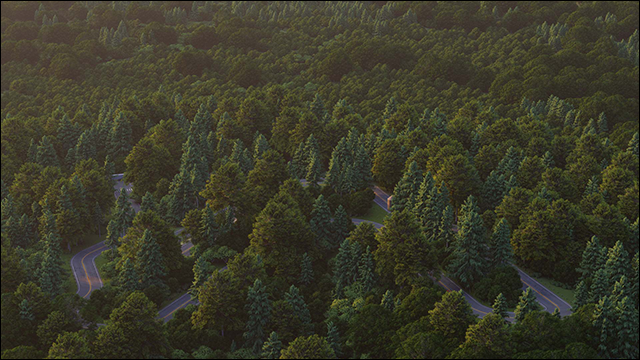
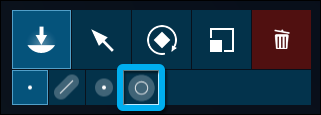
Need environmental context, fast? With the new *Paint Placement* tool in Lumion 10, sweep your mouse like a brush across an area to place hundreds of *Nature* objects in your project.
[Video: Paint Placement](https://youtu.be/Zz0LCrd2g8M)
*
*
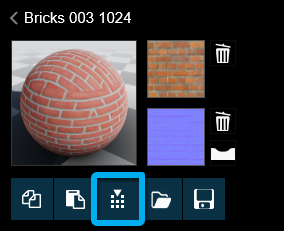
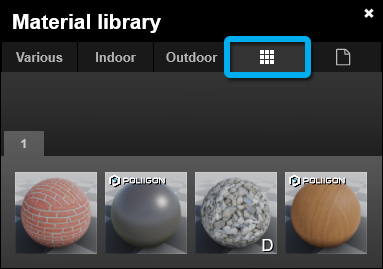
**1.12: Custom materials library** (*Materials Editor*)
Your favorite materials are now accessible from one convenient place. You can save any material as a *Custom Material*.
[Video: Custom Materials Library](https://youtu.be/aO_IST4oXz0)
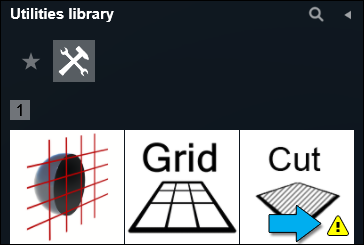
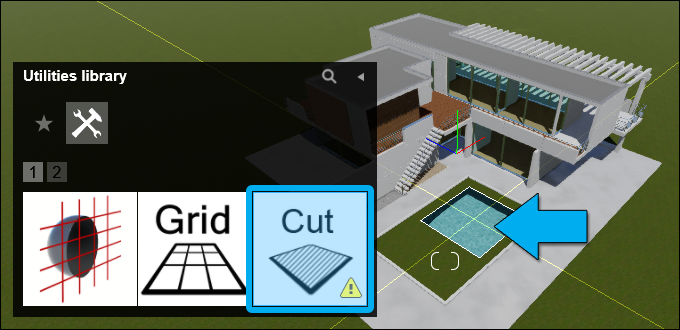
**1.13: Landscape Cutter** (*Build Mode: Objects: Utilities Category* -\> *Place*)
Place the *Landscape Cutter* over the area you want to remove and create a top surface cutout to fit with the elements of your design.
[Video: Landscape Cutter](https://youtu.be/7RepC_SfS8Q)
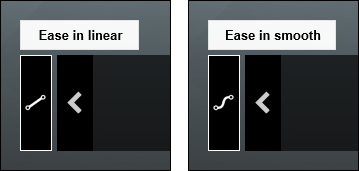
**1.14: Ease in/out control for movie clips** (*Movie Clip Editor*)
Now, with ease in/out control for movie clips, you can choose whether the camera accelerates at the beginning of a movie clip and decelerates at the end, or if the camera maintains a constant, linear speed.
[Video: Ease in/out control for movie clips](https://youtu.be/46ixtyra5Yw)
**1.15: Improved .DWG model import (*Build Mode*)**
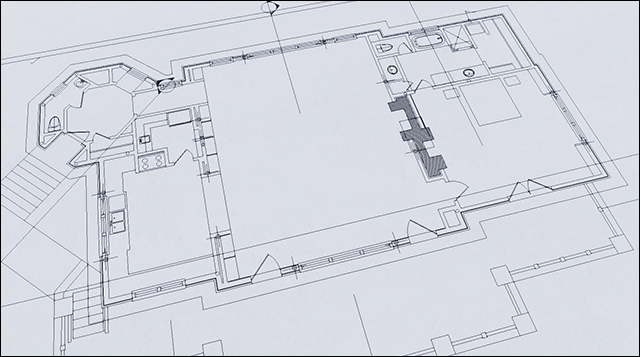
With the release of Lumion 10, an updated .DWG model importer is now integrated into Lumion and you no longer need the *DWG to Lumion Bridge* plug-in. However, please note that the earlier versions of the *AutoCAD to Lumion Bridge* plug-in are still required for *Lumion* 9.5 and earlier versions.
- The .DWG model importer has been rewritten almost from scratch. This solves a lot of problems, especially with AEC/MEP objects, thanks to better separation of surfaces. Unfortunately, that requires a break in compatibility in material naming conventions with previous versions of Lumion. Material naming is based on layer color.
- You can now import lines when importing a .DWG file.
- .DXF model importer has also been improved.
## **2. Other New Features & Improvements**
### ***Build*** ***Mode***
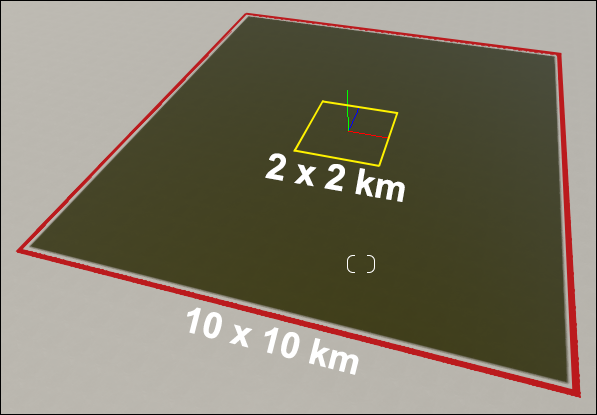
**2.1: Larger editable *Lumion Landscape*** (*Build Mode: Landscape* tab)The editable *Lumion Landscape* now consists of a high-detail 2 x 2 km square surrounded by a low-detail 10 x 10 km square. The outlines of the squares are yellow and red respectively.
Note that you can paint the *Lumion Landscape* and change the shape/height of the yellow 2 x 2 km square at a higher level of detail than the surrounding 10 x 10 km square.
**2.2: Real Skies *(2)*** (*Build Mode*: *Weather* tab)
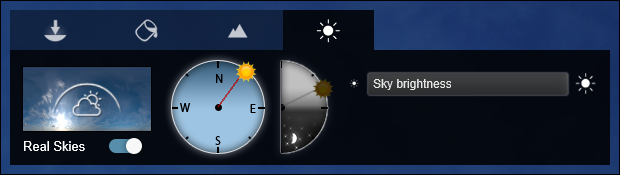
You now have a choice of using Lumion *Sky and Clouds* or *Real Skies* in *Build Mode*. That selection flows through to *Photo, Movie* and *Panorama Modes*. *(2) Real Skies are available in both Lumion and Lumion Pro, except for Night Real Skies that are Pro only.*
**2.3: Improved *Object Library* browser functionality
Several aspects of the *Object Library* browser have been improved.**
**[Video: Improved object library](https://youtu.be/xTxWikMJ9Lw)**
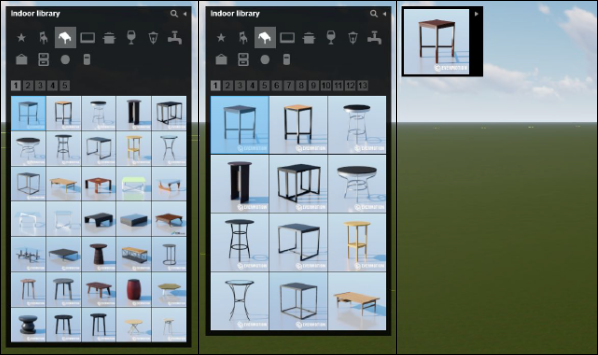
- **A new toggle button for the thumbnail image size** on the *Settings* screen helps you find and place the correct object.
- **A new *Hide* button** minimizes the *Object Library* browser window to maximize your screen space.
- **Subcategories have been reordered** in a more sensible manner instead of alphabetical as in previous versions.
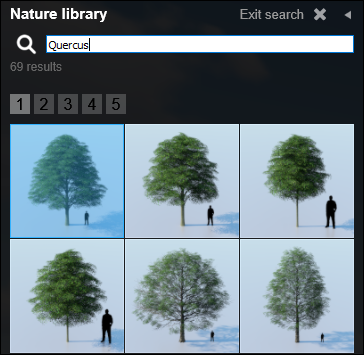
- **Search on the genus and/or species names** of trees and plants, for example '*Quercus*' to see all Oak trees. At the moment this only works for the models in the *Nature Category* and not for the *Fine-detail Nature Category* models.
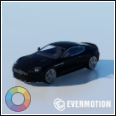
- **Color wheel icons** will be displayed if you can customize the colors of objects.
**2.4: *Layers* updated** (*Build Mode*)
The *Layers* interface and features have been redesigned for better object management when building your *Project*:
- Moving objects to a *Layer* is now made easier by selecting the *Layer* in a drop-down in the *Object Properties* dialog.
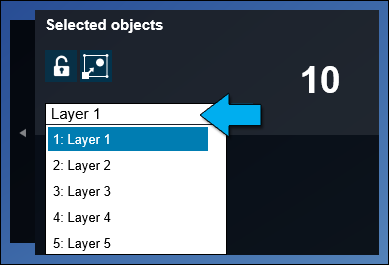
- You can choose a *Layer* and *Select All* in the Layer.
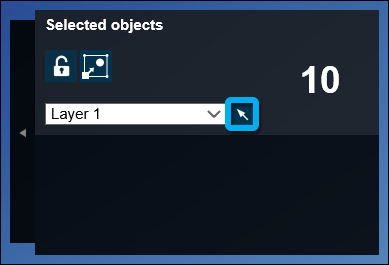
- Selecting an object will show which *Layer* it is on.
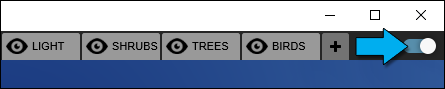
- Naming Layers has been made easier, and all *Layers* apart from the active *Layer*, can be automatically hidden to give more screen space.
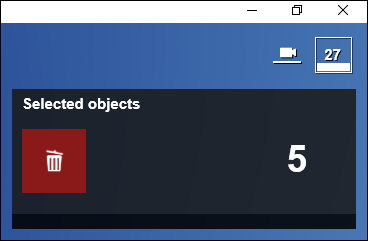
**2.5: Delete objects via *Object Properties* panel** (*Build Mode: Object Properties*)
Delete multiple objects without the need to select the *Object Icon*:
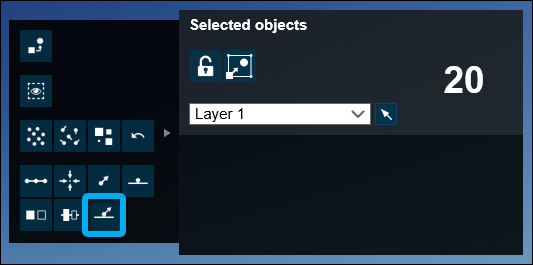
**2.6:** ***Conform to Landscape*** (*Build Mode: Object Properties* -\> *Advanced Options*)
This function that evaluates all selected objects and makes them conform to the *Lumion Landscape* or to *Imported Models* (whichever is closest).
**2.7: *Lumion Performance Monitor*** *(Build Mode)*
The *Performance Monitor* now displays memory available, and an object count to help you assess the complexity of your project.
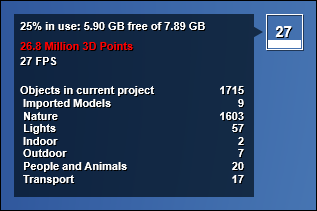
**2.8: *Advanced options* dialog setting** (*Build Mode: Object Properties* -\> *Advanced Options*)Lumion now remembers if the *Advanced options* dialog in the *Object Options* panel was shown or hidden.
**2.9: *Nature Category* stability improvements** (*Build Mode: Nature Category*)
Lumion is now stable when handling tens of thousands of *Nature* models and the low-detail billboard versions are displayed correctly.
### ***Movie*, *Photo* and *Panorama Mode***
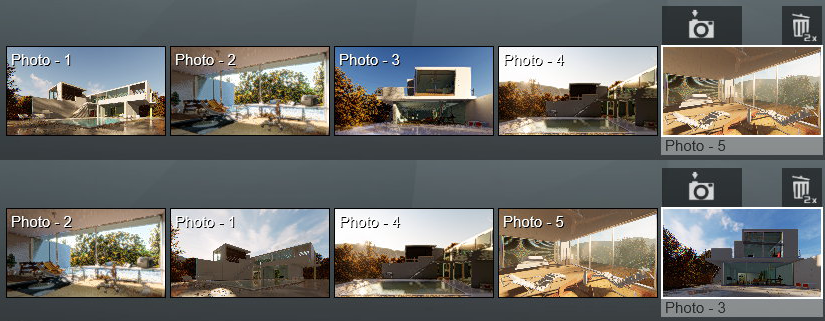
**2.10: Reorder *Photos*** (*Photo Mode*)
The order of *Photos* in a *Photo Set* can now be reordered by drag and drop.
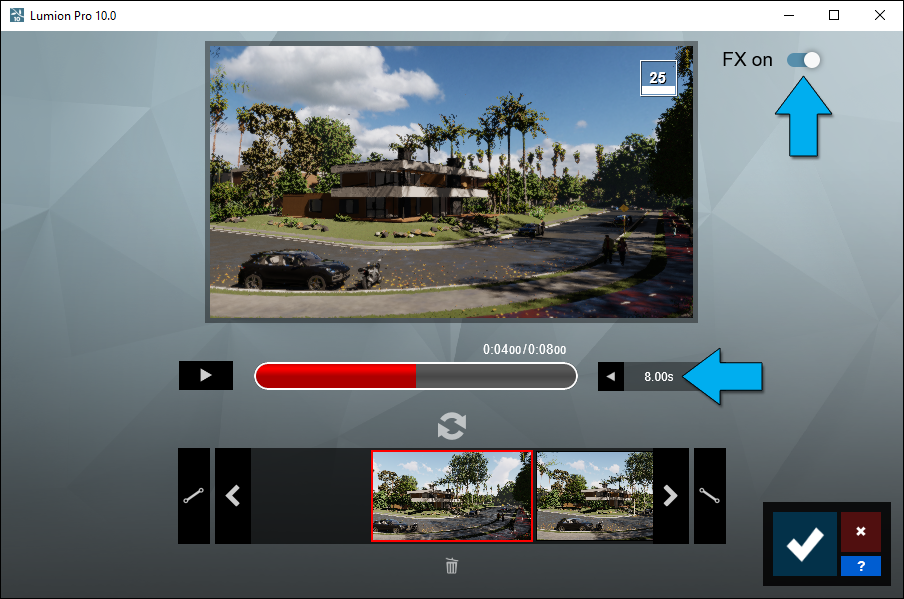
**2.11: *Clip Editor* redesigned** (*Movie Mode*)
The interface has been updated and shows the playbar that is also present in *Movie Mode* itself. You can now type in the duration of the *Clip*. There is also a new switch feature to allow the *Effects Stack* to be turned off or on in the *Clip Editor*:
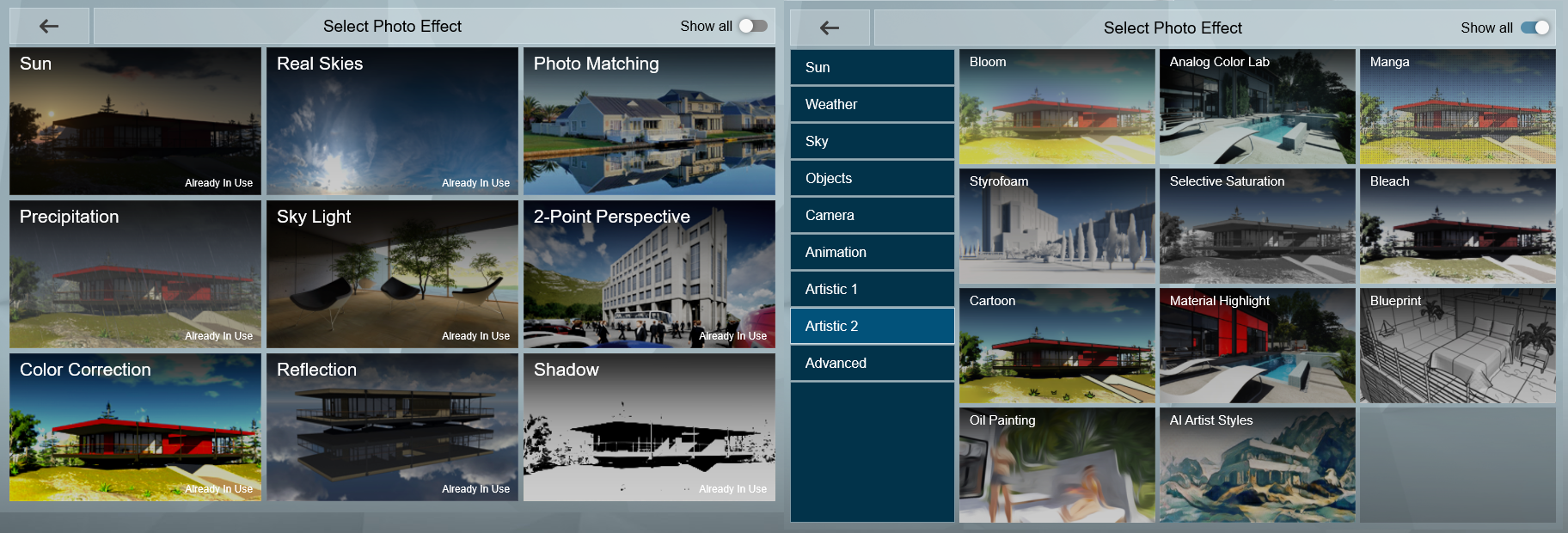
**2.12: *Effects* screen redesigned** (*Movie Mode*, *Photo Mode*, *Panorama Mode*)
The first time when you start Lumion and go to *Effects*, you will only see the nine most useful *Effects*. They are suitable to be used in most cases. You will still have access to all *Effects* by toggling *Show All*. The overall categories have been renamed and the *Effects* are reordered among them so the grouping makes more sense.
**2.13: Improved switching time between *Photos*** *(Photo Mode, Panorama Mode)*
Switching between *Photos* is now faster than before.
**2.14: *Styles* have been tweaked** (*Movie Mode*, *Photo Mode*)
The *Chromatic Aberration Effect* has been removed from all *Styles*. The *Real Skies Effect* has been added to the following *Styles*: *Realistic, Interior, Dawn, Daytime* and *Overcast*. Note that the *Night Style* does not currently include *Real Skies* from the *Night* tab.
### ***Material Editor***
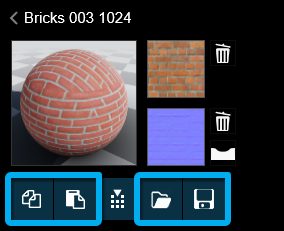
**2.15: *Material Editor* interface update:** *Copy/Paste* and *Load/Save*. Improved interface design means these functions are now more easily accessible.
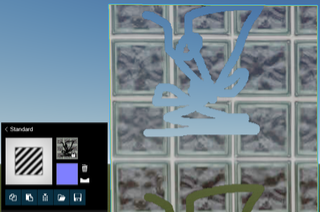
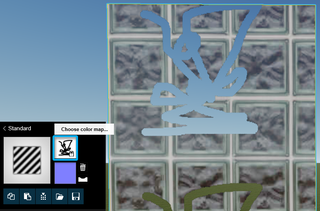
**2.16:** ***Material Editor*****:** It is now possible to view the alpha channel within a texture by holding down the CTRL key when the mouse is over the *Color Map* or *Normal Map* thumbnail images in the following material categories: *3D Grass Materials*, *Fur Materials*, *Standard Materials* and *Lightmap Materials*.
### ***Object Library***
**2.17: Easily find new objects added in version 10** (*Lumion Object Library*)
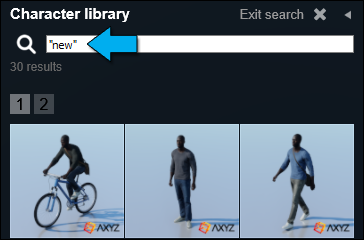
It is now possible to locate newly added models in *Lumion* 10 by searching for the tag “new” (quotation marks required). *Note that this does not include models from earlier versions in Lumion Pro now included in Lumion (Standard)*.
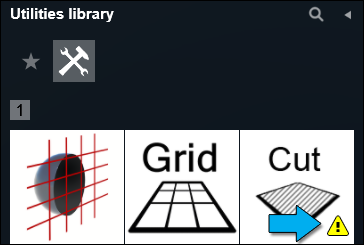
**2.18: Placement warning system** (*Lumion Object Library*)
A warning system is now available for objects that have a limited number of placements.
### **Importing & exporting**
**2.19: Improved import of SketchUp textures**
*SketchUp* import has been updated to use *SketchUp SDK 2019.2*. As a result, textures should be imported faster, resulting in less time in importing your models.
**2.20: Optimization of *Imported Model* file sizes**
The *Imported Model* .LIB files are now smaller than before.
**2.21: Import performance improvement**
A new version for part of the importing process has been written. This should improve importing performance and decrease importing time in comparison with *Lumion* 9.x.
### **Loading & saving**
**2.22: Imported Model Data Sizes**
*Imported Models* and .LS *Project* files now require less file space due to an optimization of the *Imported Model* data. This will improve the import time, and require less file space on disk. As an example, one of our test models went from 4.34 GB down to 2.90 GB. Results will vary depending on the model data requirements.
**2.23: Improved loading times**
The loading routine has seen an improvement. This is most noticeable for larger scenes with lots of objects in combination with *Imported Models* that contain a lot of surfaces. In our test of a large .LS *Project* file, loading time decreases from ~13 minutes to ~7 minutes.
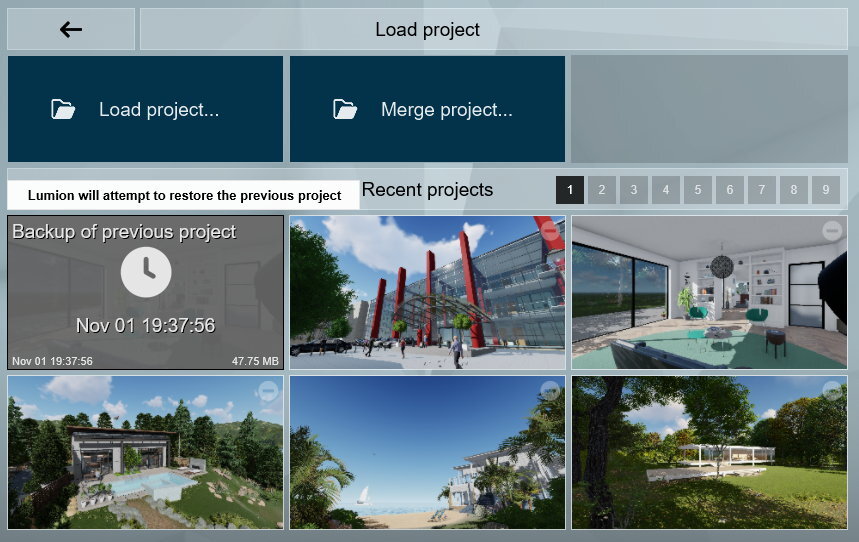
**2.24:** ***Backup of previous*** ***project* option** *(Load Project* screen)
As a fast save option, a copy of the project will be made when you open a different project. This will act as a backup of the currently open project for you. Note that the *QuickSave* feature has been disabled (F5 key) to prevent this project file from being overwritten by accident.
The backup is available as the first thumbnail on the *Load Project* screen (previously shown as *Last quicksave* in the *Recent Scenes*).
### **Miscellaneous**
**2.25: Improved user interface**
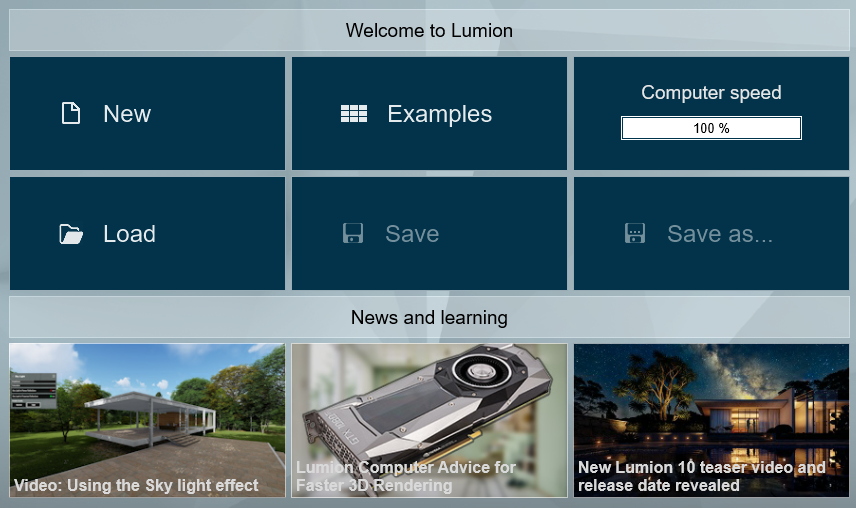
In *Lumion* 10 we continue the overhaul of the interface, by updating and improving the interface in the *Material Editor* and *Effects Library* as well as on the *Home* screen, *New Project* screen, *Save Project* screen and *Load Project* screen.
**2.26: *Home* screen**
All the choices you have are shown on the first screen itself. It is all pretty straight forward.
**2.27: *Create new Project* screen**
You can now directly import a model when you start a new *Project*. Select your model and the *Project* template you want to use and you’re ready to go.
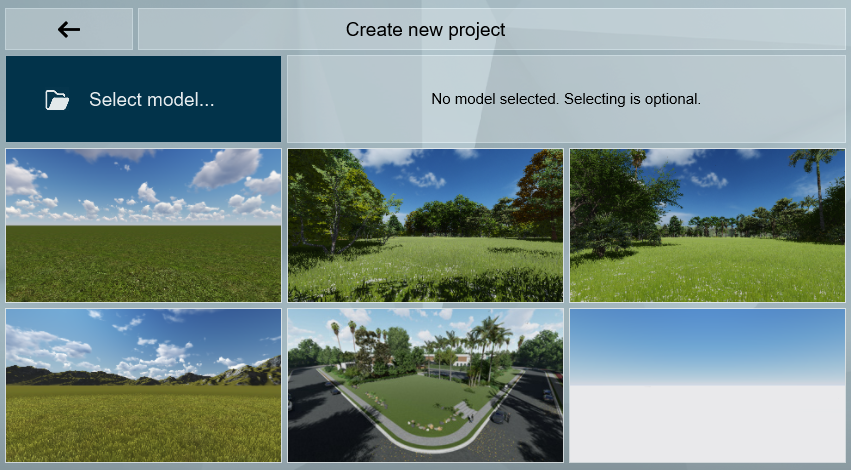
**2.28: *Select model to import* in a *Project***
You can now import a model directly from file into a *Project* before selecting the *Project* template you want.
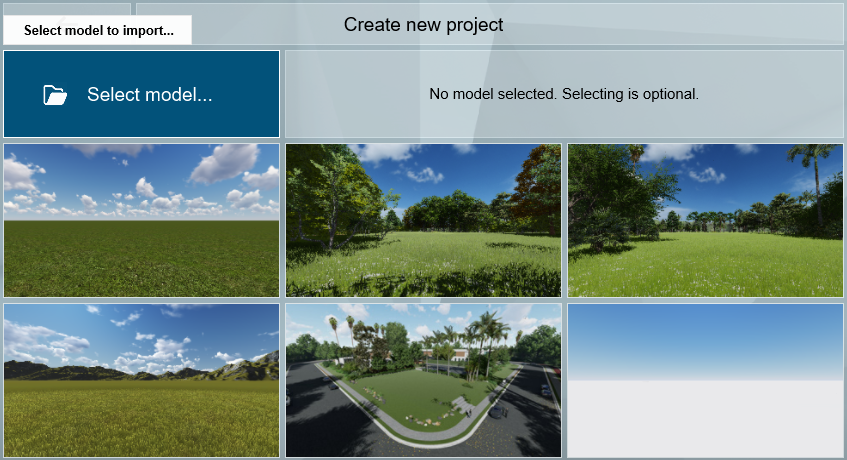
**2.29: New Templates** (*Home* screen)We added three new templates when you start a new *Project*:
- *Van Manen Environment*.
- *Forest Environment*.
- *Suburban Environment*.
These replace the *Night*, *Sunset* and *Mountains in Spring* presets.
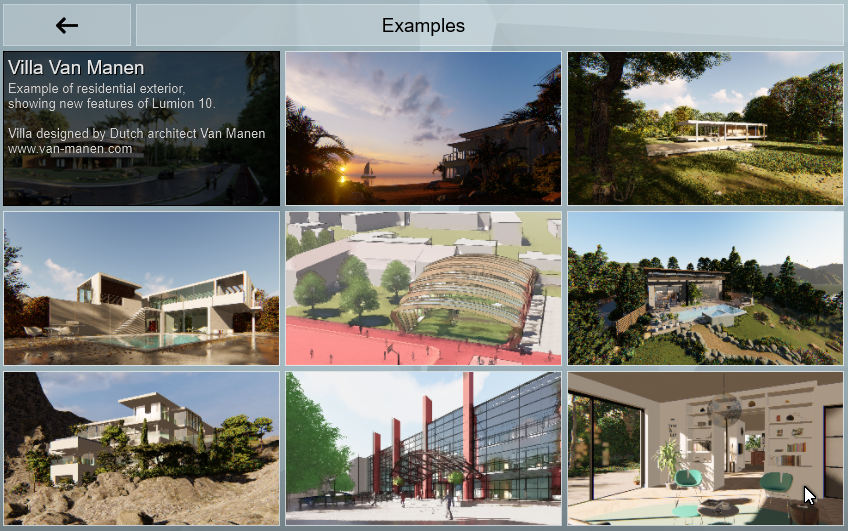
**2.30: Example Projects** (*Home* screen)
We added a new and more detailed residential *Example Project - Villa Van Manen*. This replaces the Garden Project.
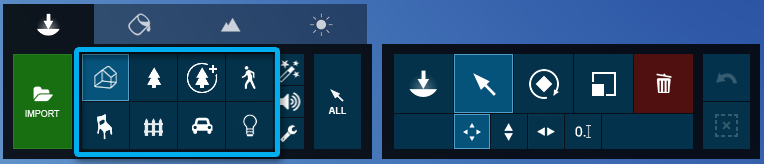
**2.31: *Object Category* redesign** (*Build Mode* -\> *Objects* tab)The *Objects Categories* have been reordered. We have 8 main categories: *Imported models, Nature, Fine-detail Nature, People & Animals, Indoor, Outdoor, Transport* and *Lights*.
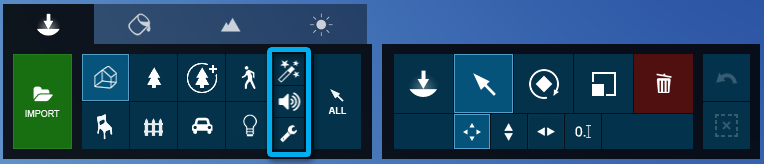
And 3 minor categories: *Effects, Sounds effects and Utilities*. *Utilities* is a new category on the toolbar. Previously found within the *Lights and Utilities* category.
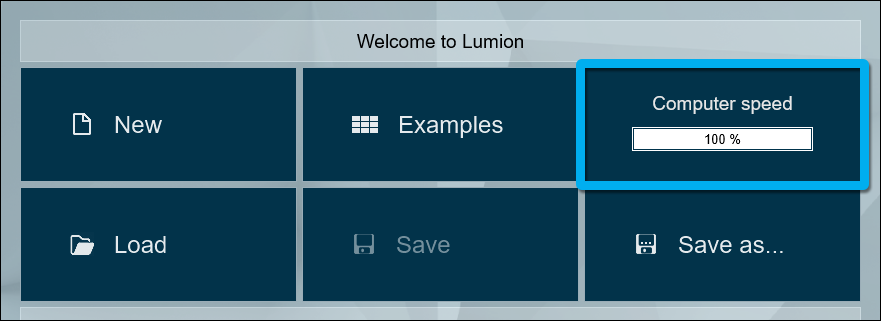
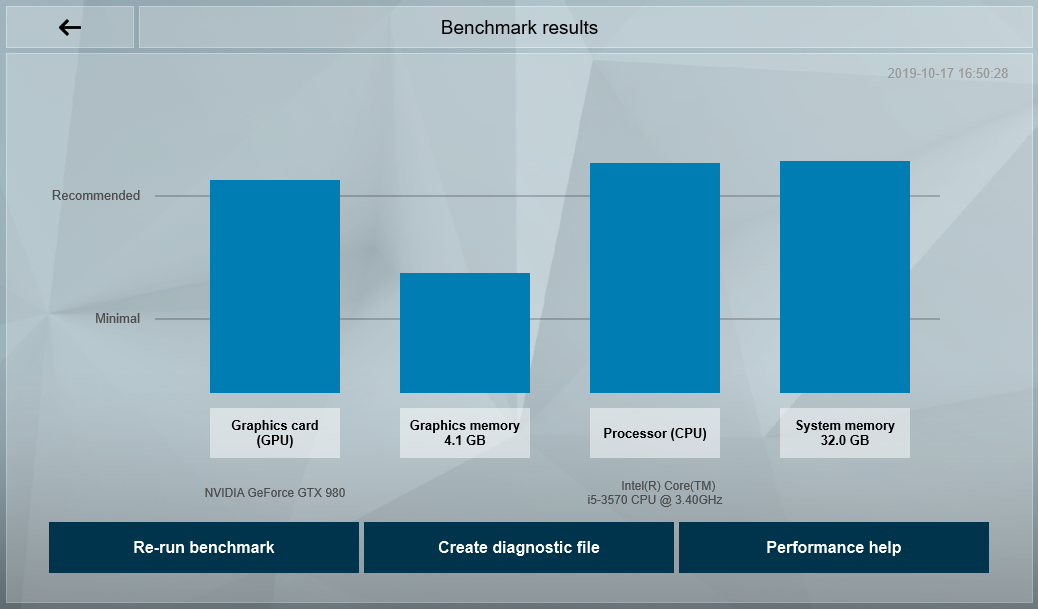
**2.32:** ***Lumion Benchmark**
Lumion* *Benchmark* results have been updated to match the *Lumion* 10 system requirements:
- **Lumion website:** [Lumion 10 System Requirements](https://lumion.com/requirements.html)
## **3. Changes & Resolved Errors**
### **3.1: *Build Mode* and *Object Library***
- *Area Light*: Width and length type-in inputs now work as expected.
- *Spotlight Brightness*: This slider can now be set to its maximum value of 100,000 instead of 50,000.
- When you delete an *Imported Model* from a page in the *Imported Model Library*, the page will stay active. It will no longer return to page 1 by default.
- Models from the *Nature Category* no longer disappear at high elevations.
- *Groups*: Objects no longer become ungrouped when you undo a *Group* deletion.
- *Groups*: A deleted object is no longer selected if you undo the deletion while editing a *Group*.
- The deleted object will be placed back in the group.
- When undoing the deletion outside of *Edit Group*, the deleted object will be placed back in the project, but won’t be part of the *Group* anymore.
- *Groups*: Attempting to load a specific user-submitted *Group* object will no longer make *Lumion* crash.
- *Groups*: Certain objects that should not be grouped or added to a *Group* will no longer be grouped.
- The *Group* button will be disabled if your selection contains object from the *Utilities Category* (except for another *Group*) or *Fine-detail Nature* objects.
- When selected objects cannot be grouped a warning is shown with tooltip: “Some selected objects cannot be grouped”.
- If all selected objects cannot be grouped the *Group* button will be disabled with the tooltip: “Grouping is not available for selected objects”.
- *Groups*: It is not possible for the *Replace Selection* function to work when the object being replaced is in a *Group*. So the when editing a *Group*, the *Replace Selection* function will now be grayed out.
- If the color of a model from the *Object Library* can be customised, the (horizontal) *Brightness* slider is no longer available and you should use the vertical *Brightness* bar instead. This now becomes consistent with the color selector interface for HD vehicles.
- *Special effects*: *Falling Leaves*: The *Brightness* slider now works as expected.
#### **Place/Move/Rotate/Scale/Delete**
- X and Z keys lock movement along X or Z axis: The selected object will now keep its initial height when moving the object along the X or Z axis.
- *Mass Placement*: Thumbnail images are a little bit larger compared to previous versions which makes it easier to manage the content. Replacing an item will no longer accidentally delete an object.
- *Mass Placement*: Removing an item from the *Mass Placement* object list now requires a double- click on the *Remove* (Bin icon).
- *Mass Placement*: Objects selected before a *Mass Placement* will be unselected.
- *White project template*: Painting height with the yellow brush circle is now possible.
- *Conform to landscape*: The performance has been improved. Only the object below the mouse cursor will continuously update according to the *Lumion Landscape* or *Imported Models* (whichever is closest). All other objects within your selection will only conform once upon completion of the move (while holding F, release the left mouse button).
- *Conform to landscape*: The results are now more accurate, especially when applying to a large selection.
- *Conform to landscape*: This function will ignore *Imported Models* on hidden *Layers*.
- *Place on ground*: This function will ignore *Imported Models* on hidden *Layers*.
- *Imported Models Library*: A model which had variations can now be removed from the library.
- Holding the ALT key while rotating or scaling will no longer prevent an undo action.
- Undo has been improved in several places and should be more reliable now.
- *Place Mode*: Objects other than *Nature* and *3D People* objects will now snap to 45 degree angles while rotating them with the R key.
#### **Landscape Mode**
- *OpenStreetMap*: Clicking outside the search box text field in the map window will hide the results list. Clicking inside the search box will unhide the results list again.
- *OpenStreetMap*: Help information was added for the function that lets you hide selected buildings.
- *OpenStreetMap*: An *OpenStreetMap* preview is now projected onto the *Lumion Landscape*.
- When switching to *Photo Mode*, buttons from any of the *Landscape Mode* categories won’t be rendered at the wrong location for a brief moment.
- *Build Mode*: A model will no longer be visible when the camera is at a height above 200m, and the model is below the terrain, and outside or partly outside of the editable *Landscape*.
- *Water*: It is now possible to delete a *Water Plane* when *Layer* 1 is hidden.
### **3.2: *Movie*, *Photo* and *Panorama Modes***
#### **Photo Mode**
- *Photo Mode*: An issue where using the scroll wheel whilst rendering an image would adjust the camera position and result in ghosting in the final render has been fixed.
#### **Movie Mode**
- *Entire Movie*: Rendering *Keyframes* via the *Image Sequence* tab will now always output all camera keyframes, regardless of the frames per second setting.
- Rendering *Keyframes* from a *Clip* no longer results in one *Keyframe* from the next *Clip* also being rendered.
- The *Clip* tooltip that shows the name is now hidden when the mouse is outside the *Clip* thumbnail image.
- *Clip Editor*: The red scrub-bar no longer moves erratically when clicking the left/right arrow buttons at low framerates.
#### **Panorama Mode**
- *Noise Effect*: This *Effect* has been disabled as it doesn’t work on 360 renders.
### **3.3: Materials**
- *3D Grass Materials*: On horizontal double-sided surfaces with a single material, the *3D Grass* is now only applied once on the side facing up.
- *PureGlass Materials*: The *Opacity* slider has been renamed to Transparency.
- *Material Editor*: On-screen help text is not required for *PureGlass*, *Lightmap*, *Glass*, *3D Grass* and *Fur Materials* and has therefore been hidden.
- *Material Editor*: The *Nature* material category has been renamed to *Various*.
- *Standard Materials*: The *Y Offset* slider now also allows for non-square textures.
- *Glass/PureGlass Materials*: The *Reflectivity* slider range is now from 0 to 1.0 as in other material types.
- *Landscape Grass* is now only shown on the high-quality *Lumion Landscape* (2 x 2 km).
### **3.4: Effects & Styles**
- *Handheld Camera Effect*: Copying this *Effect* from a *Movie Clip* and pasting it onto a *Photo* no longer locks the camera for the *Photo*.
- *Handheld Camera Effect*: The screen no longer goes black when using the *Edit lookat point* when there is also a *Move* or *Advanced Move Effect* in the *Project*.
- *Advanced Move Effect*: Car wheels that were spinning forwards when the car was moving backwards have been fixed.
- *Reflection Effect*: *3D Silhouette People* are now rendered correctly when they are behind or overlap windows in *Planar Reflections*.
- *Sky Drop Effect*: This *Effect* no longer keeps a record of an object if it is deleted.
- *Motion Blur*: The preview of this *Effect* has been improved. Renderings at 1 or 2 *Star Quality* no longer suffer from extreme motion blur.
- *Precipitation Effect*: This *Effect* now has the same effect on the entire *Lumion Landscape*.
- *Precipitation Effect*: *Planar Reflections* will no longer flicker when changing the value of the *Extra Fog Addition* slider.
- *Autumn Color Effect*: This effect has been rewritten so that it does not affect the tree color in *Build Mode* when switching between *Photo*/*Movie* and *Build Modes*. You no longer have to add the effect to reset the colors in *Build Mode*.
- *Depth of Field Effect*: This *Effect* no longer creates a halo around *Fur Materials*.
- *Fog Effect*: *Emitter area size* is now spelt correctly.
### **3.5: Save, load and recovery**
- *Recovery*: The performance of the recovery file creation has been improved.
- It is no longer possible to load an example *Project* that is not available in *Lumion Trial*.
- The warning message on saving a *Project* in *Lumion Trial* has been restored.
- More detailed information is now displayed when a *Project* file can't be opened.
- The *error.log* file now includes more detailed log entries when starting *Lumion*, trying to quit *Lumion* and when *Lumion* has quit. In addition, more information about save and load functions is also being logged.
- The Lumion title bar now shows the name of the Lumion *Project* file that is currently open.
### **3.6: Importing and Exporting**
- .FBX file import: Animated surfaces that share the same material are treated as one surface again, just like in *Lumion* 8.0 and earlier versions.
- .FBX file import: A user-submitted .FBX file that contained invalid polygons will no longer result in a crash.
- *LiveSync*: The model for a *LiveSync* import in an empty *Project* is now added as a new model in the *Main* subcategory of the *Imported Models Library*.
- .SKP file import: *Lumion* now shows more information when you try to import a model that only contains lines.
- ALT + Re-import model: A user-submitted .DAE file that is located on a BIM server is now being re-imported as expected.
- Lumion *Glass* and *Water* materials are now automatically assigned to surfaces that use materials with the words "Glass" or "Water" in any of the supported languages when importing a .DAE file with the *Import new model* function.
### **3.7: Miscellaneous**
- Text fields no longer linger when closing windows in certain situations.
- *Build Mode*: Deleting the *Reflection Control* object now recalculates the *Projected Reflections*.
- The eyelashes of 'Man Asian 0006 SoftDrink' now look correct.
- *Color Selector*: When holding down the SHIFT key to fine-tune the color selection, the mouse cursor is now hidden.
- The thumbnail image of *Office Chair 022* now matches the model.
- *Project Templates*: The origin (0,0,0) is always in view when loaded.
- The colors of animated 3D people and animals have been tweaked.
- The wording "Converting" was changed to “Creating” in order to better reflect the operation when switching to *Photo Mode* after taking a snapshot in *Build Mode* with CTRL + number key.
- *Lumion Viewer*: A warning message is now displayed if you try to open *Project* files made in *Lumion Pro Student* and *Lumion Trial*.
- *Lumion* now continues to import models and load/save *Project* files if you switch to a different window or application.
- Text fields: Alt + 1, 2, 3 etc is now disabled when editing text fields.
- Various textual changes in buttons, titles, tooltips and the on screen help.
- *Remote Desktop*: Mouse sensitivity is now adjusted on the fly if you start a session while *Lumion* is running.
**From the Team:**
Enjoy learning and using Lumion 10.
- [Visit our other Sections](https://support.lumion.com/knowledge-base/visit-our-other-sections?hsLang=en-us)
- [Contact Us](https://support.lumion.com/knowledge-base/contact-us?hsLang=en-us)
- [Lumion Account](https://support.lumion.com/knowledge-base/lumion-account?hsLang=en-us)
- [Latest News](https://support.lumion.com/knowledge-base/latest-news?hsLang=en-us#main-content)
- [Major Known Issues](https://support.lumion.com/knowledge-base/latest-news?hsLang=en-us#major-known-issues)
- [Lumion 2025: Major Version Release Details](https://support.lumion.com/knowledge-base/latest-news?hsLang=en-us#lumion-2025-major-version-release-details)
- [Lumion 2024: Major Version Release Details](https://support.lumion.com/knowledge-base/latest-news?hsLang=en-us#lumion-2024-major-version-release-details)
- [Lumion 2023: Major Version Release Details](https://support.lumion.com/knowledge-base/latest-news?hsLang=en-us#lumion-2023-major-version-release-details)
- [Lumion 2023: Update Release Notes](https://support.lumion.com/knowledge-base/latest-news?hsLang=en-us#lumion-2023-update-release-notes)
- [Lumion 12](https://support.lumion.com/knowledge-base/latest-news?hsLang=en-us#lumion-12)
- [Lumion 11](https://support.lumion.com/knowledge-base/latest-news?hsLang=en-us#lumion-11)
- [Lumion 10](https://support.lumion.com/knowledge-base/latest-news?hsLang=en-us#lumion-10)
- [Sales Questions](https://support.lumion.com/knowledge-base/sales-questions?hsLang=en-us)
- [Subscriptions](https://support.lumion.com/knowledge-base/subscriptions?hsLang=en-us)
- [New User Questions](https://support.lumion.com/knowledge-base/new-user-questions?hsLang=en-us)
- [Learning Resources](https://support.lumion.com/knowledge-base/learning-resources?hsLang=en-us)
- [System Requirements Questions](https://support.lumion.com/knowledge-base/system-requirements-questions?hsLang=en-us#main-content)
- [Determining the 'Complexity' of your Projects](https://support.lumion.com/knowledge-base/system-requirements-questions?hsLang=en-us#determining-the-complexity-of-your-projects)
- [System Messages from Lumion](https://support.lumion.com/knowledge-base/system-requirements-questions?hsLang=en-us#system-messages-from-lumion)
- [Requirements for Prior Versions](https://support.lumion.com/knowledge-base/system-requirements-questions?hsLang=en-us#requirements-for-prior-versions)
- [Download & Installation Questions](https://support.lumion.com/knowledge-base/download-installation-questions?hsLang=en-us#main-content)
- [Download/Installation: General Questions](https://support.lumion.com/knowledge-base/download-installation-questions?hsLang=en-us#download-installation-general-questions)
- [Download Questions](https://support.lumion.com/knowledge-base/download-installation-questions?hsLang=en-us#download-questions)
- [Installation Questions](https://support.lumion.com/knowledge-base/download-installation-questions?hsLang=en-us#installation-questions)
- [Lumion Pro Updater](https://support.lumion.com/knowledge-base/download-installation-questions?hsLang=en-us#lumion-pro-updater)
- [Plugins to CAD software](https://support.lumion.com/knowledge-base/download-installation-questions?hsLang=en-us#plugins-to-cad-software)
- [License and General Product Questions](https://support.lumion.com/knowledge-base/license-and-general-product-questions?hsLang=en-us#main-content)
- [License System Messages from Lumion](https://support.lumion.com/knowledge-base/license-and-general-product-questions?hsLang=en-us#license-system-messages-from-lumion)
- [Import & Export Questions](https://support.lumion.com/knowledge-base/import-export-questions?hsLang=en-us#main-content)
- [Model Import Guidelines](https://support.lumion.com/knowledge-base/import-export-questions?hsLang=en-us#model-import-guidelines)
- [Lumion LiveSync and import plugins](https://support.lumion.com/knowledge-base/import-export-questions?hsLang=en-us#lumion-livesync-and-import-plugins)
- [System Messages from Lumion when importing](https://support.lumion.com/knowledge-base/import-export-questions?hsLang=en-us#system-messages-from-lumion-when-importing)
- [General Questions](https://support.lumion.com/knowledge-base/general-questions?hsLang=en-us#main-content)
- [Keyboard Shortcuts in Lumion](https://support.lumion.com/knowledge-base/general-questions?hsLang=en-us#keyboard-shortcuts-in-lumion)
- [Upgrading and Updating your Lumion Version](https://support.lumion.com/knowledge-base/general-questions?hsLang=en-us#upgrading-and-updating-your-lumion-version)
- [Using Lumion 2023](https://support.lumion.com/knowledge-base/general-questions?hsLang=en-us#using-lumion-2023)
- [System Messages from Lumion](https://support.lumion.com/knowledge-base/general-questions?hsLang=en-us#system-messages-from-lumion)
- [Build Mode Questions](https://support.lumion.com/knowledge-base/build-mode-questions?hsLang=en-us#main-content)
- [Landscape and Terrains](https://support.lumion.com/knowledge-base/build-mode-questions?hsLang=en-us#landscape-and-terrains)
- [OpenStreetMap](https://support.lumion.com/knowledge-base/build-mode-questions?hsLang=en-us#openstreetmap)
- [Lighting: Sun and Artificial Lights](https://support.lumion.com/knowledge-base/build-mode-questions?hsLang=en-us#lighting-sun-and-artificial-lights)
- [Questions mainly for older versions than Lumion 12](https://support.lumion.com/knowledge-base/build-mode-questions?hsLang=en-us#questions-mainly-for-older-versions-than-lumion-12)
- [Library Content](https://support.lumion.com/knowledge-base/library-content?hsLang=en-us#main-content)
- [Library Content in Lumion 2026](https://support.lumion.com/knowledge-base/library-content?hsLang=en-us#library-content-in-lumion-2026)
- [Library Content in Lumion 2025](https://support.lumion.com/knowledge-base/library-content?hsLang=en-us#library-content-in-lumion-2025)
- [Library Content in Lumion 2024](https://support.lumion.com/knowledge-base/library-content?hsLang=en-us#library-content-in-lumion-2024)
- [Library Content in Lumion 2023](https://support.lumion.com/knowledge-base/library-content?hsLang=en-us#library-content-in-lumion-2023)
- [Library Content in Lumion 12](https://support.lumion.com/knowledge-base/library-content?hsLang=en-us#library-content-in-lumion-12)
- [Movie & Photo Mode Questions](https://support.lumion.com/knowledge-base/movie-photo-mode-questions?hsLang=en-us#main-content)
- [Photo Mode](https://support.lumion.com/knowledge-base/movie-photo-mode-questions?hsLang=en-us#photo-mode)
- [Movie Mode](https://support.lumion.com/knowledge-base/movie-photo-mode-questions?hsLang=en-us#movie-mode)
- [Animation in Movie Mode](https://support.lumion.com/knowledge-base/movie-photo-mode-questions?hsLang=en-us#animation-in-movie-mode)
- [Effects in Photo or Movie Mode](https://support.lumion.com/knowledge-base/movie-photo-mode-questions?hsLang=en-us#effects-in-photo-or-movie-mode)
- [Reflections](https://support.lumion.com/knowledge-base/movie-photo-mode-questions?hsLang=en-us#reflections)
- [Material Questions](https://support.lumion.com/knowledge-base/material-questions?hsLang=en-us#main-content)
- [Materials in versions 12 and earlier](https://support.lumion.com/knowledge-base/material-questions?hsLang=en-us#materials-in-versions-12-and-earlier)
- [Using LiveSync for Revit and a Section Box](https://support.lumion.com/knowledge-base/material-questions?hsLang=en-us#using-livesync-for-revit-and-a-section-box)
- [Rendering Questions](https://support.lumion.com/knowledge-base/rendering-questions?hsLang=en-us#main-content)
- [General Rendering Questions](https://support.lumion.com/knowledge-base/rendering-questions?hsLang=en-us#general-rendering-questions)
- [Rendering of Photos](https://support.lumion.com/knowledge-base/rendering-questions?hsLang=en-us#rendering-of-photos)
- [Rendering of Clips and Movies](https://support.lumion.com/knowledge-base/rendering-questions?hsLang=en-us#rendering-of-clips-and-movies)
- [Tips to getting the best renders](https://support.lumion.com/knowledge-base/rendering-questions?hsLang=en-us#tips-to-getting-the-best-renders)
- [Rendering Performance](https://support.lumion.com/knowledge-base/rendering-questions?hsLang=en-us#rendering-performance)
- [Technical Issues when Rendering](https://support.lumion.com/knowledge-base/rendering-questions?hsLang=en-us#technical-issues-when-rendering)
- [Panorama Mode Questions](https://support.lumion.com/knowledge-base/panorama-mode-questions?hsLang=en-us#main-content)
- [Technical questions when rendering with Panorama Mode](https://support.lumion.com/knowledge-base/panorama-mode-questions?hsLang=en-us#technical-questions-when-rendering-with-panorama-mode)
- [File & BackUp Questions](https://support.lumion.com/knowledge-base/file-backup-questions?hsLang=en-us#main-content)
- [Saving and Backup](https://support.lumion.com/knowledge-base/file-backup-questions?hsLang=en-us#saving-and-backup)
- [File Saving Issues](https://support.lumion.com/knowledge-base/file-backup-questions?hsLang=en-us#file-saving-issues)
- [Lumion-Documents](https://support.lumion.com/knowledge-base/file-backup-questions?hsLang=en-us#lumion-documents)
- [Transfer, Move or Migrate Files](https://support.lumion.com/knowledge-base/file-backup-questions?hsLang=en-us#transfer-move-or-migrate-files)
- [Troubleshooting](https://support.lumion.com/knowledge-base/troubleshooting?hsLang=en-us#main-content)
- [Reports about your PC](https://support.lumion.com/knowledge-base/troubleshooting?hsLang=en-us#reports-about-your-pc)
- [Photo and Movie Mode Issues](https://support.lumion.com/knowledge-base/troubleshooting?hsLang=en-us#photo-and-movie-mode-issues)
- [Rendering Issues](https://support.lumion.com/knowledge-base/troubleshooting?hsLang=en-us#rendering-issues)
- [Error Messages from Lumion](https://support.lumion.com/knowledge-base/troubleshooting?hsLang=en-us#error-messages-from-lumion)
- [Hardware related Issues](https://support.lumion.com/knowledge-base/troubleshooting?hsLang=en-us#hardware-related-issues)
- [Other Troubleshooting Issues](https://support.lumion.com/knowledge-base/troubleshooting?hsLang=en-us#other-troubleshooting-issues)
- [Article Developments](https://support.lumion.com/knowledge-base/article-developments?hsLang=en-us#main-content)
- [Devs - Multi‑Image Button Viewer](https://support.lumion.com/knowledge-base/article-developments?hsLang=en-us#devs-multi-image-button-viewer)
[](https://lumion.com/)
[mailto:email@email.com](mailto:email@email.com)
Copyright © 2026, Lumion - Act3D B.V.
#### Product
[Plans and pricing](https://lumion.com/product/buy)
[Discover Lumion](https://lumion.com/product/discover-lumion)
[Compatibility](https://lumion.com/compatibility/)
[System Requirements](https://lumion.com/product/system-requirements)
[Find a reseller](https://lumion.com/about/find-reseller)
[Free trial](https://lumion.com/product/free-trial)
#### Solutions
[Architectural design](https://lumion.com/product/architectural-design)
[Interior design](https://lumion.com/product/interior-design)
[Landscape architecture](https://lumion.com/product/landscape-architecture)
[Urban planning](https://lumion.com/product/urban-planning)
[3D rendering](https://lumion.com/product/3d-rendering-software)
[Education](https://lumion.com/product/educational-licenses)
#### Compatibility
[Trimble SketchUp](https://lumion.com/compatibility/sketchup-rendering)
[Autodesk Revit](https://lumion.com/compatibility/revit-rendering)
[Graphisoft ArchiCAD](https://lumion.com/compatibility/archicad-rendering)
[Rhinoceros](https://lumion.com/compatibility/rhino-rendering)
[Autodesk Autocad](https://lumion.com/compatibility/autocad-rendering)
[Autodesk FormIt Pro](https://lumion.com/compatibility/lumion-for-autodesk-formit-pro)
[Nemetschek Allplan](https://lumion.com/compatibility/allplan-rendering)
[Nemetschek Vectorworks](https://lumion.com/compatibility/vectorworks-rendering)
[BricsCAD](https://lumion.com/compatibility/bricscad-rendering)
[3D Studio Max](https://lumion.com/compatibility/3ds-max-rendering)
#### Resources
[Made with Lumion](https://lumion.com/made-with-lumion)
[Tutorials](https://support.lumion.com/video-tutorials?hsLang=en-us)
[Support and learning](https://support.lumion.com/knowledge-base/api/v2/help_center/en-us/articles/360044608053.json?hsLang=en-us)
[Downloads](https://support.lumion.com/downloads?hsLang=en-us)
[Community](https://community.lumion.com/index.php)
#### About
[Our Story](https://lumion.com/about)
[We're hiring!](https://lumion.com/about/careers)
[News](https://lumion.com/news)
[Contact us](https://lumion.com/about/contact)
[Terms & conditions](https://lumion.com/legal/terms-of-service) [EULA](https://lumion.com/legal/eula) [Privacy statement](https://lumion.com/legal/privacy-statement) [CEIP](https://lumion.com/legal/ceip) [Disclaimer](https://lumion.com/legal/disclaimer) © 2026 Lumion