---
title: "Lumion 10.3.2: Release notes"
description: Knowledge Base
---
Solutions
[Architectural design All you need to bring your residential, commercial or institutional designs to life](https://lumion.com/product/architectural-design) [Landscape architecture Beautiful terrains and fine-detailed nature for any climate or season](https://lumion.com/product/landscape-architecture)
[Interior design Realistic light, high-quality textures, and an extensive asset library](https://lumion.com/product/interior-design) [Students and Faculties Lumion is free for students, educators, and faculties around the world](https://lumion.com/product/educational-licenses)
[SketchUp](https://lumion.com/compatibility/sketchup-rendering) [Revit](https://lumion.com/compatibility/revit-rendering) [ArchiCAD](https://lumion.com/compatibility/archicad-rendering) [Rhino](https://lumion.com/compatibility/rhino-rendering) [Autocad](https://lumion.com/compatibility/autocad-rendering) [See more](https://lumion.com/compatibility/)
Product
[Discover Axogram New Live architectural diagramming](https://lumion.com/product/axogram) [Lumion Cloud Where design meets collaboration](https://lumion.com/product/lumion-cloud)
[Lumion Pro Advanced visualization solution](https://lumion.com/product/lumion-pro) [Discover AI tools New AI built for architectural work](https://lumion.com/product/ai)
[Lumion Pro 2026.1 is out now! 🚀](https://lumion.com/product/latest-version-pro) [Compatibility](https://lumion.com/compatibility/) [System Requirements](https://lumion.com/product/system-requirements) [Roadmap](https://lumion.com/product/roadmap)
[Pricing](https://lumion.com/product/buy) Resources
[Made with Lumion Get inspired by the stories behind the designs](https://lumion.com/made-with-lumion)
[Tips & Guides Make the most out of Lumion with helpful guides and tutorials](https://lumion.com/tips-guides)
[Knowledge base](https://support.lumion.com/knowledge-base?hsLang=en-us) [Community](https://community.lumion.com/index.php) [Downloads](https://support.lumion.com/downloads?hsLang=en-us)
About
[Who we are Learn about our story and mission](https://lumion.com/about) [Careers - We're hiring Let's build the future of architectural visualization](https://lumion.com/about/careers)
[News Discover the latest product news and more](https://lumion.com/news)
[Find your local reseller](https://lumion.com/about/find-reseller) [Contact us](https://lumion.com/about/contact)
[](http://lumion.com)
[My Account](https://account.lumion.com)
Solutions
[Architectural design](https://lumion.com/product/architectural-design) [Interior design](https://lumion.com/product/interior-design) [Landscape architecture](https://lumion.com/product/landscape-architecture) [Students and Faculties](https://lumion.com/product/educational-licenses)
---
[SketchUp](https://lumion.com/compatibility/sketchup-rendering) [Revit](https://lumion.com/compatibility/revit-rendering) [ArchiCAD](https://lumion.com/compatibility/archicad-rendering) [Rhino](https://lumion.com/compatibility/rhino-rendering) [Autocad](https://lumion.com/compatibility/autocad-rendering) [See more](https://lumion.com/compatibility/)
Product
[Axogram New](https://lumion.com/product/axogram) [Lumion Cloud](https://lumion.com/product/lumion-cloud) [Lumion Pro](https://lumion.com/product/lumion-pro) [Discover AI tools New](https://lumion.com/product/ai)
---
[Lumion Pro 2026.1 is out now! 🚀](https://lumion.com/product/latest-version-pro) [Compatibility](https://lumion.com/compatibility/) [System Requirements](https://lumion.com/product/system-requirements) [Roadmap](https://lumion.com/product/roadmap)
[Pricing](https://lumion.com/product/buy) Resources
[Made with Lumion](https://lumion.com/made-with-lumion) [Tips & Guides](https://lumion.com/tips-guides)
---
[Knowledge base](https://support.lumion.com/knowledge-base?hsLang=en-us) [Community](https://community.lumion.com/index.php) [Downloads](https://support.lumion.com/downloads?hsLang=en-us)
About
[Who we are](https://lumion.com/about) [Careers - We're hiring](https://lumion.com/about/careers) [News](https://lumion.com/news)
---
[Find your local reseller](https://lumion.com/about/find-reseller) [Contact us](https://lumion.com/about/contact)
[My Account](https://account.lumion.com)
[Submit a request](https://support.lumion.com/hc/en-us/requests/new?hsLang=en-us)
[](https://lumion.com/) [Login](https://account.lumion.com/)
[](https://lumion.com/)
## Main menu
Solutions
Product
[Pricing](https://lumion.com/product/buy)
Resources
About
[Submit a request](https://support.lumion.com/hc/en-us/requests/new?hsLang=en-us)
[Login](https://account.lumion.com/)
Start for free
Back
### Solutions
[Architectural design](https://lumion.com/product/architectural-design) [Interior design](https://lumion.com/product/interior-design) [Landscape architecture](https://lumion.com/product/landscape-architecture) [Students and Faculties](https://lumion.com/product/educational-licenses)
---
[SketchUp](https://lumion.com/compatibility/sketchup-rendering) [Revit](https://lumion.com/compatibility/revit-rendering) [ArchiCAD](https://lumion.com/compatibility/archicad-rendering) [Rhino](https://lumion.com/compatibility/rhino-rendering) [Autocad](https://lumion.com/compatibility/autocad-rendering) [See more](https://lumion.com/compatibility/)
Back
### Product
[Axogram — New](https://lumion.com/product/axogram) [Lumion Cloud](https://lumion.com/product/lumion-cloud) [Lumion Pro](https://lumion.com/product/lumion-pro) [Discover AI tools — New](https://lumion.com/product/ai)
---
[Lumion Pro 2026.1 is out now! 🚀](https://lumion.com/product/latest-version-pro) [Compatibility](https://lumion.com/compatibility/) [System Requirements](https://lumion.com/product/system-requirements) [Roadmap](https://lumion.com/product/roadmap)
Back
### Resources
[Made with Lumion](https://lumion.com/made-with-lumion) [Tips & Guides](https://lumion.com/tips-guides)
---
[Knowledge base](https://support.lumion.com/knowledge-base?hsLang=en-us) [Community](https://community.lumion.com/index.php) [Downloads](https://support.lumion.com/downloads?hsLang=en-us)
Back
### About
[Who we are](https://lumion.com/about) [Careers - We're hiring](https://lumion.com/about/careers) [News](https://lumion.com/news)
---
[Find your local reseller](https://lumion.com/about/find-reseller) [Contact us](https://lumion.com/about/contact)
Back
### Start for free
[Lumion Pro](https://lumion.com/product/free-trial#request-trial) [Lumion Cloud](https://lumion.com/product/lumion-cloud#start) [Axogram](https://lumion.com/product/axogram#plans-pricing)
Lumion Knowledge Base
How can we help?
- There are no suggestions because the search field is empty.
[Skip to content](https://support.lumion.com/knowledge-base/api/v2/help_center/en-us/articles/360044886773.json#main-content)
English - United States
Show submenu for translations

Open main navigation
Close main navigation
- English - United States
Show submenu for translations
- Contact us
Contact us
How can we help you?
- There are no suggestions because the search field is empty.
1. [Knowledge Base](https://support.lumion.com/knowledge-base?hsLang=en-us)
2. [Latest News](https://support.lumion.com/knowledge-base/latest-news?hsLang=en-us)
3. [Lumion 10](https://support.lumion.com/knowledge-base/latest-news?hsLang=en-us#lumion-10)
# Lumion 10.3.2: Release notes
## 
## **Lumion 10.3.2: Release Notes**
**Compatibility**
- Please note that *Projects* and models saved in version 10.3.2 cannot be opened in older versions of *Lumion*.
- Please click on the following link to see how to open *Projects* from older versions of *Lumion* in *Lumion* 10.3.2:
- **Knowledge Base:** [Lumion 10.3.2: Everything you need to know](https://support.lumion.com/knowledge-base/api/v2/help_center/en-us/articles/360044361114.json?hsLang=en-us)
**Note:** Features, models and materials with the asterisk (\*) character are only available in *Lumion 10.3.2 Pro*.
## **1. New Feature Highlights**
**1.1: *Lumion LiveSync for AutoCAD*** (*Build Mode, Photo Mode, Movie Mode, Panorama Mode*)

Always get a real-time view of your *AutoCAD* 3D model in Lumion’s breathtaking, full context environments with *Lumion LiveSync for AutoCAD*, new in Lumion 10.3.2.
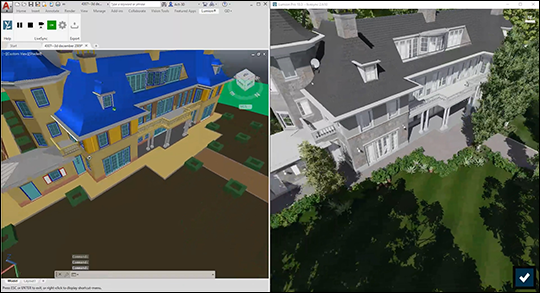
The free *Lumion LiveSync for AutoCAD* plugin lets you set up a simultaneous, real-time connection between your 3D model in *AutoCAD* and Lumion 10.3.2. Change the model’s shape in *AutoCAD* to test a modified design, and you’ll instantly see the model updated in Lumion so you can view it with accurate lighting and shadow, surrounding context such as urban neighborhoods or rural settings, and beautiful, realistic materials.
*Lumion LiveSync for AutoCAD* supports *AutoCAD* 2017, 2018, 2019, 2020 and 2021 and is available here:
- **Download Link:** [Download Lumion LiveSync for AutoCAD](https://support.lumion.com/knowledge-base/api/v2/help_center/en-us/articles/360041424634.json?hsLang=en-us)
**1.2: Custom *Displacement Maps*** *(Build Mode)*
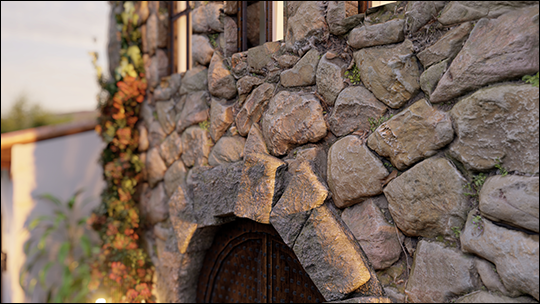
Lumion comes with a wide and impressive collection of high-quality, physically-based rendered (PBR) materials. Now, in Lumion 10.3.2, you can instantly heighten the realism, texture and detail of any material with the new *Displacement Map* import feature. By making your materials look as real as possible, you can open the door to endless possibilities for creating atmosphere and emotional involvement in your architectural renders.
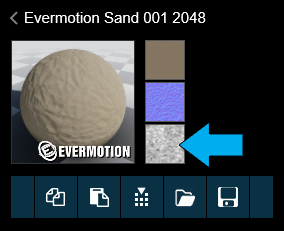
The new *Displacement Map* import feature requires that you download or make your own *Displacement Maps* for Lumion’s built-in or customized materials. For the best performance, import textures with a maximum width/height of 4,000 pixels only.
You can learn more about where to find textures for your materials here:
- **Lumion Community:** [The official Lumion list of texture collections](https://community.lumion.com/index.php?resources/the-official-lumion-list-of-texture-collections.4/)
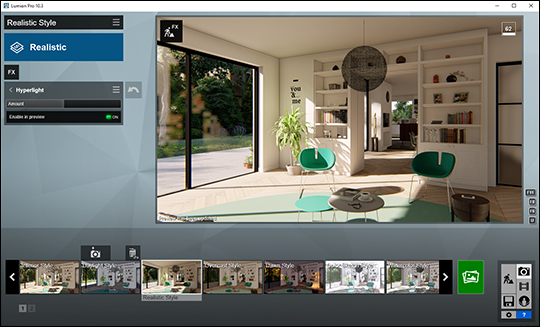
**1.3: *Hyperlight* in the *High-Quality preview*** *(Photo Mode, Movie Mode)*
Lumion 10.3.2 comes with a significant improvement to the *High-quality preview* feature by incorporating *Hyperlight* lighting into the preview, enhancing the beauty of your real-time view.
This is a great timesaver when tweaking the lighting of your *Photos* and *Clips*.
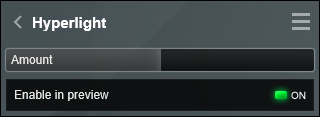
Example showing the *High-quality preview* with *Hyperlight* enabled in Lumion 10.3.2:
**1.4: Support for .SKP files from SketchUp 2020**

Lumion 10.3.2 can now also import .SKP files from *SketchUp 2020*.
Get the latest plug-in here:
- **Download Link:** [Download Lumion LiveSync for SketchUp](https://support.lumion.com/knowledge-base/api/v2/help_center/en-us/articles/360007502894.json?hsLang=en-us)
**1.5: *Automatic Reflection Planes* in the *Reflection Effect*** *(Photo Mode, Movie Mode, Panorama Mode)*
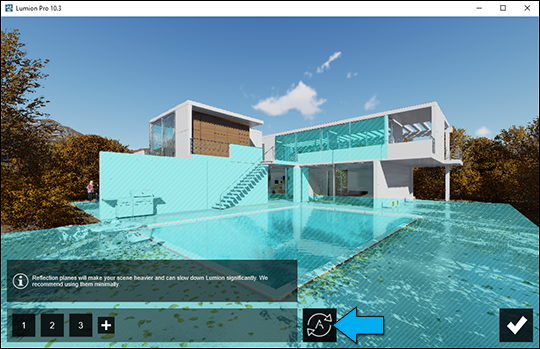
In the *Reflection Effect*, a new button has been added to the *Edit Reflection Planes Mode*. This function
analyzes the surfaces in the viewport and automatically applies *Reflection Planes* to the planar surfaces with reflective materials that benefit the most from them.
You can use the auto-created planes as selected by Lumion, or add and delete planes (as in previous versions) so that you get the optimal number and selection of surfaces for the Projects reflection planes.
**1.6: Improvements to the *Timeline* slider** *(Movie Mode)*
- Holding down the Shift key while dragging the *Timeline* slider now lets you finetune the slider position.
- If the mouse cursor is placed on the *Timeline* slider and the time is set to frames (rather than seconds), the navigation keys Left Arrow key and Right Arrow key allow you to move the position of the *Timeline* slider by one frame at a time.
If the time is set to seconds, hold down the Ctrl key to show the frames before pressing the navigation keys - Left Arrow key and Right Arrow key.
\[currently applies to the *Entire Movie* only\]
**1.7: Large texture previews** *(Material Editor Mode)*
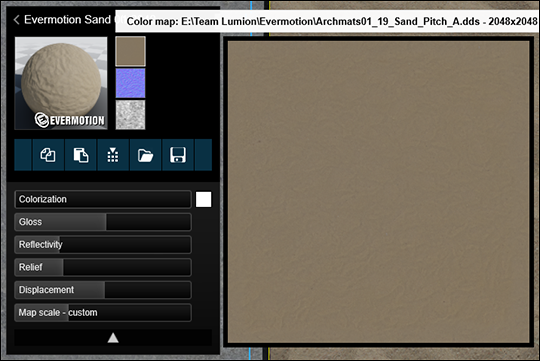
When the mouse cursor is placed on the *Color Map* slot, the *Normal Map* slot or the *Displacement Map* slot, the full path to the file as well as a larger preview (up to 400 x 400 pixels) are displayed.
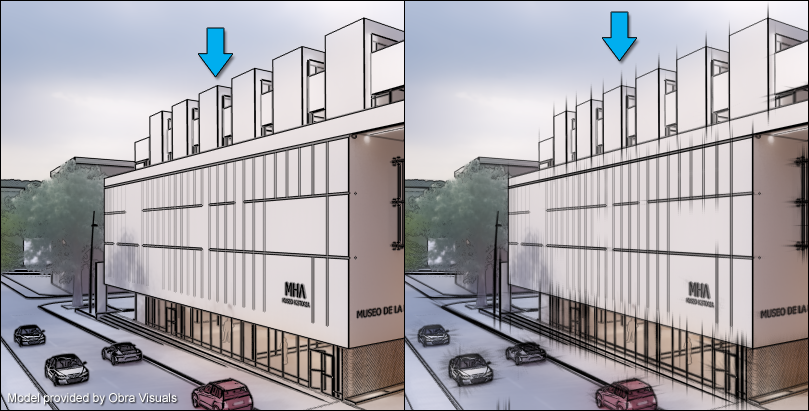
**1.8: Better control over the *Extended lines* in the *Outlines Effect*** *(Movie Mode)*
The line extension at corners can now be disabled so that the line ends on the surface edge and provides a similar effect as imported lines from applications such as SketchUp and 3ds Max.
## **2. Changes & Resolved Errors**
### **2.1: *Build Mode***
- At 3 Star *Editor Quality* or lower, *Video Textures* are now paused at the first frame of the video in *Build Mode* (*Object Mode, Landscape Mode and Weather Mode*). This is done in order to boost performance. In *Material Mode*, *Video Textures* will playback.
- Self-shadows from the sun on the *Lumion Landscape* are now also visible at 2 and 3 Star *Editor Quality*.
- In *Place Mode* when rotating animated 3D people and animal models, the *Rotation gizmo* will follow the mouse cursor exactly.
- In *Build with Effects Mode*, rotate and move are now working correctly with the *2-Point Perspective Effect* enabled.
- In *Build with Effects Mode*, objects placed outside of the 10x10 km *Lumion Landscape* are able to be properly selected.
- The original lights being replaced will no longer also show when doing a *Replace Selection*.
- When importing models, Lumion will now always generate a new thumbnail image in the *Imported Model Library*.
- It is no longer possible to try duplicating a *Fine-Detail Nature* object or a *Landscape Cutter* object via *Alt + Move* as these objects should not be copied using *Alt + Move*. The object will move as if using the *Move Tool* only.
- *Text fields* no longer become unresponsive when you move your selection to a hidden *Layer*.
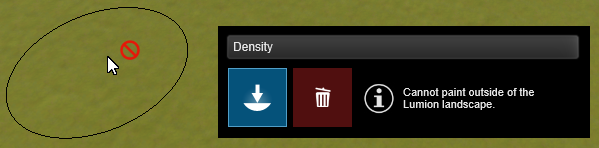
- *Paint Placement* now shows a blocked icon next to the mouse cursor when painting outside the 2 x 2 km *Lumion Landscape* that is supported. The border of the 2 x 2 km *Lumion Landscape* is also shown.
- When a *Simple Text* object is selected and you click on the toolbar (*Place, Select, Rotate, Scale, and Delete*), then Lumion will not select any other *Simple Text* object that might be in the *Project*.
- An object that is placed above the *Lumion Landscape* and is seen from below can now be moved by using *Move* in combination with *Shift* (Move objects horizontally), *Z* (Move objects along the Z axis only) or *X* (Move objects along the X axis only).
- The corner nodes of the *Landscape Cutter* object that were not required during a *Move Up, Move Horizontal and Type-In* are no longer visible.
- The cutout for a *Lumion Landscape* will be hidden when the *Landscape Cutter* object is moved to a *Layer* that is hidden.
- *Water Planes* can now be placed correctly again.
- Occluded *People - 3D - Silhouettes* models are no longer rendered on top of *Projected Reflections*.
- Some dead trees that were still in *Nature - Broadleaves* are now moved to *Nature - Leafless* trees.
- Animations are now frozen at the current frame of the *Entire Movie*, *Clip* or *Photo* for all modes available in *Build with Effects Mode*.
- *Billboard characters* (*People - 2D and People - 2d - Silhouettes*), will now ignore collision with any other character models when in *Place Mode*.
- The *Object Insertion Point* is no longer considered a node when using *Place objects on nodes*.
- Objects from the *Effects* category can no longer be grouped accidentally.
- The interface no longer overlaps the *Layer* toolbar when in *Edit Group Mode*.
- The camera can now move through parts of the *Lumion Landscape* that are below 0.0 m and that are being cut by the *Landscape Cutter* object.
- Duplicating a model with *Variations* via *Alt + Move* will now keep its *Variations*.
- When multiple models with *Variations* are selected, all selected models will switch to the clicked on *Variation*. If a model does not have a *Variation* in that position, it will not switch.
- *Simple Text* objects now show complex characters, such as Kanji, Hiragana and Katakana characters, correctly.
- Using *Randomize Position* on your selection right after it was duplicated will now keep the correct average position of the selection.
- *Water Planes* are now correctly placed just above the *Lumion Landscape* in *Build with Effects Mode* with the *2-Point Perspective Effect* enabled.
- *Tooltips* are now shown in the *hotkeys list* for any pressed hotkey.
- The *ALT* key now works as a toggle when moving a selection, just like all other hotkeys. When moving a selection using *ALT + Move* and the *ALT* key is released then the selection will be moved not duplicated.
- The performance of duplicating a selection when using *ALT + Move* has been improved. This is most noticeable for larger selections.
### **2.2: Movie, Photo and Panorama Modes**
#### ***Photo Mode***
- *Photos* will keep their assigned *Style* and/or *Effects* when rearranging their position on *Photo Set* 2 or higher.
- The shadows in *Projected Reflections* are now updated for each new *Photo* when rendering a *Photo Set*.
#### ***Movie Mode***
- The camera no longer pauses at each keyframe in *Clips*.
- In *Record Clip* or *Edit Clip* mode, it is possible again to use *CTRL + number key* to store camera keyframes to *Photo Set* 1. And restore the *Photo* slot to a camera keyframe in the *Clip Editor* by using *Shift + number key*.
- The *Aurora Effect* now animates when the *Clip* or *Movie* is rendered at 1 Star *Output Quality*.
- Imported animated objects will continue their animation over the duration of multiple *Clips*.
- *Ease in/out linear transitions* between *Clips* are now 100% linear.
- The camera will no longer overshoot when the camera position is close to the position of the camera in the next or previous camera keyframe.
#### ***Renders***
- There will no longer be a shadow shape rendered on the landscape when the *Shadow Range* is below 300m and *Shadow Type* is *Ultra Sharp* for a users *Project*.
- *Shadows* are now correctly rendered in the *Planar Reflections* in the *Reflection Effect*.
- The *Specular Reflection* map in the *Custom Output Map* options now renders all different reflection types (*Planar Reflections, Speedray Reflections and Projected Reflections*).
### **2.3: Materials**
- The settings for *Weathering*, *Edges*, and *Foliage* are now retained when a copy of an *Imported Model* is added to the *Project*.
- Lowering the *Weathering* value to 0 will no longer make surfaces disappear.
- A *Video Texture* will no longer show a warning icon with the message ‘*The movie failed to load*’ when it has been loaded.
- The *Landscape Material* is now correctly displayed when the camera is far away from the *Imported Model*.
- The *Water Material* is no longer rendered when it is underwater, for example below the *Ocean* or a *Water Plane*.
- The resolution of a *Color Map* or *Displacement Map* will no longer affect the *Normal Map* created by Lumion. For example, a 256 x 256 version of a *Color Map* will generate a similar *Normal Map* as a 2048x2048 version of the same image.
- Some tweaks were made to the interface in *Material Mode*. In the *Object Properties* panel the buttons *Select all in this layer* and *Lock object* selection and make it unable to select that could not be used in certain cases have been removed. The *Layer* toolbar is now accessible. The *Flip normal map* direction button has been re-positioned next to the *Relief* slider. And the *Colorization* color can now be accessed by clicking the *Choose color button* next to the *Colorization slider*.
- *Video Textures* do not use the alpha map of the embedded *Color Map* for shadows anymore.
- The trashcan button to delete a material is only visible in the *Custom materials* category.
### **2.4: Effects & Styles**
- In the *Reflection Effect* while in *Edit Reflection Planes* an information text has been added about using *Reflection Planes* and the effect that it can have on the performance of Lumion.
- The *Flicker Reduction* slider has been removed in the *Reflection Effect* and replaced with an internally calculated value for near pixel perfect reflections.
- Keyframes set in the *Variation Control Effect* are now using step interpolation instead of linear interpolation. The variation switches on the keyframes.
- The *3D text* in the *Title Effect* now renders complex characters, such as Kanji, Hiragana and Katakana characters correctly.
- In the *Material Highlight Effect* when in *Edit Mode* the selected surface no longer shows the highlight overlay when moving the camera.
### **2.5: Save, load and recovery**
- The *Project* title and description from Lumion 9.x and older files will no longer show in the *Recent Projects* thumbnails.
- The *Lumion Viewer* now shows the *Lumion Landscape* correctly in relation to *Imported Models* for *Projects* that were based on certain *Example Projects*.
### **2.6: Importing and Exporting**
- Collada .DAE files exported from an older version of ArchiCAD no longer make Lumion crash when being imported.
- Some Collada .DAE files no longer have inverted polygons after being imported.
- An additional copy of the textures that were imported via your 3D/CAD software is no longer stored in the *Modelname.lib* file in *Documents/Lumion 10.0/Library*. The result is smaller *Imported Model* files and .LS *Project* files.
- *Variations* in the *Variations* interface in *Build Mode* are no longer removed when *LiveSync* is reconnected to one of the *Variations*.
- Xrefs in .DWG files are now imported with the correct materials.
- Lumion no longer crashes when importing .DWG files that contain XRefs.
- *Tesselation* of imported .DWG files is controlled by their FACETRES value in AutoCAD. See section 2.3 in the following article for more information:
- **Knowledge Base:** [Model import guidelines for AutoCAD](https://support.lumion.com/knowledge-base/api/v2/help_center/en-us/articles/360007793333.json?hsLang=en-us).
### **2.7: Miscellaneous**
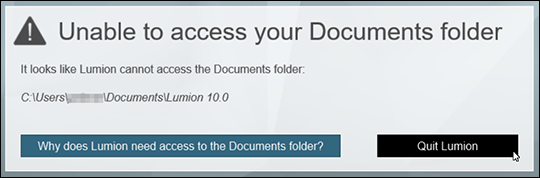
- While starting up, Lumion will now check if it has read/write access in the *Documents* folder.
If not, you will be referred to a *Knowledge Base* article which advises you how to resolve this issue.
- In *Select Mode*, the position will never show trailing zeros and never more than 2 decimals when typing in positions. For example; “0.00 \> 0”, “0.10 \> 0.1”, “15.108 \> 15.11”, “15.104 \> 15.1” “15.0 \> 15”.
- When rendering a frame from an *Image Sequence* the *error.log* file will no longer show the text '*Error: Save to file'*.
- Various text errors have been corrected.
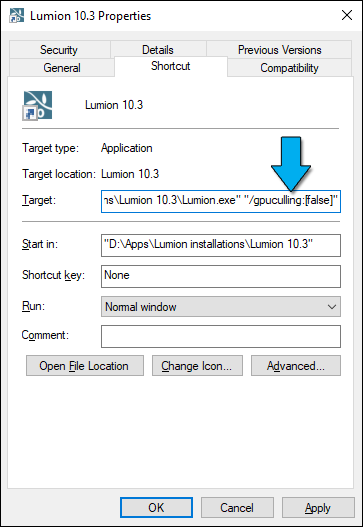
- **Object Culling:** In rare cases, *object culling* may result in flickering shadows when rendering high-resolution *Movies* with certain NVIDIA RTX graphics cards, for example the NVIDIA RTX 2080 Ti. You can now disable object culling if you encounter such a problem in your *Project*. Here's how:
- Close Lumion.
- Right-click on the shortcut icon for Lumion 10.3.2 and select *Properties*.
- In the *Target field*, add a space and paste "/gpuculling:\[false\]" (including the quotation marks " ) into the field.
- Click on 'OK' and restart Lumion.
- [Visit our other Sections](https://support.lumion.com/knowledge-base/visit-our-other-sections?hsLang=en-us)
- [Contact Us](https://support.lumion.com/knowledge-base/contact-us?hsLang=en-us)
- [Lumion Account](https://support.lumion.com/knowledge-base/lumion-account?hsLang=en-us)
- [Latest News](https://support.lumion.com/knowledge-base/latest-news?hsLang=en-us#main-content)
- [Major Known Issues](https://support.lumion.com/knowledge-base/latest-news?hsLang=en-us#major-known-issues)
- [Lumion 2025: Major Version Release Details](https://support.lumion.com/knowledge-base/latest-news?hsLang=en-us#lumion-2025-major-version-release-details)
- [Lumion 2024: Major Version Release Details](https://support.lumion.com/knowledge-base/latest-news?hsLang=en-us#lumion-2024-major-version-release-details)
- [Lumion 2023: Major Version Release Details](https://support.lumion.com/knowledge-base/latest-news?hsLang=en-us#lumion-2023-major-version-release-details)
- [Lumion 2023: Update Release Notes](https://support.lumion.com/knowledge-base/latest-news?hsLang=en-us#lumion-2023-update-release-notes)
- [Lumion 12](https://support.lumion.com/knowledge-base/latest-news?hsLang=en-us#lumion-12)
- [Lumion 11](https://support.lumion.com/knowledge-base/latest-news?hsLang=en-us#lumion-11)
- [Lumion 10](https://support.lumion.com/knowledge-base/latest-news?hsLang=en-us#lumion-10)
- [Sales Questions](https://support.lumion.com/knowledge-base/sales-questions?hsLang=en-us)
- [Subscriptions](https://support.lumion.com/knowledge-base/subscriptions?hsLang=en-us)
- [New User Questions](https://support.lumion.com/knowledge-base/new-user-questions?hsLang=en-us)
- [Learning Resources](https://support.lumion.com/knowledge-base/learning-resources?hsLang=en-us)
- [System Requirements Questions](https://support.lumion.com/knowledge-base/system-requirements-questions?hsLang=en-us#main-content)
- [Determining the 'Complexity' of your Projects](https://support.lumion.com/knowledge-base/system-requirements-questions?hsLang=en-us#determining-the-complexity-of-your-projects)
- [System Messages from Lumion](https://support.lumion.com/knowledge-base/system-requirements-questions?hsLang=en-us#system-messages-from-lumion)
- [Requirements for Prior Versions](https://support.lumion.com/knowledge-base/system-requirements-questions?hsLang=en-us#requirements-for-prior-versions)
- [Download & Installation Questions](https://support.lumion.com/knowledge-base/download-installation-questions?hsLang=en-us#main-content)
- [Download/Installation: General Questions](https://support.lumion.com/knowledge-base/download-installation-questions?hsLang=en-us#download-installation-general-questions)
- [Download Questions](https://support.lumion.com/knowledge-base/download-installation-questions?hsLang=en-us#download-questions)
- [Installation Questions](https://support.lumion.com/knowledge-base/download-installation-questions?hsLang=en-us#installation-questions)
- [Lumion Pro Updater](https://support.lumion.com/knowledge-base/download-installation-questions?hsLang=en-us#lumion-pro-updater)
- [Plugins to CAD software](https://support.lumion.com/knowledge-base/download-installation-questions?hsLang=en-us#plugins-to-cad-software)
- [License and General Product Questions](https://support.lumion.com/knowledge-base/license-and-general-product-questions?hsLang=en-us#main-content)
- [License System Messages from Lumion](https://support.lumion.com/knowledge-base/license-and-general-product-questions?hsLang=en-us#license-system-messages-from-lumion)
- [Import & Export Questions](https://support.lumion.com/knowledge-base/import-export-questions?hsLang=en-us#main-content)
- [Model Import Guidelines](https://support.lumion.com/knowledge-base/import-export-questions?hsLang=en-us#model-import-guidelines)
- [Lumion LiveSync and import plugins](https://support.lumion.com/knowledge-base/import-export-questions?hsLang=en-us#lumion-livesync-and-import-plugins)
- [System Messages from Lumion when importing](https://support.lumion.com/knowledge-base/import-export-questions?hsLang=en-us#system-messages-from-lumion-when-importing)
- [General Questions](https://support.lumion.com/knowledge-base/general-questions?hsLang=en-us#main-content)
- [Keyboard Shortcuts in Lumion](https://support.lumion.com/knowledge-base/general-questions?hsLang=en-us#keyboard-shortcuts-in-lumion)
- [Upgrading and Updating your Lumion Version](https://support.lumion.com/knowledge-base/general-questions?hsLang=en-us#upgrading-and-updating-your-lumion-version)
- [Using Lumion 2023](https://support.lumion.com/knowledge-base/general-questions?hsLang=en-us#using-lumion-2023)
- [System Messages from Lumion](https://support.lumion.com/knowledge-base/general-questions?hsLang=en-us#system-messages-from-lumion)
- [Build Mode Questions](https://support.lumion.com/knowledge-base/build-mode-questions?hsLang=en-us#main-content)
- [Landscape and Terrains](https://support.lumion.com/knowledge-base/build-mode-questions?hsLang=en-us#landscape-and-terrains)
- [OpenStreetMap](https://support.lumion.com/knowledge-base/build-mode-questions?hsLang=en-us#openstreetmap)
- [Lighting: Sun and Artificial Lights](https://support.lumion.com/knowledge-base/build-mode-questions?hsLang=en-us#lighting-sun-and-artificial-lights)
- [Questions mainly for older versions than Lumion 12](https://support.lumion.com/knowledge-base/build-mode-questions?hsLang=en-us#questions-mainly-for-older-versions-than-lumion-12)
- [Library Content](https://support.lumion.com/knowledge-base/library-content?hsLang=en-us#main-content)
- [Library Content in Lumion 2026](https://support.lumion.com/knowledge-base/library-content?hsLang=en-us#library-content-in-lumion-2026)
- [Library Content in Lumion 2025](https://support.lumion.com/knowledge-base/library-content?hsLang=en-us#library-content-in-lumion-2025)
- [Library Content in Lumion 2024](https://support.lumion.com/knowledge-base/library-content?hsLang=en-us#library-content-in-lumion-2024)
- [Library Content in Lumion 2023](https://support.lumion.com/knowledge-base/library-content?hsLang=en-us#library-content-in-lumion-2023)
- [Library Content in Lumion 12](https://support.lumion.com/knowledge-base/library-content?hsLang=en-us#library-content-in-lumion-12)
- [Movie & Photo Mode Questions](https://support.lumion.com/knowledge-base/movie-photo-mode-questions?hsLang=en-us#main-content)
- [Photo Mode](https://support.lumion.com/knowledge-base/movie-photo-mode-questions?hsLang=en-us#photo-mode)
- [Movie Mode](https://support.lumion.com/knowledge-base/movie-photo-mode-questions?hsLang=en-us#movie-mode)
- [Animation in Movie Mode](https://support.lumion.com/knowledge-base/movie-photo-mode-questions?hsLang=en-us#animation-in-movie-mode)
- [Effects in Photo or Movie Mode](https://support.lumion.com/knowledge-base/movie-photo-mode-questions?hsLang=en-us#effects-in-photo-or-movie-mode)
- [Reflections](https://support.lumion.com/knowledge-base/movie-photo-mode-questions?hsLang=en-us#reflections)
- [Material Questions](https://support.lumion.com/knowledge-base/material-questions?hsLang=en-us#main-content)
- [Materials in versions 12 and earlier](https://support.lumion.com/knowledge-base/material-questions?hsLang=en-us#materials-in-versions-12-and-earlier)
- [Using LiveSync for Revit and a Section Box](https://support.lumion.com/knowledge-base/material-questions?hsLang=en-us#using-livesync-for-revit-and-a-section-box)
- [Rendering Questions](https://support.lumion.com/knowledge-base/rendering-questions?hsLang=en-us#main-content)
- [General Rendering Questions](https://support.lumion.com/knowledge-base/rendering-questions?hsLang=en-us#general-rendering-questions)
- [Rendering of Photos](https://support.lumion.com/knowledge-base/rendering-questions?hsLang=en-us#rendering-of-photos)
- [Rendering of Clips and Movies](https://support.lumion.com/knowledge-base/rendering-questions?hsLang=en-us#rendering-of-clips-and-movies)
- [Tips to getting the best renders](https://support.lumion.com/knowledge-base/rendering-questions?hsLang=en-us#tips-to-getting-the-best-renders)
- [Rendering Performance](https://support.lumion.com/knowledge-base/rendering-questions?hsLang=en-us#rendering-performance)
- [Technical Issues when Rendering](https://support.lumion.com/knowledge-base/rendering-questions?hsLang=en-us#technical-issues-when-rendering)
- [Panorama Mode Questions](https://support.lumion.com/knowledge-base/panorama-mode-questions?hsLang=en-us#main-content)
- [Technical questions when rendering with Panorama Mode](https://support.lumion.com/knowledge-base/panorama-mode-questions?hsLang=en-us#technical-questions-when-rendering-with-panorama-mode)
- [File & BackUp Questions](https://support.lumion.com/knowledge-base/file-backup-questions?hsLang=en-us#main-content)
- [Saving and Backup](https://support.lumion.com/knowledge-base/file-backup-questions?hsLang=en-us#saving-and-backup)
- [File Saving Issues](https://support.lumion.com/knowledge-base/file-backup-questions?hsLang=en-us#file-saving-issues)
- [Lumion-Documents](https://support.lumion.com/knowledge-base/file-backup-questions?hsLang=en-us#lumion-documents)
- [Transfer, Move or Migrate Files](https://support.lumion.com/knowledge-base/file-backup-questions?hsLang=en-us#transfer-move-or-migrate-files)
- [Troubleshooting](https://support.lumion.com/knowledge-base/troubleshooting?hsLang=en-us#main-content)
- [Reports about your PC](https://support.lumion.com/knowledge-base/troubleshooting?hsLang=en-us#reports-about-your-pc)
- [Photo and Movie Mode Issues](https://support.lumion.com/knowledge-base/troubleshooting?hsLang=en-us#photo-and-movie-mode-issues)
- [Rendering Issues](https://support.lumion.com/knowledge-base/troubleshooting?hsLang=en-us#rendering-issues)
- [Error Messages from Lumion](https://support.lumion.com/knowledge-base/troubleshooting?hsLang=en-us#error-messages-from-lumion)
- [Hardware related Issues](https://support.lumion.com/knowledge-base/troubleshooting?hsLang=en-us#hardware-related-issues)
- [Other Troubleshooting Issues](https://support.lumion.com/knowledge-base/troubleshooting?hsLang=en-us#other-troubleshooting-issues)
- [Article Developments](https://support.lumion.com/knowledge-base/article-developments?hsLang=en-us#main-content)
- [Devs - Multi‑Image Button Viewer](https://support.lumion.com/knowledge-base/article-developments?hsLang=en-us#devs-multi-image-button-viewer)
[](https://lumion.com/)
[mailto:email@email.com](mailto:email@email.com)
Copyright © 2026, Lumion - Act3D B.V.
#### Product
[Plans and pricing](https://lumion.com/product/buy)
[Discover Lumion](https://lumion.com/product/discover-lumion)
[Compatibility](https://lumion.com/compatibility/)
[System Requirements](https://lumion.com/product/system-requirements)
[Find a reseller](https://lumion.com/about/find-reseller)
[Free trial](https://lumion.com/product/free-trial)
#### Solutions
[Architectural design](https://lumion.com/product/architectural-design)
[Interior design](https://lumion.com/product/interior-design)
[Landscape architecture](https://lumion.com/product/landscape-architecture)
[Urban planning](https://lumion.com/product/urban-planning)
[3D rendering](https://lumion.com/product/3d-rendering-software)
[Education](https://lumion.com/product/educational-licenses)
#### Compatibility
[Trimble SketchUp](https://lumion.com/compatibility/sketchup-rendering)
[Autodesk Revit](https://lumion.com/compatibility/revit-rendering)
[Graphisoft ArchiCAD](https://lumion.com/compatibility/archicad-rendering)
[Rhinoceros](https://lumion.com/compatibility/rhino-rendering)
[Autodesk Autocad](https://lumion.com/compatibility/autocad-rendering)
[Autodesk FormIt Pro](https://lumion.com/compatibility/lumion-for-autodesk-formit-pro)
[Nemetschek Allplan](https://lumion.com/compatibility/allplan-rendering)
[Nemetschek Vectorworks](https://lumion.com/compatibility/vectorworks-rendering)
[BricsCAD](https://lumion.com/compatibility/bricscad-rendering)
[3D Studio Max](https://lumion.com/compatibility/3ds-max-rendering)
#### Resources
[Made with Lumion](https://lumion.com/made-with-lumion)
[Tutorials](https://support.lumion.com/video-tutorials?hsLang=en-us)
[Support and learning](https://support.lumion.com/knowledge-base/api/v2/help_center/en-us/articles/360044608053.json?hsLang=en-us)
[Downloads](https://support.lumion.com/downloads?hsLang=en-us)
[Community](https://community.lumion.com/index.php)
#### About
[Our Story](https://lumion.com/about)
[We're hiring!](https://lumion.com/about/careers)
[News](https://lumion.com/news)
[Contact us](https://lumion.com/about/contact)
[Terms & conditions](https://lumion.com/legal/terms-of-service) [EULA](https://lumion.com/legal/eula) [Privacy statement](https://lumion.com/legal/privacy-statement) [CEIP](https://lumion.com/legal/ceip) [Disclaimer](https://lumion.com/legal/disclaimer) © 2026 Lumion