---
title: How do you resolve Installer (v2) problems - Installation issues?
description: How do you resolve Installer (v2) problems - Installation issues
---
Solutions
[Architectural design All you need to bring your residential, commercial or institutional designs to life](https://lumion.com/product/architectural-design) [Landscape architecture Beautiful terrains and fine-detailed nature for any climate or season](https://lumion.com/product/landscape-architecture)
[Interior design Realistic light, high-quality textures, and an extensive asset library](https://lumion.com/product/interior-design) [Students and Faculties Lumion is free for students, educators, and faculties around the world](https://lumion.com/product/educational-licenses)
[SketchUp](https://lumion.com/compatibility/sketchup-rendering) [Revit](https://lumion.com/compatibility/revit-rendering) [ArchiCAD](https://lumion.com/compatibility/archicad-rendering) [Rhino](https://lumion.com/compatibility/rhino-rendering) [Autocad](https://lumion.com/compatibility/autocad-rendering) [See more](https://lumion.com/compatibility/)
Product
[Discover Axogram New Live architectural diagramming](https://lumion.com/product/axogram) [Lumion Cloud Where design meets collaboration](https://lumion.com/product/lumion-cloud)
[Lumion Pro Advanced visualization solution](https://lumion.com/product/lumion-pro) [Discover AI tools New AI built for architectural work](https://lumion.com/product/ai)
[Lumion Pro 2026.1 is out now! 🚀](https://lumion.com/product/latest-version-pro) [Compatibility](https://lumion.com/compatibility/) [System Requirements](https://lumion.com/product/system-requirements) [Roadmap](https://lumion.com/product/roadmap)
[Pricing](https://lumion.com/product/buy) Resources
[Made with Lumion Get inspired by the stories behind the designs](https://lumion.com/made-with-lumion)
[Tips & Guides Make the most out of Lumion with helpful guides and tutorials](https://lumion.com/tips-guides)
[Knowledge base](https://support.lumion.com/knowledge-base?hsLang=en-us) [Community](https://community.lumion.com/index.php) [Downloads](https://support.lumion.com/downloads?hsLang=en-us)
About
[Who we are Learn about our story and mission](https://lumion.com/about) [Careers - We're hiring Let's build the future of architectural visualization](https://lumion.com/about/careers)
[News Discover the latest product news and more](https://lumion.com/news)
[Find your local reseller](https://lumion.com/about/find-reseller) [Contact us](https://lumion.com/about/contact)
[](http://lumion.com)
[My Account](https://account.lumion.com)
Solutions
[Architectural design](https://lumion.com/product/architectural-design) [Interior design](https://lumion.com/product/interior-design) [Landscape architecture](https://lumion.com/product/landscape-architecture) [Students and Faculties](https://lumion.com/product/educational-licenses)
---
[SketchUp](https://lumion.com/compatibility/sketchup-rendering) [Revit](https://lumion.com/compatibility/revit-rendering) [ArchiCAD](https://lumion.com/compatibility/archicad-rendering) [Rhino](https://lumion.com/compatibility/rhino-rendering) [Autocad](https://lumion.com/compatibility/autocad-rendering) [See more](https://lumion.com/compatibility/)
Product
[Axogram New](https://lumion.com/product/axogram) [Lumion Cloud](https://lumion.com/product/lumion-cloud) [Lumion Pro](https://lumion.com/product/lumion-pro) [Discover AI tools New](https://lumion.com/product/ai)
---
[Lumion Pro 2026.1 is out now! 🚀](https://lumion.com/product/latest-version-pro) [Compatibility](https://lumion.com/compatibility/) [System Requirements](https://lumion.com/product/system-requirements) [Roadmap](https://lumion.com/product/roadmap)
[Pricing](https://lumion.com/product/buy) Resources
[Made with Lumion](https://lumion.com/made-with-lumion) [Tips & Guides](https://lumion.com/tips-guides)
---
[Knowledge base](https://support.lumion.com/knowledge-base?hsLang=en-us) [Community](https://community.lumion.com/index.php) [Downloads](https://support.lumion.com/downloads?hsLang=en-us)
About
[Who we are](https://lumion.com/about) [Careers - We're hiring](https://lumion.com/about/careers) [News](https://lumion.com/news)
---
[Find your local reseller](https://lumion.com/about/find-reseller) [Contact us](https://lumion.com/about/contact)
[My Account](https://account.lumion.com)
[Submit a request](https://support.lumion.com/hc/en-us/requests/new?hsLang=en-us)
Lumion Knowledge Base
How can we help?
- There are no suggestions because the search field is empty.
[Skip to content](https://support.lumion.com/knowledge-base/api/v2/help_center/en-us/articles/4416194605980.json#main-content)
English - United States
Show submenu for translations

Open main navigation
Close main navigation
- English - United States
Show submenu for translations
- Contact us
Contact us
How can we help you?
- There are no suggestions because the search field is empty.
1. [Knowledge Base](https://support.lumion.com/knowledge-base?hsLang=en-us)
2. [Download & Installation Questions](https://support.lumion.com/knowledge-base/download-installation-questions?hsLang=en-us)
3. [Installation Questions](https://support.lumion.com/knowledge-base/download-installation-questions?hsLang=en-us#installation-questions)
# How do you resolve Installer (v2) problems - Installation issues?
**Installing Lumion**
You have been trying to install Lumion, but there is a problem after the download and during the installation phase. The *Lumion* *Installer* (also referred to as *Installer*) shows an error message.
Please follow the instructions in the sections below that correspond to the error message you are seeing when trying to install Lumion.
If you are having problems with using the *Updater* once Lumion has been installed? See this article, Section 7:
- **Knowledge Base: ** [How does the Updater for Lumion work?](https://support.lumion.com/knowledge-base/api/v2/help_center/en-us/articles/7846598739612.json?hsLang=en-us)
#### **Error Message:**
#### [**1. The Lumion Installer Cache file does not exist.**](https://support.lumion.com/knowledge-base/api/v2/help_center/en-us/articles/4416194605980.json#H1)
#### [**2-9. There is an issue with the installation cache file.**](https://support.lumion.com/knowledge-base/api/v2/help_center/en-us/articles/4416194605980.json#H2)
#### [**10-11. No admin rights or write access in the selected installation folder.**](https://support.lumion.com/knowledge-base/api/v2/help_center/en-us/articles/4416194605980.json#H10)
#### [**12-13. Not enough disk space.**](https://support.lumion.com/knowledge-base/api/v2/help_center/en-us/articles/4416194605980.json#H12)
#### [**14. Installation has failed.**](https://support.lumion.com/knowledge-base/api/v2/help_center/en-us/articles/4416194605980.json#H14)
#### [**15. Silent Mode.**](https://support.lumion.com/knowledge-base/api/v2/help_center/en-us/articles/4416194605980.json#H15)
#### [**16. Installer - no flags were set.**](https://support.lumion.com/knowledge-base/api/v2/help_center/en-us/articles/4416194605980.json#H16)
If after trying the suggested fix you still get the same error message then see [Section: Still not working? Contact Us.](https://support.lumion.com/knowledge-base/api/v2/help_center/en-us/articles/4416194605980.json#H99_StillNotWorking)
If you are having trouble deploying a silent installation of Lumion, see[Section 15. Silent Mode](https://support.lumion.com/knowledge-base/api/v2/help_center/en-us/articles/4416194605980.json#h_16.).
**Why is the installation not working?**
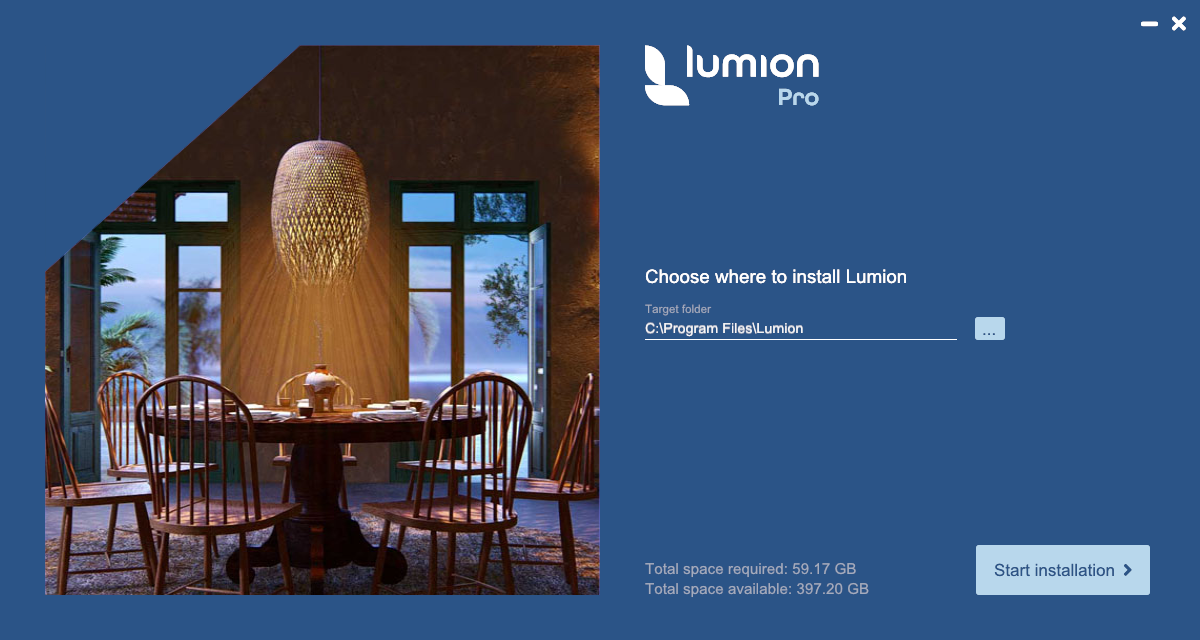
### 1. Error Message: The Lumion Installer Cache file does not exist.
\[Our reference: Inst01, 10157\]
**Explanation:**
You are running the *Installer* in *Silent Mode* via a (CMD) command console.
The Lumion cache file (required) does not exist (it has been removed or deleted by something else) or there is no internet access.
**How To Fix:**
**1.1:** Run the *Installer* in normal mode, that is, via the interface and not the command console to get the cache file.
**1.2:** When the cache file has been downloaded (less than 1.5MB) then try again in *Silent Mode*.
**1.3:** Still getting the same error message? If so, then first see [Section 15. Silent Mode](https://support.lumion.com/knowledge-base/api/v2/help_center/en-us/articles/4416194605980.json#h_01G0BHHTD61CM8T0MKQ4FVHR90):
**Note:** Sections 2 to 9 all have the same error message for the *Installer*. Please follow the steps in each section.
### 2. Error Message: There is an issue with the installation cache file.
\[Our reference: Inst02, 10197\]
**Explanation - possible causes:**
The Lumion temporary folder does not exist or the folder cannot be created. The cache file extract has failed.
The Windows user permissions were not sufficient to allow the *Installer* to create the temporary folder.
The cache file itself is outdated or corrupted.
**How To Fix:**
**2.1:** Set Windows permissions to Administrator. Close the *Installer*. Right-click the Installer '.exe' file. Select 'Run as Administrator'.
**2.2:** Else log in to Windows with an account that is an administrator and try again.
### 3. Error Message: There is an issue with the installation cache file.
\[Our reference: Inst03, 10205\]
**Explanation:**
The Lumion Installer is unable to read the file 'meta.json' if the cache is invalid.
**How To Fix:**
**3.1:** Close the *Installer*.
**3.2:** In Windows File Explorer, go to the folder where you have saved the *Installer*.
**3.3:** Delete the '.cache' file and restart the *Installer*.
### 4. Error Message: There is an issue with the installation cache file.
\[Our reference: Inst04, 10214\]
**Explanation:**
The 'Meta.json' file extracted from the '.cache' file was found on disk but was corrupted or an incorrect structure.
**How To Fix:**
**4.1:** Close the *Installer*.
**4.2:** In Windows File Explorer, go to the folder where you have saved the *Installer*.
**4.3:** Delete the '.cache' file and restart the *Installer*.
### 5. Error Message: There is an issue with the installation cache file.
\[Our reference: Inst05, 10252\]
**Explanation:**
Files required were not found on the server.
**How To Fix:**
See **Section:** Still not working? Contact Us.
### 6. Error Message: There is an issue with the installation cache file.
\[Our reference: Inst06, 10264\]
**Explanation:**
Assets needed for the *Installer* were not found on the Lumion server. If there is no connection error:- see **Section 7: ***Error Message: There is a problem with the connection from or at your PC to the Lumion servers to get the installer files*, in this article:
- **Knowledge Base: ** [How do you resolve Installer (v2) problems - Download issues?](https://support.lumion.com/knowledge-base/api/v2/help_center/en-us/articles/4416194373276.json?hsLang=en-us)
then the files are most likely being blocked by antivirus or security software.
**How To Fix:**
See the steps in this article, **Section 3.2.2:**
- **Knowledge Base: ** [How do you resolve Installer (v2) problems - Download issues?](https://support.lumion.com/knowledge-base/api/v2/help_center/en-us/articles/4416194373276.json?hsLang=en-us)
### 7. Error Message: There is an issue with the installation cache file. Json data is empty!
\[Our reference: Inst01, 10291\]
**Explanation:**
A required resource file for the *Installer* was able to be written to the temporary folder, however, it has zero (0) byte size (no data).
**How To Fix:**
Please check if you have other security systems (for example BeyondTrust) monitoring your system and possibly blocking the download or the installation.
Else, see **Section:** Still not working? Contact Us.
### 8. Error Message: There is an issue with the installation cache file.
\[Our reference: Inst08, 10299\]
**Explanation:**
A required resource file for the *Installer* was able to be written to the temporary folder, however, it has invalid content.
**How To Fix:**
See **Section:** Still not working? Contact Us.
### 9. Error Message: There is an issue with the installation cache file.
\[Our reference: Inst09, 10366\]
**Explanation:**
The *Installer* failed to create the temporary folder needed. This indicates a lack of user permissions on the system.
See also **Section** **2: ** Error Message: There is an issue with the installation cache file.
**How To Fix:**
**9.1:** Set Windows permissions to Administrator. Close the *Installer*. Right-click the Installer '.exe' file. Select 'Run as Administrator'.
**9.2:** Else log in to Windows with an account that is an administrator and try again.
**Note:** Sections 10 to 11 have the same error message for the *Installer*. Please follow the steps in each section.
### 10. The Installer does not have admin rights.
10a. Error Message: The Installer does not have admin rights.
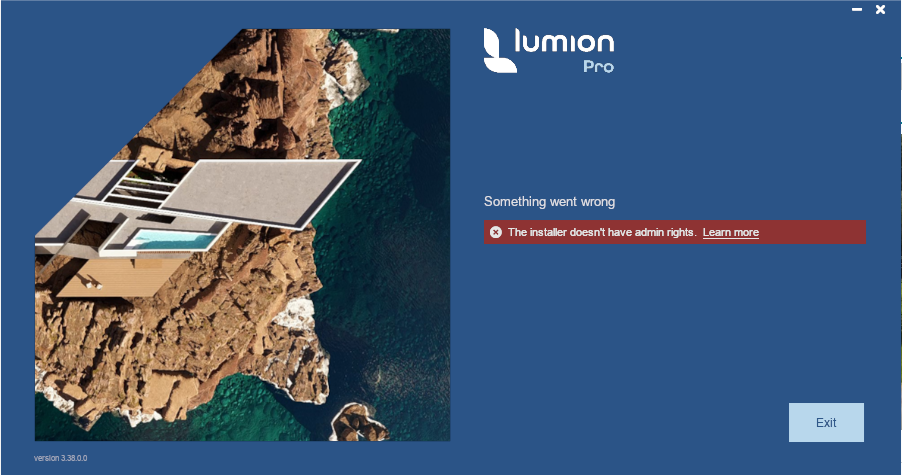
**Explanation:**
There are insufficient Administration Rights that Windows requires to install Lumion for your Windows User level when you log in to your PC.
You need Administrator rights (Windows permissions) as a user to install to the *\\Program Files* folders.
The default folder location is *C:\\Program Files\\Lumion \[version\]*.
**How To Fix:**
Make sure you have the correct permissions to install or write files:
**10.1:** Set Windows permissions to Administrator. Close the *Installer*. Right-click the *Installer* '.exe' file (*Lumion\_\[version\]\_Download.exe*). Select 'Run as Administrator'.
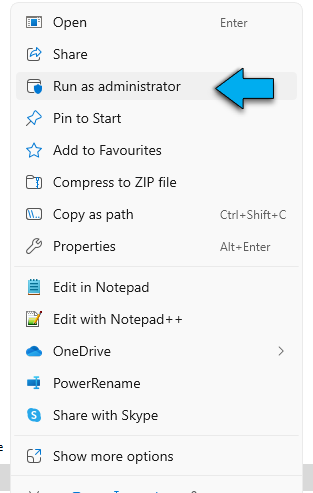
**10.2:** Else log in to Windows with an account that is an administrator and try again.
**10.3:** Then follow the steps in this article in **Section: 3.2:** Antivirus or Firewall is blocking the Installer:
- **Knowledge Base: ** [How do you resolve Installer (v2) problems - Download issues?](https://support.lumion.com/knowledge-base/api/v2/help_center/en-us/articles/4416194373276.json?hsLang=en-us)
**10b. Error Message: No write access in the selected installation folder.**
**Explanation:**
There is no write access to save files to the installation folder. The default folder location is *C:\\Program Files\\Lumion \[version\]*. You must have at least *write* file permission as a user to the *\\Program Files* folders.
**How To Fix:**
See Section 10a above.
### 11. Error Message: No write access in the selected installation folder.
\[Our reference: Inst14, 10479\]
**Explanation:**
There is no write access to create the installation folder. The default folder is *C:\\Program Files\\Lumion \[version\]*. Other drives can also be used. You must have at least *create* folder permission as a user to the *\\Program Files* folders. This problem is similar to that in section 10 above but relates to the access to the required folders.
**How To Fix:**
See Section 10a above.
**Note:** Sections 12 and 13 have the same error message for the *Installer*. Please follow the steps in each section.
### 12. Error Message:
** Not enough disk space.**
\[Our reference: Inst15, 10513\]
**Explanation:**
Before the installation commences the *Installer* checks to see if there is enough free file space for the installation. If not, then this message is displayed.
**How To Fix:**
If the drive where you are installing Lumion does not have enough free file space then you will need to cancel the installation and free up some space.
You need to free up file space on the drive where you are installing Lumion.
See this article for the file space requirements for the installation of Lumion.
- **Knowledge Base:** [What file space do I need to download and install Lumion?](https://support.lumion.com/knowledge-base/api/v2/help_center/en-us/articles/4413804109202.json?hsLang=en-us)
Please also verify that there will be **at least** 30 GB of free file space on your *C:\\ (operating system) drive*. after a successful installation. That is, the free space needs to be the installation file space required **+** the 30GB.
To help free up file space see **Section 2.** Free up File Space: in the above article.
### 13. Error Message: Not enough disk space.
\[Our reference: Inst16, 10529\]
**Explanation:**
During the installation, not all installation files or folders can be installed correctly because there is not enough disk space. This can happen even though the *Installer* checks free file space before it starts because other processes might use or download and use up the file space.
**How To Fix:**
See the steps above in **Section 12: ** Error Message: Not enough disk space.
### 14. Error Message: Installation has failed.
\[Our reference: Inst01, 10586\]
**Explanation:**
A final message if anything has failed in the installation process.
**How To Fix:**
See **Section:** Still not working? Contact Us.
### 15. Silent Mode.
See also: **Section 1.** Error Message: The *Lumion Installer* Cache file does not exist.
**15.1:** If you are using the *Lumnion Installer* in *Silent Mode* (via a CMD command console for things like batch install across a network) and get error messages not covered by those above.
**15.2:** Some errors will only be logged to the *logfile.txt* file and not displayed.
**15.3:** Then click on the *Contact Us* button above in **Section:** Still not working? Contact Us (below).
**15.4:** For further details on using *Silent Mode*, see this article:
- **Knowledge Base: ** [How do you install Lumion silently?](https://support.lumion.com/knowledge-base/api/v2/help_center/en-us/articles/360003475593.json?hsLang=en-us)
### 16. Installer (Update process) - no flags were set.
\[Our reference: Inst17, 10353\]
The Installer message is" Running in update000 but no flags were set to be in update download or
update install mode."
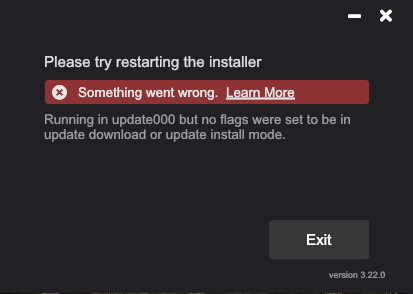
**Explanation:**
You have tried running the *Update000.exe* file in the installation folder either directly or via a Windows shortcut icon.
This exe file should only be run by and from within Lumion.
**How To Fix:**
Close Lumion if open.
Then please start Lumion and follow the steps within Lumion to download and install any pending updates. See:
- **Knowledge Base: ** [How does the Updater for Lumion work?](https://support.lumion.com/knowledge-base/api/v2/help_center/en-us/articles/7846598739612.json?hsLang=en-us)
### Still not working? Contact Us:
Click on this *Contact Us* button and let us know the error message and 'Our reference' as shown with each message in the above sections. Also, please attach to your Support Request the *logfile.txt* file that should be in the same folder that the *Installer* is.
[Contact Us](https://support.lumion.com/knowledge-base/api/v2/help_center/en-us/articles/360041760194.json?hsLang=en-us)
### See Also:
- **Knowledge Base: ** [How do you resolve Installer (v2) problems - Download issues?](https://support.lumion.com/knowledge-base/api/v2/help_center/en-us/articles/4416194373276.json?hsLang=en-us)
- **Knowledge Base: **[How do you resolve Installer (v2) problems - Installation file issues?](https://support.lumion.com/knowledge-base/api/v2/help_center/en-us/articles/4416159509532.json?hsLang=en-us)
- **Knowledge Base: **[How do you resolve Installer (v2) problems - other Installation issues?](https://support.lumion.com/knowledge-base/api/v2/help_center/en-us/articles/4416210675996.json?hsLang=en-us)
- [Visit our other Sections](https://support.lumion.com/knowledge-base/visit-our-other-sections?hsLang=en-us)
- [Contact Us](https://support.lumion.com/knowledge-base/contact-us?hsLang=en-us)
- [Lumion Account](https://support.lumion.com/knowledge-base/lumion-account?hsLang=en-us)
- [Latest News](https://support.lumion.com/knowledge-base/latest-news?hsLang=en-us#main-content)
- [Major Known Issues](https://support.lumion.com/knowledge-base/latest-news?hsLang=en-us#major-known-issues)
- [Lumion 2025: Major Version Release Details](https://support.lumion.com/knowledge-base/latest-news?hsLang=en-us#lumion-2025-major-version-release-details)
- [Lumion 2024: Major Version Release Details](https://support.lumion.com/knowledge-base/latest-news?hsLang=en-us#lumion-2024-major-version-release-details)
- [Lumion 2023: Major Version Release Details](https://support.lumion.com/knowledge-base/latest-news?hsLang=en-us#lumion-2023-major-version-release-details)
- [Lumion 2023: Update Release Notes](https://support.lumion.com/knowledge-base/latest-news?hsLang=en-us#lumion-2023-update-release-notes)
- [Lumion 12](https://support.lumion.com/knowledge-base/latest-news?hsLang=en-us#lumion-12)
- [Lumion 11](https://support.lumion.com/knowledge-base/latest-news?hsLang=en-us#lumion-11)
- [Lumion 10](https://support.lumion.com/knowledge-base/latest-news?hsLang=en-us#lumion-10)
- [Sales Questions](https://support.lumion.com/knowledge-base/sales-questions?hsLang=en-us)
- [Subscriptions](https://support.lumion.com/knowledge-base/subscriptions?hsLang=en-us)
- [New User Questions](https://support.lumion.com/knowledge-base/new-user-questions?hsLang=en-us)
- [Learning Resources](https://support.lumion.com/knowledge-base/learning-resources?hsLang=en-us)
- [System Requirements Questions](https://support.lumion.com/knowledge-base/system-requirements-questions?hsLang=en-us#main-content)
- [Determining the 'Complexity' of your Projects](https://support.lumion.com/knowledge-base/system-requirements-questions?hsLang=en-us#determining-the-complexity-of-your-projects)
- [System Messages from Lumion](https://support.lumion.com/knowledge-base/system-requirements-questions?hsLang=en-us#system-messages-from-lumion)
- [Requirements for Prior Versions](https://support.lumion.com/knowledge-base/system-requirements-questions?hsLang=en-us#requirements-for-prior-versions)
- [Download & Installation Questions](https://support.lumion.com/knowledge-base/download-installation-questions?hsLang=en-us#main-content)
- [Download/Installation: General Questions](https://support.lumion.com/knowledge-base/download-installation-questions?hsLang=en-us#download-installation-general-questions)
- [Download Questions](https://support.lumion.com/knowledge-base/download-installation-questions?hsLang=en-us#download-questions)
- [Installation Questions](https://support.lumion.com/knowledge-base/download-installation-questions?hsLang=en-us#installation-questions)
- [Lumion Pro Updater](https://support.lumion.com/knowledge-base/download-installation-questions?hsLang=en-us#lumion-pro-updater)
- [Plugins to CAD software](https://support.lumion.com/knowledge-base/download-installation-questions?hsLang=en-us#plugins-to-cad-software)
- [License and General Product Questions](https://support.lumion.com/knowledge-base/license-and-general-product-questions?hsLang=en-us#main-content)
- [License System Messages from Lumion](https://support.lumion.com/knowledge-base/license-and-general-product-questions?hsLang=en-us#license-system-messages-from-lumion)
- [Import & Export Questions](https://support.lumion.com/knowledge-base/import-export-questions?hsLang=en-us#main-content)
- [Model Import Guidelines](https://support.lumion.com/knowledge-base/import-export-questions?hsLang=en-us#model-import-guidelines)
- [Lumion LiveSync and import plugins](https://support.lumion.com/knowledge-base/import-export-questions?hsLang=en-us#lumion-livesync-and-import-plugins)
- [System Messages from Lumion when importing](https://support.lumion.com/knowledge-base/import-export-questions?hsLang=en-us#system-messages-from-lumion-when-importing)
- [General Questions](https://support.lumion.com/knowledge-base/general-questions?hsLang=en-us#main-content)
- [Keyboard Shortcuts in Lumion](https://support.lumion.com/knowledge-base/general-questions?hsLang=en-us#keyboard-shortcuts-in-lumion)
- [Upgrading and Updating your Lumion Version](https://support.lumion.com/knowledge-base/general-questions?hsLang=en-us#upgrading-and-updating-your-lumion-version)
- [Using Lumion 2023](https://support.lumion.com/knowledge-base/general-questions?hsLang=en-us#using-lumion-2023)
- [System Messages from Lumion](https://support.lumion.com/knowledge-base/general-questions?hsLang=en-us#system-messages-from-lumion)
- [Build Mode Questions](https://support.lumion.com/knowledge-base/build-mode-questions?hsLang=en-us#main-content)
- [Landscape and Terrains](https://support.lumion.com/knowledge-base/build-mode-questions?hsLang=en-us#landscape-and-terrains)
- [OpenStreetMap](https://support.lumion.com/knowledge-base/build-mode-questions?hsLang=en-us#openstreetmap)
- [Lighting: Sun and Artificial Lights](https://support.lumion.com/knowledge-base/build-mode-questions?hsLang=en-us#lighting-sun-and-artificial-lights)
- [Questions mainly for older versions than Lumion 12](https://support.lumion.com/knowledge-base/build-mode-questions?hsLang=en-us#questions-mainly-for-older-versions-than-lumion-12)
- [Library Content](https://support.lumion.com/knowledge-base/library-content?hsLang=en-us#main-content)
- [Library Content in Lumion 2026](https://support.lumion.com/knowledge-base/library-content?hsLang=en-us#library-content-in-lumion-2026)
- [Library Content in Lumion 2025](https://support.lumion.com/knowledge-base/library-content?hsLang=en-us#library-content-in-lumion-2025)
- [Library Content in Lumion 2024](https://support.lumion.com/knowledge-base/library-content?hsLang=en-us#library-content-in-lumion-2024)
- [Library Content in Lumion 2023](https://support.lumion.com/knowledge-base/library-content?hsLang=en-us#library-content-in-lumion-2023)
- [Library Content in Lumion 12](https://support.lumion.com/knowledge-base/library-content?hsLang=en-us#library-content-in-lumion-12)
- [Movie & Photo Mode Questions](https://support.lumion.com/knowledge-base/movie-photo-mode-questions?hsLang=en-us#main-content)
- [Photo Mode](https://support.lumion.com/knowledge-base/movie-photo-mode-questions?hsLang=en-us#photo-mode)
- [Movie Mode](https://support.lumion.com/knowledge-base/movie-photo-mode-questions?hsLang=en-us#movie-mode)
- [Animation in Movie Mode](https://support.lumion.com/knowledge-base/movie-photo-mode-questions?hsLang=en-us#animation-in-movie-mode)
- [Effects in Photo or Movie Mode](https://support.lumion.com/knowledge-base/movie-photo-mode-questions?hsLang=en-us#effects-in-photo-or-movie-mode)
- [Reflections](https://support.lumion.com/knowledge-base/movie-photo-mode-questions?hsLang=en-us#reflections)
- [Material Questions](https://support.lumion.com/knowledge-base/material-questions?hsLang=en-us#main-content)
- [Materials in versions 12 and earlier](https://support.lumion.com/knowledge-base/material-questions?hsLang=en-us#materials-in-versions-12-and-earlier)
- [Using LiveSync for Revit and a Section Box](https://support.lumion.com/knowledge-base/material-questions?hsLang=en-us#using-livesync-for-revit-and-a-section-box)
- [Rendering Questions](https://support.lumion.com/knowledge-base/rendering-questions?hsLang=en-us#main-content)
- [General Rendering Questions](https://support.lumion.com/knowledge-base/rendering-questions?hsLang=en-us#general-rendering-questions)
- [Rendering of Photos](https://support.lumion.com/knowledge-base/rendering-questions?hsLang=en-us#rendering-of-photos)
- [Rendering of Clips and Movies](https://support.lumion.com/knowledge-base/rendering-questions?hsLang=en-us#rendering-of-clips-and-movies)
- [Tips to getting the best renders](https://support.lumion.com/knowledge-base/rendering-questions?hsLang=en-us#tips-to-getting-the-best-renders)
- [Rendering Performance](https://support.lumion.com/knowledge-base/rendering-questions?hsLang=en-us#rendering-performance)
- [Technical Issues when Rendering](https://support.lumion.com/knowledge-base/rendering-questions?hsLang=en-us#technical-issues-when-rendering)
- [Panorama Mode Questions](https://support.lumion.com/knowledge-base/panorama-mode-questions?hsLang=en-us#main-content)
- [Technical questions when rendering with Panorama Mode](https://support.lumion.com/knowledge-base/panorama-mode-questions?hsLang=en-us#technical-questions-when-rendering-with-panorama-mode)
- [File & BackUp Questions](https://support.lumion.com/knowledge-base/file-backup-questions?hsLang=en-us#main-content)
- [Saving and Backup](https://support.lumion.com/knowledge-base/file-backup-questions?hsLang=en-us#saving-and-backup)
- [File Saving Issues](https://support.lumion.com/knowledge-base/file-backup-questions?hsLang=en-us#file-saving-issues)
- [Lumion-Documents](https://support.lumion.com/knowledge-base/file-backup-questions?hsLang=en-us#lumion-documents)
- [Transfer, Move or Migrate Files](https://support.lumion.com/knowledge-base/file-backup-questions?hsLang=en-us#transfer-move-or-migrate-files)
- [Troubleshooting](https://support.lumion.com/knowledge-base/troubleshooting?hsLang=en-us#main-content)
- [Reports about your PC](https://support.lumion.com/knowledge-base/troubleshooting?hsLang=en-us#reports-about-your-pc)
- [Photo and Movie Mode Issues](https://support.lumion.com/knowledge-base/troubleshooting?hsLang=en-us#photo-and-movie-mode-issues)
- [Rendering Issues](https://support.lumion.com/knowledge-base/troubleshooting?hsLang=en-us#rendering-issues)
- [Error Messages from Lumion](https://support.lumion.com/knowledge-base/troubleshooting?hsLang=en-us#error-messages-from-lumion)
- [Hardware related Issues](https://support.lumion.com/knowledge-base/troubleshooting?hsLang=en-us#hardware-related-issues)
- [Other Troubleshooting Issues](https://support.lumion.com/knowledge-base/troubleshooting?hsLang=en-us#other-troubleshooting-issues)
- [Article Developments](https://support.lumion.com/knowledge-base/article-developments?hsLang=en-us#main-content)
- [Devs - Multi‑Image Button Viewer](https://support.lumion.com/knowledge-base/article-developments?hsLang=en-us#devs-multi-image-button-viewer)
[](https://lumion.com/)
[mailto:email@email.com](mailto:email@email.com)
Copyright © 2026, Lumion - Act3D B.V.
#### Product
[Plans and pricing](https://lumion.com/product/buy)
[Discover Lumion](https://lumion.com/product/discover-lumion)
[Compatibility](https://lumion.com/compatibility/)
[System Requirements](https://lumion.com/product/system-requirements)
[Find a reseller](https://lumion.com/about/find-reseller)
[Free trial](https://lumion.com/product/free-trial)
#### Solutions
[Architectural design](https://lumion.com/product/architectural-design)
[Interior design](https://lumion.com/product/interior-design)
[Landscape architecture](https://lumion.com/product/landscape-architecture)
[Urban planning](https://lumion.com/product/urban-planning)
[3D rendering](https://lumion.com/product/3d-rendering-software)
[Education](https://lumion.com/product/educational-licenses)
#### Compatibility
[Trimble SketchUp](https://lumion.com/compatibility/sketchup-rendering)
[Autodesk Revit](https://lumion.com/compatibility/revit-rendering)
[Graphisoft ArchiCAD](https://lumion.com/compatibility/archicad-rendering)
[Rhinoceros](https://lumion.com/compatibility/rhino-rendering)
[Autodesk Autocad](https://lumion.com/compatibility/autocad-rendering)
[Autodesk FormIt Pro](https://lumion.com/compatibility/lumion-for-autodesk-formit-pro)
[Nemetschek Allplan](https://lumion.com/compatibility/allplan-rendering)
[Nemetschek Vectorworks](https://lumion.com/compatibility/vectorworks-rendering)
[BricsCAD](https://lumion.com/compatibility/bricscad-rendering)
[3D Studio Max](https://lumion.com/compatibility/3ds-max-rendering)
#### Resources
[Made with Lumion](https://lumion.com/made-with-lumion)
[Tutorials](https://support.lumion.com/video-tutorials?hsLang=en-us)
[Support and learning](https://support.lumion.com/knowledge-base/api/v2/help_center/en-us/articles/360044608053.json?hsLang=en-us)
[Downloads](https://support.lumion.com/downloads?hsLang=en-us)
[Community](https://community.lumion.com/index.php)
#### About
[Our Story](https://lumion.com/about)
[We're hiring!](https://lumion.com/about/careers)
[News](https://lumion.com/news)
[Contact us](https://lumion.com/about/contact)
[Terms & conditions](https://lumion.com/legal/terms-of-service) [EULA](https://lumion.com/legal/eula) [Privacy statement](https://lumion.com/legal/privacy-statement) [CEIP](https://lumion.com/legal/ceip) [Disclaimer](https://lumion.com/legal/disclaimer) © 2026 Lumion