---
title: "Lumion 2026.1: Release Notes "
description: "Lumion 2026.1: Release Notes"
---
Solutions
[Architectural design All you need to bring your residential, commercial or institutional designs to life](https://lumion.com/product/architectural-design) [Landscape architecture Beautiful terrains and fine-detailed nature for any climate or season](https://lumion.com/product/landscape-architecture)
[Interior design Realistic light, high-quality textures, and an extensive asset library](https://lumion.com/product/interior-design) [Students and Faculties Lumion is free for students, educators, and faculties around the world](https://lumion.com/product/educational-licenses)
[SketchUp](https://lumion.com/compatibility/sketchup-rendering) [Revit](https://lumion.com/compatibility/revit-rendering) [ArchiCAD](https://lumion.com/compatibility/archicad-rendering) [Rhino](https://lumion.com/compatibility/rhino-rendering) [Autocad](https://lumion.com/compatibility/autocad-rendering) [See more](https://lumion.com/compatibility/)
Product
[Discover Axogram New Live architectural diagramming](https://lumion.com/product/axogram) [Lumion Cloud Where design meets collaboration](https://lumion.com/product/lumion-cloud)
[Lumion Pro Advanced visualization solution](https://lumion.com/product/lumion-pro) [Discover AI tools New AI built for architectural work](https://lumion.com/product/ai)
[Lumion Pro 2026.1 is out now! 🚀](https://lumion.com/product/latest-version-pro) [Compatibility](https://lumion.com/compatibility/) [System Requirements](https://lumion.com/product/system-requirements) [Roadmap](https://lumion.com/product/roadmap)
[Pricing](https://lumion.com/product/buy) Resources
[Made with Lumion Get inspired by the stories behind the designs](https://lumion.com/made-with-lumion)
[Tips & Guides Make the most out of Lumion with helpful guides and tutorials](https://lumion.com/tips-guides)
[Knowledge base](https://support.lumion.com/knowledge-base?hsLang=en-us) [Community](https://community.lumion.com/index.php) [Downloads](https://support.lumion.com/downloads?hsLang=en-us)
About
[Who we are Learn about our story and mission](https://lumion.com/about) [Careers - We're hiring Let's build the future of architectural visualization](https://lumion.com/about/careers)
[News Discover the latest product news and more](https://lumion.com/news)
[Find your local reseller](https://lumion.com/about/find-reseller) [Contact us](https://lumion.com/about/contact)
[](http://lumion.com)
[My Account](https://account.lumion.com)
Solutions
[Architectural design](https://lumion.com/product/architectural-design) [Interior design](https://lumion.com/product/interior-design) [Landscape architecture](https://lumion.com/product/landscape-architecture) [Students and Faculties](https://lumion.com/product/educational-licenses)
---
[SketchUp](https://lumion.com/compatibility/sketchup-rendering) [Revit](https://lumion.com/compatibility/revit-rendering) [ArchiCAD](https://lumion.com/compatibility/archicad-rendering) [Rhino](https://lumion.com/compatibility/rhino-rendering) [Autocad](https://lumion.com/compatibility/autocad-rendering) [See more](https://lumion.com/compatibility/)
Product
[Axogram New](https://lumion.com/product/axogram) [Lumion Cloud](https://lumion.com/product/lumion-cloud) [Lumion Pro](https://lumion.com/product/lumion-pro) [Discover AI tools New](https://lumion.com/product/ai)
---
[Lumion Pro 2026.1 is out now! 🚀](https://lumion.com/product/latest-version-pro) [Compatibility](https://lumion.com/compatibility/) [System Requirements](https://lumion.com/product/system-requirements) [Roadmap](https://lumion.com/product/roadmap)
[Pricing](https://lumion.com/product/buy) Resources
[Made with Lumion](https://lumion.com/made-with-lumion) [Tips & Guides](https://lumion.com/tips-guides)
---
[Knowledge base](https://support.lumion.com/knowledge-base?hsLang=en-us) [Community](https://community.lumion.com/index.php) [Downloads](https://support.lumion.com/downloads?hsLang=en-us)
About
[Who we are](https://lumion.com/about) [Careers - We're hiring](https://lumion.com/about/careers) [News](https://lumion.com/news)
---
[Find your local reseller](https://lumion.com/about/find-reseller) [Contact us](https://lumion.com/about/contact)
[My Account](https://account.lumion.com)
[Submit a request](https://support.lumion.com/hc/en-us/requests/new?hsLang=en-us)
Lumion Knowledge Base
How can we help?
- There are no suggestions because the search field is empty.
[Skip to content](https://support.lumion.com/knowledge-base/api/v2/help-center/en-us/articles/lumion-2026.1-release-notes#main-content)
English - United States
Show submenu for translations

Open main navigation
Close main navigation
- English - United States
Show submenu for translations
- Contact us
Contact us
How can we help you?
- There are no suggestions because the search field is empty.
1. [Knowledge Base](https://support.lumion.com/knowledge-base?hsLang=en-us)
2. [Latest News](https://support.lumion.com/knowledge-base/latest-news?hsLang=en-us)
# Lumion 2026.1: Release Notes
July 14, 2026
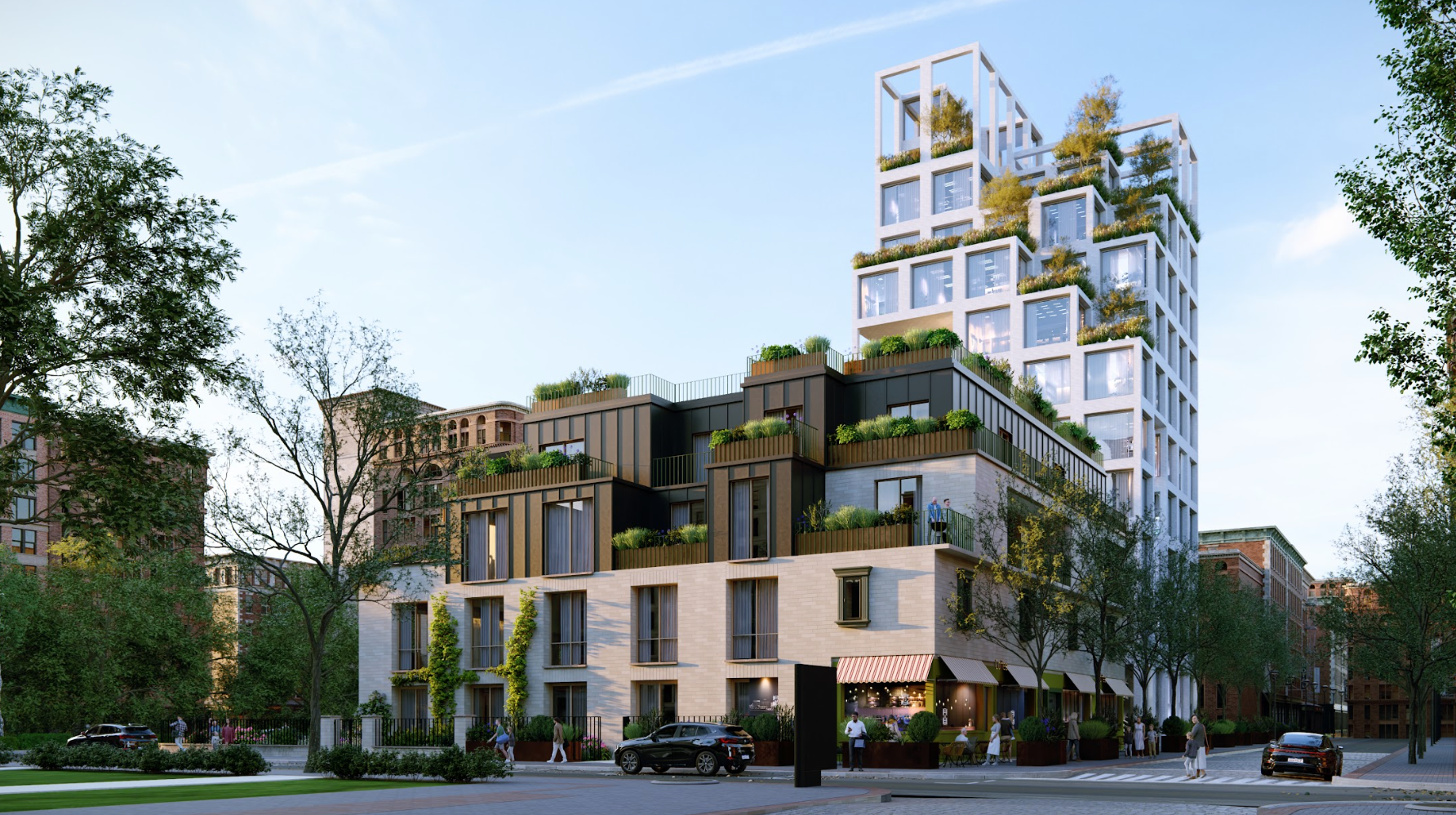
This version introduces a suite of highly anticipated features designed to elevate your architectural visualization workflows and creative flexibility.
Key additions include the all new***Pattern Editor***, which empowers you to design ***Material*** layouts with precise control over tile dimensions, bevels, and grout lines. We are also thrilled to finally enable the ***Raytracing Effect*** for ***Panorama Mode*,** enabling you to render immersive, photorealistic 360-degree experiences. Furthermore, ***Custom Styles*** integration streamlines the way you save and apply your favorite ***Effect Stacks*** across ***Projects***, while the speed-optimized **Delete Brush** makes large-scale scene cleanup faster than ever.
Beyond these new tools, this version delivers an extensive overhaul of the garden, ***Nature***, and ***Material Library*** assets, now updated with modern PBR definitions and expanded color customization, alongside substantial underlying stability and performance enhancements to keep your editing and rendering processes exceptionally smooth.
See below for the full list of changes.
**Compatibility**
- **Very Important:** Please note that ***Projects*** and models saved in version 2026.1 **cannot** be opened in older versions of *Lumion*.
- See this article on **how to get the new version**, and to see how to transfer settings, models, and ***Projects*** from older versions of *Lumion*:
- **Knowledge Base:** [Lumion 2026.0: Everything you need to know](https://support.lumion.com/knowledge-base/api/v2/help-center/en-us/articles/lumion-2026-everything-you-need-to-know?hsLang=en-us)
**Release Content**
- **Lumion Website**: [Lumion 2026.0 - See what's new](https://lumion.com/product/latest-version-pro)
- **Lumion Blog**: [Lumion Pro 2026.1 is now available](https://lumion.com/news/lumion-2026-1-release)
- **Release Video:** [Lumion Pro 2026.1 Update: Tools for faster workflows and sharper presentations](https://www.youtube.com/watch?v=W9u-Z_rnZm0)
### Menu:
| [1. New feature highlights](https://support.lumion.com/knowledge-base/api/v2/help-center/en-us/articles/lumion-2026.1-release-notes#H_1Newfeaturehighlights) [1.1: Pattern Editor](https://support.lumion.com/knowledge-base/api/v2/help-center/en-us/articles/lumion-2026.1-release-notes#PatternEditor) [1.2: Raytracing for 360 Panoramas](https://support.lumion.com/knowledge-base/api/v2/help-center/en-us/articles/lumion-2026.1-release-notes#RT360Pano) [1.3: Custom Templates](https://support.lumion.com/knowledge-base/api/v2/help-center/en-us/articles/lumion-2026.1-release-notes#CustomTemplates) [1.4: Multi Placement Collections](https://support.lumion.com/knowledge-base/api/v2/help-center/en-us/articles/lumion-2026.1-release-notes#MultiPlacement) [1.5: Custom Styles](https://support.lumion.com/knowledge-base/api/v2/help-center/en-us/articles/lumion-2026.1-release-notes#CustomStyles) [1.6: Delete Brush Mode](https://support.lumion.com/knowledge-base/api/v2/help-center/en-us/articles/lumion-2026.1-release-notes#DeleteBrush) [1.7: Custom Parallax Support](https://support.lumion.com/knowledge-base/api/v2/help-center/en-us/articles/lumion-2026.1-release-notes#CustomParallax) [1.8: Walkthrough Camera for Theatre Mode](https://support.lumion.com/knowledge-base/api/v2/help-center/en-us/articles/lumion-2026.1-release-notes#WalkthroughCamera) [1.9: Improved Update Screen](https://support.lumion.com/knowledge-base/api/v2/help-center/en-us/articles/lumion-2026.1-release-notes#UpdateScreen) [1.10: Revamped Models and Materials](https://support.lumion.com/knowledge-base/api/v2/help-center/en-us/articles/lumion-2026.1-release-notes#LibaryModels_Materials) | [2. Improvements](https://support.lumion.com/knowledge-base/api/v2/help-center/en-us/articles/lumion-2026.1-release-notes#H_2_Improvements) [3. Known Limitations](https://support.lumion.com/knowledge-base/api/v2/help-center/en-us/articles/lumion-2026.1-release-notes#H_3_KnownIssues) [4: Features that are still in development/on the Roadmap](https://support.lumion.com/knowledge-base/api/v2/help-center/en-us/articles/lumion-2026.1-release-notes#H_4_MinorUpdates) [5: Minor Updates](https://support.lumion.com/knowledge-base/api/v2/help-center/en-us/articles/lumion-2026.1-release-notes#MinorUpdates) |
| --- | --- |
### Lumion 2026.1 Release
#### 1. New feature highlights
#### 1.1. Pattern Editor
The new ***Pattern Editor*** lets you apply fully customizable tile layouts to ***Materials*** directly within Lumion. If, for example, a specific brick bond or wood flooring layout you need is missing from the ***Library***, you can easily build it yourself.
To get started, select a base ***Material*** to use as a source. In the advanced material settings, you will find a new category called***Pattern***. Enabling this feature unlocks the following options:
***Preset:*** Select from a variety of ***Patterns***, such as ***Common Bonds**, **Chevron, Basket Weave, Hexagon, Herringbone.***
***Tiling:*** Adjust the width of vertical and horizontal tiling, angle, rotation, offset, and scale.
***Variation:*** Adjust variation in color and positioning of the textures to get a random, natural pattern look.
***Bevel:*** Add a bevel effect and control how strong and visible the effect is.
***Grout:*** Change the color and width of the grout in the pattern.
**Note:** ***Landscape Tiling*** is automatically disabled when the ***Pattern Editor*** feature is active.
See the article below to learn more about the ***Pattern Editor**:*
- **Knowledge Base:** [How do yo use the Pattern Editor?](https://support.lumion.com/knowledge-base/how-do-you-use-the-pattern-editor?hsLang=en-us)
#### 1.2. Panorama Improvements
##### 1.2.1. Ray Tracing Support
2026.1 Showcase
*(Interactive panorama viewer powered by Pannellum 2.5.7)*
The ***Ray Tracing Effect*** is now officially available inside ***Panorama Mode**.* Because this requires a significant amount of VRAM to render at higher resolutions, enabling it comes with some limitations:
- The output is currently limited to a new ***Draft*** resolution (3072x1536 - ideal for graphics cards with less than 12GB of VRAM) and ***Medium*** (4096x2048). The ***Large*** resolution (8192x4096) is currently not available.
- ***Stereoscopic*** output and ***Cubic Projection*** are disabled.
Also, ***Panorama Mode*** with ***Ray Tracing*** utilizes completely separate rendering pipelines compared to the standard hybrid. This means that, when the***Effect*** is enabled, ***Objects*** or ***Materials*** not yet fully integrated into the ***Ray Tracing*** pipeline will be invisible in the real-time preview, ***HQ Preview***, and final outputs. This includes
- ***Animated Characters*, *Flags*, *Text Objects*, and *Decals*.**
- ***Effect*** ***Objects*** (fountains, fire, smoke, fog, leaves, etc.)
- ***Clipping Planes*,** ***Ocean*** and ***Water Planes*, *Waterfall Materials*, *3D Grass/Fur/Foliage Materials***, and ***Weathering*** settings.
**Note:** Since combining rasterized versions with ***Ray tracing*** inside ***Panoramas*** is not possible, the ***Fully ray-traced glass and water*** settings are permanently enabled.
The following output ***Effects*** are disabled as well:
- ***RT Volumetrics,******Volumetric Lights, Volume Clouds,* *Precipitation*, *Remove background*, *Material highlight*,** and ***Near clip plane***.
Learn more about ***Ray traced Panoramas*** in the article below:
- **Knowledge Base:** [How do you render using Ray Tracing for 360 Panoramas?](https://support.lumion.com/knowledge-base/api/v2/help_center/en-us/articles/9441974043932.json?hsLang=en-us)
##### 1.2.2. Lumion Cloud VR Support
***Panorama*** renders uploaded [Lumion Cloud](https://cloud.lumion.com/) can now be viewed immersively in with a VR Headset. It is also possible to create interactive tours where you can jump between 360 renders on your ***Projects***.
#### 1.3: Custom Templates
You can now build and save your own tailored environments as ***Templates*** using your own ***Project*** files. Under the ***Create new project*** section, you will find a new ***Custom*** tab. Simply click the **+** button to browse and import an .LSF scene file directly from your local hard drive, which will instantly generate a reusable ***Template*** entry inside the tab.
**Note:** The scene file must match your current license type (e.g., student ***Project*** files .LSFS can be added using a ***Student License Key***, but cannot be imported into a commercial ***Lumion Pro License***). Older version files will trigger a warning screen; simply open and re-save them in the current version of Lumion to resolve the issue.
Learn more below:
- **Knowledge Base:** [How do Custom Templates work in Lumion?](https://support.lumion.com/knowledge-base/how-to-save-and-load-custom-styles?hsLang=en-us)
#### 1.4: Saving & Loading Multi-Placement Collections

When distributing multiple ***Objects*** via any multi-placement method, including ***Line Placement*, *Cluster Placement*, *Paint Placement***, or ***Area Placement***, you can now save your ***Object Collection*** as an .lpc file.
This file can then be loaded into any multi-placement tool within that same category.
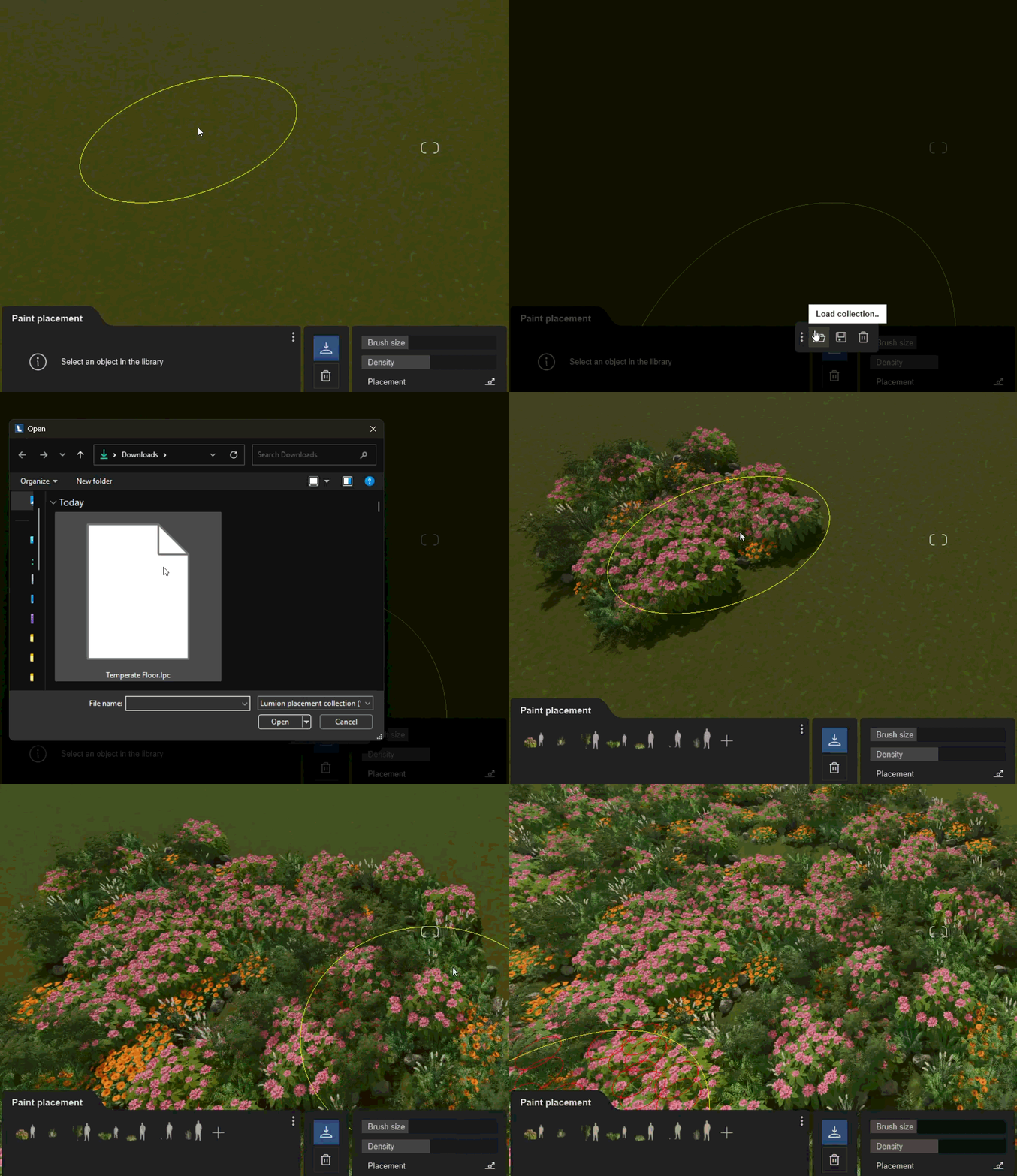
**Note:** To ensure cross-compatibility, these files are strictly category-specific. For example, a collection generated in the ***Nature*** category can only be loaded when the ***Nature*** asset tool is active, while a ***Transport*** collection requires the ***Transport*** library tool.
Here are some example ***Collections*** that you can **download for free** and use for quickly populating the landscape in your ***Projects***:
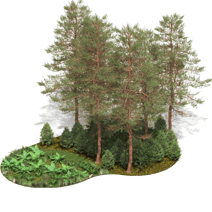 
**Boreal Forest Temperate Forest Tropical Jungle Dry Woodland**
[Canopy](https://support.lumion.com/hubfs/Technical%20Support/Nature%20Collections/Boreal.lpc?hsLang=en-us) [Canopy](https://support.lumion.com/hubfs/Technical%20Support/Nature%20Collections/Temperate.lpc?hsLang=en-us) [Canopy](https://support.lumion.com/hubfs/Technical%20Support/Nature%20Collections/Tropical.lpc?hsLang=en-us) [Canopy](https://support.lumion.com/hubfs/Technical%20Support/Nature%20Collections/Dry.lpc?hsLang=en-us)
[Groundcover](https://support.lumion.com/hubfs/Technical%20Support/Nature%20Collections/Boreal%20Floor.lpc?hsLang=en-us) [Groundcover](https://support.lumion.com/hubfs/Technical%20Support/Nature%20Collections/Temperate%20Floor.lpc?hsLang=en-us) [Groundcover](https://support.lumion.com/hubfs/Technical%20Support/Nature%20Collections/Tropical%20floor.lpc?hsLang=en-us) [Groundcover](https://support.lumion.com/hubfs/Technical%20Support/Nature%20Collections/Dry%20Floor.lpc?hsLang=en-us)
Learn more about ***Object Placement*** tools below
- **Knowledge Base: [Placing and Changing Objects](https://support.lumion.com/learning-pathways/api/v2/help-center/en-us/articles/placing-and-changing-objects?hs_preview=PIuWeJks-263034459373&hsLang=en-us)**
#### 1.5: Custom Styles
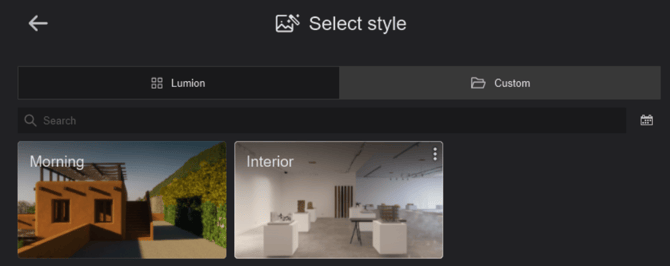
Reusing custom ***Effect*** configurations across projects is now much more intuitive. The 2026.1 release introduces ***Custom Styles***, allowing you to save your favorite effect stacks and access them directly from the ***Styles Gallery***.
- **Saving a Style:** Ensure you have at least one active effect applied. Click the **...** (three dots) icon or use the context menu in the effect list panel and select ***Save as custom style**.*This instantly adds the configuration to the ***Custom*** tab in the ***Styles Gallery***.
- **Loading a Style:** Open the ***Styles Gallery***, click the ***Custom Styles*** button, and select your saved profile on the right side.
**Note on Compatibility:** If a saved style contains an effect that is incompatible with your current mode (e.g., an ***Advanced Move*** ***Effect*** loaded while inside ***Photo Mode***), that specific effect will be automatically skipped and will not load. The interface now displays two full lines of the custom style name before truncating text.
Learn more about ***Custom Styles*** below:
- **Knowledge Base:**[Custom Styles in Lumion 2026](https://support.lumion.com/knowledge-base/custom-styles-in-lumion-2026?hsLang=en-us)
#### 1.6: Delete Brush Mode
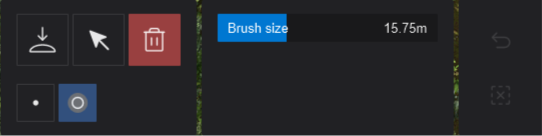
To optimize large-scale scene cleanup, you no longer need to click individual ***Object*** selection nodes to remove assets. Select the new ***Delete Brush*** tool in ***Build Mode*** to paint over multiple ***Objects*** and erase large quantities exponentially faster.
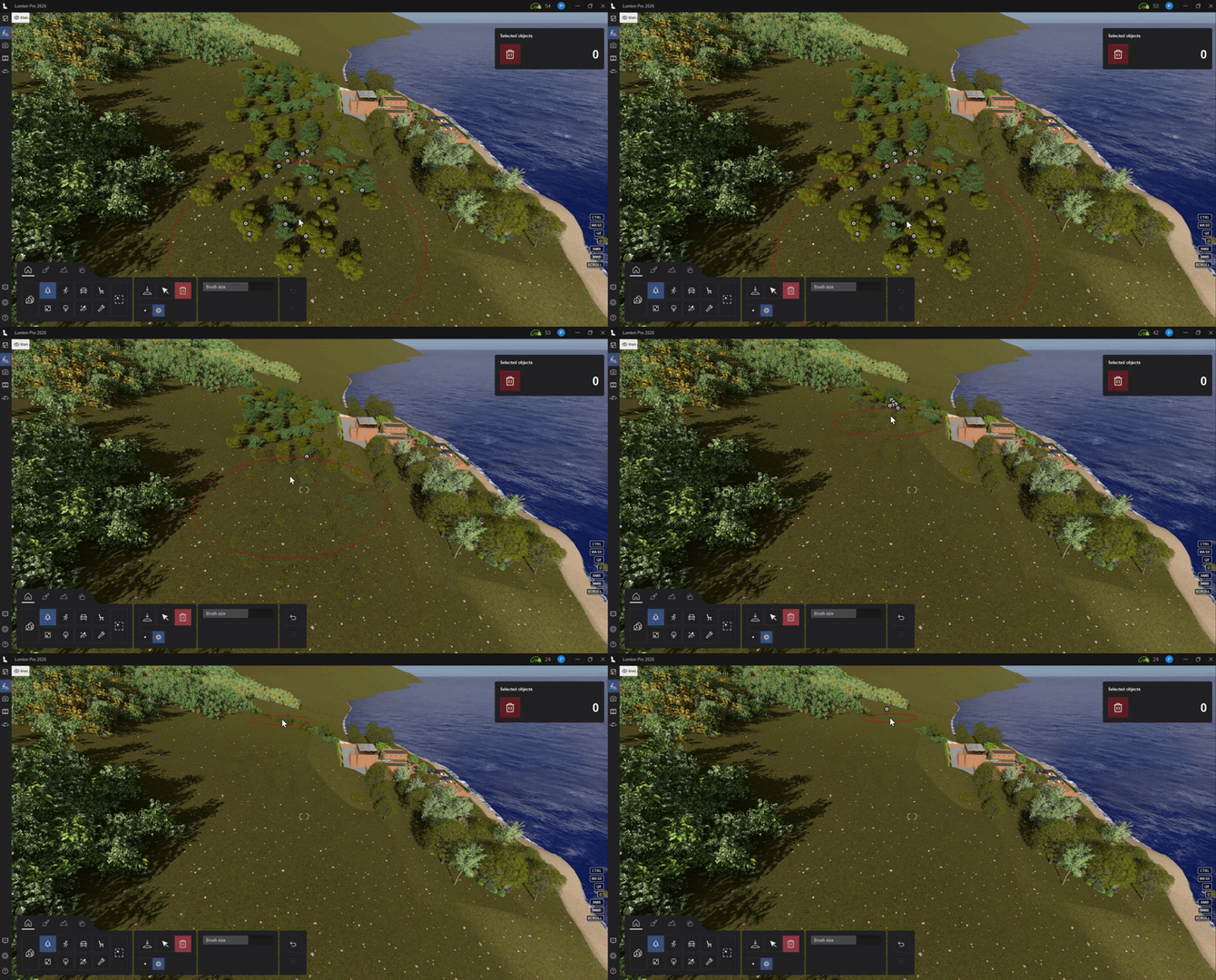
The ***Brush Size*** slider lets you increase or decrease the brush area of effect, making it easier to quickly clear larger sections of a scene while maintaining precise control.
#### 1.7: Custom Parallax .EXR Support
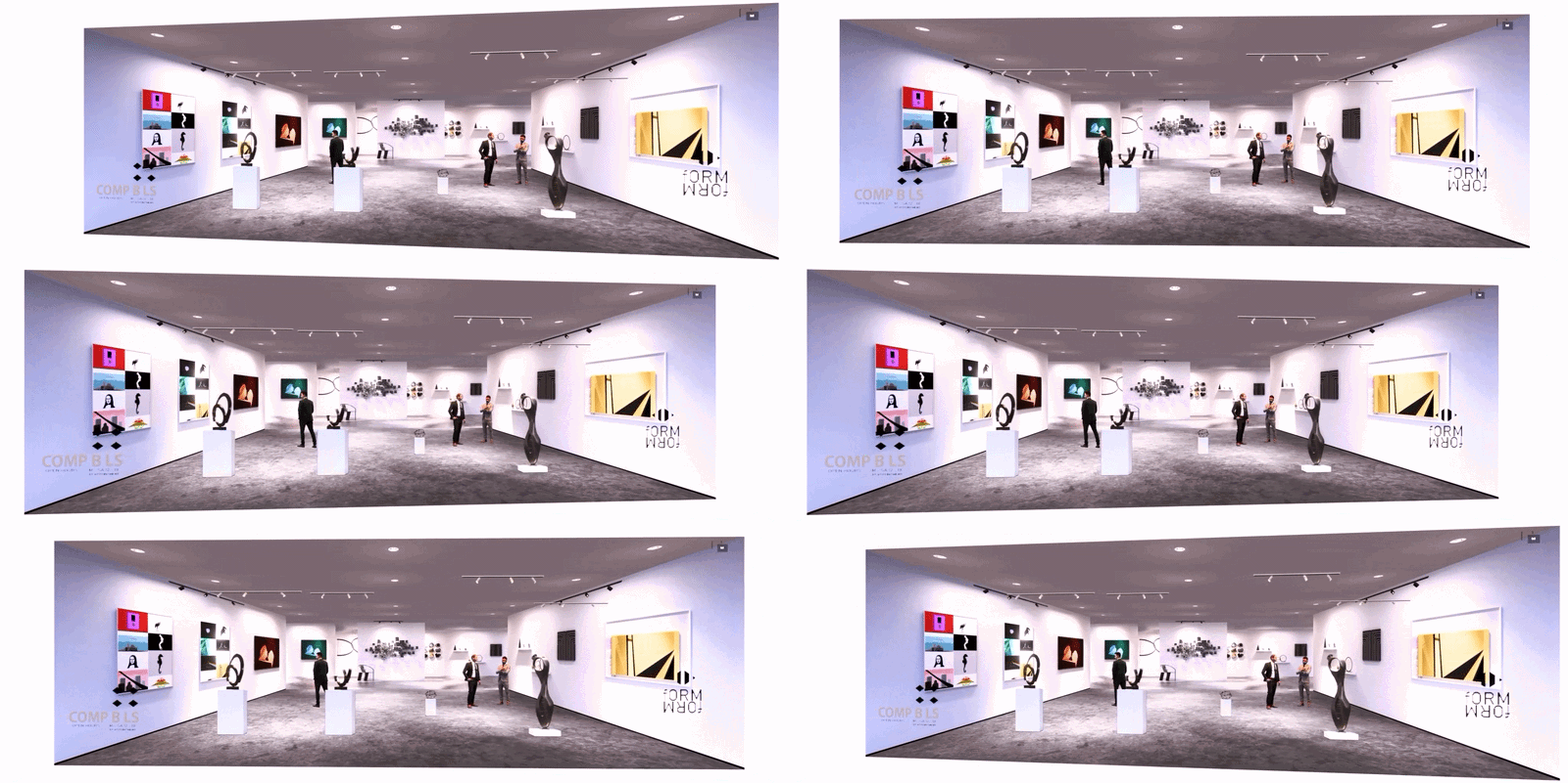
Users can now load compatible **.EXR** maps into Lumion's ***Parallax Interiors*** ***Effect Objects*** and save them to their ***Custom Library***. The article below covers everything you need to know on how to load and save these maps:
- **Knowledge Base:**[One-click 3d looking Rooms with Parallax Interiors](https://support.lumion.com/knowledge-base/api/v2/help_center/en-us/articles/9894493102748.json?hsLang=en-us)
#### 1.8: Walkthrough Camera for Theatre Mode
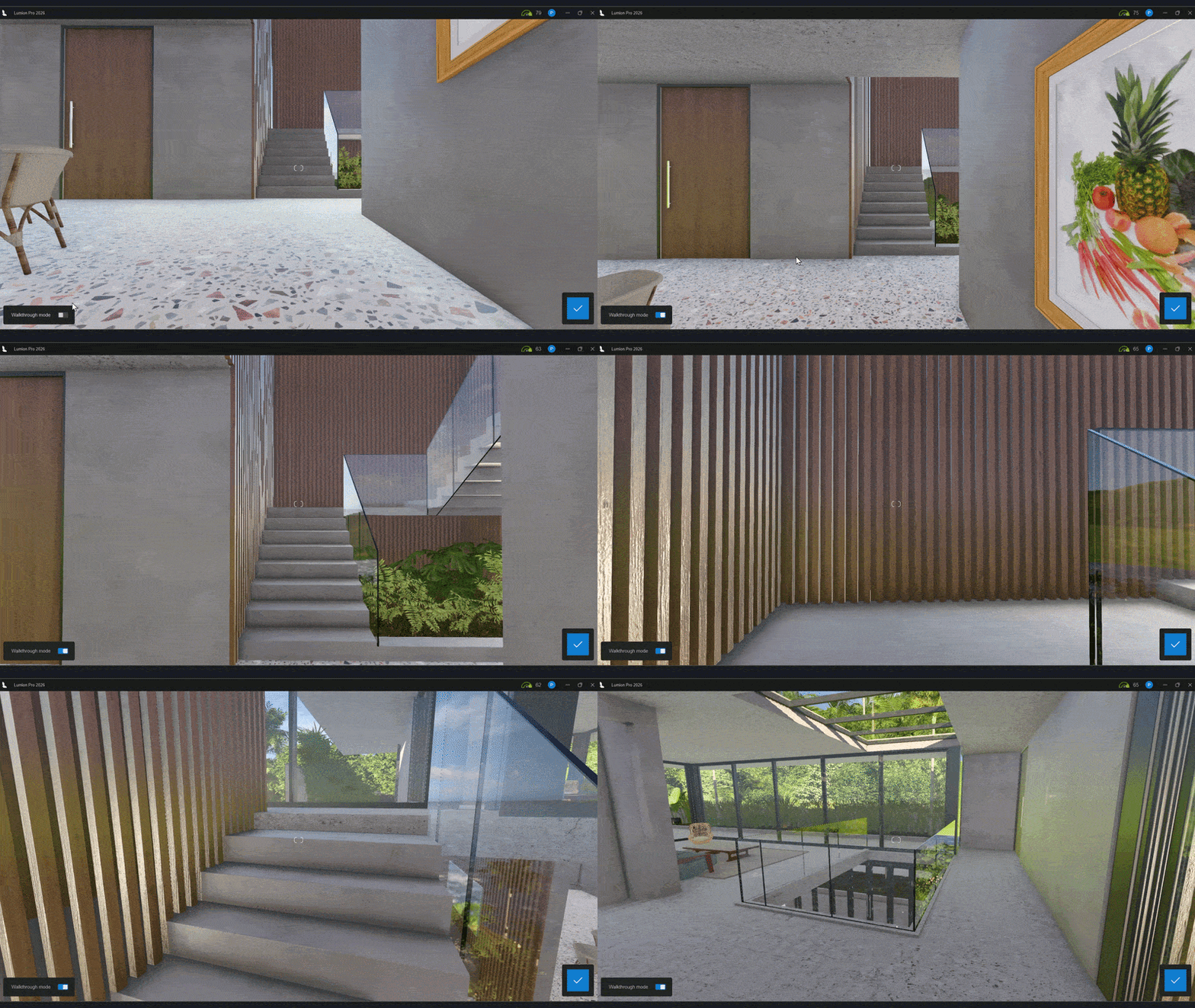
When viewing ***Projects*** in full-screen ***Theatre Mode*** (**F11**), you can now activate a realistic ***Walkthrough Mode*** toggle located at the bottom left of the user interface. When turned on, the camera stays locked at a standard human eye-level of 1.6 meters above the ground and dynamically moves at regular walking speed, automatically tracking changes in the underlying terrain or floor geometry surface.
This provides a more realistic, eye-level perspective way to review and present designs.
#### 1.9: Improved Update Screen
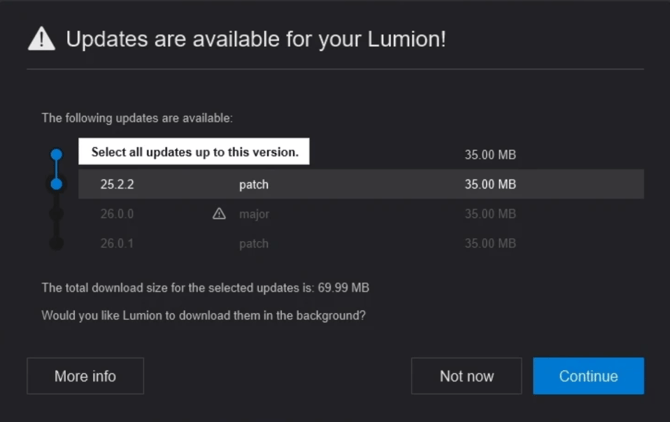
Gain better control over your software deployments. Starting with this version, whenever a new update is pushed to the server, the screen allows users to view and selectively choose the exact version build update they wish to download and install. This option becomes active once running version 2026.1 or higher, provided newer update files are available.
#### 1.10. Revamped Library Models and Materials

This release introduces an asset overhaul, modernizing older geometric ***Models*** with detailed PBR material definitions and adding color customizable parameters to optimize library footprint.
Total count of new ***Objects***:
| | ***Materials*** | ***Trees and Plants*** | ***Objects*** |
| --- | --- | --- | --- |
| ***New:*** | | 5 | 1 |
| ***Upgraded:*** | 40 | 40 | 95 |
7 individual ***Model*** color variations were removed because the primary base***Model*** is now completely color customizable via its object properties.
For a full list of new and upgraded ***Library*** models, see these articles:
- **Knowledge Base:** [Which content is available in the Model & Material Libraries in Lumion 2026?](https://support.lumion.com/knowledge-base/api/v2/help-center/en-us/articles/which-content-is-available-in-the-model-material-libraries-in-lumion-2026?hsLang=en-us)
About changes in model names and **important** changes for ***Legacy*** models:
- **Knowledge Base:** [What are the Library model Upgrades being done for Lumion 2026](https://support.lumion.com/knowledge-base/what-are-the-library-model-upgrades-being-done-for-lumion-2026?hsLang=en-us)
### 2. Improvements and Fixes
#### 2.1. Build Mode
- ***Performance Center:*** Opening the ***Performance Center*** panel will now automatically close overlapping windows behind it (such as ***Object*** properties panels). The panel is also restricted from opening while the ***OpenStreetMap*** coordinate picker is active to prevent UI overlap errors.
- ***Line Placement:*** Path nodes no longer lose focus or deselect after moving them directly or adjusting them with the transform ***Gizmo***.
- ***Line Placement + Groups:*** Fixed a severe performance bug where placing ***Group*** instances using ***Line Placement* c**aused the internal error log file to fill with "Error: Invalid mesh passed to RenderBakedModel" messages upon selecting a placed group.
- ***Line Placement:*** Fixed an issue where clicking the ***Clear all*** button failed to block active mouse cursor inputs from immediately starting an unintended new path layout.
- ***Mass Placement Modes:*** It is no longer possible to mistakenly delete an asset from the main ***Library*** while active inside any ***Mass Placement*** tool.
- ***Paint Placement:*** It is no longer possible to delete ***Nature Objects*** on hidden ***Layers***.
- ***Imported Model Thumbnails:*** Lumion will now automatically generate an updated thumbnail for the large preview of ***Imported Models***.
- ***Imported Textures:*** Fixed an issue that resulted in grayscale images being rendered red when uploaded to ***Custom Decals***, ***Flags***,the ***Image Overlay Effect***, ***Title Effect,*** and ***Photo Matching Effect***.
#### 2.2. Lumion Object Library
- ***Object Toggles:*** These no longer animate when changing ***Object*** selection.
- ***Smoke Object:*** Fixed an issue where custom dark smoke tones shifted into bright variations upon entering ***Photo Mode*** (e.g., selecting a dark red smoke color map turned bright red).
- ***Transport Objects:*** Fixed broken surface geometries present on ***Motorbike 007***.
- ***Characters:*** Corrected prop attachments and placement bugs on ***Man\_caucasian\_0007\_mobile, Woman\_caucasian\_0009\_magazine,* and *woman\_asian\_0002\_laptop*.**
- ***Seating Models:*** Resolved critical performance hits and frame drops caused by complex geometry processing on specific seats within the ***Objects** \> **Seating*** category, such as ***Bench 029***.
- ***Stylized Transport Models:*** Cleaned up the properties panel for stylized vehicles under ***Transport** \> **Stylized models*** by removing non-functional properties like ***Toggle driver*, *Lights*, and *Metallic paint***.
- ***Object Thumbnails:*** Restricted the creation of custom object thumbnails exclusively to the***Imported Models*** category.
#### 2.3. Material Mode
- ***Foliage and Ivy Materials:*** Color blending has been optimized so that applied ***Foliage*** and***Ivy***shaders naturally match the color cast of the underlying host geometry surface.
- ***3D Grass/Fur Materials:*** Fixed an issue that prevented users from changing or deleting the ***Texture*** or ***Normal Map*** of ***3D Grass/Fur Materials*** properly.
- ***Texture Mapping:*** Adjusted UI layouts so file names and resolution text no longer overlap if the preview panel size is reduced.
- ***Custom Materials:*** If no user-saved ***Custom Materials*** exist on the system, the tab automatically hides itself until a new profile is saved.
#### 2.4. Photo, Movie, and Panorama Mode
- ***Photo Sets:*** Fixed a UI issue where ***Photoset 10*** would hide completely if the immediate preceding slot *(**Photoset 9**)* was left empty.
- ***Reflection Effect:*** Lens flares generated by the ***Real Skies*** sun now accurately compute inside ***Planar Reflections*** via the ***Reflection Effect***.
- ***Reflection Effect:*** The ***Sky Light*** intensity now renders uniformly across all resolution scales inside ***Planar reflections***.
- ***Output Modes:*** Significantly optimized performance when shifting between adjacent items or switching across ***Photo, Movie**,* and ***Panorama Modes***.
- ***Movie Mode:*** Fixed an export scaling bug where rendering an ***Entire Movie*** using the ***Current frame*** selection at ***Print*** or ***Poster*** resolution incorrectly downscaled output to ***Desktop*** resolution.
- ***Movie Mode:*** The ***Landscape Cutter*** tool is now visible when recording a ***Clip*** or adding a camera ***Preset**.*
- ***Movie Mode:*** Rendering a ***Clip*** or ***Image Sequence*** at maximum quality will now use a higher resolution sky cube.
- ***Clip Editor:*** The viewport no longer resets to the first ***Keyframe*** after clicking on***Ease in/Ease***out or ***FX*** buttons.
- ***Clip Editor:*** Using the ***Update camera keyframe*** function now saves data accurately onto the currently targeted ***Keyframe*** index rather than the initially highlighted index.
- ***Photo Mode:*** Deleting a***Photo*** now resets its UI thumbnail tooltip name back to default (e.g., "**1- Photo**") instead of displaying the old edited name.
- ***Print/Poster Resolution Renders:*** Fixed pixelation artifacts occurring on high-resolution print outputs when combining the ***Sky Light*** and ***Real Skies Effects***.
- ***AI Upscaler:*** This feature is no longer in beta; the warning message was removed.
- ***Panorama Mode:*** Disabled auto-exposure when rendering with ***Stereoscopic*** enabled.
- ***Panorama Mode:*** The render screen now indicates how many ***Panoramas*** are currently being rendered.
- ***Analog Color Lab Effect:*** Removed the ***Vignette*** parameter to optimize compatibility for***Raytracing Panoramas*.**
- ***Lumion Cloud:*** Fixed the tooltip for the upload location that was becoming blank when it contained too many characters.
- ***Lumion Cloud:*** Fixed minor translation issues with Lumion Cloud.
- ***Lumion Cloud:*** The directory folder picker pop-up will also no longer unexpectedly trigger upon opening clean sessions. Minor localization translation anomalies were fixed.
- ***Lumion Cloud:*** Changed the thumbnail resolution for uploaded media to be square.
- ***Raytracing Effect:*** Fixed an issue that would cause memory (VRAM) spikes at the start of every ***Photo*** render when rendering a***Photo Set*** at 4K resolution.
- ***Raytracing Effect: Landscape*** or ***Imported Models*** with the ***Landscape Material*** no longer receive ambient occlusion when ***Raytracing*** is enabled.
- ***Raytracing Effect: Emissive*** light fixtures that have the *Show source* property disabled will no longer show their raw light shapes when the ***Raytracing Effect*** is enabled (they continue to exist correctly inside reflections).
- ***Raytracing Effect:*** Optimized raytraced high-resolution lines at ***Print/Poster*** resolution to prevent jagged edges or severe rendering artifacts.
- ***Raytracing Effect:*** Removed minor performance hiccups or preview micro-stutters when the editor camera stops moving or when pressing the U key to update reflection and cloud maps.
- ***Effects:*** Improved the precision when fine-tuning slider values while holding Shift.
- ***Lens Flare Effect:*** The real time/HQ previews matches the final render much closer.
- ***Camera Orbit:*** Fixed the camera that would not orbit around the point in the center of the viewport.
#### 2.5. Miscellaneous
- ***Tutorials:*** Restored full window manipulation, dragging, and taskbar actions (minimize, maximize, close) when working in windowed mode while the ***Welcome to Lumion*** or ***Tutorial*** pop-up prompts are active inside ***Build Mode***.
- ***Settings:*** The toggle for ***Error Log*** has been removed, it is now always turned on by default.
- ***Error Log:*** The time in the ***Error Log*** is now displayed as local and UTC.
- ***RAL Colors:*** Updated to RAL-to-RBG hex list.
- ***Example Scenes:*** Updated and fixed minor issues in the Farnsworth, High Rise, and House of time Example scenes.
### **3. Known Limitations**
For current limitations see the article below:
- **Knowledge Base:** [Transitions from prior versions to using Lumion 2025/2026: Technical Limitations](https://support.lumion.com/knowledge-base/api/v2/help_center/en-us/articles/19756688804636.json?hsLang=en-us)
### 4. . Features that are still in development/on the Roadmap:
The roadmap has been updated to show what we are currently working on:
- **Lumion website:** [Lumion Products Roadmap](https://lumion.com/product/roadmap)
### 5. Minor Updates
#### Lumion 2026.1.1 Update
**July 15, 2026**
##### **Fixes:**
- ***Project files***: Fixed a problem that could cause 4GB or larger ***Project*** files to become corrupted when loaded and saved in version 2026.1.
#### Lumion 2026.1.2 Update
**July 27, 2026**
##### **Fixes:**
- ***Importing Models:*** Fixed an issue that resulted in .DWG imports having missing elements/geometry.
- ***Imported Model Thumbnails:*** Fixed an issue that resulted in artifacts visible in***Imported Model*** **t**humbnails.
- ***Parallax Interiors:*** To accommodate larger rooms, the width slider range and snapping points of ***Parallax Interiors*** have been increased
from 1:1 - 3:1 to 1:1 - 9:1.
- ***Panoramas:*** It is now possible to assign ***Styles*** to ***Panoramas*.**
- ***Panoramas:*** All***Effects*** assigned to example scene ***Panoramas*** have been reset to behave like non-***Style Effects**,* which means they have a delete button instead of a***Restore to Style*** button.
- ***Panoramas:*** Fixed an issue that made***Water*** and ***Glass*** ***Materials*** disappear when rendering ***Panoramas*** with ***Ray tracing*** enabled.
- ***Panoramas:*** To avoid issues, ***Clip Plane Objects*** have been disabled when rendering***Panoramas*** with ***Ray tracing*** enabled.
- ***Orthographic view effect:*** Scrolling the***Effect* l**ist with the mouse scroll while ***Orthographic View*** is enabled no longer zooms in and out in the viewport.
- ***Motion Blur Effect:*** The ***Motion Blur Effect*** is now applied correctly to animated ***Objects*** when rendering ***Current Frame*** for the last frame of a ***Clip***.
- ***Styles:*** Fixed the empty***Style*** buttons.
- ***Additional Output Maps:*** ***Specular*** and ***Lighting Maps*** no longer appear white when rendered.
#### Lumion 2026.1.3 Update
**August 25, 2026**
##### **Changes:**
- ***Lumion Library:*** Removed the light sliders for all hot air balloon objects
- ***Lumion Library:*** It is now possible to change the lock state of ***Objects*** even if they are missing.
- ***Mass Placement:*** Fixed an issue that resulted in having the wrong selection of ***Objects*** when loading the same .LPC file in different versions of Lumion.
- ***Depth of Field Effect:*** Fixed an issue that resulted in pixelated edges for blurred elements in the foreground.
- ***Panoramas*:** Fixed an issue that could cause an error and prevent successful uploads when uploading 28 or more ***Panoramas*** to Lumion Cloud at once.
- ***Reflection Effect: Landscape*** elements(elevation, rock formations, textures, etc.) are now visible as expected in ***Planar Reflections***.
- ***Output***: It is not possible to leave an empty name for ***Photos***, ***Clips***, or ***Panoramas***.
- ***Lumion Cloud:*** Uploading a media with a name longer than 150 characters no longer results in an error
- ***Materials:*** It is now possible to generate a ***Displacement Map*** from the ***Normal Map*** by clicking the*Generate Displacement Map* button was added in the context menu when it is empty and there is a ***Normal Map*** present.
- ***Landscape***: The ***Landscape Cutter*** is no longer visible when ***Ray Tracing*** is enabled in ***Panorama Mode***.
- ***Real Skies Effect*:** Fixed an issue that resulted in new ***Projects*** having the wrong sky (with wrong settings) after adding the ***Ray tracing Effect*** to a ***Photo***.
- ***Project Files:*** Hovering the mouse on the ***Save/Save as*** no longer increases the memory usage which would decrease Lumion’s performance.
- ***Project Files:*** Fixed an issue that made saving ***Project*** files to require more system memory than they should during the saving process, which could cause Lumion to crash.
- ***Custom Fonts*:** The custom font cache in %appdata%\\Quest3D\\ is now properly cleared, and should no longer cause Lumion to create on rare occasions 4GB cache files.
- ***Custom Fonts*:** Both the ***Text Object*** and the ***Titles Effect*** no longer allow the user to select a font that doesn't work.
- ***Templates*:** Opening the *Times of day* template no longer triggers the *Couldn’t install specified font* error.
- ***Miscellaneous***: Fixed several issues with expired ***License Keys*** and added a warning message in the ***Error Log*** for them.
#### Lumion 2026.1.4 Update
**August 26, 2026**
##### **Changes:**
- ***Utility Objects:*** Fixed an issue that resulted in *Utilty Objects* being unusable.
- ***Advanced Move:*** Fixed an issue that caused *Objects'* position to reset in a *Clip* when moving the *Object* in *Build Mode*.
#### Lumion 2026.1.5 Update
**September 9, 2026**
##### **Changes:**
- ***Water Planes:*** Included in the ray tracing pipeline
- ***Water Planes:*** Fixed an issue where underwater rendering was not viewed correctly
- ***Water Planes:*** Added surface picking so water planes can be selected by clicking their surface rather than just the center node
- ***Water Planes:*** Replaced the "height" control with the standard XYZ move gizmo for more intuitive positioning
- ***Water Planes:*** Fixed a bug where water planes wouldn't move from the center node after switching categories in Landscape mode.
- ***Water Planes:*** Resolved an issue where surface picking wouldn't work the first time entering the water tab until the camera was moved.
- ***Ground Snapping Fixes:*** Updated a vast range of library objects (including electronics, kitchenware, and furniture) to correctly snap to the ground when auto-snap is enabled, preventing them from "hanging" in the air.
- ***Line Placement Corrections:*** Fixed a vertical offset bug where imported models would move above the ground when changing the item count with "place on ground" enabled.
- ***Line Placement Corrections:*** Resolved an issue where items would reset to the scene origin (0,0,0) when changing the number of items without a defined path.
- ***Improved Multi-select:*** Refined the Ctrl + Shift drag selection to be less "sticky," making it behave more like standard Windows file selection.
- ***LiveSync & Reimport:*** Reimporting a model now automatically closes any active LiveSync connection to ensure the scene state remains consistent.
- ***Tutorial Alignment:*** Fixed UI misalignment issues in interactive tutorials where the highlighted sections did not match the task instructions.
- [Visit our other Sections](https://support.lumion.com/knowledge-base/visit-our-other-sections?hsLang=en-us)
- [Contact Us](https://support.lumion.com/knowledge-base/contact-us?hsLang=en-us)
- [Lumion Account](https://support.lumion.com/knowledge-base/lumion-account?hsLang=en-us)
- [Latest News](https://support.lumion.com/knowledge-base/latest-news?hsLang=en-us#main-content)
- [Major Known Issues](https://support.lumion.com/knowledge-base/latest-news?hsLang=en-us#major-known-issues)
- [Lumion 2025: Major Version Release Details](https://support.lumion.com/knowledge-base/latest-news?hsLang=en-us#lumion-2025-major-version-release-details)
- [Lumion 2024: Major Version Release Details](https://support.lumion.com/knowledge-base/latest-news?hsLang=en-us#lumion-2024-major-version-release-details)
- [Lumion 2023: Major Version Release Details](https://support.lumion.com/knowledge-base/latest-news?hsLang=en-us#lumion-2023-major-version-release-details)
- [Lumion 2023: Update Release Notes](https://support.lumion.com/knowledge-base/latest-news?hsLang=en-us#lumion-2023-update-release-notes)
- [Lumion 12](https://support.lumion.com/knowledge-base/latest-news?hsLang=en-us#lumion-12)
- [Lumion 11](https://support.lumion.com/knowledge-base/latest-news?hsLang=en-us#lumion-11)
- [Lumion 10](https://support.lumion.com/knowledge-base/latest-news?hsLang=en-us#lumion-10)
- [Sales Questions](https://support.lumion.com/knowledge-base/sales-questions?hsLang=en-us)
- [Subscriptions](https://support.lumion.com/knowledge-base/subscriptions?hsLang=en-us)
- [New User Questions](https://support.lumion.com/knowledge-base/new-user-questions?hsLang=en-us)
- [Learning Resources](https://support.lumion.com/knowledge-base/learning-resources?hsLang=en-us)
- [System Requirements Questions](https://support.lumion.com/knowledge-base/system-requirements-questions?hsLang=en-us#main-content)
- [Determining the 'Complexity' of your Projects](https://support.lumion.com/knowledge-base/system-requirements-questions?hsLang=en-us#determining-the-complexity-of-your-projects)
- [System Messages from Lumion](https://support.lumion.com/knowledge-base/system-requirements-questions?hsLang=en-us#system-messages-from-lumion)
- [Requirements for Prior Versions](https://support.lumion.com/knowledge-base/system-requirements-questions?hsLang=en-us#requirements-for-prior-versions)
- [Download & Installation Questions](https://support.lumion.com/knowledge-base/download-installation-questions?hsLang=en-us#main-content)
- [Download/Installation: General Questions](https://support.lumion.com/knowledge-base/download-installation-questions?hsLang=en-us#download-installation-general-questions)
- [Download Questions](https://support.lumion.com/knowledge-base/download-installation-questions?hsLang=en-us#download-questions)
- [Installation Questions](https://support.lumion.com/knowledge-base/download-installation-questions?hsLang=en-us#installation-questions)
- [Lumion Pro Updater](https://support.lumion.com/knowledge-base/download-installation-questions?hsLang=en-us#lumion-pro-updater)
- [Plugins to CAD software](https://support.lumion.com/knowledge-base/download-installation-questions?hsLang=en-us#plugins-to-cad-software)
- [License and General Product Questions](https://support.lumion.com/knowledge-base/license-and-general-product-questions?hsLang=en-us#main-content)
- [License System Messages from Lumion](https://support.lumion.com/knowledge-base/license-and-general-product-questions?hsLang=en-us#license-system-messages-from-lumion)
- [Import & Export Questions](https://support.lumion.com/knowledge-base/import-export-questions?hsLang=en-us#main-content)
- [Model Import Guidelines](https://support.lumion.com/knowledge-base/import-export-questions?hsLang=en-us#model-import-guidelines)
- [Lumion LiveSync and import plugins](https://support.lumion.com/knowledge-base/import-export-questions?hsLang=en-us#lumion-livesync-and-import-plugins)
- [System Messages from Lumion when importing](https://support.lumion.com/knowledge-base/import-export-questions?hsLang=en-us#system-messages-from-lumion-when-importing)
- [General Questions](https://support.lumion.com/knowledge-base/general-questions?hsLang=en-us#main-content)
- [Keyboard Shortcuts in Lumion](https://support.lumion.com/knowledge-base/general-questions?hsLang=en-us#keyboard-shortcuts-in-lumion)
- [Upgrading and Updating your Lumion Version](https://support.lumion.com/knowledge-base/general-questions?hsLang=en-us#upgrading-and-updating-your-lumion-version)
- [Using Lumion 2023](https://support.lumion.com/knowledge-base/general-questions?hsLang=en-us#using-lumion-2023)
- [System Messages from Lumion](https://support.lumion.com/knowledge-base/general-questions?hsLang=en-us#system-messages-from-lumion)
- [Build Mode Questions](https://support.lumion.com/knowledge-base/build-mode-questions?hsLang=en-us#main-content)
- [Landscape and Terrains](https://support.lumion.com/knowledge-base/build-mode-questions?hsLang=en-us#landscape-and-terrains)
- [OpenStreetMap](https://support.lumion.com/knowledge-base/build-mode-questions?hsLang=en-us#openstreetmap)
- [Lighting: Sun and Artificial Lights](https://support.lumion.com/knowledge-base/build-mode-questions?hsLang=en-us#lighting-sun-and-artificial-lights)
- [Questions mainly for older versions than Lumion 12](https://support.lumion.com/knowledge-base/build-mode-questions?hsLang=en-us#questions-mainly-for-older-versions-than-lumion-12)
- [Library Content](https://support.lumion.com/knowledge-base/library-content?hsLang=en-us#main-content)
- [Library Content in Lumion 2026](https://support.lumion.com/knowledge-base/library-content?hsLang=en-us#library-content-in-lumion-2026)
- [Library Content in Lumion 2025](https://support.lumion.com/knowledge-base/library-content?hsLang=en-us#library-content-in-lumion-2025)
- [Library Content in Lumion 2024](https://support.lumion.com/knowledge-base/library-content?hsLang=en-us#library-content-in-lumion-2024)
- [Library Content in Lumion 2023](https://support.lumion.com/knowledge-base/library-content?hsLang=en-us#library-content-in-lumion-2023)
- [Library Content in Lumion 12](https://support.lumion.com/knowledge-base/library-content?hsLang=en-us#library-content-in-lumion-12)
- [Movie & Photo Mode Questions](https://support.lumion.com/knowledge-base/movie-photo-mode-questions?hsLang=en-us#main-content)
- [Photo Mode](https://support.lumion.com/knowledge-base/movie-photo-mode-questions?hsLang=en-us#photo-mode)
- [Movie Mode](https://support.lumion.com/knowledge-base/movie-photo-mode-questions?hsLang=en-us#movie-mode)
- [Animation in Movie Mode](https://support.lumion.com/knowledge-base/movie-photo-mode-questions?hsLang=en-us#animation-in-movie-mode)
- [Effects in Photo or Movie Mode](https://support.lumion.com/knowledge-base/movie-photo-mode-questions?hsLang=en-us#effects-in-photo-or-movie-mode)
- [Reflections](https://support.lumion.com/knowledge-base/movie-photo-mode-questions?hsLang=en-us#reflections)
- [Material Questions](https://support.lumion.com/knowledge-base/material-questions?hsLang=en-us#main-content)
- [Materials in versions 12 and earlier](https://support.lumion.com/knowledge-base/material-questions?hsLang=en-us#materials-in-versions-12-and-earlier)
- [Using LiveSync for Revit and a Section Box](https://support.lumion.com/knowledge-base/material-questions?hsLang=en-us#using-livesync-for-revit-and-a-section-box)
- [Rendering Questions](https://support.lumion.com/knowledge-base/rendering-questions?hsLang=en-us#main-content)
- [General Rendering Questions](https://support.lumion.com/knowledge-base/rendering-questions?hsLang=en-us#general-rendering-questions)
- [Rendering of Photos](https://support.lumion.com/knowledge-base/rendering-questions?hsLang=en-us#rendering-of-photos)
- [Rendering of Clips and Movies](https://support.lumion.com/knowledge-base/rendering-questions?hsLang=en-us#rendering-of-clips-and-movies)
- [Tips to getting the best renders](https://support.lumion.com/knowledge-base/rendering-questions?hsLang=en-us#tips-to-getting-the-best-renders)
- [Rendering Performance](https://support.lumion.com/knowledge-base/rendering-questions?hsLang=en-us#rendering-performance)
- [Technical Issues when Rendering](https://support.lumion.com/knowledge-base/rendering-questions?hsLang=en-us#technical-issues-when-rendering)
- [Panorama Mode Questions](https://support.lumion.com/knowledge-base/panorama-mode-questions?hsLang=en-us#main-content)
- [Technical questions when rendering with Panorama Mode](https://support.lumion.com/knowledge-base/panorama-mode-questions?hsLang=en-us#technical-questions-when-rendering-with-panorama-mode)
- [File & BackUp Questions](https://support.lumion.com/knowledge-base/file-backup-questions?hsLang=en-us#main-content)
- [Saving and Backup](https://support.lumion.com/knowledge-base/file-backup-questions?hsLang=en-us#saving-and-backup)
- [File Saving Issues](https://support.lumion.com/knowledge-base/file-backup-questions?hsLang=en-us#file-saving-issues)
- [Lumion-Documents](https://support.lumion.com/knowledge-base/file-backup-questions?hsLang=en-us#lumion-documents)
- [Transfer, Move or Migrate Files](https://support.lumion.com/knowledge-base/file-backup-questions?hsLang=en-us#transfer-move-or-migrate-files)
- [Troubleshooting](https://support.lumion.com/knowledge-base/troubleshooting?hsLang=en-us#main-content)
- [Reports about your PC](https://support.lumion.com/knowledge-base/troubleshooting?hsLang=en-us#reports-about-your-pc)
- [Photo and Movie Mode Issues](https://support.lumion.com/knowledge-base/troubleshooting?hsLang=en-us#photo-and-movie-mode-issues)
- [Rendering Issues](https://support.lumion.com/knowledge-base/troubleshooting?hsLang=en-us#rendering-issues)
- [Error Messages from Lumion](https://support.lumion.com/knowledge-base/troubleshooting?hsLang=en-us#error-messages-from-lumion)
- [Hardware related Issues](https://support.lumion.com/knowledge-base/troubleshooting?hsLang=en-us#hardware-related-issues)
- [Other Troubleshooting Issues](https://support.lumion.com/knowledge-base/troubleshooting?hsLang=en-us#other-troubleshooting-issues)
- [Article Developments](https://support.lumion.com/knowledge-base/article-developments?hsLang=en-us#main-content)
- [Devs - Multi‑Image Button Viewer](https://support.lumion.com/knowledge-base/article-developments?hsLang=en-us#devs-multi-image-button-viewer)
[](https://lumion.com/)
[mailto:email@email.com](mailto:email@email.com)
Copyright © 2026, Lumion - Act3D B.V.
#### Product
[Plans and pricing](https://lumion.com/product/buy)
[Discover Lumion](https://lumion.com/product/discover-lumion)
[Compatibility](https://lumion.com/compatibility/)
[System Requirements](https://lumion.com/product/system-requirements)
[Find a reseller](https://lumion.com/about/find-reseller)
[Free trial](https://lumion.com/product/free-trial)
#### Solutions
[Architectural design](https://lumion.com/product/architectural-design)
[Interior design](https://lumion.com/product/interior-design)
[Landscape architecture](https://lumion.com/product/landscape-architecture)
[Urban planning](https://lumion.com/product/urban-planning)
[3D rendering](https://lumion.com/product/3d-rendering-software)
[Education](https://lumion.com/product/educational-licenses)
#### Compatibility
[Trimble SketchUp](https://lumion.com/compatibility/sketchup-rendering)
[Autodesk Revit](https://lumion.com/compatibility/revit-rendering)
[Graphisoft ArchiCAD](https://lumion.com/compatibility/archicad-rendering)
[Rhinoceros](https://lumion.com/compatibility/rhino-rendering)
[Autodesk Autocad](https://lumion.com/compatibility/autocad-rendering)
[Autodesk FormIt Pro](https://lumion.com/compatibility/lumion-for-autodesk-formit-pro)
[Nemetschek Allplan](https://lumion.com/compatibility/allplan-rendering)
[Nemetschek Vectorworks](https://lumion.com/compatibility/vectorworks-rendering)
[BricsCAD](https://lumion.com/compatibility/bricscad-rendering)
[3D Studio Max](https://lumion.com/compatibility/3ds-max-rendering)
#### Resources
[Made with Lumion](https://lumion.com/made-with-lumion)
[Tutorials](https://support.lumion.com/video-tutorials?hsLang=en-us)
[Support and learning](https://support.lumion.com/knowledge-base/api/v2/help_center/en-us/articles/360044608053.json?hsLang=en-us)
[Downloads](https://support.lumion.com/downloads?hsLang=en-us)
[Community](https://community.lumion.com/index.php)
#### About
[Our Story](https://lumion.com/about)
[We're hiring!](https://lumion.com/about/careers)
[News](https://lumion.com/news)
[Contact us](https://lumion.com/about/contact)
[Terms & conditions](https://lumion.com/legal/terms-of-service) [EULA](https://lumion.com/legal/eula) [Privacy statement](https://lumion.com/legal/privacy-statement) [CEIP](https://lumion.com/legal/ceip) [Disclaimer](https://lumion.com/legal/disclaimer) © 2026 Lumion
```json
{
"@context" : "https://schema.org",
"@type" : "VideoObject",
"contentUrl" : "https://25757866.fs1.hubspotusercontent-eu1.net/hubfs/25757866/video_assets/436002857177/inherited/web_optimized.mp4",
"dateModified" : "2026-07-14T05:49:48.405Z",
"duration" : "PT13S",
"height" : 1142,
"name" : "Pattern (3)",
"thumbnailUrl" : "https://25757866.fs1.hubspotusercontent-eu1.net/hubfs/25757866/Pattern%20(3).mp4/medium.jpg",
"uploadDate" : "2026-07-14T05:45:06.971Z",
"width" : 1928
}
```
```json
{
"@context" : "https://schema.org",
"@type" : "VideoObject",
"contentUrl" : "https://25757866.fs1.hubspotusercontent-eu1.net/hubfs/25757866/video_assets/435799739592/inherited/web_optimized.mp4",
"dateModified" : "2026-07-13T10:29:48.926Z",
"duration" : "PT5S",
"height" : 782,
"name" : "CustomTemplates",
"thumbnailUrl" : "https://25757866.fs1.hubspotusercontent-eu1.net/hubfs/25757866/CustomTemplates.mp4/medium.jpg",
"uploadDate" : "2026-07-13T10:23:16.985Z",
"width" : 1104
}
```
```json
{
"@context" : "https://schema.org",
"@type" : "VideoObject",
"contentUrl" : "https://25757866.fs1.hubspotusercontent-eu1.net/hubfs/25757866/video_assets/436002529509/inherited/web_optimized.mp4",
"dateModified" : "2026-07-14T03:19:02.567Z",
"duration" : "PT9S",
"height" : 1080,
"name" : "CS",
"thumbnailUrl" : "https://25757866.fs1.hubspotusercontent-eu1.net/hubfs/25757866/CS.mp4/medium.jpg",
"uploadDate" : "2026-07-14T03:18:52.248Z",
"width" : 1920
}
```