---
title: Introduction to Ray Trace rendering in Lumion
description: An Introduction to Ray Trace rendering in Lumion
---
Solutions
[Architectural design All you need to bring your residential, commercial or institutional designs to life](https://lumion.com/product/architectural-design) [Landscape architecture Beautiful terrains and fine-detailed nature for any climate or season](https://lumion.com/product/landscape-architecture)
[Interior design Realistic light, high-quality textures, and an extensive asset library](https://lumion.com/product/interior-design) [Students and Faculties Lumion is free for students, educators, and faculties around the world](https://lumion.com/product/educational-licenses)
[SketchUp](https://lumion.com/compatibility/sketchup-rendering) [Revit](https://lumion.com/compatibility/revit-rendering) [ArchiCAD](https://lumion.com/compatibility/archicad-rendering) [Rhino](https://lumion.com/compatibility/rhino-rendering) [Autocad](https://lumion.com/compatibility/autocad-rendering) [See more](https://lumion.com/compatibility/)
Product
[Discover Axogram New Live architectural diagramming](https://lumion.com/product/axogram) [Lumion Cloud Where design meets collaboration](https://lumion.com/product/lumion-cloud)
[Lumion Pro Advanced visualization solution](https://lumion.com/product/lumion-pro) [Discover AI tools New AI built for architectural work](https://lumion.com/product/ai)
[Lumion Pro 2026.1 is out now! 🚀](https://lumion.com/product/latest-version-pro) [Compatibility](https://lumion.com/compatibility/) [System Requirements](https://lumion.com/product/system-requirements) [Roadmap](https://lumion.com/product/roadmap)
[Pricing](https://lumion.com/product/buy) Resources
[Made with Lumion Get inspired by the stories behind the designs](https://lumion.com/made-with-lumion)
[Tips & Guides Make the most out of Lumion with helpful guides and tutorials](https://lumion.com/tips-guides)
[Knowledge base](https://support.lumion.com/knowledge-base?hsLang=en-us) [Community](https://community.lumion.com/index.php) [Downloads](https://support.lumion.com/downloads?hsLang=en-us)
About
[Who we are Learn about our story and mission](https://lumion.com/about) [Careers - We're hiring Let's build the future of architectural visualization](https://lumion.com/about/careers)
[News Discover the latest product news and more](https://lumion.com/news)
[Find your local reseller](https://lumion.com/about/find-reseller) [Contact us](https://lumion.com/about/contact)
[](http://lumion.com)
[My Account](https://account.lumion.com)
Solutions
[Architectural design](https://lumion.com/product/architectural-design) [Interior design](https://lumion.com/product/interior-design) [Landscape architecture](https://lumion.com/product/landscape-architecture) [Students and Faculties](https://lumion.com/product/educational-licenses)
---
[SketchUp](https://lumion.com/compatibility/sketchup-rendering) [Revit](https://lumion.com/compatibility/revit-rendering) [ArchiCAD](https://lumion.com/compatibility/archicad-rendering) [Rhino](https://lumion.com/compatibility/rhino-rendering) [Autocad](https://lumion.com/compatibility/autocad-rendering) [See more](https://lumion.com/compatibility/)
Product
[Axogram New](https://lumion.com/product/axogram) [Lumion Cloud](https://lumion.com/product/lumion-cloud) [Lumion Pro](https://lumion.com/product/lumion-pro) [Discover AI tools New](https://lumion.com/product/ai)
---
[Lumion Pro 2026.1 is out now! 🚀](https://lumion.com/product/latest-version-pro) [Compatibility](https://lumion.com/compatibility/) [System Requirements](https://lumion.com/product/system-requirements) [Roadmap](https://lumion.com/product/roadmap)
[Pricing](https://lumion.com/product/buy) Resources
[Made with Lumion](https://lumion.com/made-with-lumion) [Tips & Guides](https://lumion.com/tips-guides)
---
[Knowledge base](https://support.lumion.com/knowledge-base?hsLang=en-us) [Community](https://community.lumion.com/index.php) [Downloads](https://support.lumion.com/downloads?hsLang=en-us)
About
[Who we are](https://lumion.com/about) [Careers - We're hiring](https://lumion.com/about/careers) [News](https://lumion.com/news)
---
[Find your local reseller](https://lumion.com/about/find-reseller) [Contact us](https://lumion.com/about/contact)
[My Account](https://account.lumion.com)
[Submit a request](https://support.lumion.com/hc/en-us/requests/new?hsLang=en-us)
Lumion Knowledge Base
How can we help?
- There are no suggestions because the search field is empty.
[Skip to content](https://support.lumion.com/knowledge-base/introduction-to-ray-trace-rendering-in-lumion#main-content)
English - United States
Show submenu for translations

Open main navigation
Close main navigation
- English - United States
Show submenu for translations
- Contact us
Contact us
How can we help you?
- There are no suggestions because the search field is empty.
1. [Knowledge Base](https://support.lumion.com/knowledge-base?hsLang=en-us)
2. [Rendering Questions](https://support.lumion.com/knowledge-base/rendering-questions?hsLang=en-us)
# Introduction to Ray Trace rendering in Lumion
## This rendering option provides physically accurate rendering of light and it's interaction with materials.
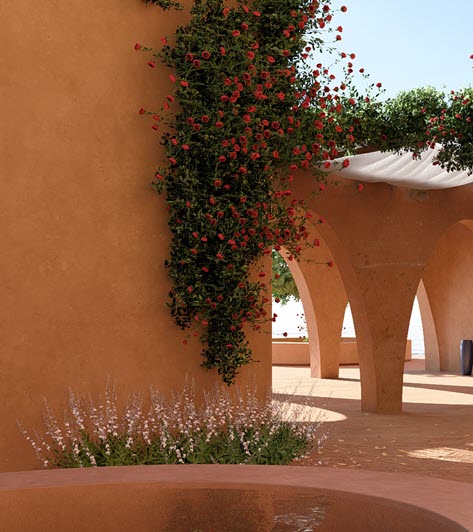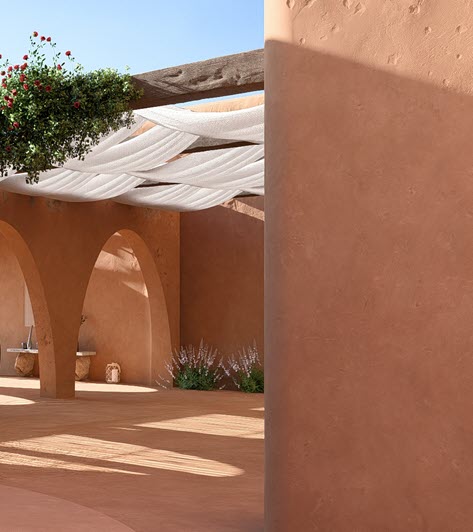
[1. Rendering in Lumion Pro](https://support.lumion.com/knowledge-base/introduction-to-ray-trace-rendering-in-lumion#H_1_RenderinginLumionPro).
[2. What Ray Tracing Improves Most](https://support.lumion.com/knowledge-base/introduction-to-ray-trace-rendering-in-lumion#H_2_WhatRayTracingImprovesMost).
[3. A few example renders using the Lumion Example Projects.](https://support.lumion.com/knowledge-base/introduction-to-ray-trace-rendering-in-lumion#H_3_AfewexamplerendersusingtheLumionExample)
[4. What Ray Tracing means in Lumion](https://support.lumion.com/knowledge-base/introduction-to-ray-trace-rendering-in-lumion#H_4.WhatRayTracingmeansinLumion).
[5. What Ray Tracing Actually Does in Lumion](https://support.lumion.com/knowledge-base/introduction-to-ray-trace-rendering-in-lumion#H_5_WhatRayTracingActuallyDoesinLumion).
[6. How do you enable Ray Tracing in Lumion Pro](https://support.lumion.com/knowledge-base/introduction-to-ray-trace-rendering-in-lumion#H_HowdoyouenableRayTracinginLumionPro).
[7. About Ray Tracing](https://support.lumion.com/knowledge-base/introduction-to-ray-trace-rendering-in-lumion#H_AboutRayTracing).
### 1. Rendering in Lumion Pro:
Lumion Pro provides you with two main rendering methods:
- ***Rasterization***: the traditional, super-fast approach, capable of photo like-realistic quality renders, but requires special effects and time to master.
- ***Ray Tracing***: for highest photo-realistic renders based on physically accurate ***Ray Tracing*** of light paths and interaction with materials.
You can use ***Ray Tracing*** for renders of interior ***Scenes*** or exterior ***Scenes***. For ***Photos*** (still image). ***Movie*** animations and currently (March 2026) to a limited extent - ***360 Panoramas***.
The level of quality you can achieve depends on:
- The Scene itself, its content.
- The lighting you manage for direct (***Sun***), ambient (***Sky and Clouds***) and artificial light sources (***Spotlights***, ***Omni Lights***, ***Line*** and ***Area Lights*)**.
- Ray Trace render settings for level of quality: Ray Traced ***Samples*** and global illumination (***Bounces***). All done via the single, simple ***Ray Tracing Effect***.
### 2. What Ray Tracing Improves Most:
#### ✔ Shadows
Softness, penumbra, and falloff are physically correct.
#### ✔ Reflections
No more screen‑space limitations—off‑camera objects reflect correctly.
#### ✔ Lighting
Via the unified Lighting System. Emissive surfaces cast real light, even when not facing the camera.
#### ✔ Glass
Glass casts shadows, interacts with DOF, and reflects accurately.
#### ✔ Materials
PBR materials behave more realistically, especially metals and rough surfaces.
***Ray Tracing*** requires a modern graphics card supporting ***Ray Tracing*** so that the extremely large number of computations needed can be done.
Whilst Ray Tracing (implemented via modern methods such as ***Path Tracing***) can provide realistic renders, it fundamentally results in noise.
The noise needs to be removed or reduced as much as is possible to a visually comfortable level via further ultra-modern methods in Lumion, such as Real-time temporal Denoising (NRD), Multiple Importance Sampling (MIS), and Radiance Caching.
### 3. A few example renders using the Lumion Example Projects:
*(click on any of the thumbnails for a full-screen view (new tab))*
| [](https://support.lumion.com/hubfs/Knowledge%20Base%20Import/On%20Ray%20Trace%20Rendering%20-%20top%20general%20article/Example%20Project%20Meditteranean%20Villa%20asIs%20PS1%20Desktop_RT%20Courtyard%20-%202.jpg?hsLang=en-us) | [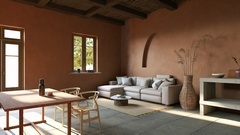](https://support.lumion.com/hubfs/Knowledge%20Base%20Import/On%20Ray%20Trace%20Rendering%20-%20top%20general%20article/ExProj-Mediterranean_RT-S-256B6_RT%20Interior-Shaodws-Medium%20Soft.jpg?hsLang=en-us) | [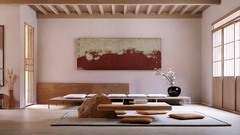](https://support.lumion.com/hubfs/Knowledge%20Base%20Import/On%20Ray%20Trace%20Rendering%20-%20top%20general%20article/Example%20Projects%20-%20Japandi%20Photos%20_asIs%20_Desktop%201920x1080_RT%20Seating%20-%20Soft%20Lighting.jpg?hsLang=en-us) |
| --- | --- | --- |
| [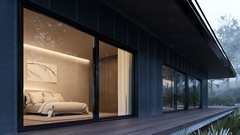](https://support.lumion.com/hubfs/Knowledge%20Base%20Import/On%20Ray%20Trace%20Rendering%20-%20top%20general%20article/Example%20Projects%20_Lakehouse%20_asIs-PS1%20_Print_RT%20Close-up%20-%20Bedroom.jpg?hsLang=en-us) | [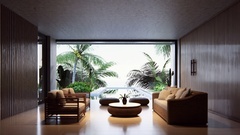](https://support.lumion.com/hubfs/Knowledge%20Base%20Import/On%20Ray%20Trace%20Rendering%20-%20top%20general%20article/Example%20Project%20-%20Tropical%20House%20_asIs%20PS1%20_Desktop1080p_RT%20Custom.jpg?hsLang=en-us) | [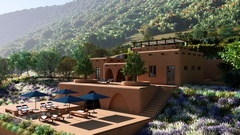](https://support.lumion.com/hubfs/Knowledge%20Base%20Import/On%20Ray%20Trace%20Rendering%20-%20top%20general%20article/Example%20Project%20Meditteranean%20Villa%20asIs%20PS1%20Desktop_RT%20Main%20shot.jpg?hsLang=en-us) |
| [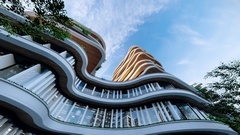](https://support.lumion.com/hubfs/Knowledge%20Base%20Import/On%20Ray%20Trace%20Rendering%20-%20top%20general%20article/Example%20Project%20-%20Curved%20High%20Rise%20_asIs%20PS1%20_Desktop1080p_RT%20Worms%20Eye.jpg?hsLang=en-us) | [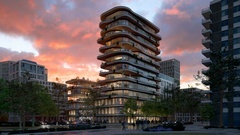](https://support.lumion.com/hubfs/Knowledge%20Base%20Import/On%20Ray%20Trace%20Rendering%20-%20top%20general%20article/Example%20Project%20-%20Curved%20High%20Rise%20_asIs%20PS1%20_Desktop1080p_RT%20Sunset.jpg?hsLang=en-us) | [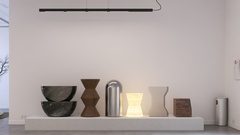](https://support.lumion.com/hubfs/Knowledge%20Base%20Import/On%20Ray%20Trace%20Rendering%20-%20top%20general%20article/Example%20Project%20-%20Model%20Gallery%20_asIs%20PS1%20_Desktop1080p_RT%20Material%20exhibit.jpg?hsLang=en-us) |
### 4. What Ray Tracing means in Lumion:
***Ray Tracing*** is a rendering method that simulates how light actually behaves in the real world by tracing the paths of light rays as they hit the surface of objects, bounce, reflect, refract, and are absorbed. This **produces much more realistic**:
- **Global illumination** (light bouncing between surfaces)
- **Reflections** (including off-screen objects)
- **Shadows** (soft, accurate, from all light sources)
- Glass, water, and translucent materials like curtains or marble
***Ray Tracing*** is a commonly known term for a rendering method. Lumion Pro implements ***Ray Tracing*** using modern performance-based ***Path Tracing***.
In Lumion Pro, *Ray Tracing* is not always on; you turn it on via a ***Ray Tracing Effect,*** and Lumion switches from its traditional ***Rasterized*** rendering to the ***Ray Tracing*** system.
### 5. What Ray Tracing Actually Does in Lumion:
- Calculates **real light paths** instead of approximations.
- Produces **accurate reflections** without Reflection Planes.
- Generates **soft, natural shadows** based on light size, distance and intensity/brightness (energy).
- Handles **glass, subsurface scattering, emissive materials** more realistically.
- Removes screen‑space limitations (lights work even when off‑camera).
### 6. How do you enable Ray Tracing in Lumion Pro:
A single ***Effect***, easy to add and adjust:
1. Go to ***Photo*** or ***Movie*** mode.
2. Open the***Effects*** panel.
3. Add the ***Ray Tracing Effect*** (found under ***Featured*** or ***Lighting***). Or use one of the pre-made ***Styles***.
4. If your GPU supports hardware ***Ray Tracing*** and your system meets the requirements. The ***Effect*** will enable and your preview or final render will use ***Ray Tracing*.**
To jump into using this ***Effect**:*
- **Knowledge Base: **[How do you use the Ray Tracing Effect?](https://support.lumion.com/knowledge-base/api/v2/help_center/en-us/articles/7442305609628.json?hsLang=en-us&__hstc=212388875.119763a91c8a65253944b965f3e043ba.1774733833843.1774733833843.1774733833843.1&__hssc=212388875.1.1774733833843&__hsfp=c12a79e8110c80475e30f1a3198adb5f)
And having a good understanding of how lighting will help with the quality and visualization:
- **Knowledge Base: **[Lighting](https://support.lumion.com/learning-pathways/api/v2/help_center/en-us/articles/12358806503964.json?hsLang=en-us)
### 7. About Ray Tracing:
For more in-depth understanding of ***Ray Tracing (Path Tracing)*** as a rendering approach in Lumion:
- **Knowledge Base:** [Ray Tracing in Lumion - Part 1 What is Ray Tracing all about](https://support.lumion.com/knowledge-base/ray-tracing-in-lumion-part-1-what-is-ray-tracing?hsLang=en-us)
- **Knowledge Base: ** [Ray Tracing in Lumion - Part 2: Using Lumion for Ray Trace Rendering](https://support.lumion.com/knowledge-base/ray-tracing-in-lumion-part-2-using-lumion-for-ray-trace-rendering?hsLang=en-us)
- [Visit our other Sections](https://support.lumion.com/knowledge-base/visit-our-other-sections?hsLang=en-us)
- [Contact Us](https://support.lumion.com/knowledge-base/contact-us?hsLang=en-us)
- [Lumion Account](https://support.lumion.com/knowledge-base/lumion-account?hsLang=en-us)
- [Latest News](https://support.lumion.com/knowledge-base/latest-news?hsLang=en-us#main-content)
- [Major Known Issues](https://support.lumion.com/knowledge-base/latest-news?hsLang=en-us#major-known-issues)
- [Lumion 2025: Major Version Release Details](https://support.lumion.com/knowledge-base/latest-news?hsLang=en-us#lumion-2025-major-version-release-details)
- [Lumion 2024: Major Version Release Details](https://support.lumion.com/knowledge-base/latest-news?hsLang=en-us#lumion-2024-major-version-release-details)
- [Lumion 2023: Major Version Release Details](https://support.lumion.com/knowledge-base/latest-news?hsLang=en-us#lumion-2023-major-version-release-details)
- [Lumion 2023: Update Release Notes](https://support.lumion.com/knowledge-base/latest-news?hsLang=en-us#lumion-2023-update-release-notes)
- [Lumion 12](https://support.lumion.com/knowledge-base/latest-news?hsLang=en-us#lumion-12)
- [Lumion 11](https://support.lumion.com/knowledge-base/latest-news?hsLang=en-us#lumion-11)
- [Lumion 10](https://support.lumion.com/knowledge-base/latest-news?hsLang=en-us#lumion-10)
- [Sales Questions](https://support.lumion.com/knowledge-base/sales-questions?hsLang=en-us)
- [Subscriptions](https://support.lumion.com/knowledge-base/subscriptions?hsLang=en-us)
- [New User Questions](https://support.lumion.com/knowledge-base/new-user-questions?hsLang=en-us)
- [Learning Resources](https://support.lumion.com/knowledge-base/learning-resources?hsLang=en-us)
- [System Requirements Questions](https://support.lumion.com/knowledge-base/system-requirements-questions?hsLang=en-us#main-content)
- [Determining the 'Complexity' of your Projects](https://support.lumion.com/knowledge-base/system-requirements-questions?hsLang=en-us#determining-the-complexity-of-your-projects)
- [System Messages from Lumion](https://support.lumion.com/knowledge-base/system-requirements-questions?hsLang=en-us#system-messages-from-lumion)
- [Requirements for Prior Versions](https://support.lumion.com/knowledge-base/system-requirements-questions?hsLang=en-us#requirements-for-prior-versions)
- [Download & Installation Questions](https://support.lumion.com/knowledge-base/download-installation-questions?hsLang=en-us#main-content)
- [Download/Installation: General Questions](https://support.lumion.com/knowledge-base/download-installation-questions?hsLang=en-us#download-installation-general-questions)
- [Download Questions](https://support.lumion.com/knowledge-base/download-installation-questions?hsLang=en-us#download-questions)
- [Installation Questions](https://support.lumion.com/knowledge-base/download-installation-questions?hsLang=en-us#installation-questions)
- [Lumion Pro Updater](https://support.lumion.com/knowledge-base/download-installation-questions?hsLang=en-us#lumion-pro-updater)
- [Plugins to CAD software](https://support.lumion.com/knowledge-base/download-installation-questions?hsLang=en-us#plugins-to-cad-software)
- [License and General Product Questions](https://support.lumion.com/knowledge-base/license-and-general-product-questions?hsLang=en-us#main-content)
- [License System Messages from Lumion](https://support.lumion.com/knowledge-base/license-and-general-product-questions?hsLang=en-us#license-system-messages-from-lumion)
- [Import & Export Questions](https://support.lumion.com/knowledge-base/import-export-questions?hsLang=en-us#main-content)
- [Model Import Guidelines](https://support.lumion.com/knowledge-base/import-export-questions?hsLang=en-us#model-import-guidelines)
- [Lumion LiveSync and import plugins](https://support.lumion.com/knowledge-base/import-export-questions?hsLang=en-us#lumion-livesync-and-import-plugins)
- [System Messages from Lumion when importing](https://support.lumion.com/knowledge-base/import-export-questions?hsLang=en-us#system-messages-from-lumion-when-importing)
- [General Questions](https://support.lumion.com/knowledge-base/general-questions?hsLang=en-us#main-content)
- [Keyboard Shortcuts in Lumion](https://support.lumion.com/knowledge-base/general-questions?hsLang=en-us#keyboard-shortcuts-in-lumion)
- [Upgrading and Updating your Lumion Version](https://support.lumion.com/knowledge-base/general-questions?hsLang=en-us#upgrading-and-updating-your-lumion-version)
- [Using Lumion 2023](https://support.lumion.com/knowledge-base/general-questions?hsLang=en-us#using-lumion-2023)
- [System Messages from Lumion](https://support.lumion.com/knowledge-base/general-questions?hsLang=en-us#system-messages-from-lumion)
- [Build Mode Questions](https://support.lumion.com/knowledge-base/build-mode-questions?hsLang=en-us#main-content)
- [Landscape and Terrains](https://support.lumion.com/knowledge-base/build-mode-questions?hsLang=en-us#landscape-and-terrains)
- [OpenStreetMap](https://support.lumion.com/knowledge-base/build-mode-questions?hsLang=en-us#openstreetmap)
- [Lighting: Sun and Artificial Lights](https://support.lumion.com/knowledge-base/build-mode-questions?hsLang=en-us#lighting-sun-and-artificial-lights)
- [Questions mainly for older versions than Lumion 12](https://support.lumion.com/knowledge-base/build-mode-questions?hsLang=en-us#questions-mainly-for-older-versions-than-lumion-12)
- [Library Content](https://support.lumion.com/knowledge-base/library-content?hsLang=en-us#main-content)
- [Library Content in Lumion 2026](https://support.lumion.com/knowledge-base/library-content?hsLang=en-us#library-content-in-lumion-2026)
- [Library Content in Lumion 2025](https://support.lumion.com/knowledge-base/library-content?hsLang=en-us#library-content-in-lumion-2025)
- [Library Content in Lumion 2024](https://support.lumion.com/knowledge-base/library-content?hsLang=en-us#library-content-in-lumion-2024)
- [Library Content in Lumion 2023](https://support.lumion.com/knowledge-base/library-content?hsLang=en-us#library-content-in-lumion-2023)
- [Library Content in Lumion 12](https://support.lumion.com/knowledge-base/library-content?hsLang=en-us#library-content-in-lumion-12)
- [Movie & Photo Mode Questions](https://support.lumion.com/knowledge-base/movie-photo-mode-questions?hsLang=en-us#main-content)
- [Photo Mode](https://support.lumion.com/knowledge-base/movie-photo-mode-questions?hsLang=en-us#photo-mode)
- [Movie Mode](https://support.lumion.com/knowledge-base/movie-photo-mode-questions?hsLang=en-us#movie-mode)
- [Animation in Movie Mode](https://support.lumion.com/knowledge-base/movie-photo-mode-questions?hsLang=en-us#animation-in-movie-mode)
- [Effects in Photo or Movie Mode](https://support.lumion.com/knowledge-base/movie-photo-mode-questions?hsLang=en-us#effects-in-photo-or-movie-mode)
- [Reflections](https://support.lumion.com/knowledge-base/movie-photo-mode-questions?hsLang=en-us#reflections)
- [Material Questions](https://support.lumion.com/knowledge-base/material-questions?hsLang=en-us#main-content)
- [Materials in versions 12 and earlier](https://support.lumion.com/knowledge-base/material-questions?hsLang=en-us#materials-in-versions-12-and-earlier)
- [Using LiveSync for Revit and a Section Box](https://support.lumion.com/knowledge-base/material-questions?hsLang=en-us#using-livesync-for-revit-and-a-section-box)
- [Rendering Questions](https://support.lumion.com/knowledge-base/rendering-questions?hsLang=en-us#main-content)
- [General Rendering Questions](https://support.lumion.com/knowledge-base/rendering-questions?hsLang=en-us#general-rendering-questions)
- [Rendering of Photos](https://support.lumion.com/knowledge-base/rendering-questions?hsLang=en-us#rendering-of-photos)
- [Rendering of Clips and Movies](https://support.lumion.com/knowledge-base/rendering-questions?hsLang=en-us#rendering-of-clips-and-movies)
- [Tips to getting the best renders](https://support.lumion.com/knowledge-base/rendering-questions?hsLang=en-us#tips-to-getting-the-best-renders)
- [Rendering Performance](https://support.lumion.com/knowledge-base/rendering-questions?hsLang=en-us#rendering-performance)
- [Technical Issues when Rendering](https://support.lumion.com/knowledge-base/rendering-questions?hsLang=en-us#technical-issues-when-rendering)
- [Panorama Mode Questions](https://support.lumion.com/knowledge-base/panorama-mode-questions?hsLang=en-us#main-content)
- [Technical questions when rendering with Panorama Mode](https://support.lumion.com/knowledge-base/panorama-mode-questions?hsLang=en-us#technical-questions-when-rendering-with-panorama-mode)
- [File & BackUp Questions](https://support.lumion.com/knowledge-base/file-backup-questions?hsLang=en-us#main-content)
- [Saving and Backup](https://support.lumion.com/knowledge-base/file-backup-questions?hsLang=en-us#saving-and-backup)
- [File Saving Issues](https://support.lumion.com/knowledge-base/file-backup-questions?hsLang=en-us#file-saving-issues)
- [Lumion-Documents](https://support.lumion.com/knowledge-base/file-backup-questions?hsLang=en-us#lumion-documents)
- [Transfer, Move or Migrate Files](https://support.lumion.com/knowledge-base/file-backup-questions?hsLang=en-us#transfer-move-or-migrate-files)
- [Troubleshooting](https://support.lumion.com/knowledge-base/troubleshooting?hsLang=en-us#main-content)
- [Reports about your PC](https://support.lumion.com/knowledge-base/troubleshooting?hsLang=en-us#reports-about-your-pc)
- [Photo and Movie Mode Issues](https://support.lumion.com/knowledge-base/troubleshooting?hsLang=en-us#photo-and-movie-mode-issues)
- [Rendering Issues](https://support.lumion.com/knowledge-base/troubleshooting?hsLang=en-us#rendering-issues)
- [Error Messages from Lumion](https://support.lumion.com/knowledge-base/troubleshooting?hsLang=en-us#error-messages-from-lumion)
- [Hardware related Issues](https://support.lumion.com/knowledge-base/troubleshooting?hsLang=en-us#hardware-related-issues)
- [Other Troubleshooting Issues](https://support.lumion.com/knowledge-base/troubleshooting?hsLang=en-us#other-troubleshooting-issues)
- [Article Developments](https://support.lumion.com/knowledge-base/article-developments?hsLang=en-us#main-content)
- [Devs - Multi‑Image Button Viewer](https://support.lumion.com/knowledge-base/article-developments?hsLang=en-us#devs-multi-image-button-viewer)
[](https://lumion.com/)
[mailto:email@email.com](mailto:email@email.com)
Copyright © 2026, Lumion - Act3D B.V.
#### Product
[Plans and pricing](https://lumion.com/product/buy)
[Discover Lumion](https://lumion.com/product/discover-lumion)
[Compatibility](https://lumion.com/compatibility/)
[System Requirements](https://lumion.com/product/system-requirements)
[Find a reseller](https://lumion.com/about/find-reseller)
[Free trial](https://lumion.com/product/free-trial)
#### Solutions
[Architectural design](https://lumion.com/product/architectural-design)
[Interior design](https://lumion.com/product/interior-design)
[Landscape architecture](https://lumion.com/product/landscape-architecture)
[Urban planning](https://lumion.com/product/urban-planning)
[3D rendering](https://lumion.com/product/3d-rendering-software)
[Education](https://lumion.com/product/educational-licenses)
#### Compatibility
[Trimble SketchUp](https://lumion.com/compatibility/sketchup-rendering)
[Autodesk Revit](https://lumion.com/compatibility/revit-rendering)
[Graphisoft ArchiCAD](https://lumion.com/compatibility/archicad-rendering)
[Rhinoceros](https://lumion.com/compatibility/rhino-rendering)
[Autodesk Autocad](https://lumion.com/compatibility/autocad-rendering)
[Autodesk FormIt Pro](https://lumion.com/compatibility/lumion-for-autodesk-formit-pro)
[Nemetschek Allplan](https://lumion.com/compatibility/allplan-rendering)
[Nemetschek Vectorworks](https://lumion.com/compatibility/vectorworks-rendering)
[BricsCAD](https://lumion.com/compatibility/bricscad-rendering)
[3D Studio Max](https://lumion.com/compatibility/3ds-max-rendering)
#### Resources
[Made with Lumion](https://lumion.com/made-with-lumion)
[Tutorials](https://support.lumion.com/video-tutorials?hsLang=en-us)
[Support and learning](https://support.lumion.com/knowledge-base/api/v2/help_center/en-us/articles/360044608053.json?hsLang=en-us)
[Downloads](https://support.lumion.com/downloads?hsLang=en-us)
[Community](https://community.lumion.com/index.php)
#### About
[Our Story](https://lumion.com/about)
[We're hiring!](https://lumion.com/about/careers)
[News](https://lumion.com/news)
[Contact us](https://lumion.com/about/contact)
[Terms & conditions](https://lumion.com/legal/terms-of-service) [EULA](https://lumion.com/legal/eula) [Privacy statement](https://lumion.com/legal/privacy-statement) [CEIP](https://lumion.com/legal/ceip) [Disclaimer](https://lumion.com/legal/disclaimer) © 2026 Lumion