---
title: Lumion 2025.2 Release Notes
description: Lumion 2025.2 Release Notes
---
Solutions
[Architectural design All you need to bring your residential, commercial or institutional designs to life](https://lumion.com/product/architectural-design) [Landscape architecture Beautiful terrains and fine-detailed nature for any climate or season](https://lumion.com/product/landscape-architecture)
[Interior design Realistic light, high-quality textures, and an extensive asset library](https://lumion.com/product/interior-design) [Students and Faculties Lumion is free for students, educators, and faculties around the world](https://lumion.com/product/educational-licenses)
[SketchUp](https://lumion.com/compatibility/sketchup-rendering) [Revit](https://lumion.com/compatibility/revit-rendering) [ArchiCAD](https://lumion.com/compatibility/archicad-rendering) [Rhino](https://lumion.com/compatibility/rhino-rendering) [Autocad](https://lumion.com/compatibility/autocad-rendering) [See more](https://lumion.com/compatibility/)
Product
[Discover Axogram New Live architectural diagramming](https://lumion.com/product/axogram) [Lumion Cloud Where design meets collaboration](https://lumion.com/product/lumion-cloud)
[Lumion Pro Advanced visualization solution](https://lumion.com/product/lumion-pro) [Discover AI tools New AI built for architectural work](https://lumion.com/product/ai)
[Lumion Pro 2026.1 is out now! 🚀](https://lumion.com/product/latest-version-pro) [Compatibility](https://lumion.com/compatibility/) [System Requirements](https://lumion.com/product/system-requirements) [Roadmap](https://lumion.com/product/roadmap)
[Pricing](https://lumion.com/product/buy) Resources
[Made with Lumion Get inspired by the stories behind the designs](https://lumion.com/made-with-lumion)
[Tips & Guides Make the most out of Lumion with helpful guides and tutorials](https://lumion.com/tips-guides)
[Knowledge base](https://support.lumion.com/knowledge-base?hsLang=en-us) [Community](https://community.lumion.com/index.php) [Downloads](https://support.lumion.com/downloads?hsLang=en-us)
About
[Who we are Learn about our story and mission](https://lumion.com/about) [Careers - We're hiring Let's build the future of architectural visualization](https://lumion.com/about/careers)
[News Discover the latest product news and more](https://lumion.com/news)
[Find your local reseller](https://lumion.com/about/find-reseller) [Contact us](https://lumion.com/about/contact)
[](http://lumion.com)
[My Account](https://account.lumion.com)
Solutions
[Architectural design](https://lumion.com/product/architectural-design) [Interior design](https://lumion.com/product/interior-design) [Landscape architecture](https://lumion.com/product/landscape-architecture) [Students and Faculties](https://lumion.com/product/educational-licenses)
---
[SketchUp](https://lumion.com/compatibility/sketchup-rendering) [Revit](https://lumion.com/compatibility/revit-rendering) [ArchiCAD](https://lumion.com/compatibility/archicad-rendering) [Rhino](https://lumion.com/compatibility/rhino-rendering) [Autocad](https://lumion.com/compatibility/autocad-rendering) [See more](https://lumion.com/compatibility/)
Product
[Axogram New](https://lumion.com/product/axogram) [Lumion Cloud](https://lumion.com/product/lumion-cloud) [Lumion Pro](https://lumion.com/product/lumion-pro) [Discover AI tools New](https://lumion.com/product/ai)
---
[Lumion Pro 2026.1 is out now! 🚀](https://lumion.com/product/latest-version-pro) [Compatibility](https://lumion.com/compatibility/) [System Requirements](https://lumion.com/product/system-requirements) [Roadmap](https://lumion.com/product/roadmap)
[Pricing](https://lumion.com/product/buy) Resources
[Made with Lumion](https://lumion.com/made-with-lumion) [Tips & Guides](https://lumion.com/tips-guides)
---
[Knowledge base](https://support.lumion.com/knowledge-base?hsLang=en-us) [Community](https://community.lumion.com/index.php) [Downloads](https://support.lumion.com/downloads?hsLang=en-us)
About
[Who we are](https://lumion.com/about) [Careers - We're hiring](https://lumion.com/about/careers) [News](https://lumion.com/news)
---
[Find your local reseller](https://lumion.com/about/find-reseller) [Contact us](https://lumion.com/about/contact)
[My Account](https://account.lumion.com)
[Submit a request](https://support.lumion.com/hc/en-us/requests/new?hsLang=en-us)
Lumion Knowledge Base
How can we help?
- There are no suggestions because the search field is empty.
[Skip to content](https://support.lumion.com/knowledge-base/lumion-2025.2-release-notes#main-content)
English - United States
Show submenu for translations

Open main navigation
Close main navigation
- English - United States
Show submenu for translations
- Contact us
Contact us
How can we help you?
- There are no suggestions because the search field is empty.
1. [Knowledge Base](https://support.lumion.com/knowledge-base?hsLang=en-us)
2. [Latest News](https://support.lumion.com/knowledge-base/latest-news?hsLang=en-us)
3. [Lumion 2025: Major Version Release Details](https://support.lumion.com/knowledge-base/latest-news?hsLang=en-us#lumion-2025-major-version-release-details)
# Lumion 2025.2 Release Notes

November 18, 2025
This update introduces several improvements to the [**Lumion Cloud**](https://lumion.com/product/lumion-cloud) media upload process, as well as better license authentication and numerous bug fixes.
Now, you can select which folder or project to upload media to and also render and upload videos directly to Lumion Cloud. It is also now possible to lock a license in Lumion so that it is possible to sign in and out and have the license on the PC remain unchanged.
Read more about all the changes below.
### Important:
- Lumion 2025.2.0 is available as an **Update,** **only for users in Lumion 2025.0.2 and 2025.1.0**. Users on older versions need to do a full installation.
See also: **Knowledge Base:** [Lumion 2025: Everything you need to know](https://support.lumion.com/knowledge-base/api/v2/help_center/en-us/articles/19336288624668.json?hsLang=en-us)
- Note that *Projects* and models saved in version 2025.2.0 **cannot** be opened in older versions of *Lumion*.
- All users are required to log in to their *Lumion Account* when starting Lumion 2025.2 for the first time. See the article below for more details on this change:
- **Knowledge Base:** [Why does Lumion require a sign-in to start?](https://support.lumion.com/knowledge-base/api/v2/help_center/en-us/articles/21543347074332.json?hsLang=en-us)
- This release is for **commercial** customers. The version release for students and Faculty is planned for later this month.
#### [1. New Features](https://support.lumion.com/knowledge-base/lumion-2025.2-release-notes#H1_New_Features)
#### [2. Other New Features](https://support.lumion.com/knowledge-base/lumion-2025.2-release-notes#H2-Other-New-Features)
#### [3. Fixes](https://support.lumion.com/knowledge-base/lumion-2025.2-release-notes#H3-Fixes)
#### [4. Minor Updates](https://support.lumion.com/knowledge-base/lumion-2025.2-release-notes#H4-Minor-Updates)
### 1. New Features
#### 1.1. Rendering and uploading directly to Lumion Cloud
##### 1.1.1 Video Upload
Just like *Photos* and *Panoramas*, its is now also possible to render and upload *Movies* directly from Lumion to Lumion Cloud by enabling this toggle in the output settings. This works with all resolutions and aspect ratios.
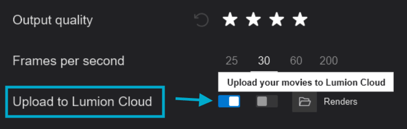
Lumion can also upload the video as separate *Clips* by enabling the second toggle:

##### 1.1.2 Select Folder when uploading
It is now possible to select the folder where the render will be uploaded to when rendering and uploading content directly to Lumion Cloud.

The '*Projects*' and '*Renders*' folders are available by default and you can can add/remove sub-folders as needed from Lumion Cloud.
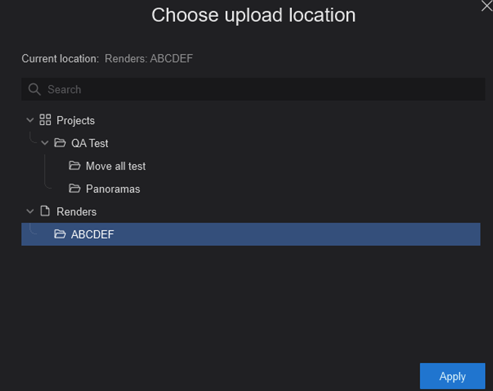
Lumion will remember the selected cloud folders for each media mode separately. It will also store the selected cloud folders in the .LSF file when saving the *Project*. The available upload locations are updated automatically in Lumion.
#### 1.2. Settings
##### 1.2.1 License Locking
Lumion can now lock the *License Key* to a specific PC by enabling this option from the Settings \> License screen (requires starting Lumion as an administrator).

This will make it so that users do not need to select a *License Key* when logging into Lumion. The license used will be the one that was active when enabling the setting.
More information on this feature and its purpose can be found in this article:
- **Knowledge Base:** [How do you lock a Lumion license key to a PC?](https://support.lumion.com/knowledge-base/how-do-you-lock-a-lumion-license-key-to-a-pc?hsLang=en-us)
### 2. Other New Features:
#### 2.1. User Authentication
Session handling and authentication have been Improved. Lumion now responds more gracefully when user authentication becomes invalid during a session. Previously, if the session refresh failed (for example due to token expiration or loss of internet connection), Lumion would continue running while the user was technically signed out. This could lead to unexpected behavior, as Lumion assumes the user is always authenticated
Now, a new **“No internet connection”** indicator has been added that will appear whenever connection drops.

Lumion will continue working while offline, however cloud features will not be available until a connection is restored.
Clicking this button manually triggers a connection check. Lumion will also stop validating the user cookie whenever no connection is detected, preventing unintended sign-outs.
### 3. Fixes
#### **3.1. Build mode**
- ***Lumion Imported Model Library**:* Fixed a problem that caused fewer rows of items to be displayed in the *Imported Model Library.*
- ***Text Object:*** Fixed an issue that would cause a *Text Object's* text box to get deselected after moving the cursor outside of it.
- ***Imported models:*** The “Cannot create or modify variations on multiple selected objects” warning message no longer changes position when hovering the cursor over it.
- ***Space Objects Evenly:*** Fixed the way the *Space Objects Evenly* function behaves when multiple *Imported Models* are selected.
- ***Groups:*** Fixed an issue that would prevent the user from placing a *Group* on the *Landscape* level due to an invisible box that was created when right clicking to rotate the camera.
- ***Groups:*** Fixed an issue that would result in unexpected results like placing dozens of *Objects* at the origin (0,0,0 position) when selecting a *Group* with a single *Object* in it.
- ***Groups:*** Fixed an issue where *Groups* would break if they were saved with less than 2 *Groups* in it.
- ***Groups:*** *Group* option buttons are now available right after changing a *Group’s* position.
- ***Groups:*** *Groups* created in newer versions of Lumion will no longer appear in the *Library* for older versions.
- ***Hotkeys:*** Placement hotkeys no longer disappear when browsing *Library Objects*.
- ***Landscape Mode:*** Fixed an issue with the cursor that could occur after using the *Undo, Flatten Landscape*, or *Load Landscape File* functions.
- ***Randomize Position:*** Fixed the a problem that could occur when using *Randomize Position* right after *Align Position.*
- ***Performance Center:*** The *Performance Center* drop down menus sometimes failed to open when Lumion’s performance was slow. This has been resolved.
- ***Decals:*** Fixed an issue that resulted in *Decals* still visible but un-selectable after deleting a *Group* that contained *Decals*.
- ***Decals:*** Fixed multiple issues that could occur when using *Mass Placement* with a *Group* that contained *Decals*.
- ***Flag Objects:*** Flag *Objects* will now retain their imported texture as expected.
- ***Replace Selection:*** The selected *Object* in the *Library* is now deselected when entering *Replace Selection*.
#### 3.2. Material mode
- **.DDS textures:** Lumion no longer crashes when loading a .DDS texture with a resolution that is not divisible by 4.
#### 3.3. Loading, Saving, and Merging Project files
- **Recent files:** Fixed an issue that would result in Lumion showing the wrong file type in *Recent Files* after
switching license type.
- **Project Recovery:** When recovering a *Project* after a crash, some *Effects* would have their settings reverted to default or have excessive values such as for the *Color Correction Effect*. This has been fixed.
- ***Merge Project*:** Resolved an issue caused by merging incompatible *Project* files , which could result in a completely black scene.
- ***Closing Lumion:*** Fixed a problem that could cause the *Save* option to be unavailable when closing Lumion.
#### 3.4. Importing and Exporting
- ***LiveSync:*** Fixed an issue that prevented the *LiveSync* reconnection of a model after saving and loading a Lumion *Project*.
- ***LiveSync:*** While synced, fixed the blue highlight of a model in *Build Mode* when Lumion is not the active window.
#### 3.5. Photo, Movie, and Panorama Mode
- ***Movie Mode:** Clips* that were copied from a *Clip Set* and pasted on a different *Clip Set* would not be saved properly. This has been resolved.
- ***Movie Mode:*** Fixed an issue that would cause the next *Clip Set* to not be created.
- ***Movie Mode:*** Merged *Clips* are now added to the correct *Clip Set*.
- ***Movie Mode:*** It is now possible to rename *Clips* in the render screen.
- ***Raytracing Effect:*** Reduced the *Reflectivity* of the *Ocean* when using *Fully Ray-Traced Glass* and *Water*.
- ***Raytracing Effect:*** Fixed the dark shading near the horizon edge of the Ocean.
- ***Raytracing Effect:*** Fixed black thumbnails being created when storing a *Photo* after rendering the *HQ Preview* while the *Raytracing Effect* is enabled.
- ***2-Point Perspective Effect:*** The *Effect* is now visible on the thumbnail shown when rendering.
- ***Undo changes and restore Style:*** The *Revert to Style* button is no longer visible on *Effects* that haven't been modified.
- ***Effects List:*** Improved dragging *Effects* up and down in the *Effects List*.
- ***Mass Move Effect:*** It is no longer possible to place *Path Nodes* in the sky.
- ***Cloud Upload:*** Canceling a render during the Cloud upload process will no longer create an invalid media file on the cloud. This is valid for *Photos*, *Movies* and *Panoramas*.
- ***Cloud Upload:*** Fixed an issue that resulted in broken uploads after switching license type for the first time on a computer.
- ***Cloud upload + AI Upscale:*** The preview shown after a render finishes will now display the correct image size when Cloud Upload and AI Upscale are enabled.
- ***Renaming Photos/Movies:*** Renaming *Photos* and *Movies* have been unified so they work the same way when rendering.
- ***Photo/Movie Set:*** Fixed the highlight around the thumbnails when selecting/deselecting Photos and Clips in the render Photo Set/clips screens. The the tooltip for Clips was updated as well.
#### 3.6. Miscellaneous
- ***User Sign-in***: Fixed a problem that could cause *Activation Codes* to be visible in the authentication screen after logging out.
- ***User Sign-in***: Fixed a problem that could cause an “error 500” message when signing in.
- ***User Sign-in***: Fixed an error that could occur with a specific version of Windows and Windows Defender security software.
- ***User Sign-in***: Improved the error messages shown when something goes wrong during the user authentication process.
- ***User interface:*** It is no longer possible to click buttons under an overlapping panel (such as clicking on *Object* properties through the *Performance Center* panel.)
- ***License Key:*** Lumion no longer deactivates the cached license on start up.
- ***Updates:*** Updates have been re-enabled when starting Lumion.:
● Lumion **2024.0.1** to **2024.4.2** cannot update to **2025.0**+. They only update to **2024.4.3** at the most.
● Lumion **2025.0** to **2025.0.1** cannot update to **2025.1.0**+. Only versions **2025.0.2** and **2025.1.0** can update directly to to **2025.2.0**.
### 4. Minor Updates
#### Lumion 2025.2.1 Update
**November 25, 2025**
##### **Fixes:**
- ***3D Grass***: Fixed a problem that could cause *3D Grass* to look very reflective when using *Ray Tracing*.
- ***Landscape Grass:*** Blending of the grass and *Landscape* have also been improved in both rasterization and *Ray Tracing* pipelines:
###### **Ray Tracing:** 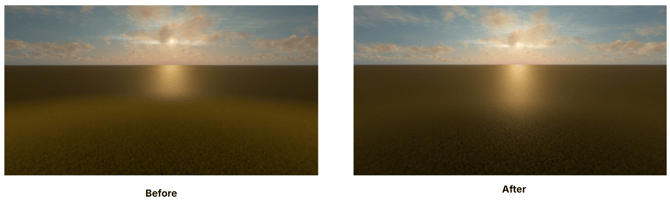 **Rasterization:** 
- ***Orbit Camera:*** Fixed an issue that would cause this function to not work correctly in *Build Mode.*
#### Lumion 2025.2.2 Update
**December 5, 2025**
##### **Fixes:**
- ***Sign in***: Fixed a problem that could cause Lumion to be unable to authenticate on certain network environments.
- ***Sign in:*** You can now manually copy the Lumion login URL in cases where the browser fails to open automatically.
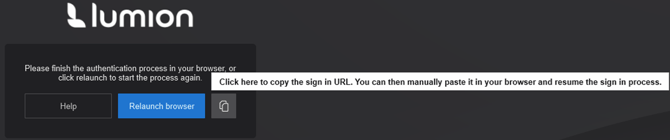
- ***Sign in:*** It is now possible to login on multiple PCs using the same *Lumion Account* as long as the registered floating (Studio) *License Key* has enough available *Seats*. This change is an interim step toward a more flexible and scalable licensing experience for multi *Seat* floating *License Key* users.
- ***Material Editor:*** Fixed inconsistent display of *Material* names caused by UI caching issues in the *Material Library*.
- ***Fully Ray-Traced Water*:** Water colors are now rendered correctly when *Fully Ray-Traced Water* is enabled.
- ***Line and Cluster Placement:*** No longer ignore *Imported Models* (*Objects* are no longer placed only on the *Landscape*).
- ***Line and Cluster Placement:*** An *Object* is no longer unintentionally placed when clicking *Confirm and return to Build mode* after deleting *Objects* during *Mass Placement*.
- ***Cluster Placement:*** No longer forces *Objects*onto the top surface of *Imported Models*.Placement now respects geometry correctly.
- ***Space objects evenly:**Objects* now correctly respect *Imported Model* geometry instead of passing through it when using *Place on Landscape + Space Evenly*.
- ***Align Height:*** Fixed an issue where *Object* height was incorrectly influenced by *Landscape* changes when an *Imported Model* was present.
### See Also:
- **Knowledge Base:** [Lumion 2025: Everything you need to know](https://support.lumion.com/knowledge-base/api/v2/help_center/en-us/articles/19336288624668.json?hsLang=en-us)
- **Knowledge Base:** [Lumion 2025.1 Release Notes](https://support.lumion.com/knowledge-base/api/v2/help_center/en-us/articles/21853789940892.json?hsLang=en-us)
- **Knowledge Base:** [Lumion 2025.0: Release Notes](https://support.lumion.com/knowledge-base/api/v2/help_center/en-us/articles/19336065135516.json?hsLang=en-us)
- [Visit our other Sections](https://support.lumion.com/knowledge-base/visit-our-other-sections?hsLang=en-us)
- [Contact Us](https://support.lumion.com/knowledge-base/contact-us?hsLang=en-us)
- [Lumion Account](https://support.lumion.com/knowledge-base/lumion-account?hsLang=en-us)
- [Latest News](https://support.lumion.com/knowledge-base/latest-news?hsLang=en-us#main-content)
- [Major Known Issues](https://support.lumion.com/knowledge-base/latest-news?hsLang=en-us#major-known-issues)
- [Lumion 2025: Major Version Release Details](https://support.lumion.com/knowledge-base/latest-news?hsLang=en-us#lumion-2025-major-version-release-details)
- [Lumion 2024: Major Version Release Details](https://support.lumion.com/knowledge-base/latest-news?hsLang=en-us#lumion-2024-major-version-release-details)
- [Lumion 2023: Major Version Release Details](https://support.lumion.com/knowledge-base/latest-news?hsLang=en-us#lumion-2023-major-version-release-details)
- [Lumion 2023: Update Release Notes](https://support.lumion.com/knowledge-base/latest-news?hsLang=en-us#lumion-2023-update-release-notes)
- [Lumion 12](https://support.lumion.com/knowledge-base/latest-news?hsLang=en-us#lumion-12)
- [Lumion 11](https://support.lumion.com/knowledge-base/latest-news?hsLang=en-us#lumion-11)
- [Lumion 10](https://support.lumion.com/knowledge-base/latest-news?hsLang=en-us#lumion-10)
- [Sales Questions](https://support.lumion.com/knowledge-base/sales-questions?hsLang=en-us)
- [Subscriptions](https://support.lumion.com/knowledge-base/subscriptions?hsLang=en-us)
- [New User Questions](https://support.lumion.com/knowledge-base/new-user-questions?hsLang=en-us)
- [Learning Resources](https://support.lumion.com/knowledge-base/learning-resources?hsLang=en-us)
- [System Requirements Questions](https://support.lumion.com/knowledge-base/system-requirements-questions?hsLang=en-us#main-content)
- [Determining the 'Complexity' of your Projects](https://support.lumion.com/knowledge-base/system-requirements-questions?hsLang=en-us#determining-the-complexity-of-your-projects)
- [System Messages from Lumion](https://support.lumion.com/knowledge-base/system-requirements-questions?hsLang=en-us#system-messages-from-lumion)
- [Requirements for Prior Versions](https://support.lumion.com/knowledge-base/system-requirements-questions?hsLang=en-us#requirements-for-prior-versions)
- [Download & Installation Questions](https://support.lumion.com/knowledge-base/download-installation-questions?hsLang=en-us#main-content)
- [Download/Installation: General Questions](https://support.lumion.com/knowledge-base/download-installation-questions?hsLang=en-us#download-installation-general-questions)
- [Download Questions](https://support.lumion.com/knowledge-base/download-installation-questions?hsLang=en-us#download-questions)
- [Installation Questions](https://support.lumion.com/knowledge-base/download-installation-questions?hsLang=en-us#installation-questions)
- [Lumion Pro Updater](https://support.lumion.com/knowledge-base/download-installation-questions?hsLang=en-us#lumion-pro-updater)
- [Plugins to CAD software](https://support.lumion.com/knowledge-base/download-installation-questions?hsLang=en-us#plugins-to-cad-software)
- [License and General Product Questions](https://support.lumion.com/knowledge-base/license-and-general-product-questions?hsLang=en-us#main-content)
- [License System Messages from Lumion](https://support.lumion.com/knowledge-base/license-and-general-product-questions?hsLang=en-us#license-system-messages-from-lumion)
- [Import & Export Questions](https://support.lumion.com/knowledge-base/import-export-questions?hsLang=en-us#main-content)
- [Model Import Guidelines](https://support.lumion.com/knowledge-base/import-export-questions?hsLang=en-us#model-import-guidelines)
- [Lumion LiveSync and import plugins](https://support.lumion.com/knowledge-base/import-export-questions?hsLang=en-us#lumion-livesync-and-import-plugins)
- [System Messages from Lumion when importing](https://support.lumion.com/knowledge-base/import-export-questions?hsLang=en-us#system-messages-from-lumion-when-importing)
- [General Questions](https://support.lumion.com/knowledge-base/general-questions?hsLang=en-us#main-content)
- [Keyboard Shortcuts in Lumion](https://support.lumion.com/knowledge-base/general-questions?hsLang=en-us#keyboard-shortcuts-in-lumion)
- [Upgrading and Updating your Lumion Version](https://support.lumion.com/knowledge-base/general-questions?hsLang=en-us#upgrading-and-updating-your-lumion-version)
- [Using Lumion 2023](https://support.lumion.com/knowledge-base/general-questions?hsLang=en-us#using-lumion-2023)
- [System Messages from Lumion](https://support.lumion.com/knowledge-base/general-questions?hsLang=en-us#system-messages-from-lumion)
- [Build Mode Questions](https://support.lumion.com/knowledge-base/build-mode-questions?hsLang=en-us#main-content)
- [Landscape and Terrains](https://support.lumion.com/knowledge-base/build-mode-questions?hsLang=en-us#landscape-and-terrains)
- [OpenStreetMap](https://support.lumion.com/knowledge-base/build-mode-questions?hsLang=en-us#openstreetmap)
- [Lighting: Sun and Artificial Lights](https://support.lumion.com/knowledge-base/build-mode-questions?hsLang=en-us#lighting-sun-and-artificial-lights)
- [Questions mainly for older versions than Lumion 12](https://support.lumion.com/knowledge-base/build-mode-questions?hsLang=en-us#questions-mainly-for-older-versions-than-lumion-12)
- [Library Content](https://support.lumion.com/knowledge-base/library-content?hsLang=en-us#main-content)
- [Library Content in Lumion 2026](https://support.lumion.com/knowledge-base/library-content?hsLang=en-us#library-content-in-lumion-2026)
- [Library Content in Lumion 2025](https://support.lumion.com/knowledge-base/library-content?hsLang=en-us#library-content-in-lumion-2025)
- [Library Content in Lumion 2024](https://support.lumion.com/knowledge-base/library-content?hsLang=en-us#library-content-in-lumion-2024)
- [Library Content in Lumion 2023](https://support.lumion.com/knowledge-base/library-content?hsLang=en-us#library-content-in-lumion-2023)
- [Library Content in Lumion 12](https://support.lumion.com/knowledge-base/library-content?hsLang=en-us#library-content-in-lumion-12)
- [Movie & Photo Mode Questions](https://support.lumion.com/knowledge-base/movie-photo-mode-questions?hsLang=en-us#main-content)
- [Photo Mode](https://support.lumion.com/knowledge-base/movie-photo-mode-questions?hsLang=en-us#photo-mode)
- [Movie Mode](https://support.lumion.com/knowledge-base/movie-photo-mode-questions?hsLang=en-us#movie-mode)
- [Animation in Movie Mode](https://support.lumion.com/knowledge-base/movie-photo-mode-questions?hsLang=en-us#animation-in-movie-mode)
- [Effects in Photo or Movie Mode](https://support.lumion.com/knowledge-base/movie-photo-mode-questions?hsLang=en-us#effects-in-photo-or-movie-mode)
- [Reflections](https://support.lumion.com/knowledge-base/movie-photo-mode-questions?hsLang=en-us#reflections)
- [Material Questions](https://support.lumion.com/knowledge-base/material-questions?hsLang=en-us#main-content)
- [Materials in versions 12 and earlier](https://support.lumion.com/knowledge-base/material-questions?hsLang=en-us#materials-in-versions-12-and-earlier)
- [Using LiveSync for Revit and a Section Box](https://support.lumion.com/knowledge-base/material-questions?hsLang=en-us#using-livesync-for-revit-and-a-section-box)
- [Rendering Questions](https://support.lumion.com/knowledge-base/rendering-questions?hsLang=en-us#main-content)
- [General Rendering Questions](https://support.lumion.com/knowledge-base/rendering-questions?hsLang=en-us#general-rendering-questions)
- [Rendering of Photos](https://support.lumion.com/knowledge-base/rendering-questions?hsLang=en-us#rendering-of-photos)
- [Rendering of Clips and Movies](https://support.lumion.com/knowledge-base/rendering-questions?hsLang=en-us#rendering-of-clips-and-movies)
- [Tips to getting the best renders](https://support.lumion.com/knowledge-base/rendering-questions?hsLang=en-us#tips-to-getting-the-best-renders)
- [Rendering Performance](https://support.lumion.com/knowledge-base/rendering-questions?hsLang=en-us#rendering-performance)
- [Technical Issues when Rendering](https://support.lumion.com/knowledge-base/rendering-questions?hsLang=en-us#technical-issues-when-rendering)
- [Panorama Mode Questions](https://support.lumion.com/knowledge-base/panorama-mode-questions?hsLang=en-us#main-content)
- [Technical questions when rendering with Panorama Mode](https://support.lumion.com/knowledge-base/panorama-mode-questions?hsLang=en-us#technical-questions-when-rendering-with-panorama-mode)
- [File & BackUp Questions](https://support.lumion.com/knowledge-base/file-backup-questions?hsLang=en-us#main-content)
- [Saving and Backup](https://support.lumion.com/knowledge-base/file-backup-questions?hsLang=en-us#saving-and-backup)
- [File Saving Issues](https://support.lumion.com/knowledge-base/file-backup-questions?hsLang=en-us#file-saving-issues)
- [Lumion-Documents](https://support.lumion.com/knowledge-base/file-backup-questions?hsLang=en-us#lumion-documents)
- [Transfer, Move or Migrate Files](https://support.lumion.com/knowledge-base/file-backup-questions?hsLang=en-us#transfer-move-or-migrate-files)
- [Troubleshooting](https://support.lumion.com/knowledge-base/troubleshooting?hsLang=en-us#main-content)
- [Reports about your PC](https://support.lumion.com/knowledge-base/troubleshooting?hsLang=en-us#reports-about-your-pc)
- [Photo and Movie Mode Issues](https://support.lumion.com/knowledge-base/troubleshooting?hsLang=en-us#photo-and-movie-mode-issues)
- [Rendering Issues](https://support.lumion.com/knowledge-base/troubleshooting?hsLang=en-us#rendering-issues)
- [Error Messages from Lumion](https://support.lumion.com/knowledge-base/troubleshooting?hsLang=en-us#error-messages-from-lumion)
- [Hardware related Issues](https://support.lumion.com/knowledge-base/troubleshooting?hsLang=en-us#hardware-related-issues)
- [Other Troubleshooting Issues](https://support.lumion.com/knowledge-base/troubleshooting?hsLang=en-us#other-troubleshooting-issues)
- [Article Developments](https://support.lumion.com/knowledge-base/article-developments?hsLang=en-us#main-content)
- [Devs - Multi‑Image Button Viewer](https://support.lumion.com/knowledge-base/article-developments?hsLang=en-us#devs-multi-image-button-viewer)
[](https://lumion.com/)
[mailto:email@email.com](mailto:email@email.com)
Copyright © 2026, Lumion - Act3D B.V.
#### Product
[Plans and pricing](https://lumion.com/product/buy)
[Discover Lumion](https://lumion.com/product/discover-lumion)
[Compatibility](https://lumion.com/compatibility/)
[System Requirements](https://lumion.com/product/system-requirements)
[Find a reseller](https://lumion.com/about/find-reseller)
[Free trial](https://lumion.com/product/free-trial)
#### Solutions
[Architectural design](https://lumion.com/product/architectural-design)
[Interior design](https://lumion.com/product/interior-design)
[Landscape architecture](https://lumion.com/product/landscape-architecture)
[Urban planning](https://lumion.com/product/urban-planning)
[3D rendering](https://lumion.com/product/3d-rendering-software)
[Education](https://lumion.com/product/educational-licenses)
#### Compatibility
[Trimble SketchUp](https://lumion.com/compatibility/sketchup-rendering)
[Autodesk Revit](https://lumion.com/compatibility/revit-rendering)
[Graphisoft ArchiCAD](https://lumion.com/compatibility/archicad-rendering)
[Rhinoceros](https://lumion.com/compatibility/rhino-rendering)
[Autodesk Autocad](https://lumion.com/compatibility/autocad-rendering)
[Autodesk FormIt Pro](https://lumion.com/compatibility/lumion-for-autodesk-formit-pro)
[Nemetschek Allplan](https://lumion.com/compatibility/allplan-rendering)
[Nemetschek Vectorworks](https://lumion.com/compatibility/vectorworks-rendering)
[BricsCAD](https://lumion.com/compatibility/bricscad-rendering)
[3D Studio Max](https://lumion.com/compatibility/3ds-max-rendering)
#### Resources
[Made with Lumion](https://lumion.com/made-with-lumion)
[Tutorials](https://support.lumion.com/video-tutorials?hsLang=en-us)
[Support and learning](https://support.lumion.com/knowledge-base/api/v2/help_center/en-us/articles/360044608053.json?hsLang=en-us)
[Downloads](https://support.lumion.com/downloads?hsLang=en-us)
[Community](https://community.lumion.com/index.php)
#### About
[Our Story](https://lumion.com/about)
[We're hiring!](https://lumion.com/about/careers)
[News](https://lumion.com/news)
[Contact us](https://lumion.com/about/contact)
[Terms & conditions](https://lumion.com/legal/terms-of-service) [EULA](https://lumion.com/legal/eula) [Privacy statement](https://lumion.com/legal/privacy-statement) [CEIP](https://lumion.com/legal/ceip) [Disclaimer](https://lumion.com/legal/disclaimer) © 2026 Lumion