---
title: How do you use the Lumion Cloud AI Material Generator
description: How do you use the Lumion Cloud PBR Material Generator
---
Solutions
[Architectural design All you need to bring your residential, commercial or institutional designs to life](https://lumion.com/product/architectural-design) [Landscape architecture Beautiful terrains and fine-detailed nature for any climate or season](https://lumion.com/product/landscape-architecture)
[Interior design Realistic light, high-quality textures, and an extensive asset library](https://lumion.com/product/interior-design) [Students and Faculties Lumion is free for students, educators, and faculties around the world](https://lumion.com/product/educational-licenses)
[SketchUp](https://lumion.com/compatibility/sketchup-rendering) [Revit](https://lumion.com/compatibility/revit-rendering) [ArchiCAD](https://lumion.com/compatibility/archicad-rendering) [Rhino](https://lumion.com/compatibility/rhino-rendering) [Autocad](https://lumion.com/compatibility/autocad-rendering) [See more](https://lumion.com/compatibility/)
Product
[Discover Axogram New Live architectural diagramming](https://lumion.com/product/axogram) [Lumion Cloud Where design meets collaboration](https://lumion.com/product/lumion-cloud)
[Lumion Pro Advanced visualization solution](https://lumion.com/product/lumion-pro) [Discover AI tools New AI built for architectural work](https://lumion.com/product/ai)
[Lumion Pro 2026.1 is out now! 🚀](https://lumion.com/product/latest-version-pro) [Compatibility](https://lumion.com/compatibility/) [System Requirements](https://lumion.com/product/system-requirements) [Roadmap](https://lumion.com/product/roadmap)
[Pricing](https://lumion.com/product/buy) Resources
[Made with Lumion Get inspired by the stories behind the designs](https://lumion.com/made-with-lumion)
[Tips & Guides Make the most out of Lumion with helpful guides and tutorials](https://lumion.com/tips-guides)
[Knowledge base](https://support.lumion.com/knowledge-base?hsLang=en-us) [Community](https://community.lumion.com/index.php) [Downloads](https://support.lumion.com/downloads?hsLang=en-us)
About
[Who we are Learn about our story and mission](https://lumion.com/about) [Careers - We're hiring Let's build the future of architectural visualization](https://lumion.com/about/careers)
[News Discover the latest product news and more](https://lumion.com/news)
[Find your local reseller](https://lumion.com/about/find-reseller) [Contact us](https://lumion.com/about/contact)
[](http://lumion.com)
[My Account](https://account.lumion.com)
Solutions
[Architectural design](https://lumion.com/product/architectural-design) [Interior design](https://lumion.com/product/interior-design) [Landscape architecture](https://lumion.com/product/landscape-architecture) [Students and Faculties](https://lumion.com/product/educational-licenses)
---
[SketchUp](https://lumion.com/compatibility/sketchup-rendering) [Revit](https://lumion.com/compatibility/revit-rendering) [ArchiCAD](https://lumion.com/compatibility/archicad-rendering) [Rhino](https://lumion.com/compatibility/rhino-rendering) [Autocad](https://lumion.com/compatibility/autocad-rendering) [See more](https://lumion.com/compatibility/)
Product
[Axogram New](https://lumion.com/product/axogram) [Lumion Cloud](https://lumion.com/product/lumion-cloud) [Lumion Pro](https://lumion.com/product/lumion-pro) [Discover AI tools New](https://lumion.com/product/ai)
---
[Lumion Pro 2026.1 is out now! 🚀](https://lumion.com/product/latest-version-pro) [Compatibility](https://lumion.com/compatibility/) [System Requirements](https://lumion.com/product/system-requirements) [Roadmap](https://lumion.com/product/roadmap)
[Pricing](https://lumion.com/product/buy) Resources
[Made with Lumion](https://lumion.com/made-with-lumion) [Tips & Guides](https://lumion.com/tips-guides)
---
[Knowledge base](https://support.lumion.com/knowledge-base?hsLang=en-us) [Community](https://community.lumion.com/index.php) [Downloads](https://support.lumion.com/downloads?hsLang=en-us)
About
[Who we are](https://lumion.com/about) [Careers - We're hiring](https://lumion.com/about/careers) [News](https://lumion.com/news)
---
[Find your local reseller](https://lumion.com/about/find-reseller) [Contact us](https://lumion.com/about/contact)
[My Account](https://account.lumion.com)
[Submit a request](https://support.lumion.com/hc/en-us/requests/new?hsLang=en-us)
[](https://lumion.com/) [Login](https://account.lumion.com/)
[](https://lumion.com/)
## Main menu
Solutions
Product
[Pricing](https://lumion.com/product/buy)
Resources
About
[Submit a request](https://support.lumion.com/hc/en-us/requests/new?hsLang=en-us)
[Login](https://account.lumion.com/)
Start for free
Back
### Solutions
[Architectural design](https://lumion.com/product/architectural-design) [Interior design](https://lumion.com/product/interior-design) [Landscape architecture](https://lumion.com/product/landscape-architecture) [Students and Faculties](https://lumion.com/product/educational-licenses)
---
[SketchUp](https://lumion.com/compatibility/sketchup-rendering) [Revit](https://lumion.com/compatibility/revit-rendering) [ArchiCAD](https://lumion.com/compatibility/archicad-rendering) [Rhino](https://lumion.com/compatibility/rhino-rendering) [Autocad](https://lumion.com/compatibility/autocad-rendering) [See more](https://lumion.com/compatibility/)
Back
### Product
[Axogram — New](https://lumion.com/product/axogram) [Lumion Cloud](https://lumion.com/product/lumion-cloud) [Lumion Pro](https://lumion.com/product/lumion-pro) [Discover AI tools — New](https://lumion.com/product/ai)
---
[Lumion Pro 2026.1 is out now! 🚀](https://lumion.com/product/latest-version-pro) [Compatibility](https://lumion.com/compatibility/) [System Requirements](https://lumion.com/product/system-requirements) [Roadmap](https://lumion.com/product/roadmap)
Back
### Resources
[Made with Lumion](https://lumion.com/made-with-lumion) [Tips & Guides](https://lumion.com/tips-guides)
---
[Knowledge base](https://support.lumion.com/knowledge-base?hsLang=en-us) [Community](https://community.lumion.com/index.php) [Downloads](https://support.lumion.com/downloads?hsLang=en-us)
Back
### About
[Who we are](https://lumion.com/about) [Careers - We're hiring](https://lumion.com/about/careers) [News](https://lumion.com/news)
---
[Find your local reseller](https://lumion.com/about/find-reseller) [Contact us](https://lumion.com/about/contact)
Back
### Start for free
[Lumion Pro](https://lumion.com/product/free-trial#request-trial) [Lumion Cloud](https://lumion.com/product/lumion-cloud#start) [Axogram](https://lumion.com/product/axogram#plans-pricing)
Lumion Knowledge Base: Lumion Cloud
How can we help?
- There are no suggestions because the search field is empty.
[Skip to content](https://support.lumion.com/lumion-cloud/how-do-you-use-the-lumion-cloud-ai-material-generator#main-content)
English - United States
Show submenu for translations

Open main navigation
Close main navigation
- English - United States
Show submenu for translations
- Contact us
Contact us
How can we help you?
- There are no suggestions because the search field is empty.
1. [Lumion Cloud](https://support.lumion.com/lumion-cloud?hsLang=en-us)
2. [Lumion Cloud](https://support.lumion.com/lumion-cloud/lumion-cloud?hsLang=en-us)
3. [Feature Guides](https://support.lumion.com/lumion-cloud/lumion-cloud?hsLang=en-us#feature-guides)
# How do you use the Lumion Cloud AI Material Generator
## Create custom materials fast using the AI Material Generator in Lumion Cloud.
The Lumion Cloud %%AI Material Generator%% is a cloud-based tool designed to streamline your PBR (Physically Based Rendering) workflow. By analyzing a single color image, the AI generates the necessary maps to create realistic, high quality %%Materials%% for Lumion.
**Knowledge Base Tip:** For the best results, ensure your source image is a "clean" texture without pre-baked shadows or highlights.
**[1. Uploading the Source Map](https://support.lumion.com/lumion-cloud/how-do-you-use-the-lumion-cloud-ai-material-generator#Uploading_the_source_map)**
**[2. Fine tuning the Map Settings](https://support.lumion.com/lumion-cloud/how-do-you-use-the-lumion-cloud-ai-material-generator#Fine_tuning_the_map_settings)**
**[3. Downloading and Applying to Lumion](https://support.lumion.com/lumion-cloud/how-do-you-use-the-lumion-cloud-ai-material-generator#Downloading_and_applying_to_lumion)**
### 1. Uploading the Source Map
The generator requires an Albedo or Color map to begin. As shown in the %%Albedo Map Settings%%, this represents the flat, "true" color of your material. It acts as the raw surface pigment without any lighting, shadows, or reflections.
**1.1** Import your %%Color Map%%, you can use photos here or any %%Color Map%% you want to try.
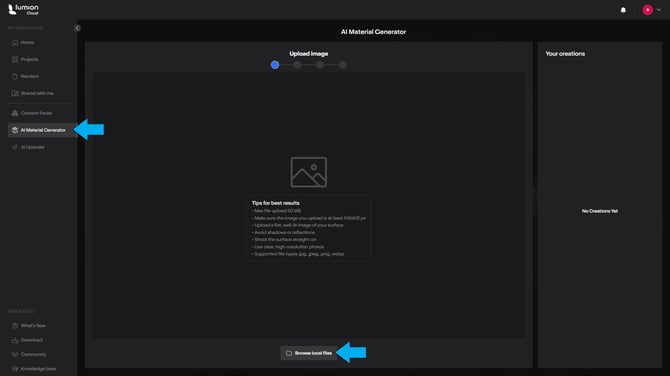
**1.2.** Crop your image and click generate, follow the optimize guide, here is where you affect how seamless the %%Material%% should turn out.
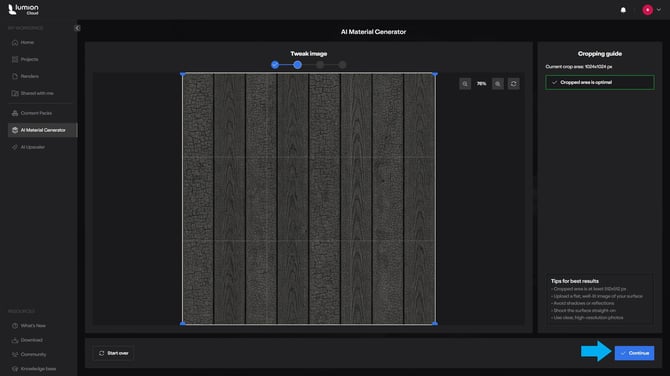
### 2. Fine tuning the Map Settings
Once the AI processes your image, you can generate four additional maps. You can adjust each one using the sidebar sliders:
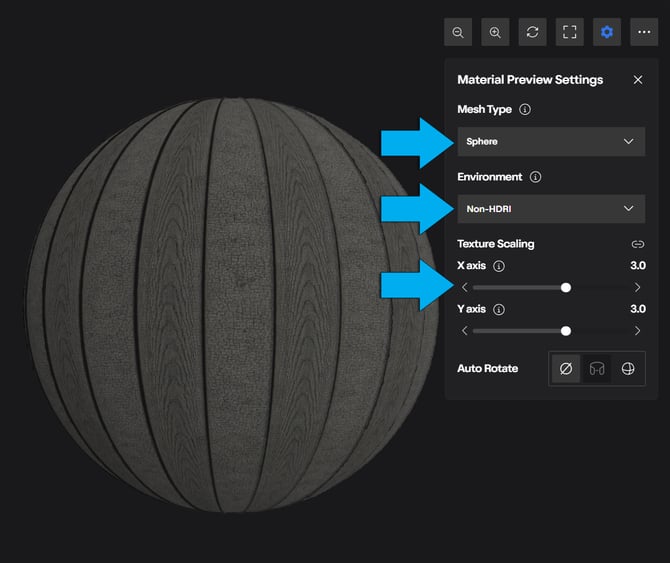
**2.1.** %%Color Map Material%% preview lets you change the preview mesh type, change the HDRI environment to check how your %%Material%% looks in different lighting conditions and to change the scaling.
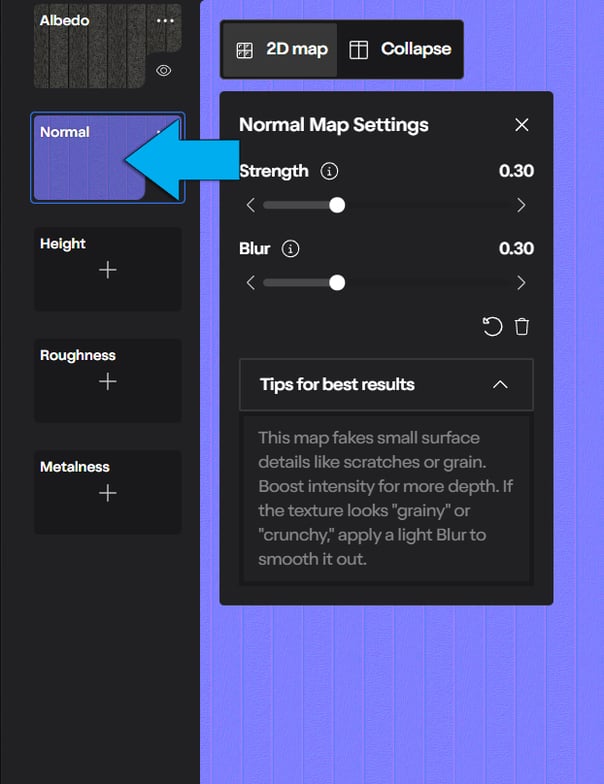
**2.2.** The %%Normal Map%% adds small scale surface details like scratches or grain by manipulating how light bounces off the surface.
**2.3.** The %%Height Map%% simulates depth, allowing surfaces like bricks or stones to appear volumetric without increasing the actual geometry.
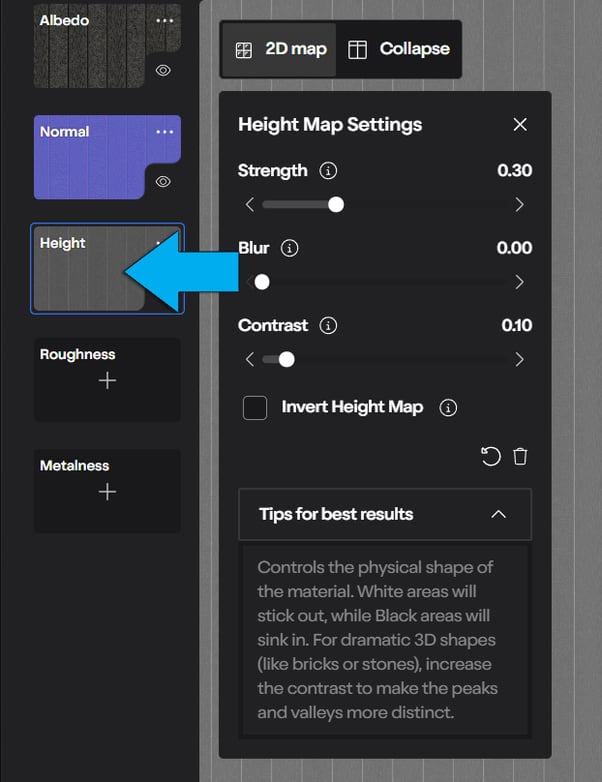
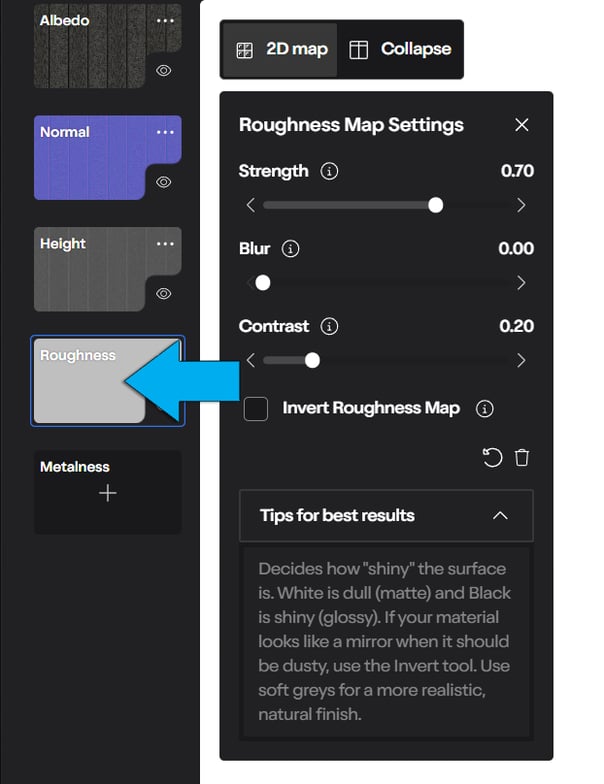
**2.4.** The %%Roughness Map%% determines surface shininess, where black represents a glossy, mirror like finish and white represents a dull, matte surface.
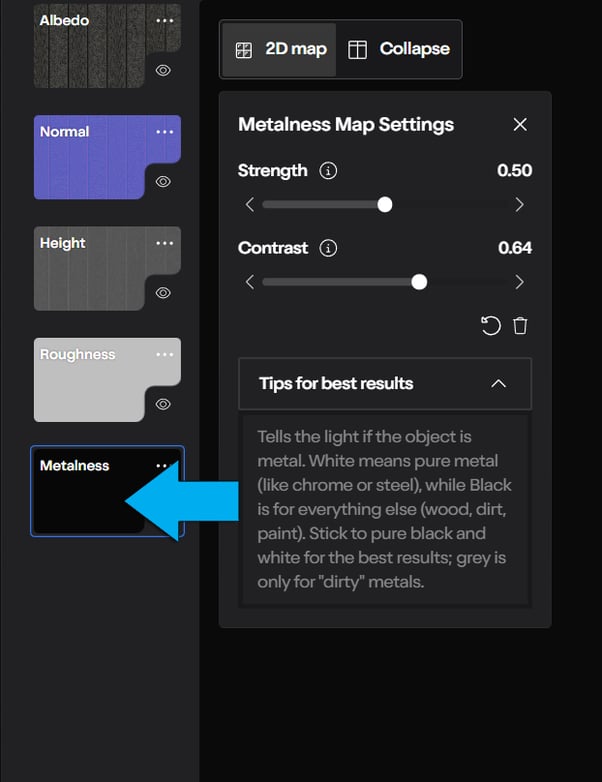
**2.5.** The %%Metalness Map%% defines which parts of the surface are metallic, influencing how the %%Material%% reflects light compared to non- metallic surfaces.
### **3. Downloading and Applying to Lumion**
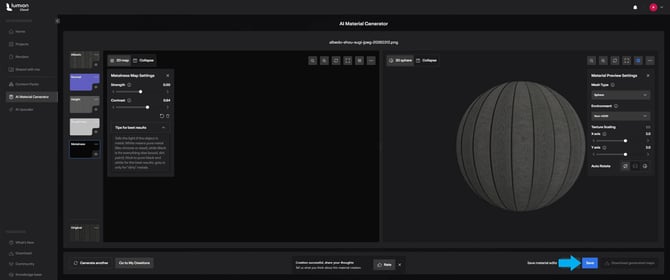
**3.1.** Once you are satisfied, save and %%Download%% the generated maps:
**3.2.** Open your %%Project%% in Lumion. For a full %%Material%% workflow, also see here:
- **Knowledge Base:** [What do the properties of the Standard Material mean in Lumion 2023 and newer?](https://support.lumion.com/_hcms/analytics/search/conversion?redirect=aHR0cHM6Ly9zdXBwb3J0Lmx1bWlvbi5jb20va25vd2xlZGdlLWJhc2UvYXBpL3YyL2hlbHBfY2VudGVyL2VuLXVzL2FydGljbGVzLzc3NjQwMzQyODQxODguanNvbg%3D%3D&ct=SEARCH&pid=25757866&cid=265919817929&t=c3RhbmRhcmQ%3D&d=support.lumion.com&c=5&rp=4&ab=false&opcid=&rs=UNKNOWN&hs-expires=1806098422&hs-version=1&hs-signature=APUk-v4SHIJ22KAModXVH4velHrwzTHyWQ&hsLang=en-us)
**3.3** In %%Material Editor%% select your surface you will be applying the %%Material%% to.
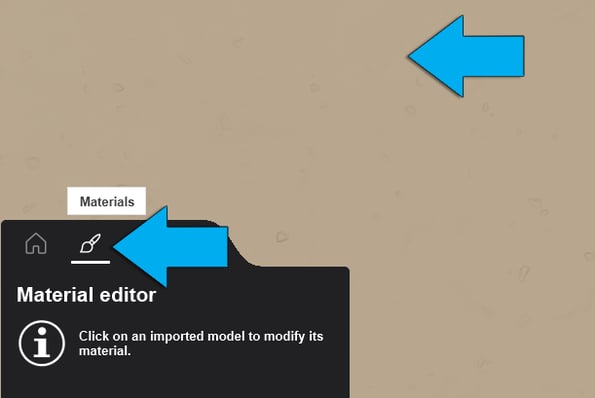
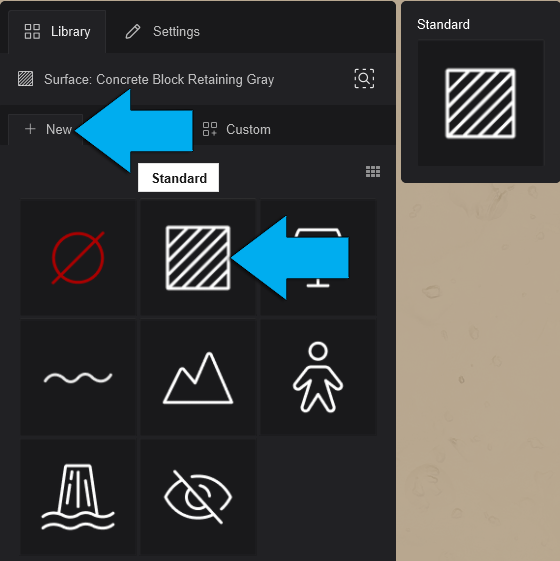
**3.4.** Go to %%New%% and %%Standard Material.%%
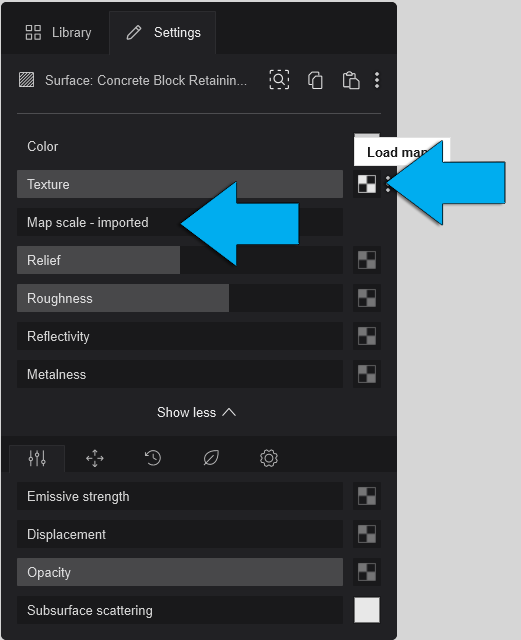
**3.5.** Select %%Material Settings%% and load your %%Color Map%%*,* in the *%%Texture Slot%%* and adjust the scale.
**3.6.** Add the %%Normal Map%% in the %%Relief%% slot.
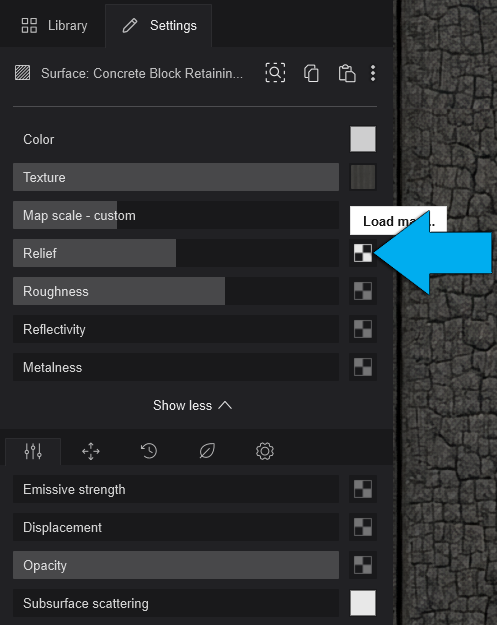
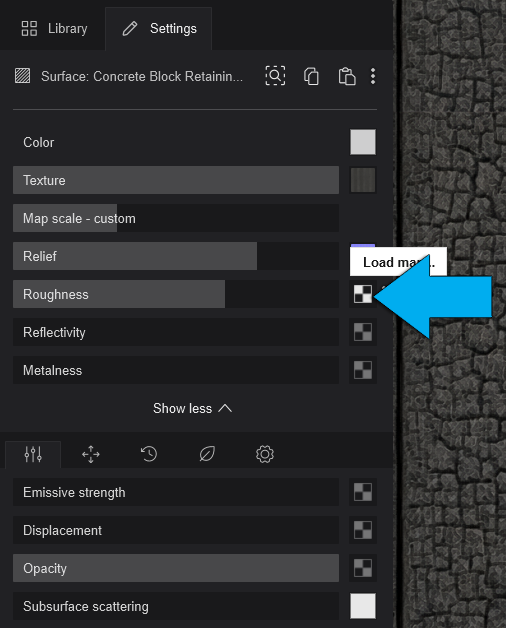
**3.7.** Add the %%Roughness Map%%.
**
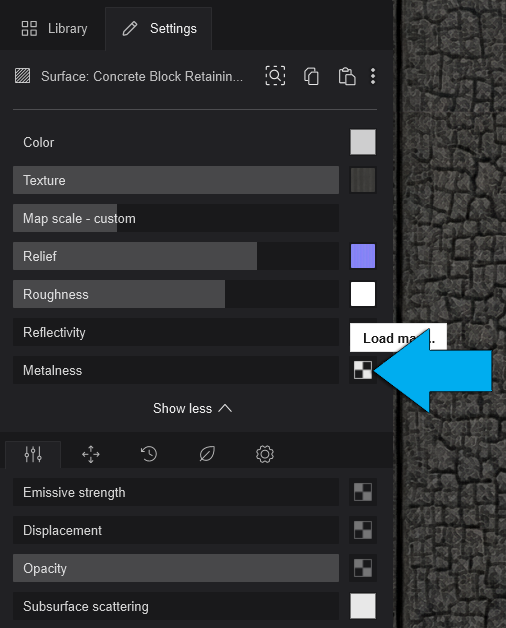
**3.8.** Add the %%Metalness Map%%.
**
**3.9.** Finally, add your %%Height Map%% in the %%Displacement slot%% and increase it to a desired value.
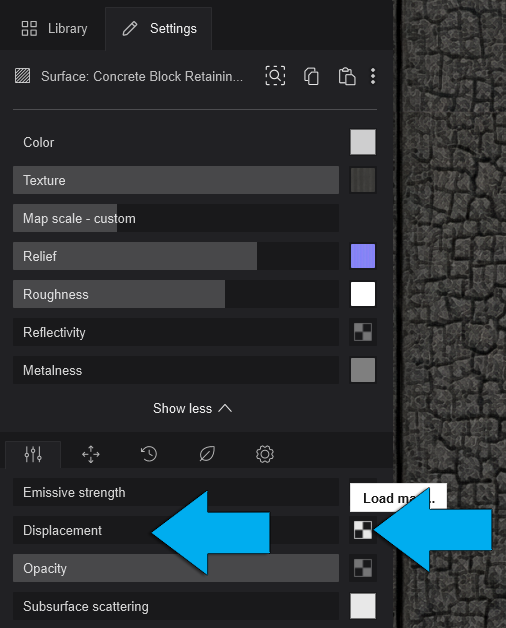
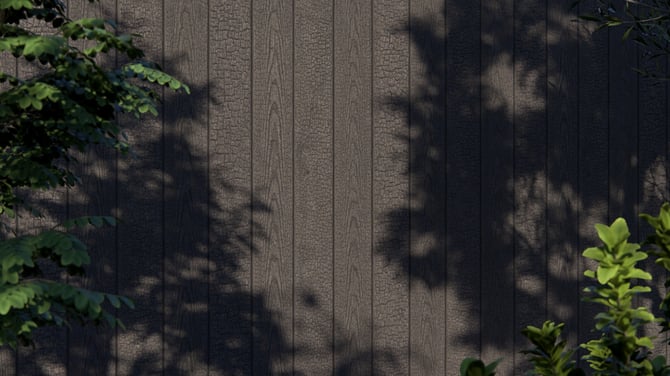
And just like that, a full custom PBR %%Material%% in Lumion.
**Knowledge Base Tip:** If you need the %%Maps%% to be a higher resolution, simply use the %%Lumion Upscaler%% to increase it.
**Note:** AI-generated textures may not always tile seamlessly, which can result in visible misalignment or patterns not matching perfectly when applied.
- [Visit our other Sections](https://support.lumion.com/lumion-cloud/visit-our-other-sections?hsLang=en-us)
- [Lumion Cloud](https://support.lumion.com/lumion-cloud/lumion-cloud?hsLang=en-us#main-content)
- [Feature Guides](https://support.lumion.com/lumion-cloud/lumion-cloud?hsLang=en-us#feature-guides)
- [Video Tutorials](https://support.lumion.com/lumion-cloud/lumion-cloud?hsLang=en-us#video-tutorials)
[](https://lumion.com/)
[mailto:email@email.com](mailto:email@email.com)
Copyright © 2026, Lumion - Act3D B.V.
#### Product
[Plans and pricing](https://lumion.com/product/buy)
[Discover Lumion](https://lumion.com/product/discover-lumion)
[Compatibility](https://lumion.com/compatibility/)
[System Requirements](https://lumion.com/product/system-requirements)
[Find a reseller](https://lumion.com/about/find-reseller)
[Free trial](https://lumion.com/product/free-trial)
#### Solutions
[Architectural design](https://lumion.com/product/architectural-design)
[Interior design](https://lumion.com/product/interior-design)
[Landscape architecture](https://lumion.com/product/landscape-architecture)
[Urban planning](https://lumion.com/product/urban-planning)
[3D rendering](https://lumion.com/product/3d-rendering-software)
[Education](https://lumion.com/product/educational-licenses)
#### Compatibility
[Trimble SketchUp](https://lumion.com/compatibility/sketchup-rendering)
[Autodesk Revit](https://lumion.com/compatibility/revit-rendering)
[Graphisoft ArchiCAD](https://lumion.com/compatibility/archicad-rendering)
[Rhinoceros](https://lumion.com/compatibility/rhino-rendering)
[Autodesk Autocad](https://lumion.com/compatibility/autocad-rendering)
[Autodesk FormIt Pro](https://lumion.com/compatibility/lumion-for-autodesk-formit-pro)
[Nemetschek Allplan](https://lumion.com/compatibility/allplan-rendering)
[Nemetschek Vectorworks](https://lumion.com/compatibility/vectorworks-rendering)
[BricsCAD](https://lumion.com/compatibility/bricscad-rendering)
[3D Studio Max](https://lumion.com/compatibility/3ds-max-rendering)
#### Resources
[Made with Lumion](https://lumion.com/made-with-lumion)
[Tutorials](https://support.lumion.com/video-tutorials?hsLang=en-us)
[Support and learning](https://support.lumion.com/knowledge-base/api/v2/help_center/en-us/articles/360044608053.json?hsLang=en-us)
[Downloads](https://support.lumion.com/downloads?hsLang=en-us)
[Community](https://community.lumion.com/index.php)
#### About
[Our Story](https://lumion.com/about)
[We're hiring!](https://lumion.com/about/careers)
[News](https://lumion.com/news)
[Contact us](https://lumion.com/about/contact)
[Terms & conditions](https://lumion.com/legal/terms-of-service) [EULA](https://lumion.com/legal/eula) [Privacy statement](https://lumion.com/legal/privacy-statement) [CEIP](https://lumion.com/legal/ceip) [Disclaimer](https://lumion.com/legal/disclaimer) © 2026 Lumion
```json
{
"@context" : "https://schema.org",
"@type" : "VideoObject",
"caption" : {
"@type" : "MediaObject",
"contentUrl" : "https://support.lumion.com/media-transcripts/384046518488/en.vtt",
"inLanguage" : "en",
"name" : "en Captions"
},
"contentUrl" : "https://25757866.fs1.hubspotusercontent-eu1.net/hubfs/25757866/video_assets/384046518488/inherited/web_optimized.mp4",
"dateModified" : "2026-03-26T21:45:35.086Z",
"duration" : "PT2M5S",
"height" : 1080,
"name" : "LCloudMaterialEditor",
"thumbnailUrl" : "https://25757866.fs1.hubspotusercontent-eu1.net/hubfs/25757866/LCloudMaterialEditor.mp4/medium.jpg",
"uploadDate" : "2026-03-26T21:45:10.966Z",
"width" : 1920
}
```