

1. If you purchased Lumion directly via our website
If you own a Subscription License Key purchased directly from our website, you can add additional Seats to your License Key directly in your administrator Lumion Account.
Here's how:
1.1. Make sure to log in with the email used to purchase the license, then go to your main Account page, click on License Keys, and then click on the 'Manage Seats' button below the Seats section (this is only visible to the administrator account):

1.2. Then select your numbe of desired Seats from the 'Add new Seats' dropdown menu.
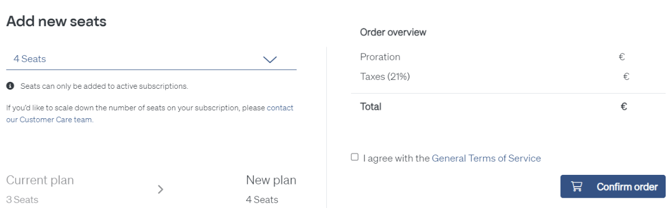
1.3. Click on 'Confirm order' to finish the purchase.
Note: For any new Seats you add to your Subscription, we calculate a prorated amount for the remaining days left. You will be billed once you confirm this order.
2. If you purchased the License Key via your local reseller:
Please contact them to buy additional Seats :
- Lumion Website: Find a reseller page
See Also:
- Knowledge Base: What options does my Lumion Account offer?