



A red question mark is a placeholder that Lumion displays when a %%Project%% contains an %%Object%% that Lumion can no longer find.
This does not necessarily mean that the %%Project%% is corrupted.
There are two main causes:
- A Lumion %%Library Object%% used by the %%Project%% is no longer available in the installed %%Library%%.
- An %%Imported Model%% used by the %%Project%% is missing from the local Lumion %%Library%%.
The solution depends on which type of %%Object%% is missing.
1. Missing Lumion Library Objects in Lumion 2026
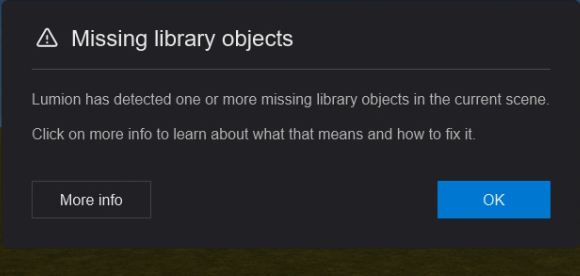
When opening an older %%Project%% in Lumion 2026.0.1 or newer, Lumion may display a Missing %%Library Objects%% message.
The missing %%Objects%% will appear in the %%Project%% as question mark placeholders.
Why does this happen?
As part of the Lumion %%Library%% improvements, a number of older %%Library%% assets were updated, replaced, renamed, or deprecated.
The first phase was introduced in Lumion 2026.0 and primarily affected %%Nature Objects%% such as Trees and Plants. Further %%Library%% updates were introduced in Lumion 2026.1.
Some renamed or upgraded models are automatically recognized and replaced by their newer equivalent when an older %%Project%% is opened.
However, models that were deprecated and removed from the installed Library may appear as question marks when opening %%Projects%% that used those models.
2. How do you restore a deprecated Lumion Library Object?
You have two options.
2.1. Restore the original Legacy model
Legacy versions of the removed Library models are available for download in this article: Installing these files allows older %%Projects%% to continue displaying and rendering the original models.
Please see:
- Knowledge Base: What are the Library model Upgrades being done for Lumion 2026
That article includes the downloadable Legacy model packs and installation instructions. A complete Legacy package is also available for %%Projects%% that use models deprecated in Lumion 2026 or earlier versions.
2.2. Replace the missing Object with a current Library model
You can also replace the question mark placeholder with another %%Object%% from the current Lumion %%Library%%. Simply select the missing %%Object%% and use the Replace function to choose a new %%Library Object%%.
Lumion keeps the placeholder in the original %%Object's%% location so that it can be replaced without having to manually recreate its placement.
If you are unable to select, replace, or delete a missing %%Object%%, first make sure you are using the latest available update for your Lumion version.
3. What if the missing Object is an Imported Model?
A question mark can also appear when Lumion cannot find the files associated with an %%Imported Model%%. This is different from the deprecated Lumion %%Library Objects%% described above.
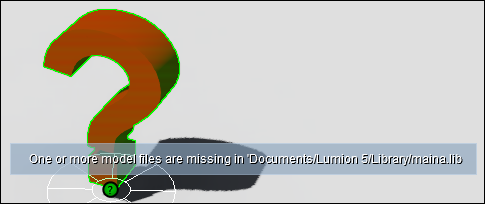
You can move the mouse cursor over the %%Object%% Icon of the question mark to see the name of the missing %%Imported Model%%.
For current versions, %%Imported Model Library%% data is normally stored under:
Documents\Lumion\Library
If the original %%Imported Model Library%% files are still available, restore them to the correct %%Library%% folder and restart Lumion.
Also check whether your antivirus software has moved any of the files to quarantine.
4. What if the Project has already been saved with a missing Imported Model?
If a %%Project%% is saved while the %%Imported Model%% data is missing, simply restoring the old %%Library%% files may no longer restore the %%Object%% automatically.
In that case:
- Re-import the original model if necessary.
- Select the missing question mark placeholder.
- Use Replace to replace it with the re-imported model.
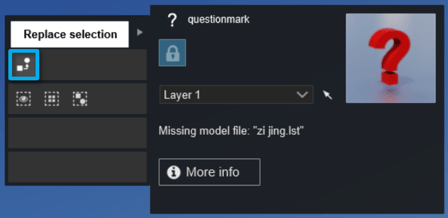
The question mark placeholder preserves useful information such as the original position, rotation and scale, making it easier to replace the missing %%Object%%.
5. How can you tell which type of Object is missing?
If it is a Lumion Library Object:
It may be an %%Object%% that was deprecated or replaced as part of the Lumion 2026 %%Library%% updates.
If it is an Imported Model:
The missing %%Object%% name shown by Lumion should correspond to one of your own imported model files.
If you're unsure which applies, or need further help, please contact us:
- Knowledge Base: Contact Lumion Technical Support