
Every conversation can reveal whether a customer is succeeding, struggling, considering leaving, ready to buy, or unaware of something that could improve their workflow.
This article covers practices for the support team to develop commercial awareness, notice wider context behind a request, and how to act on it appropriately.
When a ticket comes in, beyond resolving the immediate question or technical issue or help the customer achieve the outcome behind the question, the goal is to:
- Detect frustration, low adoption, churn risk, and buying intent early.
- Connect customers with the right training, product, person, or commercial option.
- Improve our information in HubSpot.
- Learn why problems occur and help prevent them from happening again.
The ticket is the starting point, not the whole customer story.
1. The CARE workflowUse the CARE workflow on every meaningful customer interaction.
C: Correct the immediate issue
Answer the question, investigate the problem, and restore the customer's ability to work. Commercial activity must never replace good technical support.
A: Assess the wider context
Look beyond the latest message. Review the customer, company, license, activations, renewal status, previous tickets, recent frustration, and stated goals.
R: Respond to the signal
Take the next useful action. This might be offering a call, sharing targeted training, arranging a Sales handoff, reviewing compensation, recording churn risk, recommending a relevant workflow, or collecting product feedback.
E: Enrich the record and learn
Update HubSpot properties, document the case in the IKB, or ask whether this problem could have been prevented for this customer or others by doing something different.
2. The 60-second commercial scanNot every ticket requires a full account review. However, before responding to or closing a meaningful case, take a quick look at the following.
Customer context
- Who is the customer and what is their role?
- Which company, institution, or practice do they belong to?
- What industry are they in?
- Which 3D modeling software do they use?
- Are they a beginner, an experienced user, or evaluating Lumion for the first time?
Product and license health
- Which Lumion product and version are they using?
- Are they currently able to use Lumion?
- Are they using the latest version?
- How many activations or seats are in use and when was the last activation
- Is automatic renewal turned off and Is the subscription approaching renewal or expiry?
You can easily see this info in HubSpot by clicking on the preview icon of the contact on the right and peeking at the license card: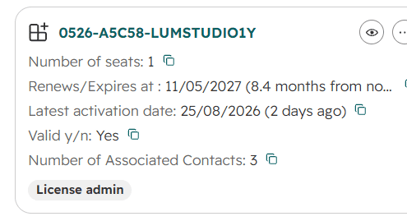
Relationship history
- Have they contacted us before? Are there several recent tickets or unresolved problems? (see ticket history section)
- Have they expressed frustration, disappointment, or loss of confidence?
- Have they mentioned a competitor, price concerns, cancellation, or a refund?
- Were any previous commitments or follow-ups missed?
Opportunity and next action
- Would targeted training solve more than the immediate question?
- Would a live session be faster or more reassuring?
- Is there a relevant Lumion Cloud, AI Enhancer, Axogram, or Lumion workflow to introduce?
- Does Sales, Customer Success, or Product need to become involved?
- Is the HubSpot record complete enough for the next person to understand the customer?
| Signal | What it may mean | Recommended action |
|---|---|---|
| The customer is clearly new or confused by basic workflows | Onboarding gap | Solve the question, share a small set of relevant training resources, and offer an onboarding or screen-sharing session. |
| The account has very few activations or little apparent use | Low adoption, setup trouble, or unused purchase | Ask whether they have been able to get started and offer a live session. Do not assume the reason without asking. |
| The customer has repeated issues or several recent tickets | Accumulated frustration and increased churn risk | Take ownership, review the history, avoid making them repeat information, and offer a call. Record the risk signal. |
| The customer has been unable to use Lumion | High-impact service failure | Prioritize restoration, establish the affected period and business impact, and consider a compensation review after the technical facts are confirmed. |
| The customer is angry, disappointed, or losing confidence | Relationship recovery is needed | Acknowledge the impact, explain the next action clearly, offer a call, and schedule a follow-up rather than simply closing the ticket. |
| The customer asks for a refund outside the standard refund conditions | Possible churn and unresolved value problem | Understand why they want to leave. Escalate for a retention review and ask Sales whether a discount, credit, extension, or other approved option is appropriate. Do not promise an exception before approval. |
| Automatic renewal is off | Possible planned cancellation, procurement preference, or simple oversight | Ask whether there is anything affecting their decision to renew. Offer a live session and record the Risk/Retention Reason when appropriate. |
| The customer says Lumion is too expensive | Price or value concern | Ask what they need and what is preventing the purchase or renewal. Confirm whether a valid promotion applies and offer a Sales conversation. |
| The customer mentions moving to D5, Twinmotion, Enscape, or another competitor | Explicit churn signal | Ask what is driving the comparison, listen without becoming defensive, record the Risk/Retention Reason, and offer a call or appropriate handoff. |
| A prospect is deciding whether to purchase Lumion | Active commercial opportunity | Answer all questions you can, offer a short call or demo, and create a warm Sales handoff. Do not leave the customer waiting silently for Sales. |
| A customer asks about more seats, another product, or a wider rollout | Expansion opportunity | Clarify the need, record the opportunity, and connect them with Sales using a complete handoff summary. |
| A customer struggles with a workflow rather than a single error | Product adoption or usability issue | Ask them to describe the full workflow, desired result, frequency, and current workaround. Help with the workflow and capture structured feedback. |
| A customer could benefit from another Lumion tool or service | Adoption opportunity | Recommend it only when it directly supports their goal. Explain the benefit in the context of their work. |
| An active discount or promotion applies | The customer may be able to buy or renew under better terms | Communicate it clearly and promptly. Confirm eligibility and exact terms with Sales when needed. |
| A commercial request has been forwarded but not yet accepted by Sales | Risk of a missed or delayed opportunity | Send an interim response, introduce yourself, answer available questions, explain the handoff, and set an expectation for the next contact. |
A call is often the best next step when email is creating friction or when the customer's wider situation is unclear.
Offer a live session when:
- The customer is a beginner and needs help getting started.
- Activations are very low and the customer may not be using the product.
- Automatic renewal is off and there may be a product or experience problem.
- The customer has experienced repeated issues or is clearly frustrated.
- A technical problem has prevented them from working.
- The workflow is difficult to understand through screenshots or written descriptions.
- The customer is deciding whether to buy, renew, or expand.
- A project review or workflow conversation could reveal a better solution.
Do not force a call. Some customers prefer email, have limited availability, or only need a straightforward answer.
Before the call
- Review the account, license, activations, renewal status, and ticket history.
- Define what the call should accomplish.
- Ask for the relevant files, diagnostics, project examples, or questions in advance.
- Invite Sales or Customer Success only when their involvement is useful and explained to the customer.
After the call
- Send a concise written recap.
- Record decisions, commitments, and follow-up dates in HubSpot.
- Update any risk, opportunity, product, and workflow properties.
- Keep ownership until every agreed action has a clear owner.
When a confirmed problem prevented a customer from using Lumion, solving the technical issue may not be enough. We must also recognize the time and value they lost.
Collect:
- The date the problem started.
- The date access or functionality was restored.
- Whether Lumion was completely unavailable or only partially affected.
- The relevant tickets, diagnostics, and confirmed cause.
- The effect on the customer's work, deadline, or project.
If compensation may be justified, escalate with the verified facts and recommend an appropriate review. Depending on policy and approval, this may involve restoring lost subscription time, a credit, or another commercial remedy.
Do not promise compensation before it is approved. A useful first response is:
I understand that this issue prevented you from using Lumion for part of your subscription. I will document the affected period and review the available options with the appropriate team so we can make sure the impact is properly considered.
Once an option is approved, communicate it clearly and record it in HubSpot.
6. Refund, discount, and pricing conversationsDo not treat refund or pricing questions as administrative interruptions. They usually reveal a concern about value, trust, affordability, or product fit.
If a refund is requested
- Understand the reason before quoting policy.
- Check the purchase date, subscription status, support history, and impact of any confirmed product issue.
- Explain the applicable policy accurately and empathetically.
- If the request falls outside standard terms, escalate only when there is a credible reason for an exception or retention review.
- Ask Sales whether an approved alternative, such as a discount, subscription extension, or account adjustment, is available.
If price is preventing a purchase or renewal
- Ask which package, term, or seat count they need.
- Ask whether the concern is budget, timing, value, procurement, or product fit.
- Communicate any verified discount or promotion that applies.
- Offer to connect the customer with Sales.
- Record the price concern and next action.
Never invent, imply, or promise a discount that has not been confirmed.
7. Warm commercial handoffsA forwarded ticket is not a completed handoff. Support remains responsible for the customer experience until the receiving team has enough context and accepts the next action.
For a Sales or Customer Success handoff, include:
- Customer and company name.
- Role, email, phone number, country, and preferred language when known.
- Product, license, subscription, seat, and renewal information.
- What the customer is trying to achieve.
- The technical issue and its current status.
- The commercial signal, such as purchase interest, renewal concern, low adoption, refund request, or expansion.
- Relevant history, frustration, deadline, and competitor mentions.
- What has already been offered or promised.
- The recommended next action and urgency.
Interim reply example
Hi [Name],
Thank you for contacting us. I am reviewing your request and have involved our Sales team so they can help with the commercial options. In the meantime, I am happy to answer any product or technical questions that may help with your decision. I will keep an eye on the request and make sure it reaches the right person.
Do not let an interested customer sit without acknowledgment simply because another department will ultimately own the conversation.
8. Recommend products in contextProduct education should feel useful, not promotional. First understand the customer's goal, then explain the most relevant capability.
Examples:
- Lumion Cloud: Recommend it when the customer needs easier presentation sharing, review, collaboration, or access to Cloud workflows.
- AI Enhancer: Recommend it when the customer wants to refine realism, materials, vegetation, people, atmosphere, or presentation quality. Be transparent about generative limitations and exact repeatability.
- Axogram: Recommend it when the customer needs fast architectural diagrams, annotations, arrows, zones, or clearer design communication. Only discuss capabilities approved for public communication.
- Training or live onboarding: Recommend it when the main obstacle is knowledge, setup, or workflow confidence.
Do not introduce an unrelated product while the customer is angry or still blocked. Restore confidence first, then offer relevant additional value.
9. Ask about the workflow, not only the symptomA technical answer may solve today's ticket without addressing why the customer encountered the problem.
Useful questions include:
- What are you ultimately trying to create or deliver?
- How often do you use this workflow?
- Which modeling application and file type are involved?
- At which step does the problem begin?
- What have you tried so far?
- How much project time does this add?
- Do other team members experience the same problem?
- What would the ideal workflow look like?
After resolving the case, ask:
- Why did this happen in the first place?
- Could better onboarding, interface design, documentation, validation, or automation have prevented it?
- Is this an isolated incident or part of a wider pattern?
- What evidence should be passed to Product, Development, Marketing, or the Knowledge Base team?
Capture the customer's goal, frequency, impact, workaround, and supporting examples. A feature request without this context is much less useful.
10. HubSpot and CRM enrichmentEvery meaningful conversation should leave the CRM more accurate than it was before.
Update information when it is available and relevant:
- Contact name, role, email, phone number, country, and preferred language.
- Company or institution name, website, industry, and location.
- Correct contact-to-company association.
- Duplicate contact or company records, but merge only when identity is certain.
- Phone numbers captured through Aircall when appropriate.
- Lumion product, version, license, subscription, seats, and renewal status.
- 3D modeling software and relevant workflow.
- Correct ticket category and subcategory.
- Risk/Retention Reason when churn indicators are present.
- Competitor mentioned, price concern, refund request, or commercial interest.
- Training, onboarding, call, compensation, or Sales follow-up offered.
- Outcome, owner, and next follow-up date.
Do not guess missing details or overwrite reliable information. Use information provided by the customer, visible in the conversation or account, or verified through approved company sources.
11. Churn risk and the Risk/Retention ReasonRecord the Risk/Retention Reason when a customer:
- Expresses dissatisfaction with Lumion or Support.
- Reports repeated or unresolved problems.
- Says the product is too expensive.
- Mentions cancelling, not renewing, or requesting a refund.
- Says they are moving to or evaluating a competitor.
- Has been unable to use the product for a meaningful period.
- Has automatic renewal turned off together with another risk signal.
- Has extremely low adoption and confirms they are struggling to use the product.
The property should describe the real reason, not simply say “at risk.” Add a short note with evidence and the action taken so Sales or Customer Success can follow up intelligently.
Do not treat low activations or automatic renewal being off as proof of churn by themselves. They are prompts to ask a question.
12. Example: basic resolution versus customer recoverySituation
A long-term customer reports a recurring crash. They have opened three recent tickets, automatic renewal is off, and they mention testing D5 because Lumion has delayed a project.
Basic ticket handling
- Request diagnostics.
- Provide the technical solution.
- Close the ticket.
Commercially aware handling
- Review the three previous tickets so the customer does not repeat the history.
- Acknowledge the cumulative project impact.
- Prioritize the technical investigation and offer a live troubleshooting call.
- Ask what is driving the move toward D5.
- Record the Risk/Retention Reason and competitor mention.
- Establish whether Lumion was unusable and for how long.
- If the impact is verified, submit a compensation or subscription-time review.
- Arrange an informed follow-up from Sales or Customer Success.
- Send a recap and keep ownership until the technical and relationship actions are complete.
- Ask whether the recurring failure indicates a documentation, product, or process gap that should be escalated.
The technical solution may be identical in both approaches. The difference is whether we recover the customer relationship and learn from the case.
13. Guardrails- Solve the customer's problem before looking for an upsell.
- Do not make every interaction a sales conversation.
- Do not promise refunds, discounts, credits, compensation, or subscription extensions without the required approval.
- Do not hide or misrepresent policy to preserve a sale.
- Do not create artificial urgency or pressure.
- Do not recommend a product that is irrelevant to the customer's goal.
- Do not assume intent from activation or renewal data. Ask and verify.
- Respect customers who prefer not to schedule a call.
- Discuss unreleased products only within approved communication guidance.
- Record commitments and follow-up dates. Never rely on memory alone.
- A warm handoff does not mean abandoning the customer to another department.
Ask yourself:
- Is the immediate question or problem actually resolved?
- Can the customer now accomplish what they were trying to do?
- Did I review the account for adoption, renewal, history, and risk signals?
- Would a call, training resource, product workflow, or another team help?
- Did the customer lose working time that should be reviewed?
- Is there a buying, renewal, expansion, or churn signal to record?
- Is the HubSpot contact and company information accurate and sufficiently complete?
- Is the Risk/Retention Reason updated when required?
- Does every promised action have an owner and follow-up date?
- Could this issue have been prevented for the next customer?
Close the ticket only when the customer outcome and the next action are clear, not merely because the latest question received an answer.
15. Management setup- Approving refunds, subscription extensions, credits, and other compensation = Patricia
- Which discounts and promotions can Support communicate directly?