
Steps for Seat reduction
1. Go to the ORDERS portal and find the license.
In this case, best is to send a manual renewal link so they can access it, see the new number of seats, amount, and renew.
If they are on auto-renewal, be careful with timing of the request: auto renew happens 1 day prior to the expiry date, and if Seats are not updated on time, we then have to refund.
If they request a downsize many weeks , days, month before renewal ..if you deploy the change they will experience reduction in the subscription period for which they already prepaid the previous higher number of Seats.
It is important to make them aware of this and suggest reducing seats closer to the renewal date.
1. Go to the ORDERS portal and find the license.
2. Click on the edit button.
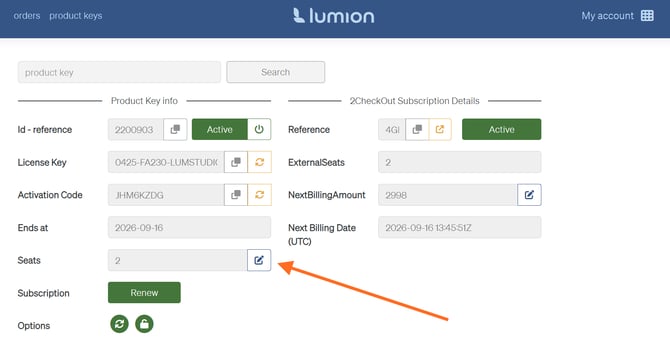
3. In this case, the License has 2 users. Once you try to move down to 1 the system will show an error (this is known to IT but please bring it out again as it makes no sense).
You will have to reduce the users to 1, reduce the Seat to 1, add back the second user.
4. Customers get an email with Renewal Notification
-
14 days prior
-
7 Days prior
In this case, best is to send a manual renewal link so they can access it, see the new number of seats, amount, and renew.
If they are on auto-renewal, be careful with timing of the request: auto renew happens 1 day prior to the expiry date, and if Seats are not updated on time, we then have to refund.
If they request a downsize many weeks , days, month before renewal ..if you deploy the change they will experience reduction in the subscription period for which they already prepaid the previous higher number of Seats.
It is important to make them aware of this and suggest reducing seats closer to the renewal date.